Introduction
Welcome to Module 11, where we shift our focus from the kernel-level aspects of virtualization with KVM to the userspace component that orchestrates it all: QEMU. In our previous module, you became proficient in analyzing KVM's behavior, particularly how it handles VM exits for I/O and other privileged operations. We established that KVM, while powerful, relies on a userspace partner—which in our case was QEMU—to manage the virtual machine and emulate hardware.
In this lesson, we will dissect that partner. Our goal is to describe the QEMU architecture, including its main loop, TCG, and accelerator backends like KVM. You will learn how QEMU can function both as a full system emulator for running foreign architectures and as a virtualizer that leverages hardware support via KVM.
Understanding this architecture is crucial for anyone serious about virtualization. It's the key to debugging complex guest-host interactions, understanding performance characteristics, and, in line with your goals, contributing to open-source projects like QEMU itself by adding or modifying emulated hardware.
1. QEMU's Dual Identity: Emulator and Virtualizer
At its core, QEMU is a machine emulator. However, its role in a modern Linux system is twofold, depending on the task at hand.
- Emulator: When you need to run software compiled for one architecture (e.g., ARM) on a host machine with a different architecture (e.g., x86), QEMU acts as a pure emulator. It uses a sophisticated technique to translate the guest's machine code into code that the host CPU can execute.
- Virtualizer: When the guest and host share the same architecture (e.g., an x86 guest on an x86 host), QEMU can offload the CPU execution to a specialized backend that uses hardware virtualization extensions (like Intel VT-x or AMD-V). This backend is called an accelerator.
Throughout our last module, you were using QEMU in its virtualizer role, with KVM serving as the accelerator. QEMU managed the VM, set up the memory and devices, and KVM handled the raw execution of guest code.
2. The Core Architecture: An Event-Driven Userspace Process
Regardless of whether it's emulating or virtualizing, QEMU's fundamental design is that of a standard Linux userspace process. This is a critical point to internalize.
To understand how QEMU and KVM work together, let's first watch a short video that provides a high-level overview of their relationship.
Virtualization and Cloud Computing Lecture 4: Hardware-assisted CPU virtualization in KVM/QEMU
The following video, 'Hardware-assisted CPU virtualization in KVM/QEMU', offers a concise explanation of how the QEMU userspace process interacts with the KVM kernel module to run a VM.
Please watch the segments from 02:57 to 06:47. Pay close attention to these key concepts: How QEMU runs as a regular user-space process and uses mmap to allocate the guest's physical RAM. The creation of a host thread for each guest vCPU. The use of ioctl calls on the /dev/kvm device file as the communication mechanism between QEMU and KVM. The concept of the KVM_RUN loop, where QEMU hands control to KVM to execute the guest and gets it back upon a VM exit.
As the video explained, from the host OS's perspective, QEMU is just another process. This process has three main characteristics:
- Guest RAM as Mapped Memory: QEMU allocates a large block of its own virtual memory to serve as the guest's physical RAM. The host kernel sees this simply as memory belonging to the QEMU process.
- vCPUs as Host Threads: QEMU creates a standard host thread for each virtual CPU (vCPU) in the guest. This is why you can see
qemu-system-x86threads intoporpsand pin them to specific physical CPUs. The host scheduler manages these threads like any other. - An Event-Driven Main Loop: Device emulation, user interaction (via monitors), and other management tasks are not performed in a simple, linear fashion. Instead, QEMU is built around an event-driven model. It has a central main loop that waits for events to occur and then dispatches them to the appropriate handlers.
Events can include:
- Data is available to be read from a disk image file.
- A network packet has arrived on a host
tapinterface. - A timer, needed for an emulated hardware clock, has expired.
- A user typed a command into the QEMU monitor.
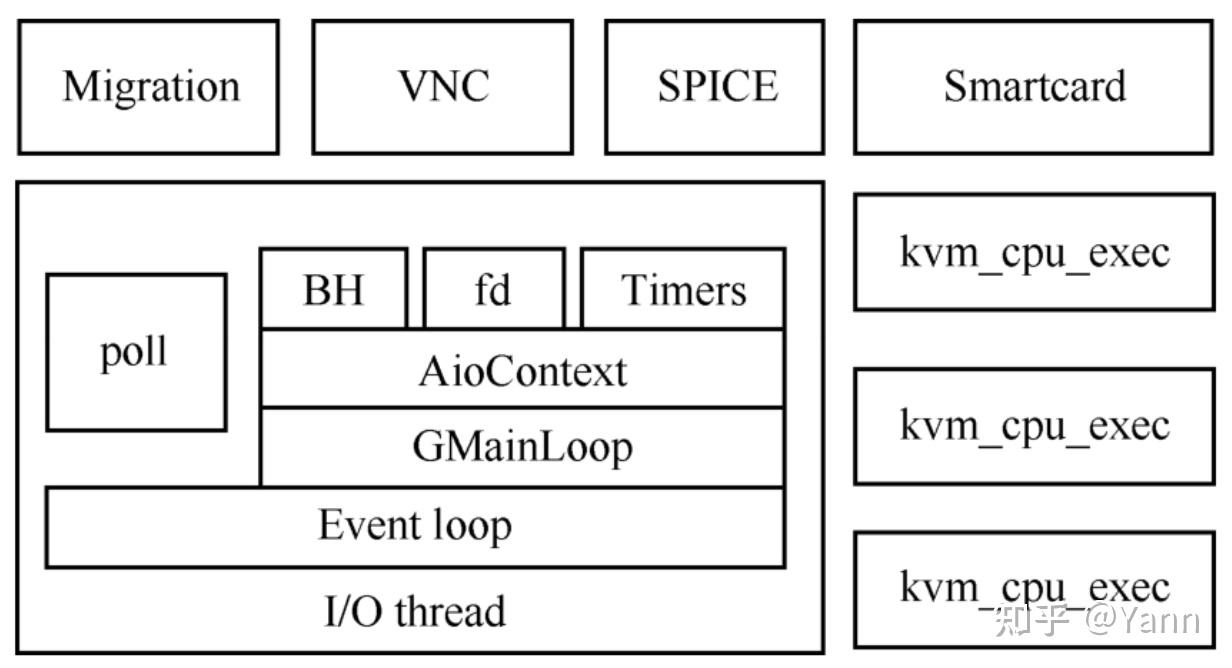
To dig a bit deeper into this model, let's consult a document written by a QEMU developer.
The 'QEMU Code Overview' presentation by Stefan Hajnoczi provides a fantastic summary of QEMU's internal architecture. We will focus on the slides that describe the process model and the main loop.
Please read the slides under the 'Architecture' heading (page 6). Focus on the 'QEMU process model' and 'Main loop' sections. The 'Architecture summary' diagram on page 7 provides a great visual recap of how the main loop, vCPU threads, and host kernel interact.
This event-driven design is what allows a single-threaded main loop to manage a complex virtual machine with multiple devices, while dedicated vCPU threads handle the core computational workload.
3. CPU Execution Backends
Now we come to the heart of the matter: how does QEMU actually execute the guest's CPU instructions? This is handled by a configurable accelerator. We will examine the two most important ones.
Backend 1: The Tiny Code Generator (TCG) for Emulation
When hardware virtualization is not used (either because it's unavailable or because of a cross-architecture guest), QEMU falls back to its built-in CPU emulator, the Tiny Code Generator (TCG).
TCG is a dynamic binary translator, also known as a Just-In-Time (JIT) compiler. It works as follows:
- QEMU's vCPU thread encounters a block of guest machine code that it hasn't seen before.
- TCG translates this block of guest code (e.g., ARM instructions) into a series of intermediate "TCG ops".
- These TCG ops are then translated into the host machine's native instruction set (e.g., x86-64 instructions).
- This newly generated block of host code, called a Translated Block (TB), is stored in a code cache.
- The vCPU thread then executes this TB directly on the host CPU.
- The next time the guest's execution flow reaches the same block of code, QEMU finds the already-translated TB in the cache and executes it immediately, skipping the translation steps.
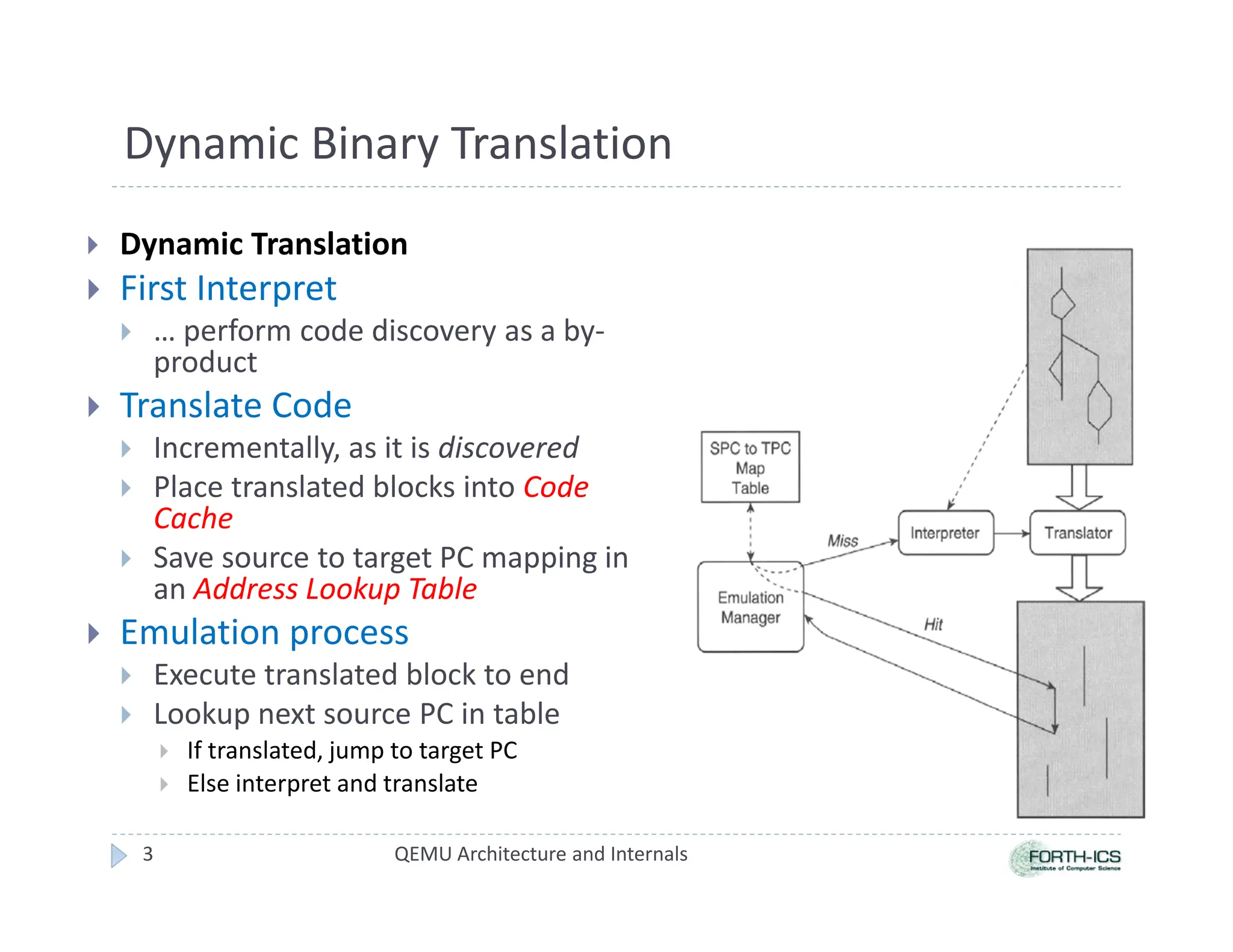
This process allows QEMU to emulate any supported guest architecture on any host, making it incredibly flexible. The main execution loop in TCG mode is a tight loop that finds or generates a TB, executes it, and then moves on to the next one.
A deep dive into QEMU: The execution loop
The blog post 'A deep dive into QEMU: The execution loop' provides an excellent, code-level view of how the TCG execution loop functions.
Please read the first three sections: 'The Big picture', 'Entering the TCG execution loop', and 'A primer on Translated Blocks'. Don't worry about understanding every line of C code. Focus on these concepts: The main loop inside qemu_tcg_rr_cpu_thread_fn that calls tcg_cpu_exec. The use of setjmp/longjmp as an exception mechanism to exit the tight execution loop when an event like an interrupt occurs. The core logic: find an existing Translated Block (tb_find) or generate a new one (tb_gen_code), then execute it (cpu_loop_exec_tb).
Backend 2: The KVM Accelerator for Virtualization
As you already know from the previous module, when the guest and host architectures match, we can do much better than TCG. The KVM accelerator allows QEMU to leverage the CPU's hardware virtualization capabilities.
The flow here is fundamentally different:
- The QEMU vCPU thread issues an
ioctl(KVM_RUN)to the KVM kernel module. - The kernel takes over. KVM instructs the physical CPU to enter "guest mode" and begins executing the guest's code stream natively and directly on the hardware. QEMU and the host OS are effectively paused on that CPU core.
- The guest runs at near-native speed until it executes a privileged instruction, an I/O operation occurs, or an external interrupt arrives.
- This triggers a VM Exit. The hardware automatically traps out of guest mode and returns control to the KVM module in the host kernel.
- KVM inspects the reason for the exit. If it's something QEMU needs to handle (like an access to an emulated network card), the
KVM_RUNioctl returns, and control is passed back to the QEMU vCPU thread. - The QEMU thread performs the necessary device emulation.
- Once finished, the thread calls
ioctl(KVM_RUN)again, and the cycle repeats.
This "dance" between QEMU, KVM, and the hardware allows non-privileged guest code to run at full speed while maintaining the hypervisor's control over the system.
Let's return to the 'QEMU Code Overview' PDF, which contains a clear summary of this accelerator model.
Please review page 8, 'Device emulation'. The 'Hardware emulation model' diagram shows the clear distinction between accelerators (KVM or TCG) running guest code and the device models implementing guest hardware. The 'KVM accelerator pseudo-code' on page 9 concisely illustrates the KVM_RUN ioctl loop we've been discussing.
Interview Scenario
An interviewer wants to gauge your understanding of QEMU's core design. They ask:
"We use QEMU for two distinct purposes: running legacy MIPS-based firmware for analysis on our x86 developer machines, and deploying production x86 Linux VMs. Could you contrast the architectural model and CPU execution flow within QEMU for these two scenarios?"
To answer this, you should structure your response in two parts:
-
Scenario 1: MIPS on x86 (Emulation)
- Start by identifying this as a cross-architecture emulation scenario that uses QEMU's Tiny Code Generator (TCG) backend.
- Describe the process of dynamic binary translation: guest MIPS instructions are translated into host x86-64 instructions in units called Translated Blocks (TBs).
- Mention the code cache, which stores these TBs to avoid re-translation, and explain that the entire process of instruction fetching, decoding, translating, and executing is handled within the QEMU userspace process. The host kernel is not aware that MIPS code is being run.
-
Scenario 2: x86 on x86 (Virtualization)
- Identify this as a hardware-assisted virtualization scenario that uses the KVM accelerator.
- Describe the division of labor: QEMU runs as the userspace VMM, managing the VM's configuration, memory (
mmap), and emulated devices. The KVM kernel module controls the CPU's hardware virtualization features. - Explain the
KVM_RUNloop: QEMU's vCPU thread makes anioctlto KVM, which allows the guest's x86 code to run natively on the CPU. - Explain VM Exits: When a privileged operation occurs, the hardware traps to KVM. KVM may handle it or pass control back to QEMU for device emulation. This is fundamentally different from TCG's constant translation loop, resulting in much higher performance.
Conclusion
In this lesson, you've gained a foundational understanding of QEMU's architecture. This knowledge demystifies how a single tool can act as both a cross-architecture emulator and a high-performance hypervisor frontend.
Key Takeaways:
- QEMU is a userspace process that relies on an event-driven main loop to manage VM devices and services.
- For CPU execution, QEMU uses one of two backends:
- TCG (Tiny Code Generator): A dynamic binary translator for pure emulation, enabling cross-architecture virtualization.
- KVM Accelerator: A backend that uses a kernel module (
/dev/kvm) to leverage hardware virtualization features for high-performance, same-architecture virtualization.
- The interaction with KVM is a cycle: QEMU calls
KVM_RUN, the guest runs natively on the CPU, a privileged event causes a VM exit to KVM, and KVM may return to QEMU to handle the event.
Preview of the Next Lesson:
Now that we have this high-level architectural view, our next lesson will zoom in on one of QEMU's most important jobs: explaining the mechanisms of hardware device emulation. We will explore how QEMU creates "virtual hardware" like network cards and storage controllers in software, how it exposes them to the guest via Memory-Mapped I/O (MMIO), and how the guest OS interacts with them. This is the first step toward our goal of eventually implementing a simple emulated device of our own.