Introduction
In our previous lesson, we tackled interrupt storms, a critical failure mode where a device floods the CPU with interrupts. We saw how a driver's Interrupt Service Routine (ISR) is the frontline for interacting with hardware. However, a modern kernel is more than just a collection of independent ISRs; it needs a structured way to manage the hundreds of devices and drivers that make up a system.
This lesson addresses the learning outcome: Describe the Linux device model (buses, devices, drivers) and its representation in sysfs. We will explore the elegant, unified framework the Linux kernel uses to create a logical map of the system's hardware, manage the relationship between devices and their controlling software, and expose this entire structure to user space for inspection and control.
For an embedded developer, mastering this model is the difference between writing an isolated piece of code and architecting a driver that integrates cleanly and robustly into the broader kernel ecosystem—a topic central to senior-level interviews.
1. The Need for a Unified Model
Prior to kernel version 2.6, Linux had several different driver models for different types of hardware. This made system-wide tasks like power management and hot-plugging devices incredibly complex. The Linux Device Model was created to solve this by providing a single, unified data structure to represent the system's topology.
The goals of this model are to:
- Manage the relationship between devices and drivers.
- Provide a hierarchical view of the system for orderly power management (e.g., you must power up a USB controller before the devices connected to it).
- Enable a generic mechanism for matching a newly discovered device with its appropriate driver.
- Export a representation of the system's structure to user space.
This user-space representation is a virtual filesystem called sysfs, which is fundamental to how modern Linux systems are managed and debugged.
Linux Device Model — The Linux Kernel documentation
For a concise overview of the device model's purpose and its main components, let's turn to the official kernel documentation.
Please read the "Overview" section. Focus on the list of five key entities: device, driver, bus, class, and subsystem. These are the core concepts we will be building upon.
2. The Core Components
The device model is built from a set of interconnected data structures. At the very bottom of this hierarchy is the kobject.
The kobject Foundation
A kobject (kernel object) is the fundamental building block of the device model. It doesn't do much on its own; its purpose is to be embedded within larger structures to give them common properties:
- Reference Counting: It manages the lifetime of the object. Code can get a reference (
kobject_get()) or put a reference (kobject_put()). When the count drops to zero, the object is freed. This prevents use-after-free bugs. - Hierarchy:
kobjectsare linked in a parent-child tree. - Sysfs Representation: A
kobjectwith a name will appear as a directory insysfs. This is the direct link between the kernel's data structures and the user-space view.
To bring these concepts to life, the following video explains the kobject and its closely related helper structures, kset (a collection of kobjects) and ktype (describes the behavior of a type of kobject).
19. Device Model & Sysfs in Linux Kernel
This video provides a clear, visual explanation of the kobject, ktype, and kset structures, which form the foundation of the device model.
Please watch the segment from 11:30 to 21:44. Focus on how a kobject represents a device, how a ktype defines common attributes and behaviors, and how a kset groups similar kobjects together. The diagrams showing the relationships are particularly helpful.
The Main Players: Device, Driver, and Bus
Building on the kobject, the kernel defines the primary actors in the device model.
-
struct device: Represents a piece of hardware. It contains akobject, a pointer to its parent device, the bus it's on, and the driver controlling it. Importantly, you rarely use a rawstruct device; it's typically embedded within a bus-specific device structure likestruct pci_deviceorstruct platform_device. -
struct device_driver: Represents the software that drives the hardware. It also contains akobjectand, critically, function pointers for key operations likeprobe(when a device is matched) andremove(when a device is removed). -
struct bus_type: Represents a communication channel that connects processors and devices (e.g., PCI, USB, I2C). A bus is responsible for matching devices to drivers. It contains amatch()function that the kernel calls to see if a given driver can handle a given device. -
struct class: A higher-level, functional grouping of devices. For example, thenetclass groups all network interfaces (eth0,wlan0), and theinputclass groups all input devices (keyboards, mice), regardless of whether they are connected via USB or Bluetooth. This provides a user-friendly view, abstracting away the underlying bus topology.
Linux Device Model — The Linux Kernel documentation
The "Linux Kernel Labs" documentation provides concise definitions and code snippets for these core structures.
Please read the sections titled "Buses", "Devices", "Drivers", and "Classes". For each section, focus on the purpose of the main struct (e.g., struct bus_type) and examine its key fields as described in the text. Don't worry about understanding every line of the example code; the goal is to grasp the role and relationship of each component.
3. sysfs: The Device Model Exposed
sysfs is a virtual filesystem, usually mounted at /sys, that provides a user-space view of the kernel's kobject hierarchy. It's not a representation of data on a disk; it's a direct window into the kernel's device model data structures.
The layout of sysfs can seem confusing at first because it presents multiple views of the same system, using symbolic links extensively.
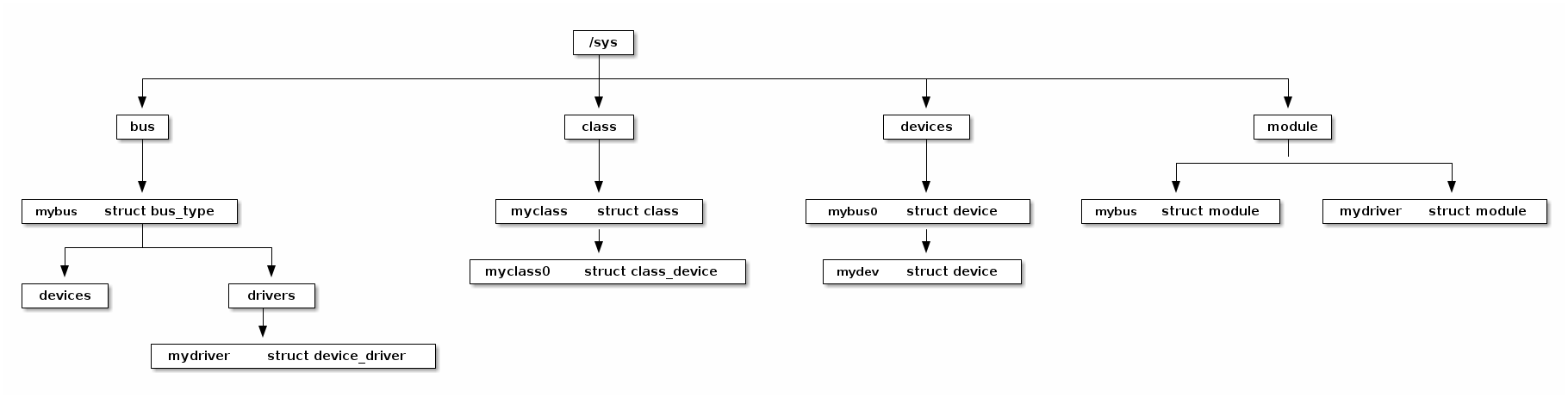
/sys/devices/: This is the canonical representation of the device tree. It shows the physical hierarchy of how devices are connected to each other. Every device in the system has a directory here./sys/bus/: This directory reorganizes the devices by the bus they are connected to. For example,/sys/bus/pci/devices/will contain symbolic links to all the PCI devices, whose actual directories reside under/sys/devices/. It also contains adriverssubdirectory for all registered drivers on that bus./sys/class/: This provides the most abstract view, grouping devices by function. For example,/sys/class/net/will contain entries foreth0,lo, etc., which are symbolic links pointing back to their respective directories in/sys/devices/.- Attributes: Inside each device or driver directory are files. These are called attributes. Reading from a file attribute executes a
show()function in the driver to export a kernel value to user space. Writing to a file attribute executes astore()function to pass a value from user space into the kernel, allowing you to tune driver parameters on the fly.
19. Device Model & Sysfs in Linux Kernel
Let's see a practical demonstration of how the kobject hierarchy is translated into the sysfs filesystem.
Watch the segment from 25:19 to 29:34. The video connects the kobject structures we saw earlier directly to the directories and files you see in /sys, explaining how the parent pointers in kobjects create the directory hierarchy.
4. The Bus-Device-Driver Dance: Match and Probe
The most important function of the device model is to connect devices with their drivers. This process is often called "probing".
Understanding the Structure of a Linux Kernel Device Driver
This video gives an excellent high-level overview of the bus infrastructure and the crucial role it plays in decoupling drivers from devices.
Watch the segment from 42:22 to 47:09. Pay close attention to the explanation of the platform bus, how devices are registered (often via the device tree), and how a 'match' between a device and driver triggers the driver's probe function.
Here's the sequence of events:
- Device Registration: At boot time or during hotplug, the kernel discovers a device. For many embedded systems, this happens when the kernel parses the device tree. It creates a
struct deviceand registers it with the appropriate bus (e.g., an I2C sensor is registered with the I2C bus). - Driver Registration: A kernel module containing a driver is loaded. It creates a
struct device_driverand registers it with the same bus. - The Match: The bus core is notified of the new device or driver. It iterates through all the drivers on that bus and calls the bus's
match()function for each device/driver pair. - The Probe: If
match()returns true, the kernel has found a fit! It then calls theprobe()function from thestruct device_driver. This is the driver's main initialization entry point. Insideprobe(), the driver will:- Map the device's memory-mapped I/O (MMIO) regions.
- Request the device's IRQ line (as we discussed in previous lessons).
- Initialize hardware.
- Register with other kernel subsystems (e.g., register a character device, a network device, etc.).
If probe returns successfully, the device is bound to the driver. If it returns an error, the kernel may try to match the device with the next available driver.
5. Interview Scenario
Scenario: You've written a driver for a custom SPI-based accelerometer. You load the module with insmod, and lsmod shows it's loaded. However, the device doesn't work, and none of the printk messages in your driver's probe() function appear in dmesg.
What is the single most likely architectural reason for this failure, and what are the first three things you would check in sysfs to confirm your hypothesis?
Click for Analysis
-
Most Likely Reason: The bus matching failed. The kernel loaded your driver module, but it never associated your driver's code with the physical device object. Therefore, your driver's
probe()function was never called. -
Sysfs Debugging Steps:
-
Check if the driver is on the bus: Navigate to
/sys/bus/spi/drivers/. Is there a directory with the name of your driver (e.g.,my_accel_driver)?- If NO: The
spi_register_driver()call in your module's init function either failed or was never executed. Check the return value of the registration function. - If YES: The driver is correctly registered with the SPI bus. Proceed to the next step.
- If NO: The
-
Check if the device is on the bus: Navigate to
/sys/bus/spi/devices/. Is there a directory representing your device (e.g.,spi0.0)?- If NO: The device itself was never instantiated. In a modern embedded system, this almost always points to a mistake in the device tree. The
compatiblestring might be wrong, thestatusmight be"disabled", or the node might be missing entirely. - If YES: The kernel sees the physical device. Proceed to the next step.
- If NO: The device itself was never instantiated. In a modern embedded system, this almost always points to a mistake in the device tree. The
-
Check the binding: Go into the device's directory (e.g.,
/sys/bus/spi/devices/spi0.0/). Look for a symbolic link nameddriver.- If it points to your driver's directory (e.g.,
../../../../bus/spi/drivers/my_accel_driver), then the binding was successful, and the problem is inside your probe function (perhaps it's returning an error early before the printk). - If the
driverlink is missing or broken, this is the "smoking gun". It confirms the match failed. The most common reason is a mismatch between thecompatiblestring in the device tree node and the ID table (spi_device_id) in your driver. You should check themodaliasattribute file in the device's sysfs directory (cat /sys/bus/spi/devices/spi0.0/modalias) and ensure it matches an entry in your driver's ID table.
- If it points to your driver's directory (e.g.,
-
Conclusion
Today we've demystified the core framework that organizes all hardware in a Linux system. You now understand how the kernel uses kobjects, devices, drivers, and buses to create a coherent, manageable, and extensible system architecture.
Key Takeaways:
- The Linux Device Model unifies hardware management, enabling features like power management and hotplug.
kobjectis the fundamental unit, providing reference counting and a direct mapping to a directory insysfs.- The system is organized into devices (hardware), drivers (software), and buses (the connection). Classes provide a functional grouping on top.
sysfsis the user-space window into this model, providing an invaluable tool for debugging device enumeration and driver binding issues.- The
bus->match()anddriver->probe()sequence is the critical "dance" that links a physical device to the code that controls it.
In our next lesson, we will put this theory into practice. Our learning outcome will be: Explain the probe/remove lifecycle of a platform driver and write a basic platform driver. We'll take the concepts of device, driver, and probe and use them to write a clean, modern driver from scratch.