Introduction
Welcome to the next lesson in our exploration of kernel security and isolation mechanisms. In the previous lessons, we covered namespaces, which control what a process can see, and cgroups, which manage how many resources a process can use. We've built a solid understanding of the two foundational pillars of Linux containerization.
Today, we complete this triad by examining how to control what a process can do. This lesson addresses the learning outcome: Explain the seccomp-bpf mechanism for restricting system calls and write a basic filter using libseccomp.
Seccomp (Secure Computing mode) is a powerful kernel security feature that acts like a firewall for system calls. By restricting the specific syscalls a process is allowed to make, we can dramatically reduce the kernel's attack surface and enforce the principle of least privilege. This is a critical skill for anyone building secure embedded systems, working with containers, or preparing for high-level technical interviews.
We will start by understanding why seccomp is necessary, then dive into its BPF-based filtering mechanism, and finally, get hands-on by writing and applying a seccomp filter using the standard libseccomp library.
1. The "Why": Reducing the Kernel's Attack Surface
The Linux kernel exposes hundreds of system calls to user-space applications. Each one is an entry point into the kernel, and therefore a potential vector for an attacker to exploit a vulnerability. However, most applications only use a small fraction of these available syscalls.
The core idea behind seccomp is to limit a process to only the syscalls it genuinely needs to function. If an attacker compromises the process and tries to execute a malicious action using an unexpected syscall (e.g., mount to access a new filesystem or reboot to disrupt the system), the seccomp filter will block it before the kernel even attempts to execute it.
To get a clear overview of this concept, let's watch the first few minutes of a talk by Michael Kerrisk, a leading expert on Linux APIs.
Using seccomp to limit the Linux kernel attack service - Michael Kerrisk - NDC Security 2023
This video segment from 'Using seccomp to limit the Linux kernel attack service' introduces the fundamental motivation for seccomp and its evolution from a very restrictive 'strict mode' to the flexible 'filter mode' we use today.
Watch from the beginning to 05:36. Focus on: How an attacker's view of system calls differs from a developer's. The concept of reducing the kernel's attack surface. The history and difference between the original seccomp (strict mode) and seccomp2 (filter mode).
This brings us to the key enforcement mechanism of modern seccomp: BPF.
2. The "How": Seccomp and the Berkeley Packet Filter (BPF)
So, how does the kernel flexibly filter system calls? The "magic" behind seccomp filter mode is the Berkeley Packet Filter (BPF). BPF defines a small, safe, in-kernel virtual machine that can execute programs (filters) loaded from user-space.
Originally designed to filter network packets for tools like tcpdump, the BPF infrastructure was ingeniously repurposed for seccomp. Instead of inspecting network packet headers, the BPF program for seccomp inspects the system call number and its arguments.
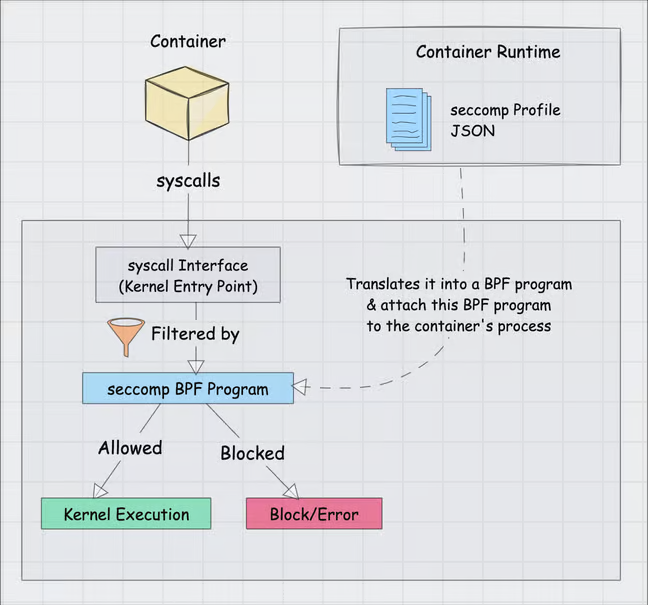
This BPF program is evaluated by the kernel before the actual syscall code is executed. This is a critical detail. Seccomp is the earliest possible enforcement point, acting as a gatekeeper in front of the kernel's main syscall dispatch table.
Let's dive deeper into the mechanics of this BPF virtual machine.
Using seccomp to limit the Linux kernel attack service - Michael Kerrisk - NDC Security 2023
This next segment from Michael Kerrisk's talk explains the BPF virtual machine's characteristics and how it was repurposed for seccomp.
Watch from 09:19 to 16:28. Pay close attention to: The safety guarantees of the BPF VM (e.g., no loops, kernel validation). The fixed-size instruction format and simple instruction set. The data the BPF program operates on: the syscall number and arguments.
When a seccomp filter is executed, the BPF program receives a data structure, struct seccomp_data, which contains details about the attempted syscall. The BPF program inspects this data and must return a verdict.
The verdict is a 32-bit value where the upper 16 bits define the action, and the lower 16 bits provide optional data for that action. Key actions include:
SECCOMP_RET_ALLOW: The syscall is permitted and executed normally.SECCOMP_RET_KILL_PROCESS: The process is immediately terminated.SECCOMP_RET_ERRNO: The syscall is blocked, and an error number (specified in the lower 16 bits) is returned to the user-space application (e.g.,EPERM).SECCOMP_RET_TRACE: The process is sent a signal, allowing a tracer likestraceor a debugger to intervene.SECCOMP_RET_LOG: The syscall is allowed, but the action is logged in the audit log.
While it's possible to write BPF bytecode by hand using macros, as demonstrated later in the video, it is tedious and error-prone. In modern practice, we almost always use a library to handle this for us.
3. Practical Application: Writing a Filter with libseccomp
The standard way to create and manage seccomp filters in C/C++ is with libseccomp. This library provides a high-level API that abstracts away the complexities of generating BPF bytecode, managing architecture differences, and loading the filter into the kernel.
The general workflow with libseccomp is:
- Initialize a filter context:
seccomp_init() - Define a default action: This is what happens if a syscall doesn't match any specific rule. For a secure "allow-list" approach, this is typically
SCMP_ACT_ERRNO(EPERM)orSCMP_ACT_KILL. - Add rules: Use
seccomp_rule_add()to specify an action (likeSCMP_ACT_ALLOW) for individual syscalls. - Load the filter:
seccomp_load()compiles the rules into a BPF program and loads it into the kernel for the current process.
Once loaded, the filter is irreversible for that process and is inherited by any children it creates via fork().
Hands-On Exercise: Building a Simple Syscall Firewall
Now, let's put theory into practice. We'll write a C program that installs a seccomp filter to demonstrate its effect.
Seccomp Explained: How Linux Blocks Syscalls Before They Run
The following article, 'Seccomp: The Syscall Firewall', provides an excellent, concise C program that perfectly demonstrates the use of libseccomp. We will use this code for our hands-on exercise.
Read the section 'A Concrete Example: What Seccomp Actually Does', focusing on the C code in 'The Demo Program'. Understand what the program does before and after calling install_seccomp_filter().
Here is the code from the article for you to compile and run. Save it as seccomp_demo.c.
// seccomp_demo.c


#define _GNU_SOURCE
#include <seccomp.h>
#include <stdio.h>
#include <stdlib.h>
#include <unistd.h>
#include <errno.h>
#include <string.h>
#include <sys/utsname.h>

static void die(const char *msg) {
    perror(msg);
    exit(EXIT_FAILURE);
}

static void print_uname(const char *label) {
    struct utsname u;
    int rc = uname(&u);
    if (rc == -1) {
        printf("%s: uname() failed: errno=%d (%s)\n",
               label, errno, strerror(errno));
    } else {
        printf("%s: uname() ok: sysname=%s, release=%s\n",
               label, u.sysname, u.release);
    }
}

static void install_seccomp_filter(void) {
    int rc;
    scmp_filter_ctx ctx;

    // 1. Initialize filter with a default action: return EPERM
    ctx = seccomp_init(SCMP_ACT_ERRNO(EPERM));
    if (ctx == NULL) {
        die("seccomp_init");
    }

    // 2. Add explicit ALLOW rules for necessary syscalls
    rc = seccomp_rule_add(ctx, SCMP_ACT_ALLOW, SCMP_SYS(read), 0);
    rc |= seccomp_rule_add(ctx, SCMP_ACT_ALLOW, SCMP_SYS(write), 0);
    rc |= seccomp_rule_add(ctx, SCMP_ACT_ALLOW, SCMP_SYS(exit), 0);
    rc |= seccomp_rule_add(ctx, SCMP_ACT_ALLOW, SCMP_SYS(exit_group), 0);
    rc |= seccomp_rule_add(ctx, SCMP_ACT_ALLOW, SCMP_SYS(getpid), 0);
    if (rc < 0) {
        seccomp_release(ctx);
        die("seccomp_rule_add");
    }

    // 3. Load the filter into the kernel
    rc = seccomp_load(ctx);
    if (rc < 0) {
        seccomp_release(ctx);
        die("seccomp_load");
    }

    // 4. Release the context object
    seccomp_release(ctx);
}

int main(void) {
    printf("== Before seccomp ==\n");
    pid_t pid = getpid();
    printf("before: getpid() = %d\n", pid);
    print_uname("before");

    printf("\nInstalling seccomp filter (default DENY, allow read/write/exit/getpid)...\n\n");
    install_seccomp_filter();

    printf("== After seccomp ==\n");
    pid = getpid();
    printf("after: getpid() = %d (still works)\n", pid);
    print_uname("after");

    printf("\nDone.\n");
    return 0;
}
To compile and run:
- First, make sure you have the
libseccompdevelopment library installed. On Debian/Ubuntu systems, you can install it with:sudo apt-get update sudo apt-get install libseccomp-dev - Compile the program, linking against
libseccomp:gcc seccomp_demo.c -o seccomp_demo -lseccomp - Run the executable:
./seccomp_demo
You should see output similar to this:
== Before seccomp ==
before: getpid() = 12345
before: uname() ok: sysname=Linux, release=5.15.0-78-generic

Installing seccomp filter (default DENY, allow read/write/exit/getpid)...

== After seccomp ==
after: getpid() = 12345 (still works)
after: uname() failed: errno=1 (Operation not permitted)

Done.
As you can see, the call to getpid() succeeds after the filter is loaded because we explicitly allowed it. However, the call to uname() now fails with "Operation not permitted" because it was not in our allow-list and the default action of the filter is to return an error (EPERM).
4. Interview Scenario
Scenario: You are tasked with securing an embedded IoT device that runs a critical data-logging application alongside a third-party application for remote diagnostics. The third-party app is a pre-compiled binary, and you are concerned it could be a vector for attack. You must ensure it can only perform its intended function: opening a TCP connection to a specific server, sending diagnostic data, and nothing else.
Question: How would you use seccomp, in conjunction with other Linux security mechanisms, to build a sandbox for this third-party application? What is the main challenge you would face?
Click here for the analysis
Answer: This is an excellent use case for a multi-layered sandboxing approach, with seccomp playing a key role.
-
Cgroups: First, I would place the third-party application into its own cgroup to limit its CPU, memory, and I/O usage. This prevents it from impacting the performance of the critical data-logging application. For example:
echo 50000 100000 > /sys/fs/cgroup/diag_app/cpu.maxto limit it to 50% of a CPU core. -
Namespaces: I would run the application in its own mount and network namespace. The mount namespace would provide a minimal root filesystem containing only the necessary libraries and files, preventing it from accessing other parts of the system. The network namespace would be configured with a single virtual Ethernet interface, allowing it to communicate only with the host, which can then forward traffic to the designated server.
-
Seccomp Filter: This is the most important step for limiting its actions. I would use
libseccompto create a strict allow-list filter. The main challenge is discovering the exact set of system calls the binary needs.- Discovery: I would use
straceto trace the application's syscalls during normal operation (strace -c -f ./diag_app). This gives a starting point. - Filter Implementation: The filter would allow syscalls like
socket,connect,sendto,recvfrom,closefor networking. It would also need basic syscalls likeread,write,mmap,brkfor memory management, andexit_group. Critically, it would deny syscalls likefork,execve,mount,reboot, and any file-related calls other than what's needed for its configuration. - Refinement: Since
stracemay not cover all code paths, a robust strategy is to deploy the seccomp filter in a logging mode first (SECCOMP_RET_LOG) during testing. This allows any unexpected but legitimate syscalls to be logged without killing the application, so the filter can be refined before being deployed with aSECCOMP_RET_KILLorSECCOMP_RET_ERRNOdefault action.
- Discovery: I would use
By combining cgroups (limiting resources), namespaces (limiting view), and seccomp (limiting actions), we can create a strong, defense-in-depth sandbox for the untrusted binary. The primary difficulty with seccomp is accurately profiling the application to build a complete yet minimal syscall allow-list.
Conclusion
In this lesson, you have learned about seccomp, the kernel's powerful mechanism for filtering system calls. We've explored how it uses BPF to create a fast and secure firewall between user-space and the kernel, drastically reducing the system's attack surface.
Key Takeaways:
- Seccomp's Purpose: To restrict the system calls a process can make, enforcing the principle of least privilege at the kernel boundary.
- BPF Mechanism: Seccomp filter mode uses a BPF program to evaluate every syscall and its arguments before execution, returning a verdict like
ALLOW,KILL, orERRNO. libseccomp: This is the standard high-level library used to create, manage, and load seccomp filters, abstracting away the complexity of raw BPF.- Allow-List Approach: The most secure way to use seccomp is to create a filter with a default-deny action and explicitly allow only the necessary syscalls.
Preview of the Next Lesson:
We have now covered the three main pillars of Linux OS-level virtualization, or "containerization": namespaces, cgroups, and seccomp. In the next module, we will shift our focus from isolating processes to isolating entire machines. We will dive into hardware-assisted virtualization, exploring how modern CPUs provide features like Intel VT-x and AMD-V, and how the Linux KVM (Kernel-based Virtual Machine) subsystem leverages this hardware to efficiently run multiple, complete operating systems on a single host.