Hello! Welcome back to our FP&A course.
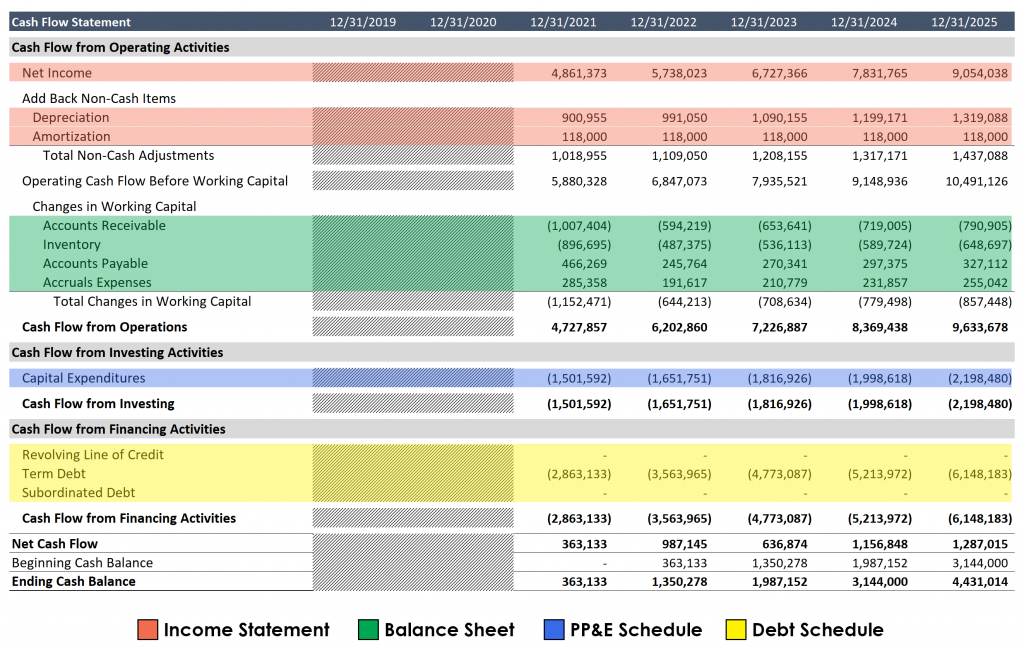
In our last lesson, you did the heavy lifting of constructing the entire Cash Flow Statement (CFS), deriving it from the Income Statement and changes in the Balance Sheet. You now know how to calculate Cash Flow from Operations, Investing, and Financing to arrive at the period's final, calculated cash balance.
Today is the moment of truth. We will integrate all supporting schedules to complete the three-statement model and troubleshoot to ensure the balance sheet balances. This is where all your work from the previous lessons—building schedules for working capital, PP&E, debt, and equity—culminates. We will perform the final, critical link that brings the model to life and ensures its internal consistency. Your engineering background, focused on ensuring complex systems are sound and balanced, will be directly applicable to the logic of this process.
By the end of this 60-minute lesson, you will be able to:
- Link the Cash Flow Statement's ending cash balance back to the Balance Sheet.
- Implement a "balance check" to verify the model's integrity.
- Apply a systematic troubleshooting process to find and fix errors when the model does not balance.
- Appreciate the dynamic nature of a fully integrated model.
Let's put the final piece of the puzzle in place.
1. The Final Link: Closing the Loop with Cash
So far, we have a complete Income Statement, a nearly complete Balance Sheet, and a complete Cash Flow Statement that ends with a calculated Ending Cash Balance. The final step is to connect this result back to the Balance Sheet.

The process is straightforward but critical:
- Go to the
Cash and Cash Equivalentsline item on the asset side of your Balance Sheet for the first forecast period. - Instead of a hardcoded number or a simple growth assumption, you will now link this cell directly to the
Ending Cash Balancecalculated at the bottom of your Cash Flow Statement for that same period. - Copy this formula across for all forecast periods.
At this point, the fundamental accounting equation, Assets = Liabilities + Equity, should hold true for every forecast period. To verify this, we add a Balance Check row at the bottom of our model. This is a simple formula:
The value in this row should be zero (or extremely close to it, accounting for any tiny rounding differences in Excel) for every single period. A non-zero value means there's an error somewhere in your model's logic.
Let's watch this exciting final step in action.
How to Link the 3 Financial Statements in Excel
The video 'How to Link the 3 Financial Statements in Excel' from Corporate Finance Institute demonstrates this exact process, showing the 'moment of truth' when the model balances.
Please watch from 26:06 to 32:44. The speaker first completes the Cash Flow Statement, then links the closing cash balance back to the Balance Sheet. Pay close attention at 31:42 where he links the cash and the balance check formula turns to zero. This is the goal of our exercise today.
Seeing that balance check show 0.0 across all years is one of the most satisfying moments in financial modeling. It confirms that the logic of your entire structure is sound.
2. When the Model Doesn't Balance: A Troubleshooting Guide
More often than not, your model won't balance on the first try. This is normal and a critical part of the learning process. The key is not to panic, but to have a systematic method for debugging. Think of it like a structural engineer inspecting a bridge for points of failure.
Here is a practical, step-by-step guide to finding the error.
Balance Sheet Forecasting Guide
The article 'Balance Sheet Forecasting Guide' from Wall Street Prep provides an excellent, practical section on how to debug an unbalanced model. We'll use this as our guide.
Please read the section 'How to Balance the 3-Statement Model'. It lists the most common errors and provides a robust, manual process for locating the source of the imbalance.
Let's summarize and structure the troubleshooting process from the article:
Common Error Categories:
- Incorrect Signs: This is the most frequent culprit. Remember, on the CFS, an increase in an asset is a use of cash (negative), while an increase in a liability is a source of cash (positive). Double-check that your CapEx, share buybacks, and dividends are also negative.
- Broken Links or Mislinks: Linking to the wrong cell (e.g., linking dividends to the share issuance line) will throw the model off.
- A Balance Sheet Change Not Reflected on the CFS: This is the core principle. Every change in a Balance Sheet account must be explained by a corresponding line item on the Cash Flow Statement. If you forecast an asset to grow but forget to include that change in the CFS, your model will not balance.
The "Tick-and-Tie" Method:
This is the manual but foolproof process described in the article for finding the error.
- Start with the first asset on your Balance Sheet (after cash), like
Accounts Receivable. - Look at the change in that account from the prior period to the current period (
Current AR - Prior AR). - Find the line on the Cash Flow Statement that is meant to explain this change (e.g.,
Change in Accounts Receivable). - Verify that the cash impact on the CFS is correct. For an asset like AR, the cash impact should be the negative of the change (
-(Current AR - Prior AR)). - Once you've verified it, mentally "tick off" both the BS account and the corresponding CFS line.
- Proceed systematically down every single line item on the Balance Sheet. The line item that doesn't have a corresponding and correct reflection on the CFS is your source of error.
Test your understanding!
Your balance check shows -$50. This means your Assets are $50 lower than your Liabilities + Equity, or Liabilities + Equity are $50 higher than Assets.
You review your statements and find:
- Your PP&E schedule shows you purchased a new machine for $50 (CapEx).
- Your PP&E balance on the Balance Sheet correctly increased by this amount.
- On the Cash Flow Statement, you completely forgot to add a line for Capital Expenditures in the Cash Flow from Investing section.
How does this single omission lead to a -$50 imbalance?
Show answer
- Balance Sheet Impact:
Total Assetsincreased by $50 because PP&E went up. - Cash Flow & Cash Impact: Since you forgot to include the -$50 CapEx outflow on the CFS, your
Net Change in Cashis $50 higher than it should be. Consequently, yourEnding Cash Balanceis also $50 too high. - The Error: When you link this artificially high cash balance back to the Balance Sheet, you are double-counting the asset. The $50 increase is already in PP&E. Now you've incorrectly added another $50 to Cash. So
Total Assetsare overstated by $50 relative to the claims (L+E).
Wait, the logic in the answer seems to point to a +$50 error, but the question states a -$50 error. Let's re-evaluate.
A balance check of Assets - (L+E) = -$50 means Assets are lower than L+E.
- PP&E on BS: Correctly reflects the $50 purchase. Let's assume this part is linked from a schedule.
- CFS Error: You forgot to show the -$50 cash outflow for CapEx.
- Resulting Cash Balance: Your ending cash balance is $50 higher than it should be.
- Final BS Link: You link this inflated cash number to the Balance Sheet. So your cash asset is $50 too high. Your PP&E asset is also $50 higher. Your Total Assets are effectively $100 too high on the asset side compared to what they should be.
- Let's rethink. The act of purchasing the asset for cash is cash-neutral on the asset side: PP&E goes up by $50, Cash goes down by $50.
Total Assetsshould be unchanged. - If you forget to show the -$50 CapEx on the CFS, your
Ending Cash Balancedoesn't decrease. It's $50 higher than it should be. - So on the Balance Sheet: PP&E is up $50, but Cash hasn't gone down by $50. Your
Total Assetshave increased by $50. - Nothing has happened on the
L+Eside. - Therefore,
Assetsare now $50 higher thanL+E. The balance checkAssets - (L+E)would be+$50.
Let's flip the error. What if you showed the -$50 CapEx on the CFS, but forgot to increase PP&E on the Balance Sheet?
- CFS & Cash Impact: The CFS is correct. It shows a -$50 use of cash for investing. Your
Ending Cash Balanceis correctly $50 lower. - Balance Sheet Impact: You link this lower cash balance to the BS, so the
Cashasset is correct. However, you forgot to increase thePP&Easset by $50. - The Imbalance: Your
Total Assetsare now $50 lower than they should be, because the cash went out but no new asset appeared. TheL+Eside is unchanged. Therefore,Assets - (L+E)will be-$50. This matches the question. The error is a failure to link the CapEx to the PP&E roll-forward on the Balance Sheet.
Conclusion
Congratulations! You have now built and balanced a fully integrated three-statement financial model. You've placed the final link in the chain and learned the essential, practical skill of troubleshooting when things don't add up. The model is no longer a set of static, independent reports; it is a dynamic simulation of a business's financial operations.
Key Takeaways:
- A three-statement model is balanced by linking the
Ending Cash Balancefrom the CFS to theCashline on the Balance Sheet. - A
Balance Checkformula (Assets - (L+E) = 0) is your non-negotiable proof that the model is mechanically sound. - Troubleshooting is a systematic "tick-and-tie" process. Every change on the Balance Sheet must be fully and correctly explained on the Cash Flow Statement.
- The most common errors involve incorrect signs (+/-) and forgetting to reflect a BS change on the CFS.
In our next and final lesson for this module, we will address a sophisticated problem that our now-integrated model has created: circular references. You may have noticed that interest expense depends on the debt balance, but the cash available to pay down debt (and thus the debt balance itself) depends on net income, which is affected by interest expense. We'll explore how to resolve this "chicken-and-egg" problem in Excel.