Welcome to our third lesson. In our previous session, you learned about Python's fundamental data types for numbers (int and float) and how to perform calculations using arithmetic operators. We also covered the crucial concept of dynamic typing, which sets Python apart from statically-typed languages like C++.
This lesson transitions from numbers to text, one of the most common forms of data you'll encounter. We will explore Python's string data type, which is engineered for powerful and flexible text manipulation. You will learn how to access specific parts of a string through indexing and slicing, and how to use built-in string methods to clean, transform, and parse textual data. Mastering these skills is essential for nearly every application of Python, from parsing user input in web applications to cleaning text data for Natural Language Processing (NLP) models.
1. Strings as Sequences
In Python, a string is an ordered sequence of characters. You can create a string by enclosing text in either single quotes ('...') or double quotes ("..."). This flexibility is useful when your string itself contains quotes.
# Both are valid strings
course_name = "Python for Programmers"
greeting = 'Hello, world!'


# Using double quotes to include a single quote
message = "It's a sunny day."


# Using single quotes to include double quotes
quote = 'He said, "Python is versatile!"'
Like many modern languages, Python strings are immutable. This is a critical concept. It means that once a string is created, it cannot be changed. Any operation or method that appears to modify a string actually returns a new string with the changes. Your original string remains untouched. This is a design choice that ensures predictability and safety when passing strings between different parts of a program.
For a formal explanation of immutability, please read the following section.
practical-python | Practical Python Programming (course by @dabeaz)
This section from the "Practical Python" guide clearly explains and demonstrates the concept of string immutability.
Read the section titled "String Mutability". Pay close attention to the TypeError that occurs when you try to assign a new value to a character's index. This is direct proof of immutability.
2. Accessing Substrings: Indexing and Slicing
Since strings are sequences, you can access their contents by position. Python offers two main ways to do this: indexing to get a single character, and slicing to get a substring.
Indexing
You can retrieve a single character using its index inside square brackets []. Python uses zero-based indexing, meaning the first character is at index 0.
Python also supports negative indexing, which is a convenient way to access characters from the end of the string. The last character is at index -1, the second-to-last is at -2, and so on.
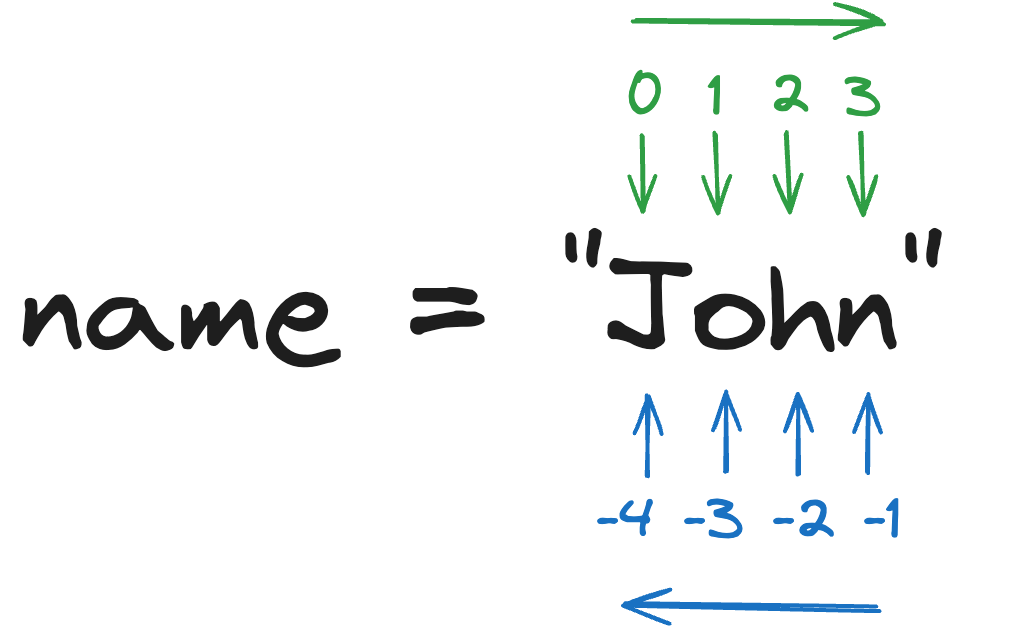
Here are some examples:
text = "Python"


# Positive indexing
print(text[0])  # Output: P
print(text[3])  # Output: h


# Negative indexing
print(text[-1]) # Output: n
print(text[-2]) # Output: o
Slicing
To extract a substring (a "slice"), you use the syntax [start:stop]. This gives you the part of the string from the start index up to, but not including, the stop index.
my_string[2:5]extracts characters at index 2, 3, and 4.- If you omit
start(my_string[:5]), the slice starts from the beginning. - If you omit
stop(my_string[2:]), the slice goes to the end.
You can also add a third parameter, step, to skip characters: [start:stop:step]. A common and highly "Pythonic" idiom is using [::-1] to reverse a string.
The following video provides an excellent walkthrough of both indexing and slicing.
Python Tutorial for Beginners 2: Strings - Working with Textual Data
This segment from Corey Schafer's tutorial visually demonstrates how to access characters and ranges of characters in a string.
Watch from this point to see how to get a string's length, access individual characters with indexing, and extract substrings with slicing. Note the explanation of the stop index being non-inclusive.
3. Common String Methods
Beyond accessing parts of a string, you'll often need to transform it. Python provides a rich set of built-in string methods for this. A method is a function that belongs to an object; in this case, a string object. The syntax is always my_string.method().
Remembering the immutability principle: these methods do not change the original string. They return a new, modified string.
Let's explore some of the most useful methods, grouped by their purpose.
Case Conversion and Cleaning
These are essential for standardizing text data before comparison or analysis.
lower(): Returns a new string with all characters converted to lowercase.upper(): Returns a new string with all characters converted to uppercase.strip(): Returns a new string with leading and trailing whitespace (spaces, tabs, newlines) removed.lstrip()andrstrip()remove from the left or right only.
raw_input = "  Data Science  "
clean_input = raw_input.strip() # "Data Science"
lower_input = clean_input.lower() # "data science"

print(f"Original: '{raw_input}'")
print(f"Stripped: '{clean_input}'")
print(f"Lowered: '{lower_input}'")
Searching and Checking
These methods help you find substrings or verify the string's content.
startswith(prefix): ReturnsTrueif the string starts withprefix, otherwiseFalse.endswith(suffix): ReturnsTrueif the string ends withsuffix, otherwiseFalse.count(substring): Returns the number of timessubstringappears in the string.find(substring): Returns the starting index of the first occurrence ofsubstring. If not found, it returns-1.
filename = "report_2023.csv"
print(filename.startswith("report")) # True
print(filename.endswith(".txt"))   # False
print(filename.find("_"))          # 6
Splitting and Replacing
These are powerful tools for restructuring strings.
replace(old, new): Returns a new string where all occurrences ofoldare replaced withnew.split(separator): Returns a list of substrings, splitting the original string at each occurrence of theseparator. If no separator is given, it splits by whitespace. This process is often called tokenization.
The video below demonstrates these methods with practical examples, reinforcing the idea that they create new strings.
Python String Functions Explained | Text Manipulation & Cleaning | #Python Course 8
This tutorial from "Data with Baraa" focuses on string functions in the context of data cleaning, which aligns well with your interests in data science.
Watch the following segments: Replace: See how replace() can be used to fix formatting in dates and phone numbers, including how to chain multiple replace() calls. Split: Understand how split() is used to break a string into a list of smaller strings, with great examples for parsing timestamps and CSV data. Strip: Learn how strip(), lstrip(), and rstrip() are used to remove unwanted whitespace from the beginning and end of strings.
4. Practice Exercises
Your preference for hands-on practice is key to mastering these concepts. Let's work through some exercises.
First, let's practice with some guided examples from the "Practical Python" resource.
practical-python | Practical Python Programming (course by @dabeaz)
These exercises provide direct, hands-on practice with indexing, slicing, concatenation, and common string methods in an interactive Python shell.
Open a Python interactive shell (just type python in your terminal) and work through the following exercises: Exercise 1.13: This will solidify your understanding of positive/negative indexing and reinforce immutability. Exercise 1.14: Practice combining strings and see how new strings are created. Exercise 1.16: Experiment with methods like lower(), find(), replace(), and strip().
For more comprehensive practice, the PYnative website offers a fantastic collection of problems. Each one connects a specific string operation to a real-world programming task, which is excellent for building intuition.
Try solving the following problem. The goal is to remove "noise" (special symbols) from a string, a common first step in NLP.
Problem: Given str1 = "/*Jon is @developer & musician!!", write a script to produce the output "Jon is developer musician".
Hint and Solution
Hint: You can iterate through the original string character by character. Build a new string, but only add characters that are either alphanumeric (letters or numbers) or spaces. Python has string methods to check this, such as char.isalnum() and char.isspace().
Solution:
str1 = "/*Jon is @developer & musician!!"
new_str = ""

for char in str1:


    # Keep the character if it's a letter, number, or space
    if char.isalnum() or char.isspace():
        new_str += char


# The problem description has a small ambiguity.
# It expects "Jon is developer musician", but the loop above produces "Jon is developer  musician" (two spaces).
# A simple way to fix this is to split the string and rejoin it.
words = new_str.split()
final_str = " ".join(words)

print(final_str)
This problem is adapted from Exercise 23 in the PYnative collection.
For more challenges like this, I highly recommend working through the exercises on PYnative. They cover a wide range of scenarios, from basic indexing to more complex parsing logic.
Python String Exercise with Solutions
This resource is a treasure trove of practice problems. The "Exercise Purpose" for each problem explains its real-world relevance.
Browse through the list of exercises and try to solve a few that seem interesting to you. I particularly recommend: Exercise 7: "Split a string on hyphens" (tokenization). Exercise 8: "Find all occurrences of a substring by ignoring the case" (case normalization). Exercise 16: "Extract File Extension" (string parsing).
Conclusion
In this lesson, you've gained a solid foundation for working with text in Python. We've covered the three pillars of string manipulation:
- Strings as immutable sequences: You understand that strings are ordered collections of characters that cannot be changed in place.
- Indexing and Slicing: You can now access any individual character or extract any substring using positive and negative indices.
- String Methods: You are equipped with a powerful toolkit of methods like
strip(),lower(),replace(), andsplit()to clean, standardize, and restructure textual data.
These skills are not just academic; they are the workhorses of data cleaning, web scraping, and any task involving text processing. You are now well-prepared to handle real-world textual data.
In our next lesson, we will combine these skills with new ones. You'll learn how to read input from a user and how to format your output into clean, readable strings using f-strings, one of Python's most beloved features.