In our last session, we successfully established your professional Python development environment. You now have Python and VS Code installed, understand how to manage a project with a virtual environment, and can run a script from the command line. With that foundation in place, we can now shift our focus from setup to the core principles of the language.
Today's lesson addresses the first building blocks of any program: data. We will explore how to store information in variables, understand Python's approach to data types, and learn how to perform calculations with numbers using arithmetic operators. This will be a significant step in your transition from C++ to Python, as we'll highlight some key philosophical differences between the two languages, particularly in how they handle types.
1. Storing Data: Variables and Assignment
At its core, a program manipulates data. A variable is simply a name that we assign to a piece of data, giving us a way to label and refer to it later. Think of it as a labeled box where you can store a value. In Python, you create a variable and give it a value using the assignment operator, the equals sign (=).
For example:
# Assigning an integer to a variable
age = 30


# Assigning a floating-point number
pi_approx = 3.14159


# Variable names are case-sensitive
student_count = 50
Student_Count = 10 # This is a different variable
Python has a few rules for naming variables:
- They can contain letters, numbers, and underscores (
_). - They cannot start with a number.
- They are case-sensitive.
- You cannot use Python's reserved keywords (like
if,for,while, etc.) as variable names.
By convention, Python variable names are written in snake_case, using lowercase letters and underscores to separate words.
To get a more intuitive feel for how variables work, watch the following segment from a tutorial by Kevin Stratvert. The "red bucket" analogy is a simple but effective way to visualize the concept of assigning and reassigning values.
👩💻 Python for Beginners Tutorial
This video provides a clear, beginner-friendly introduction to variables.
Watch the section on variables starting from the bucket analogy. Pay close attention to how a variable can hold a value, and how that value can be overwritten or changed. Then, continue watching as he explains how Python handles variable types automatically.
2. Python's Type System: Dynamic Typing
The video you just watched touched upon one of the most significant differences between Python and a language like C++: the typing system. In C++, you must declare the type of a variable before you can use it (e.g., int age = 30;). This is known as static typing, where type checking happens at compile-time.
Python, on the other hand, uses dynamic typing. You don't declare a variable's type. Instead, the type is associated with the value the variable holds at any given moment, and it's checked at runtime. A variable x can hold an integer, and later in the program, it can be reassigned to hold a string.

Let's see a quick, direct comparison.
This short video from Boot.dev clearly demonstrates the essence of dynamic typing.
Watch the segment from "python is a dynamically typed language" to see how a variable's type can be changed during program execution.
You can verify a variable's type at any point using the built-in type() function. Open your main.py file from the previous lesson, clear its contents, and try this:
# main.py


# 1. Assign an integer
x = 10
print("The value of x is:", x)
print("The type of x is:", type(x))

print("-" * 20) # A separator for clarity


# 2. Reassign a string to the same variable
x = "Hello Python"
print("The value of x is:", x)
print("The type of x is:", type(x))
Run this script from your VS Code terminal (python main.py). You will see how the type associated with the variable x changes from <class 'int'> to <class 'str'> after the reassignment. This flexibility is a hallmark of Python and contributes to its reputation for rapid development.
For a more detailed textual explanation of variables and dynamic typing, you can refer to the following guide.
[PDF] Introduction to Python Part 1
This document provides a concise summary of variables and Python's typing system.
On page 4, read the section "Variables" for a review of assignment and naming rules. Then, read the two sections on "Variable Data Types" to solidify your understanding of dynamic typing and how it contrasts with statically typed languages like C++.
3. Numbers and Arithmetic
Now that we understand how to store data, let's learn how to work with it. Python has two main numeric types:
- Integers (
int): Whole numbers, positive or negative (e.g.,10,-3,0). - Floating-point numbers (
float): Numbers with a decimal component (e.g.,3.14,-0.01,2.0).
Python supports a full range of arithmetic operators to perform calculations.
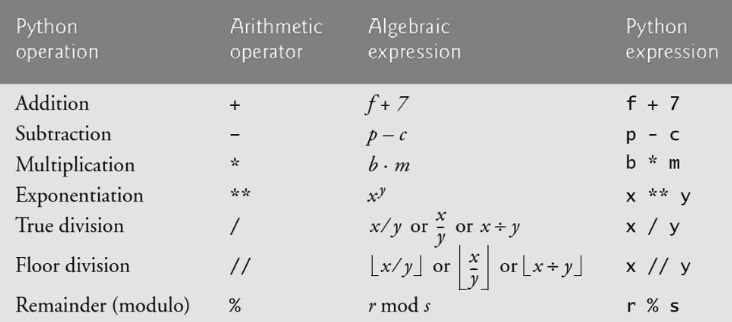
The following video demonstrates these operators in a live coding session. Notice the distinction between true division (/), which always results in a float, and floor division (//), which discards the fractional part.
👩💻 Python for Beginners Tutorial
This part of Kevin Stratvert's tutorial provides a practical demonstration of all the arithmetic operators.
Watch the segment from "working with operators". Pay attention to the examples for standard operators (+, -, *), exponentiation (**), true division (/), floor division (//), and the modulus operator (%). The video also provides a good reminder of the order of operations (PEMDAS).
Augmented Assignment Operators
Like C++, Python provides shorthand operators for modifying a variable's value. These are known as augmented assignment operators.
| Operator | Equivalent to... |
|---|---|
x += y |
x = x + y |
x -= y |
x = x - y |
x *= y |
x = x * y |
x /= y |
x = x / y |
These are very common and help make code more concise. For example, to increment a counter, you would write count += 1.
4. Practice Exercise
Let's combine what we've learned. Modify your main.py script to solve a simple problem: calculating the area of a circle.
- Create a variable named
radiusand assign it a numeric value (e.g.,5). - Create a variable named
piand assign it the value3.14159. - Calculate the area of the circle using the formula . In Python, you'll use the exponentiation operator
**. Store the result in a variable namedarea. - Print the result in a user-friendly format, for example: "The area of a circle with radius 5 is: 78.53975".
Click here for a sample solution.
# main.py

radius = 5
pi = 3.14159


# Calculate the area using the formula pi * r^2
area = pi * (radius ** 2)

print("The area of a circle with radius", radius, "is:", area)
For more practice, which is key to your learning goal, the following resource offers a large collection of exercises.
Python Exercises, Practice, Challenges [385+ Exercises]
The PYnative website offers a great set of practice problems for all levels.
Explore the first set of exercises, "Basic Exercise for Beginners". Try to solve the first 5-10 problems, which cover variables, numbers, and basic operations. This will be excellent preparation for our next topics.
Conclusion
In this lesson, you made the crucial leap from setting up your environment to writing your first functional code. You have learned:
- How to declare and assign values to variables.
- The concept of dynamic typing and how it differs from the static typing you've seen in C++.
- Python's core numeric types,
intandfloat. - How to use the full suite of arithmetic operators, including
+,-,*,/,//,%, and**, to perform calculations.
You now have the fundamental tools to handle numeric data in Python. This is the first step towards building any kind of program, whether for data analysis, web applications, or algorithmic problem-solving.
In the next lesson, we will move from numbers to text. You'll learn how to work with strings, one of Python's most powerful and versatile data types, and discover how to manipulate text using indexing, slicing, and built-in methods.