Welcome to our third lesson! In the last session, we dissected the fundamental building block of the web: the HTML element. We learned about opening and closing tags, how to nest elements correctly, and how attributes provide extra information.
Today, we move from the building blocks to the blueprint. You will learn how to assemble those elements into a complete, valid HTML5 document. We'll construct the essential "skeleton" that every single webpage on the internet is built upon, using the five most fundamental components: <!DOCTYPE html>, <html>, <head>, <title>, and <body>. This is a major step, as by the end of this lesson, you will have written your very first webpage.
The Blueprint of a Webpage
Every HTML document, no matter how complex, follows a standard structure. Think of it as a universal blueprint or a "boilerplate" template. This structure ensures that web browsers can understand and render your page correctly.
The structure is hierarchical, meaning elements are nested within one another. In our last lesson, you learned about nesting simple elements like <strong> inside a <p>. The entire HTML document works the same way, but with larger, structural elements.
This diagram shows how the core elements of a webpage are nested:
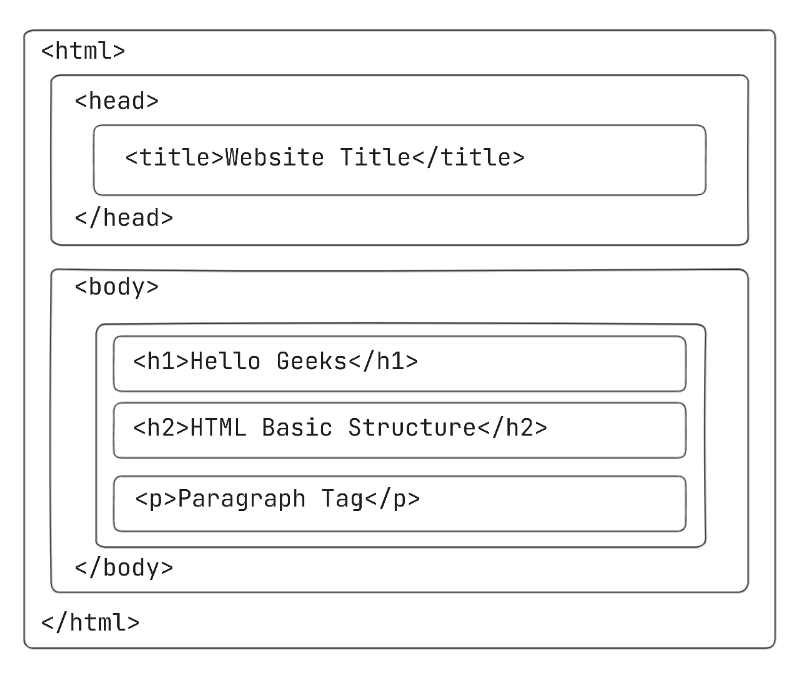
As you can see, the <html> element acts as the root container for the entire document. Inside it are two direct children: <head> and <body>. Let's explore what each part of this blueprint does.
The Five Foundational Components
A minimal, valid HTML5 document is built from five key pieces. Let's break them down before we assemble them.
-
<!DOCTYPE html>
This is not an HTML tag, but a special declaration. It must be the very first thing in your file. Its only purpose is to tell the browser that the document should be interpreted as modern HTML5. It's a simple, mandatory instruction. -
<html>...</html>
This is the root element of the page. It wraps all other content. Everything else in your document (except the<!DOCTYPE>declaration) will be nested inside these tags. -
<head>...</head>
This element is a container for metadata—data about the HTML document that is not displayed on the page itself. This includes things like the page title, links to stylesheets (CSS), and character encoding. Think of it as the "brain" of the page, holding important background information. -
<body>...</body>
This element contains all the visible content of your webpage. Any text, headings, paragraphs, images, videos, and links that you want a user to see and interact with must be placed within the<body>tags. -
<title>...</title>
Nested inside the<head>, this element defines the title of your document. The text you place here appears in the browser tab, in bookmarks, and in search engine results. It's crucial for usability and SEO.
To solidify these concepts, let's turn to a well-structured article that explains how to put this all together.
Building Your First Web Page - Learn to Code HTML & CSS
This article by Shay Howe provides a clear and concise explanation of the fundamental structure required for every HTML document. It perfectly covers the five components we've just discussed.
Please read the section titled "Setting Up the HTML Document Structure." Pay close attention to the descriptions of each element's role and study the code example that shows how they fit together.
Your First Webpage: Putting Theory into Practice
Now that you understand the theory, it's time to build something. You're going to create your very first HTML file from scratch. This is where your practice-oriented approach really comes into play.
Here is the complete code for a minimal, valid HTML5 page.
<!DOCTYPE html>
<html>
  <head>
    <title>My First Web Page</title>
  </head>
  <body>
    <h1>Hello, World!</h1>
    <p>This is my very first webpage, built from scratch.</p>
  </body>
</html>
Let's quickly walk through this:
- The
<!DOCTYPE html>declaration is at the top. - The
<html>element wraps everything. - The
<head>contains the<title>, which will display "My First Web Page" in the browser tab. - The
<body>contains a heading (<h1>) and a paragraph (<p>), which will be visible on the page.
Now, it's your turn. You will create this file and open it in your browser. The following video segment is highly recommended as it walks you through setting up a professional code editor (VS Code) and an extension called "Live Server" that makes development much easier.
This video from Bro Code provides a great practical guide for getting your development environment ready.
I recommend you watch the setup guide from this section of the video to install VS Code and the Live Server extension. This will make writing and testing your code much more efficient.
Once you have your editor ready, follow these steps:
- Create a new file and save it as
index.html. The.htmlextension is essential. - Type or copy the boilerplate code above into your
index.htmlfile. - Save the file.
- Open it in your web browser. If you installed the Live Server extension, you can right-click in your file and select "Open with Live Server." Otherwise, you can find the file on your computer and double-click it.
You should see a simple page with the heading "Hello, World!" and the paragraph text below it. Look at the browser tab—it should say "My First Web Page." Congratulations!
Conclusion
In this lesson, you've successfully transitioned from understanding individual HTML elements to constructing a complete and valid webpage. You now know the five foundational components that form the skeleton of every HTML document.
Key Takeaways:
- Every HTML5 page must start with the
<!DOCTYPE html>declaration. - The
<html>element is the root container for all page content. - The
<head>section contains metadata, like the<title>, which is not visible on the page itself. - The
<body>section contains all the visible content that the user sees. - The
<title>element sets the text for the browser tab and is important for bookmarks and search engines.
You've built your first page, a critical milestone. Now that you have the basic structure down, we can start enriching it. In the next lesson, we will look at how to add an important attribute to the <html> tag—the lang attribute—to declare the primary language of your page, which is a key step for accessibility.