Welcome back! In our previous lesson, we built a crucial skill for writing professional code: handling errors with try/except blocks. This ensures our programs are robust and don't crash when faced with unexpected situations.
Today, we'll focus on the data format that powers the modern web: JSON (JavaScript Object Notation). For your goal of building a grasp.study clone that interacts with the Claude API, mastering JSON is non-negotiable. APIs almost universally use JSON to send and receive information. This lesson will teach you how to read, write, and manipulate JSON data structures using Python's built-in json module. Your experience with APIs in your MERN stack projects will give you a great head start here, as the concepts will be familiar, even if the Python syntax is new.
What is JSON?
JSON is a lightweight, text-based format for data interchange. It's easy for humans to read and for machines to parse and generate. Given your background in JavaScript, its syntax will look very familiar, as it's derived from JavaScript object literal syntax.
A JSON structure consists of two main building blocks:
- A collection of name/value pairs, which in Python maps to a
dict. - An ordered list of values, which in Python maps to a
list.
The primary difference from a Python dictionary is that in JSON, keys must always be strings enclosed in double quotes. Let's start with a comprehensive overview of the syntax.
Working With JSON Data in Python
This article from Real Python provides an excellent introduction to JSON syntax and highlights some common pitfalls for Python developers.
Please read the sections Introducing JSON and Examining JSON Syntax. As you read, notice the direct parallels between JSON objects and Python dictionaries, and JSON arrays and Python lists. Then, read Exploring JSON Syntax Pitfalls, paying close attention to the strict rules about double quotes, comments, and trailing commas, which differ from Python's more flexible dictionary syntax.
Serialization and Deserialization: The Core Operations
Working with JSON in Python revolves around two main processes:
- Serialization (or "dumping"): Converting a Python object (like a
dictorlist) into a JSON-formatted string or writing it to a file. - Deserialization (or "loading"): Parsing a JSON-formatted string or reading a JSON file and converting it into a Python object.
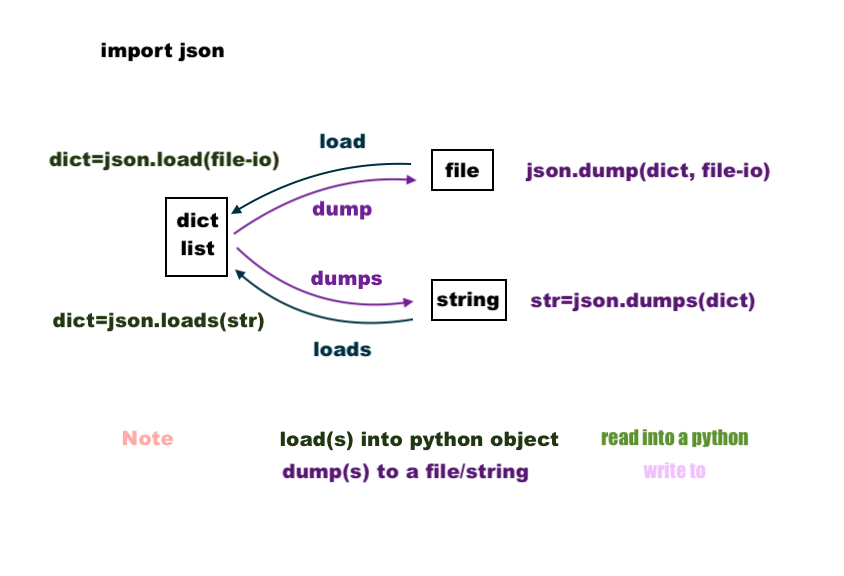
Python's json module provides four key functions for these operations, and their names can be a bit confusing at first. The "s" at the end of dumps and loads is your clue: it stands for string.
json.dump(): Writes a Python object to a file.json.dumps(): Converts a Python object to a JSON string.json.load(): Reads a JSON file into a Python object.json.loads(): Parses a JSON string into a Python object.
This diagram provides a great visual summary of the data flow for these four functions.
From Python to JSON: Serialization
Let's start with serialization. Imagine you have a Python dictionary representing some user settings, and you want to save it or send it over a network.
import json

user_profile = {
    "username": "dev_learner",
    "theme": "dark",
    "notifications_enabled": True,
    "login_attempts": 3,
    "last_login": None
}
Writing to a String with json.dumps()
To convert this dictionary into a JSON string, we use json.dumps(). A key feature of dumps() is its ability to "prettify" the output using the indent argument, which is invaluable for debugging.
The following video from Corey Schafer clearly demonstrates this process.
Python Tutorial: Working with JSON Data using the json Module
This segment shows how to convert a Python object to a nicely formatted JSON string.
Watch the section from this timestamp. Pay close attention to how he uses the indent and sort_keys arguments to make the output human-readable.
As you saw in the video, using indent adds newlines and spaces, making the structure clear.
# Convert to a compact JSON string (hard to read)
compact_json_string = json.dumps(user_profile)
print(compact_json_string)


# Output: {"username": "dev_learner", "theme": "dark", "notifications_enabled": true, "login_attempts": 3, "last_login": null}


# Convert to a "pretty" JSON string (easy to read)
pretty_json_string = json.dumps(user_profile, indent=4)
print(pretty_json_string)


# Output:
# {
#     "username": "dev_learner",
#     "theme": "dark",
#     "notifications_enabled": true,
#     "login_attempts": 3,
#     "last_login": null
# }
Notice how Python's True and None were automatically converted to JSON's true and null.
Writing to a File with json.dump()
Writing to a file is just as straightforward. Instead of getting a string back, you provide a file object to json.dump(), and it writes the JSON data directly into that file. This is more memory-efficient than creating a giant string first.
Working With JSON Data in Python
This reading will solidify your understanding of serializing Python objects, both to strings and files.
Focus on the subsections Convert Python Dictionaries to JSON and Write a JSON File. The file-writing example using the with open(...) context manager is a standard pattern you will use frequently.
Here's the pattern in action:
# Assuming user_profile dictionary from before
with open('profile.json', 'w', encoding='utf-8') as f:
    json.dump(user_profile, f, indent=4)


# This creates a file named 'profile.json' with the pretty-printed JSON content.
From JSON to Python: Deserialization
Now for the reverse process: turning JSON data back into a Python object you can work with.
Reading from a String with json.loads()
If you receive JSON data as a string (e.g., from an API response), you use json.loads() to parse it.
Python Tutorial: Working with JSON Data using the json Module
This video clip will walk you through parsing a JSON string and then accessing the resulting Python object.
Watch from the beginning until the end of the loop example. Notice how the JSON data types are converted into their Python equivalents (e.g., null becomes None) and how you can then iterate over the resulting list and access dictionary keys just like any other native Python object.
Reading from a File with json.load()
To read a JSON file from your disk, you'll combine open() with json.load().
# Assuming 'profile.json' exists from the previous step
with open('profile.json', 'r', encoding='utf-8') as f:
    data = json.load(f)

print(type(data))  # <class 'dict'>
print(data['username']) # dev_learner
Manipulating the Data
Once you've used json.load() or json.loads(), you no longer have JSON—you have a standard Python dictionary or list. You can then use all the Python skills you already know to access, modify, and iterate through the data.
Your experience with the MERN stack is highly relevant here. The process is the same: a server serializes data to a JSON string, it's sent over HTTP, and the client deserializes it into an object to be used by the application.
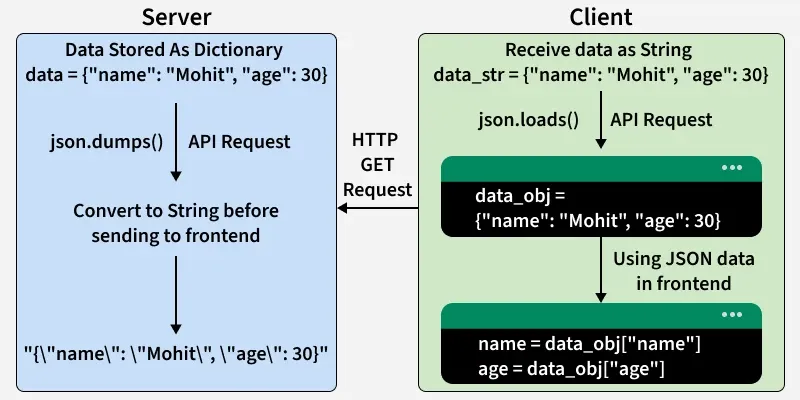
Navigating nested structures is a common task. If you have a dictionary containing a list of dictionaries, you'll use a combination of key access ([]) and list indexing ([]) or loops to get to the data you need.
Python - Accessing Nested Dictionary Keys
This Academind video is excellent at demonstrating how to "drill down" into a complex, nested data structure that has been loaded from JSON.
Watch the section that explains how to access nested data. Focus on the strategy of using type() to inspect your data at each level and alternating between key access for dictionaries and loops/indices for lists. Then, watch how he builds a function to extract specific information and appends it to a new list.
Error Handling with JSON
Connecting back to our last lesson, what happens when things go wrong? Two common errors arise when working with JSON:
FileNotFoundError: If you try toopen()a file that doesn't exist.json.JSONDecodeError: If you try to load a string or file that is not valid JSON (e.g., contains a syntax error like a trailing comma or single quotes).
You should always wrap your JSON loading code in a try...except block to handle these potential issues gracefully.
How to Read and Write JSON Files in Python
This article provides concise and practical examples of handling common errors when working with JSON.
Please read the sections titled Handling Common Errors and Security Considerations. The JSONDecodeError example is particularly important, as malformed data from an API or file is a common problem.
Here is a robust example combining file opening and JSON decoding:
import json

file_path = 'possibly_malformed_profile.json'

try:
    with open(file_path, 'r', encoding='utf-8') as f:
        data = json.load(f)
    print("Successfully loaded data:", data)
except FileNotFoundError:
    print(f"Error: The file '{file_path}' was not found.")
except json.JSONDecodeError as e:
    print(f"Error decoding JSON from '{file_path}': {e}")
except Exception as e:
    print(f"An unexpected error occurred: {e}")
Conclusion
You've now covered the essentials of working with JSON in Python, a fundamental skill for any developer building modern applications, especially those that communicate with APIs.
Key Takeaways:
- JSON is the standard data interchange format for web APIs, using key-value objects and arrays.
- Serialization (Python object to JSON) is done with
json.dump()(to a file) andjson.dumps()(to a string). - Deserialization (JSON to Python object) is done with
json.load()(from a file) andjson.loads()(from a string). - The
indentargument is your best friend for creating readable JSON for logging and debugging. - Once loaded, JSON data becomes a normal Python
dictorlist, which you can manipulate using standard Python operations. - Always wrap JSON loading operations in
try...exceptblocks to handleFileNotFoundErrorandjson.JSONDecodeError.
In our next lesson, we will put this knowledge into practice. We'll learn how to make HTTP requests to an external API using the requests library and process the JSON response. This will be our first step in communicating with external services and a direct move towards interacting with the Anthropic API for our project.