Hello again! In our last session, we explored list comprehensions and lambda functions, powerful tools for writing concise and efficient Python code for the "happy path"—when everything works as expected.
Today, we shift our focus to the "unhappy path." In any real-world application, especially one that interacts with files, networks, and user input like our grasp.study clone will, things can and will go wrong. This lesson will equip you to handle these situations gracefully. We'll be covering how to implement robust error handling using Python's try/except blocks. Mastering this will allow you to build resilient applications that don't crash unexpectedly, providing a much better experience for the end-user.
When Code Goes Wrong: Exceptions
When a Python script encounters a situation it can't cope with during execution, it raises an exception. If this exception isn't handled, the program stops immediately and prints a traceback.
For example, consider this simple code:
# This will crash if the user doesn't enter a number
age = int(input("Please enter your age: "))
print(f"Next year, you will be {age + 1}.")
If a user enters "twenty" instead of "20", the int() function can't convert the string to an integer and raises a ValueError. The program crashes with a traceback, which, while useful for us as developers, is confusing for a user.
The solution is to anticipate these potential errors and handle them. This is what try and except are for.
The try...except Block: Your Safety Net
The fundamental idea of error handling is to try a block of code that might fail. If it fails (raises an exception), you catch that specific exception and execute a different block of code to handle it.
This video from Corey Schafer provides a fantastic introduction using a common scenario: trying to open a file that doesn't exist.
Python Tutorial: Using Try/Except Blocks for Error Handling
This video clearly demonstrates the problem that try/except solves and introduces the basic syntax.
Watch the first segment from the beginning until the explanation of the try/except flow. Notice how the code stops crashing and instead displays a user-friendly message.
The core logic is:
- Code inside the
tryblock is executed first. - If an exception occurs within the
tryblock, Python immediately stops executing the rest of thetryblock and looks for a matchingexceptblock. - If a matching
exceptblock is found, its code is executed. - If no exception occurs, the
exceptblock is skipped entirely.
Be Specific: Catching the Right Exceptions
A common mistake for beginners is to use a bare except: block, which catches all possible exceptions. This is generally a bad practice because it can hide bugs you didn't anticipate. For example, it could catch a NameError from a simple typo, making your code much harder to debug.
It is always better to catch only the specific exceptions you expect. Corey Schafer's video explains this distinction perfectly.
Python Tutorial: Using Try/Except Blocks for Error Handling
This next segment highlights the danger of catching overly broad exceptions and shows how to handle multiple, specific exceptions.
Continue watching from where the last clip ended. Pay close attention to how he first demonstrates the problem with a general except and then refactors it to catch FileNotFoundError and a more general Exception separately. Also, note the as e syntax, which is crucial for getting information about the error.
You can handle different exceptions in different ways:
try:


    # Some code that might raise different errors
    value = 10 / int(input("Enter a number to divide by: "))
except ValueError:


    # Handles cases where input is not a number, e.g., int("abc")
    print("Invalid input. Please enter a number.")
except ZeroDivisionError:


    # Handles cases where input is 0
    print("You cannot divide by zero.")
except Exception as e:


    # A fallback for any other unexpected exceptions
    print(f"An unexpected error occurred: {e}")
As shown in the video, the order matters. Python checks the except blocks from top to bottom and executes the first one that matches. Therefore, you should always place more specific exceptions before more general ones.
The Full Picture: else and finally
The try/except structure can be extended with two more optional clauses: else and finally. They provide finer control over your code's execution flow.
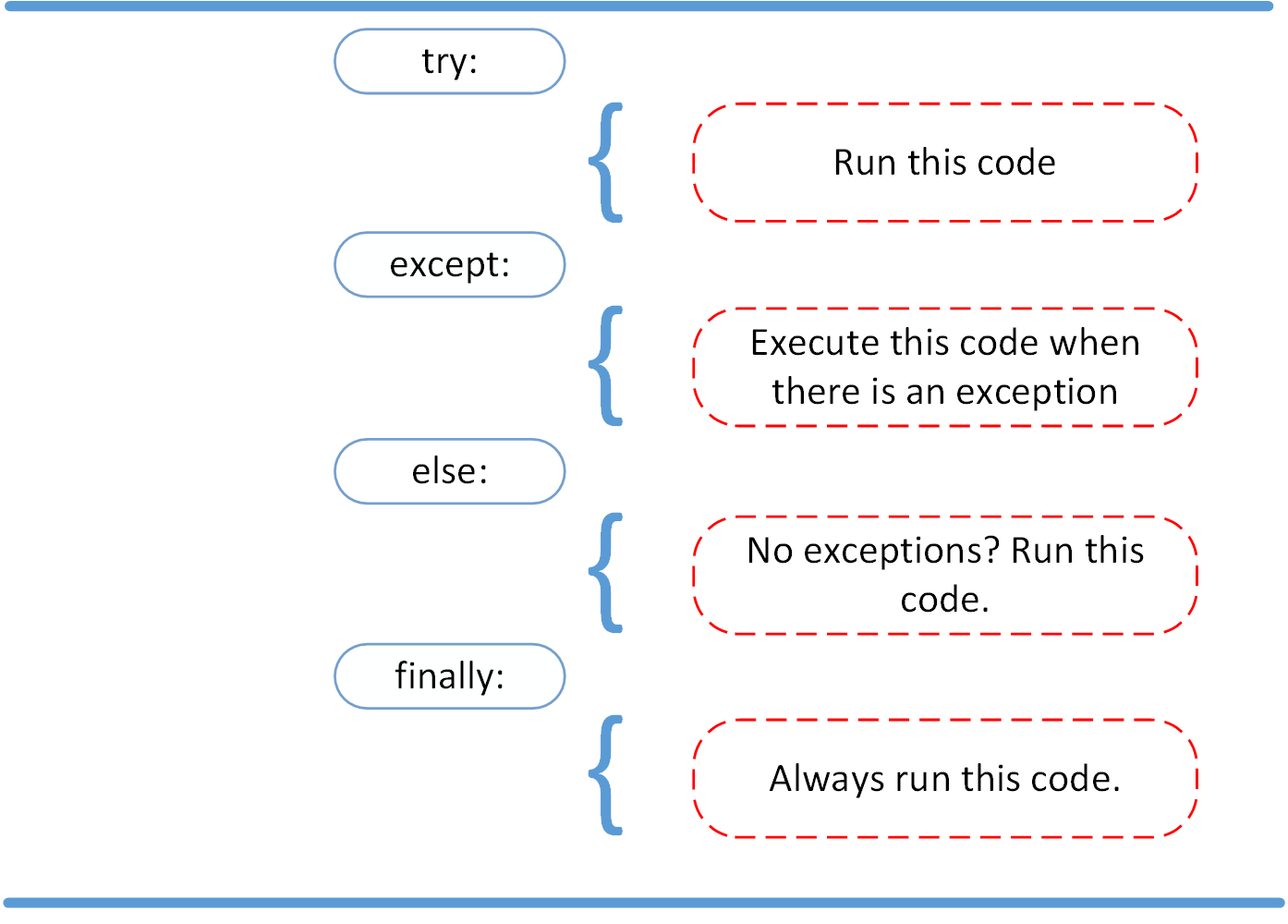
else: The code in theelseblock runs only if no exceptions were raised in thetryblock. This is useful for separating your "success" logic from the code that might fail. It helps keep yourtryblock as small as possible.finally: The code in thefinallyblock runs no matter what. It executes whether an exception was raised, whether it was caught, or even if thetryorexceptblocks have areturnstatement. It's the perfect place for cleanup actions, like closing a file or releasing a network connection, ensuring these actions always happen.
The following video and article provide clear explanations of this full structure.
Python Exception Handling Tutorial for Beginners
This video from Dave Gray walks through clear examples of when the else and finally blocks are executed.
Watch the segment on the else and finally blocks. Try to predict the output of his code examples before he runs them.
To solidify your understanding, please read the following section from a DataCamp article. It provides concise examples and clarifies the purpose of each block.
Python Try-Except Tutorial: Best Practices and Real-World ...
This article provides a solid overview of the try-except anatomy and the role of else and finally.
First, read the introductory section Anatomy of a Try-Except Block for a quick review. Then, jump to the section Using else and finally Blocks for a more detailed explanation and a practical file-handling example.
Best Practices and the "Pythonic" Philosophy
In your Java experience, you may be accustomed to the "Look Before You Leap" (LBYL) style, where you check conditions before performing an action (e.g., if (file.exists()) { ... }).
Python often encourages a different philosophy: "Easier to Ask for Forgiveness than Permission" (EAFP). This style assumes an operation will succeed and wraps it in a try block, catching the exception if it fails. This is often more efficient and avoids race conditions (e.g., where a file exists when you check, but is deleted before you open it).
This article section covers EAFP and other essential best practices.
Python Try-Except Tutorial: Best Practices and Real-World ...
This section covers several professional habits for writing robust and readable error-handling code.
Read the entire section titled Python try-except Best Practices and Common Pitfalls. Pay special attention to the EAFP principle and the advice to keep try blocks "tight".
Raising Exceptions Manually
Sometimes, an error isn't a built-in one from Python but a violation of your application's logic. For example, a function might receive an argument that is the correct type but has an invalid value. In these cases, you can—and should—manually raise an exception.
def enroll_in_course(course_id, user_age):
    if user_age < 13:


        # This is not a Python error, but it's an error for our application's rules.
        raise ValueError("Users must be 13 or older to enroll.")

    print(f"Enrolling user in course {course_id}...")


    # ... further logic

try:
    enroll_in_course("PY101", 12)
except ValueError as e:
    print(f"Enrollment failed: {e}")


    # Output: Enrollment failed: Users must be 13 or older to enroll.
You can raise built-in exceptions like ValueError or TypeError, or even define your own custom exceptions for more descriptive error handling in large projects.
Python Tutorial: Using Try/Except Blocks for Error Handling
This final clip from Corey Schafer's video demonstrates how to use the raise keyword to trigger an exception based on your own custom logic.
Watch the short segment on manually raising exceptions.
Conclusion
In this lesson, we've covered the essential mechanisms for making your Python code robust and resilient. You now have the tools to anticipate and handle errors gracefully, which is a hallmark of a professional developer.
Key Takeaways:
- Exceptions are runtime errors that stop a program's normal flow.
- The
try...exceptblock is used to catch exceptions and prevent your program from crashing. - It's crucial to catch specific exceptions rather than using a bare
except:, as this avoids masking unexpected bugs. - The
elseblock runs if thetryblock succeeds, helping to separate success logic from error-prone code. - The
finallyblock runs no matter what and is ideal for cleanup tasks like closing files or database connections. - Python's philosophy often favors EAFP (Easier to Ask Forgiveness than Permission) over LBYL (Look Before You Leap).
- You can use the
raisekeyword to trigger exceptions based on your application's own rules.
Now that we know how to handle errors when processing data, we are ready to work with one of the most common data formats on the web. In our next lesson, we will dive into reading, writing, and manipulating JSON data in Python. This will be a direct step toward interacting with the Anthropic API for our project.