Welcome back! In the last lesson, we successfully translated our Entity-Relationship Diagram into a full set of Django models, creating the structural backbone of our retail analytics application. You now have a working database schema ready to hold data.
This lesson addresses the next critical question: will it be fast? As an application like Infilect's scales to millions of data points—sales, images, and products—naive data retrieval becomes a major performance bottleneck. This is where database indexing comes in. It's a fundamental technique for ensuring your application remains responsive as data grows, directly supporting the job description's requirement for building "scalable backend/cloud applications" and having "experience in system and product development at scale."
By the end of this 60-minute lesson, you will be able to:
- Explain what a database index is and why it's essential for performance.
- Differentiate between a slow sequential scan and a fast index scan.
- Create single-column indexes on your Django models for simple lookups.
- Implement multi-column (composite) indexes to optimize complex queries.
- Apply these indexing strategies to our retail analytics project.
1. What is a Database Index? The "Why" Before the "How"
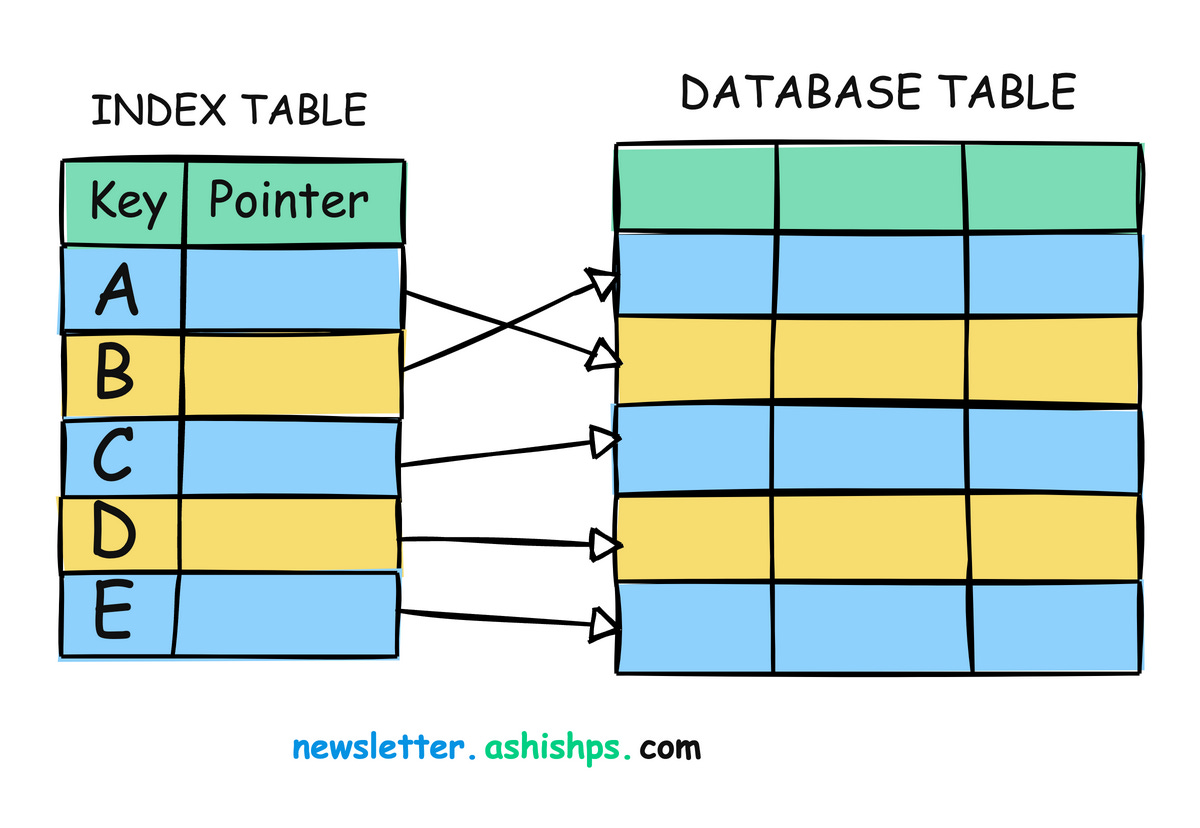
Imagine trying to find a specific topic in a 500-page book without an index. You'd have to read it page by page from the beginning—a slow, tedious process. Now imagine the book has an index at the back. You can look up the topic, find the exact page number, and jump directly to it.
A database index serves the exact same purpose. Without an index, when you query a large table (e.g., "find all sales from last Tuesday"), the database has to perform a sequential scan (or "full table scan"), examining every single row to find matches. With an index on the sale date column, it can use a much faster data structure (typically a B-Tree) to locate the relevant rows almost instantly.
This video from BugBytes provides an excellent introduction to this core concept.
Django & Database INDEXES - Performance Optimisations for Django apps
This video clearly explains the concept of a database index, using the book analogy and contrasting a slow sequential scan with a fast index scan.
Watch the initial segment that explains what an index is and why it's used to avoid sequential scans.
While indexes dramatically speed up data retrieval (SELECT queries), they come with a small cost:
- Storage: Indexes take up extra disk space.
- Write Speed:
INSERT,UPDATE, andDELETEoperations become slightly slower because the database must update both the table and its associated indexes.
The trade-off is almost always worth it for tables that will be read from frequently.
2. Adding Indexes in Django
Django provides a clean, ORM-level way to define indexes directly in your models.py file. First, it's important to know what Django indexes for you automatically.
Django & Database INDEXES - Performance Optimisations for Django apps
The BugBytes video continues by explaining the indexes Django creates by default.
Watch the section on automatic indexing in Django. The key takeaways are that Django automatically creates indexes on primary keys and foreign keys. This is why filtering by a ForeignKey is generally fast.
For fields that are not automatically indexed, like a CharField or DateTimeField, you need to add indexes explicitly. There are two main ways to do this.
This article from TestDriven.io provides a concise overview of how to create indexes in Django.
Please read the section titled Indexing in Django. Pay close attention to the two methods mentioned: using db_index=True on a field and using the indexes list within the model's Meta class.
As you just read, the two primary methods are:
db_index=True: A simple option added directly to a field definition. This is used for creating an index on a single column.class Product(models.Model): name = models.CharField(max_length=200, db_index=True) # ...Meta.indexes: A more powerful and flexible option inside the model's innerMetaclass. It's a list that holdsmodels.Indexobjects and is the required method for creating more advanced indexes, such as those spanning multiple columns.from django.db import models class Product(models.Model): name = models.CharField(max_length=200) category = models.ForeignKey('Category', on_delete=models.PROTECT) class Meta: indexes = [ models.Index(fields=['name']), ]
Both examples above achieve the same result: a single-column index on the name field. The Meta.indexes approach is often preferred for readability and because it keeps all index definitions in one place.
3. The Power of a Composite Index
Now, let's consider a common query for our retail application: "Find all products in the 'Beverages' category that cost less than $2.00".
This query filters on two fields: category and standard_price. A common mistake is to add separate, single-column indexes on both fields, assuming the database will use both. This is often not the case.
Most Django Indexes Are Useless. Here’s How to Fix Them.
This blog post by Will Poulson provides a critical insight into a common pitfall with Django indexing. It's a must-read to understand why simply adding db_index=True everywhere is not enough.
Read the first three sections of the article: What Django gives you The problem with multiple single indexes The solution: Composite indexes The key takeaway is that PostgreSQL typically uses only one index per table scan for a query. If you filter on two fields, it will likely use the index it deems most effective and then manually check the remaining rows against the second filter condition, which can still be slow.
The solution is a composite index (or multi-column index), which is a single index defined across multiple columns. This allows the database to efficiently look up records where both conditions are met.
We create these using the Meta.indexes option we saw earlier.
class Product(models.Model):


    # ... fields ...
    category = models.ForeignKey('Category', on_delete=models.PROTECT)
    standard_price = models.DecimalField(max_digits=10, decimal_places=2)

    class Meta:
        indexes = [
            models.Index(fields=['category', 'standard_price']),
        ]
The order of fields in a composite index matters. A general rule of thumb is to place the field you are more likely to use for equality checks (e.g., category = 'Beverages') before fields used for range checks (e.g., standard_price < 2.00).
The BugBytes video brilliantly demonstrates the performance difference between having no index, a single index, and a composite index.
Django & Database INDEXES - Performance Optimisations for Django apps
This is the core demonstration of the lesson. You'll see a query go from seconds to milliseconds.
Watch the following segments carefully: A Slow Query in Action: See how slow a query on a created_at field is without an index. The presenter uses a tool called Django Silk to measure the query time, which is multiple seconds. Adding a Single Index: The presenter adds a single-column index using Meta.indexes and runs the migration. The Performance Payoff: The same query is run again, and the response time drops to milliseconds. Adding a Composite Index: A new query filtering on two columns is introduced. It's slow again. The presenter modifies the index to be a composite one. The Final Speedup: With the composite index, the two-column query is now incredibly fast.
4. Hands-On Task: Optimizing Our Models
It's time to apply these concepts to our retail application. Your task is to review the models we created in the previous lesson and add indexes based on likely query patterns. Remember, once you modify the models, you'll need to create and apply a new migration.
- Open your
retail/models.pyfile. - Add the following indexes. The comments explain the reasoning for each one.
- Run the migration commands in your terminal:
python manage.py makemigrations retailand thenpython manage.py migrate.
Here is the updated code for retail/models.py. The new additions are the Meta classes and their indexes lists.
# retail/models.py

from django.db import models
import uuid


# --- Core Entities ---

class Category(models.Model):
    """e.g., 'Beverages', 'Snacks', 'Dairy'"""
    name = models.CharField(max_length=100, unique=True)

    class Meta:
        verbose_name_plural = "Categories"

    def __str__(self):
        return self.name

class Store(models.Model):
    """A physical retail location."""
    name = models.CharField(max_length=100)
    location = models.CharField(max_length=255)

    def __str__(self):
        return self.name

class Product(models.Model):
    """A specific product that the company sells."""
    name = models.CharField(max_length=200, db_index=True) # Add single index for searching by name
    description = models.TextField(blank=True, null=True)
    standard_price = models.DecimalField(max_digits=10, decimal_places=2)
    category = models.ForeignKey(Category, related_name='products', on_delete=models.PROTECT)

    shelf_images = models.ManyToManyField('ShelfImage', through='ImageAnnotation', related_name='products')
    sales = models.ManyToManyField('Sale', through='SaleItem', related_name='products')

    class Meta:


        # For querying products by category and price, e.g., "all snacks under $5"
        indexes = [
            models.Index(fields=['category', 'standard_price']),
        ]

    def __str__(self):
        return self.name

class Sale(models.Model):
    """A single sales transaction at a store."""
    id = models.UUIDField(primary_key=True, default=uuid.uuid4, editable=False)
    store = models.ForeignKey(Store, related_name='sales', on_delete=models.CASCADE)
    sale_timestamp = models.DateTimeField(auto_now_add=True)

    class Meta:


        # For querying sales by store within a date range, a very common analytics query.
        # We put 'store' first as it's an equality check.
        indexes = [
            models.Index(fields=['store', 'sale_timestamp']),
        ]

    def __str__(self):
        return f"Sale {self.id} at {self.store.name}"

class ShelfImage(models.Model):
    """An image of a shelf taken at a specific store."""
    id = models.UUIDField(primary_key=True, default=uuid.uuid4, editable=False)
    store = models.ForeignKey(Store, related_name='shelf_images', on_delete=models.CASCADE)
    image_url = models.URLField()
    capture_timestamp = models.DateTimeField()

    class Meta:


        # For finding images from a store within a specific capture time window.
        indexes = [
            models.Index(fields=['store', 'capture_timestamp']),
        ]

    def __str__(self):
        return f"Image {self.id} from {self.store.name}"


# --- Junction Models ('through' models for M2M relationships) ---

class SaleItem(models.Model):
    """
    Junction table between Sale and Product.
    Stores details for one line item in a sale.
    """
    sale = models.ForeignKey(Sale, on_delete=models.CASCADE)
    product = models.ForeignKey(Product, on_delete=models.PROTECT)
    quantity = models.PositiveIntegerField(default=1)
    price_at_time_of_sale = models.DecimalField(max_digits=10, decimal_places=2)

    class Meta:


        # unique_together implicitly creates a database index on both fields.
        # This prevents a product from appearing more than once in the same sale
        # and makes lookups by (sale, product) very fast.
        unique_together = ('sale', 'product')

    def __str__(self):
        return f"{self.quantity}x {self.product.name} in Sale {self.sale.id}"

class ImageAnnotation(models.Model):
    """
    Junction table between ShelfImage and Product.
    Stores the location of a detected product in an image.
    """
    image = models.ForeignKey(ShelfImage, on_delete=models.CASCADE)
    product = models.ForeignKey(Product, on_delete=models.CASCADE)
    bounding_box = models.JSONField(help_text="Coordinates of the product in the image...")

    class Meta:


        # Similar to SaleItem, this ensures a product is annotated only once per image
        # and creates an efficient composite index on (image, product).
        unique_together = ('image', 'product')

    def __str__(self):
        return f"{self.product.name} found in Image {self.image.id}"
After adding this code and running the migrations, your database schema is now not only well-structured but also optimized for common query patterns.
Conclusion
In this lesson, you've moved from simply defining data structures to actively optimizing them for performance. This is a crucial skill that separates junior developers from senior engineers who build systems that can withstand real-world load.
Key Takeaways:
- Indexes are essential for read performance. They prevent slow, full-table scans on large datasets.
- Django provides two main tools:
db_index=Truefor simple, single-column indexes, and theMeta.indexeslist for more powerful control, including composite indexes. - Analyze your queries. Add indexes that match how your application will filter and sort data.
- Use composite indexes for queries that frequently filter on multiple columns together. The database will likely only use one index, so make it a composite one that covers all filter conditions.
- Remember the trade-offs. Indexes consume space and slightly slow down writes. Don't index everything; be strategic.
In our next lesson, we will leverage this optimized schema to perform powerful analytical queries. You'll learn how to use Django ORM aggregations and annotations to calculate statistics, such as total sales per product or average price per category, directly in the database. This is where we start building the core business intelligence features of our application.