Welcome back! In our last lesson, you optimized our database schema by adding indexes, ensuring that we can retrieve data quickly. That was about making our database fast. Today, we'll focus on making it smart. We'll learn how to perform calculations and summaries directly within the database using Django's Object-Relational Mapper (ORM).
This lesson is all about aggregations and annotations, the ORM's powerhouse tools for data analysis. Mastering these is fundamental to building the kind of analytical features required by a company like Infilect, such as creating APIs to report Key Performance Indicators (KPIs) for products and stores. You'll move from fetching simple lists of data to generating rich, calculated insights efficiently.
By the end of this 60-minute lesson, you will be able to:
- Distinguish between
aggregate()for summarizing a whole dataset andannotate()for adding calculated fields to each item. - Use common aggregation functions like
Count,Sum,Avg,Min, andMax. - Write
GROUP BYqueries using thevalues()andannotate()pattern. - Filter querysets based on their aggregated or annotated values.
- Implement conditional logic in your queries to categorize and segment data.
1. The Two Modes of Calculation: aggregate() vs. annotate()
When performing calculations with the Django ORM, you'll primarily use two methods that serve different purposes: aggregate() and annotate(). Understanding their distinction is the first crucial step.
-
aggregate(): Use this when you want a single, summary value for an entireQuerySet. Think of it as collapsing the whole dataset into one result. It is a terminal operation, meaning it returns a dictionary of results, not aQuerySet. -
annotate(): Use this when you want to add a new, calculated field to each object in aQuerySet. It returns a new, enhancedQuerySetthat you can continue to filter, order, or modify.
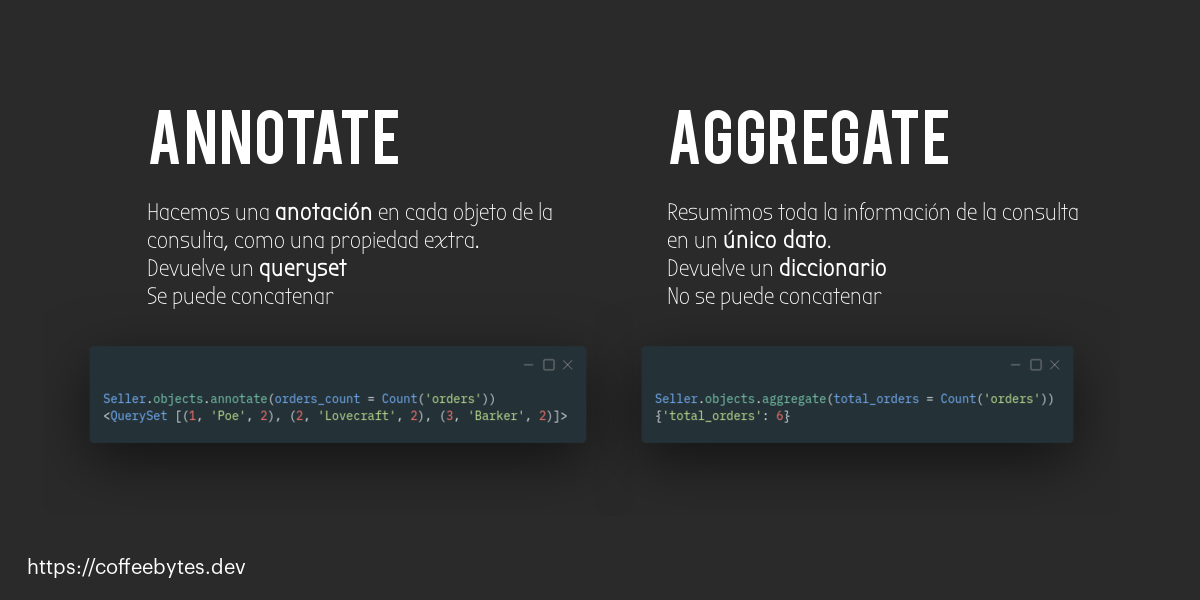
The image below provides a great visual summary. annotate() returns a QuerySet with extra properties, while aggregate() returns a final, single dictionary.
Let's watch a short segment from a BugBytes video that explains and demonstrates these concepts.
Django Aggregation & Annotation / values() and values_list() functions
This video introduces the core ideas of aggregation and annotation and then provides clear examples of using the aggregate() function.
First, watch the introduction to understand the conceptual difference between the two methods: Aggregation vs. Annotation. Next, see aggregate() in action. Pay attention to how it returns a dictionary and can perform multiple calculations at once: Using aggregate().
To summarize with our project's models:
- To find the average price of all products in your database, you would use
aggregate():from django.db.models import Avg Product.objects.aggregate(average_price=Avg('standard_price')) # Result: {'average_price': 54.23} - To find out how many sales each product has, you would use
annotate():from django.db.models import Count Product.objects.annotate(sales_count=Count('sales')) # Result: A QuerySet of Product objects, where each object has a .sales_count attribute.
2. Grouping Data: The GROUP BY Pattern
The real power of annotate() is unlocked when you combine it with the values() method. This combination is Django's equivalent of SQL's GROUP BY clause, allowing you to perform calculations on groups of data.
The pattern is: queryset.values('grouping_field').annotate(calculation).
The order is critical: values() must come before annotate(). By calling values(), you tell Django to group the rows by the unique values of the fields you specify. Then, annotate() performs its calculation on each of these groups.
This article by Haki Benita provides an excellent, SQL-first explanation of this pattern.
Understand Group by in Django with SQL | Haki Benita
This article is fantastic because it shows the Django ORM code right next to the SQL it generates, making the connection explicit.
First, read the section How to Group By to see the core values().annotate() pattern. Then, jump to the section How to Group by Multiple Fields to see how to group by more than one field at a time.
Let's apply this to our retail project. Suppose we want to calculate the total number of products in each category.
from django.db.models import Count


# Group by the category's name and count the products in each group.
category_counts = Category.objects.annotate(
    product_count=Count('products')
).values('name', 'product_count')

for item in category_counts:
    print(f"Category: {item['name']}, Products: {item['product_count']}")


# Expected Output:
# Category: Beverages, Products: 15
# Category: Snacks, Products: 22
Notice a slight variation here: annotate() is called before values(). This also works.
values('...').annotate(...): Groups first, then calculates. The result contains only the fields fromvalues()plus the annotation.annotate(...).values('...'): Calculates on each object first, then selects the fields to output. This can be less efficient if you don't need the other model fields.
The values().annotate() pattern is generally clearer for GROUP BY operations.
The BugBytes video also explains this crucial concept very clearly.
Django Aggregation & Annotation / values() and values_list() functions
This segment of the video explains why calling values() before annotate() is the key to creating grouped aggregations.
Watch from the explanation of how values() changes the behavior of annotate() to perform grouping. The presenter shows the generated SQL, making it very clear what's happening.
3. Advanced Filtering and Conditional Logic
Now that you can group and calculate data, the next step is to add more complex business logic.
Filtering on Annotated Fields (SQL's HAVING)
What if you want to find categories that have more than 10 products? You can't use a simple filter() because product_count isn't a real database field. However, you can filter on the result of an annotation. This is Django's equivalent of SQL's HAVING clause.
The pattern is to annotate() first, and then filter() on the new annotated field.
# First, annotate every category with its product count.
# Then, filter out the ones that don't meet our criteria.
popular_categories = Category.objects.annotate(
    product_count=Count('products')
).filter(product_count__gt=10)
The Haki Benita article and the BugBytes video both cover this.
Understand Group by in Django with SQL | Haki Benita
This section shows how filtering on an annotated field adds a HAVING clause to the SQL.
Read the short section titled How to Use Having.
Django Aggregation & Annotation / values() and values_list() functions
This part of the video demonstrates ordering and filtering on an annotated field.
Watch the segment from Filtering and Ordering to see this in practice.
Conditional Expressions (CASE WHEN)
This is where your queries can become truly powerful. Django allows you to embed if/elif/else logic directly into a query using Case and When objects. This lets you create complex labels or categories for your data on the fly.
For example, let's categorize products based on their price:
> $100: 'Premium'$20 - $100: 'Mid-Range'< $20: 'Economy'
from django.db.models import Case, When, Value, CharField

Product.objects.annotate(
    price_tier=Case(
        When(standard_price__gt=100, then=Value('Premium')),
        When(standard_price__gte=20, then=Value('Mid-Range')),
        default=Value('Economy'),
        output_field=CharField(),
    )
)
The BugBytes video on Conditional Expressions provides an excellent tutorial on this.
Django Conditional Expressions / Case() and When() objects
This video walks through Case and When, starting simply and building up to complex, multi-bucket categorizations.
First, watch the introduction to understand the concept. Next, see a simple boolean annotation. Finally, watch how to create multiple buckets or categories using several When() objects.
Another powerful technique is Conditional Aggregation, where you count items only if they meet a certain condition. This uses the filter argument inside an aggregate function.
from django.db.models import Count, Q


# For each product, count its total sales and also the sales made with a high quantity.
Product.objects.annotate(
    total_sales=Count('saleitem'),
    high_quantity_sales=Count('saleitem', filter=Q(saleitem__quantity__gt=5))
)
4. Hands-On Task: Building an Analytics Report
It's time to apply these concepts. You'll create a management command that prints a simple analytics report for our retail application.
-
Create a new management command file:
retail/management/commands/generate_report.py -
Add the following code. This command will calculate and print three different metrics. Your task is to study the queries and understand how they use the concepts from this lesson.
# retail/management/commands/generate_report.py from django.core.management.base import BaseCommand from django.db.models import Count, Sum, Avg, F from retail.models import Category, Store, Product class Command(BaseCommand): help = 'Generates a simple analytics report for the retail application.' def handle(self, *args, **kwargs): self.stdout.write(self.style.SUCCESS('--- Analytics Report ---')) # Metric 1: Number of products per category self.stdout.write(self.style.HTTP_INFO('\n[Metric 1: Products per Category]')) products_per_category = Category.objects.annotate( num_products=Count('products') ).values('name', 'num_products').order_by('-num_products') if not products_per_category: self.stdout.write('No categories found.') for item in products_per_category: self.stdout.write(f"- {item['name']}: {item['num_products']} products") # Metric 2: Total revenue per store # We use F() expressions to multiply quantity by price at the database level self.stdout.write(self.style.HTTP_INFO('\n[Metric 2: Total Revenue per Store]')) revenue_per_store = Store.objects.annotate( total_revenue=Sum( F('sales__saleitem__quantity') * F('sales__saleitem__price_at_time_of_sale') ) ).values('name', 'total_revenue').order_by('-total_revenue') if not revenue_per_store: self.stdout.write('No store sales data found.') for item in revenue_per_store: revenue = item['total_revenue'] or 0 # Handle cases with no sales self.stdout.write(f"- {item['name']}: ${revenue:.2f}") # Metric 3: Average product price per category self.stdout.write(self.style.HTTP_INFO('\n[Metric 3: Average Product Price per Category]')) avg_price_per_category = Category.objects.annotate( avg_price=Avg('products__standard_price') ).values('name', 'avg_price').order_by('-avg_price') if not avg_price_per_category: self.stdout.write('No product data found.') for item in avg_price_per_category: avg_price = item['avg_price'] or 0 self.stdout.write(f"- {item['name']}: ${avg_price:.2f} (avg)") self.stdout.write(self.style.SUCCESS('\n--- Report End ---')) -
Run the command:
You'll need some data in your database for this to be meaningful. If you haven't already, use the Django admin to create a fewCategory,Store,Product,Sale, andSaleIteminstances. Then run:python manage.py generate_report -
Review the output and the code. Make sure you understand how each query works and what it calculates. The second metric is a bit more complex, using
F()expressions to perform row-level calculations before summing them up—a very powerful ORM feature!
Conclusion
You've just learned one of the most powerful features of the Django ORM. By pushing calculations into the database, you write code that is not only more readable but also significantly more performant than fetching all the data into Python and then processing it.
Key Takeaways:
aggregate()returns a single dictionary of summary values for a wholeQuerySet.annotate()adds new calculated fields to each object in aQuerySet.- The
values('group_by_field').annotate(...)pattern is the key to performingGROUP BYqueries in Django. - You can filter and order by your new annotated fields just like regular model fields.
CaseandWhenexpressions allow you to embedif-elselogic directly into your database queries for powerful, on-the-fly categorization.
In our next lesson, we will address a common performance pitfall. While these queries are powerful, they can become inefficient if they involve fetching many related objects. We will learn how to use select_related and prefetch_related to eagerly load data and eliminate the dreaded "N+1 query problem."