Welcome to Module 6! In the previous module, we built a complete, documented, and secure REST API. You've mastered how to handle requests and responses, but now we're going to dive deeper into what sits behind the API: the database. For a company like Infilect, which deals with vast amounts of retail and analytics data, a well-designed database is not just a technical detail—it's the bedrock of the entire system.
This lesson introduces the fundamental principles of relational database design. We'll explore how to structure data logically to prevent errors, reduce redundancy, and ensure the long-term health and scalability of your application. Understanding these core concepts is essential before you start writing Django models for complex systems.
By the end of this lesson, you will be able to:
- Define different types of database keys (Primary, Foreign, Candidate, Surrogate) and explain their roles.
- Describe the three main types of table relationships: one-to-one, one-to-many, and many-to-many.
- Explain the purpose of database normalization.
- Walk through the process of transforming a messy, unnormalized table into a clean structure that meets the first three normal forms (1NF, 2NF, and 3NF).
1. The Problem with Unstructured Data
Imagine trying to manage all of your business data in a single, massive spreadsheet. At first, it might seem simple. But as your data grows, problems quickly emerge. You find yourself typing the same customer's address over and over, and if they move, you have to find and update every single entry—a recipe for disaster. This is the problem of data redundancy and data integrity.
A relational database solves this by organizing data into separate, specialized tables. Let's start by watching a short video that provides a great intuition for this problem and its solution.
In this video, educator Eddie Woo uses a simple business scenario to demonstrate why a single "flat file" approach is problematic and how splitting data into multiple tables elegantly solves these issues.
Watch from the beginning up to , where he explains the issues of data redundancy and inconsistency that arise from having a single table for orders. Then, continue watching from as he introduces the solution: splitting the data into two tables, Orders and Customers, and introducing a customer_id.
As the video shows, the solution involves two key ideas:
- Separating concerns: Customer information is stored in a
Customerstable, while order information is stored in anOrderstable. - Creating a link: A unique identifier, the
customer_id, is used to connect an order to the customer who placed it.
This unique identifier is a type of key, which is the fundamental building block of a relational database.
2. Database Keys: The Pillars of Structure
Keys are special columns that help enforce uniqueness and create links between tables. There are several types, and understanding them is crucial for good database design.
The following video provides a comprehensive overview of the most important types of keys you'll encounter.
Database Keys Made Easy - Primary, Foreign, Candidate, Surrogate, & Many More
This video from Decomplexify clearly explains the terminology around database keys, using practical examples to distinguish between concepts like primary, candidate, foreign, natural, and surrogate keys.
Please watch the following segments: Primary and Candidate Keys: This section explains how we choose a column (or columns) to uniquely identify each row. Alternate Keys: This covers how we enforce uniqueness on other candidate keys that weren't chosen as the primary key. Foreign Keys: This is the most important part for relating tables. It shows how a foreign key creates a link and ensures data integrity. Surrogate vs. Natural Keys: This discusses a key design choice: using a "real-world" identifier versus an arbitrary, system-generated one.
Let's summarize the most critical concepts from the video:
- Primary Key (PK): A column (or set of columns) that uniquely identifies every row in a table. It cannot contain NULL values. In Django, the
idfield that is automatically added to your models is a primary key. - Candidate Key: Any column that could have been the primary key because it is also unique. For example, in a
Userstable, bothuser_idandemailcould be candidate keys. You choose one to be the primary key. - Foreign Key (FK): A column in one table that refers to the primary key of another table. This is what creates the "relation" in a relational database. In the video example,
customer_idin theOrderstable is a foreign key that points to theCustomerstable. - Natural Key vs. Surrogate Key:
- A natural key is an identifier that already has meaning in the real world (e.g., a vehicle's VIN, a book's ISBN, a user's email address).
- A surrogate key is an artificial identifier with no real-world meaning, created purely for the database (e.g., an auto-incrementing integer like Django's default
id). Surrogate keys are often preferred because they are stable and not tied to business rules that might change.

3. Database Relationships
With primary and foreign keys, we can establish relationships between tables. There are three fundamental types.
The Beginner's Guide to Database Relationships
This article from Luzmo provides clear definitions and simple examples for the three main types of database relationships.
Please read the section titled The different types of relationships. Focus on understanding the definition and example for one-to-one, one-to-many, and many-to-many.
Here is a summary of the three relationship types:
- One-to-One (1:1): Each record in Table A is linked to exactly one record in Table B. This is less common but can be useful for splitting a very wide table or for security. For example, you might have a
Usermodel and a separateUserProfilemodel containing optional, detailed information. Each user has one profile. - One-to-Many (1:N): One record in Table A can be linked to many records in Table B, but each record in Table B is linked to only one in Table A. This is the most common relationship. The
CustomerandOrdersexample from Eddie Woo's video is a perfect illustration: one customer can have many orders. - Many-to-Many (M:N): A record in Table A can be linked to many records in Table B, and a record in Table B can be linked to many in Table A. This requires a third table, known as a junction or link table, to connect them. A classic example is
StudentsandCourses: a student can enroll in many courses, and a course can have many students. The junction table would beEnrollments, with foreign keys to bothStudentsandCourses.
4. Normalization: The Path to a Clean Database
Normalization is the formal process of organizing your tables to minimize redundancy and dependency. It's a step-by-step procedure involving different "normal forms." For most practical purposes, reaching the Third Normal Form (3NF) is the goal for transactional databases.
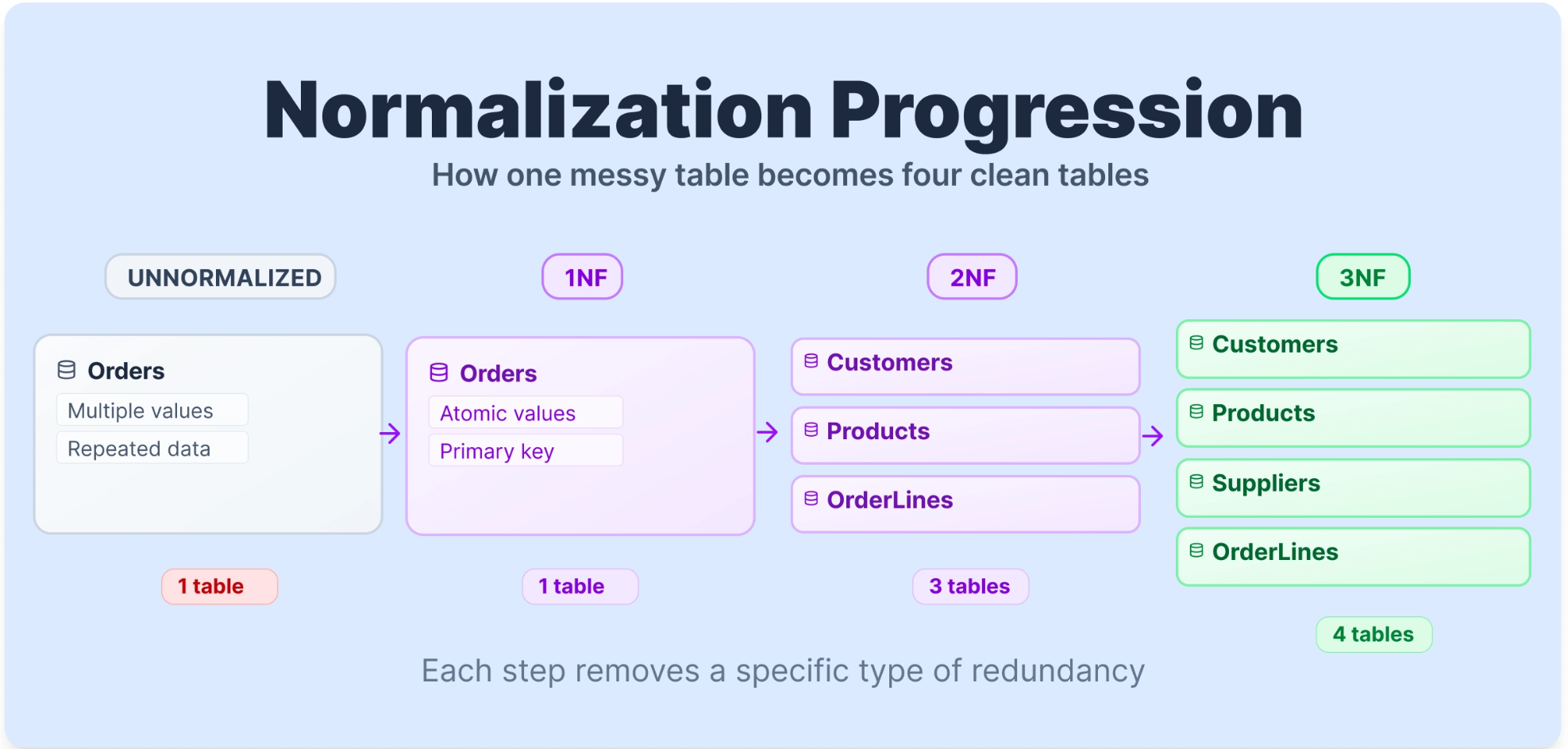
The following guide provides a fantastic, practical walkthrough of this process. We will follow its example to understand 1NF, 2NF, and 3NF.
SQL Normalization: A Beginner's Guide to 1NF, 2NF, 3NF, ...
This Dataquest article is our main guide for this section. It starts with a messy, unnormalized Orders table and refines it step-by-step.
Please read through the article, paying close attention to the table transformations at each stage: Start by reading the introduction to understand the goal. Next, read the section on First Normal Form (1NF). Note how repeating groups (like multiple products in one cell) are eliminated by giving each item its own row. Then, read about Second Normal Form (2NF). Focus on the definition of a partial dependency and see how customer and product information is moved into separate Customers and Products tables. Finally, read the section on Third Normal Form (3NF). Understand the concept of a transitive dependency and why supplier information is extracted into its own Suppliers table.
Let's distill the rules for each normal form:
-
First Normal Form (1NF):
- Rule: The table must have a primary key, and each cell must hold a single, atomic value. There should be no "repeating groups" (like a comma-separated list of products in one field).
- Outcome: Data is organized into simple rows and columns, but there is still a lot of redundancy.
-
Second Normal Form (2NF):
- Rule: The table must be in 1NF, and all non-key attributes must depend on the entire primary key (no partial dependencies). This rule is only relevant for tables with a composite primary key (a key made of multiple columns).
- Outcome: Redundancy is reduced by splitting out data that only depends on part of the key. In the example,
CustomerNamedepends only onOrderID, not the product, so it's moved to a separate table.
-
Third Normal Form (3NF):
- Rule: The table must be in 2NF, and there should be no transitive dependencies. A transitive dependency is when a non-key attribute depends on another non-key attribute, rather than directly on the primary key.
- Outcome: The database is highly organized. In the example,
SupplierCountrydepends onSupplierName(another non-key column), not directly onProductID. Moving suppliers to their own table resolves this and achieves 3NF.
The guiding principle you can remember is that every non-key attribute in a table should provide a fact about the key, the whole key, and nothing but the key.
Conclusion
In this lesson, we've laid the theoretical groundwork for designing robust and scalable databases. You've learned that a well-structured database isn't just an arbitrary collection of tables, but a logical system built on precise rules.
Key Takeaways:
- Keys are the foundation: Primary Keys ensure every record is unique, while Foreign Keys build relationships between tables.
- The three main relationships are one-to-one, one-to-many, and many-to-many, each modeling a different kind of real-world connection.
- Normalization is a systematic process for eliminating data redundancy and improving data integrity by organizing data into tables that adhere to the normal forms.
- Reaching 3NF is the standard goal for most applications you'll build, ensuring that each piece of information is stored in exactly one place.
This theory is the "why" behind the database design. In our next lesson, we will take these principles and apply them directly. We will start designing the data model for our "Retail Inventory API" project, creating an Entity-Relationship Diagram (ERD) that will serve as the blueprint for our Django models.