Welcome back! In our last lesson, you successfully converted your blocking ML API into a responsive, asynchronous service using Celery. Your API now instantly queues the prediction job and returns a 202 Accepted response, which is a massive step forward. However, this raises some critical questions for any production-grade system: What happens if the prediction task takes too long, or worse, fails?
This lesson will teach you how to build a resilient system that can handle these exact scenarios. You will learn to implement timeout configurations to prevent tasks from running indefinitely and create graceful fallbacks for when model inference fails. These skills are fundamental to building the "scalable backend/cloud applications" required by companies like Infilect, ensuring your system remains stable and predictable even when downstream services misbehave.
The Need for Resilience
In a distributed system, failure is not an "if" but a "when". An ML model inference task could fail for many reasons:
- Transient errors: A temporary network issue connecting to a model server, or a database deadlock.
- Permanent errors: Invalid input data that the model cannot process.
- Performance issues: The task takes longer than acceptable, potentially due to a large input or a slow model.
Without proper handling, these issues can lead to cascading failures, where one failing component brings down the entire system. To prevent this, we use a combination of resilience patterns.
The video "Top 5 Microservices Resilience Patterns" provides a high-level overview of why these patterns are so important.
Top 5 Microservices Resilience Patterns
This video introduces the core concepts of resilience and the problems they solve.
Watch the first section on cascading failures to understand the problem we're solving. Then, jump to the explanations of the fallback pattern and the timeout pattern. These concepts are the foundation of this lesson.
Implementing Timeouts in Celery
A task that hangs forever can consume worker resources and block other tasks from running. The first line of defense is a timeout. Celery provides two main ways to enforce time limits on tasks:
- Hard Time Limit (
time_limit): This is the maximum time a task is allowed to run. If it exceeds this limit, the worker process executing the task is killed (SIGKILL). This is abrupt and doesn't allow for cleanup. - Soft Time Limit (
soft_time_limit): This is a more graceful approach. When the time limit is reached, aSoftTimeLimitExceededexception is raised within the task. This allows you to catch the exception and perform cleanup actions, like logging the failure or saving the task's state.
For implementing graceful fallbacks, the soft time limit is almost always the better choice.
You can learn more about these options in the article "A Deep Dive into Celery Task Resilience".
Celery Task Resilience: Advanced Strategies for Reliable ...
This article provides excellent best practices for building robust Celery tasks. We'll focus on the section discussing time limits.
Read the part titled time-bound your tasks. It introduces the time_limit and soft_time_limit options and links to the official documentation.
Handling Failures: Retries and Fallbacks
When a task fails, our response depends on the type of failure.
-
For transient failures, the best strategy is often to simply retry the task. Celery's
autoretry_forparameter makes this incredibly easy. You can specify which exceptions should trigger an automatic retry, how many times to retry, and the delay between retries (using exponential backoff to avoid overwhelming a struggling service). -
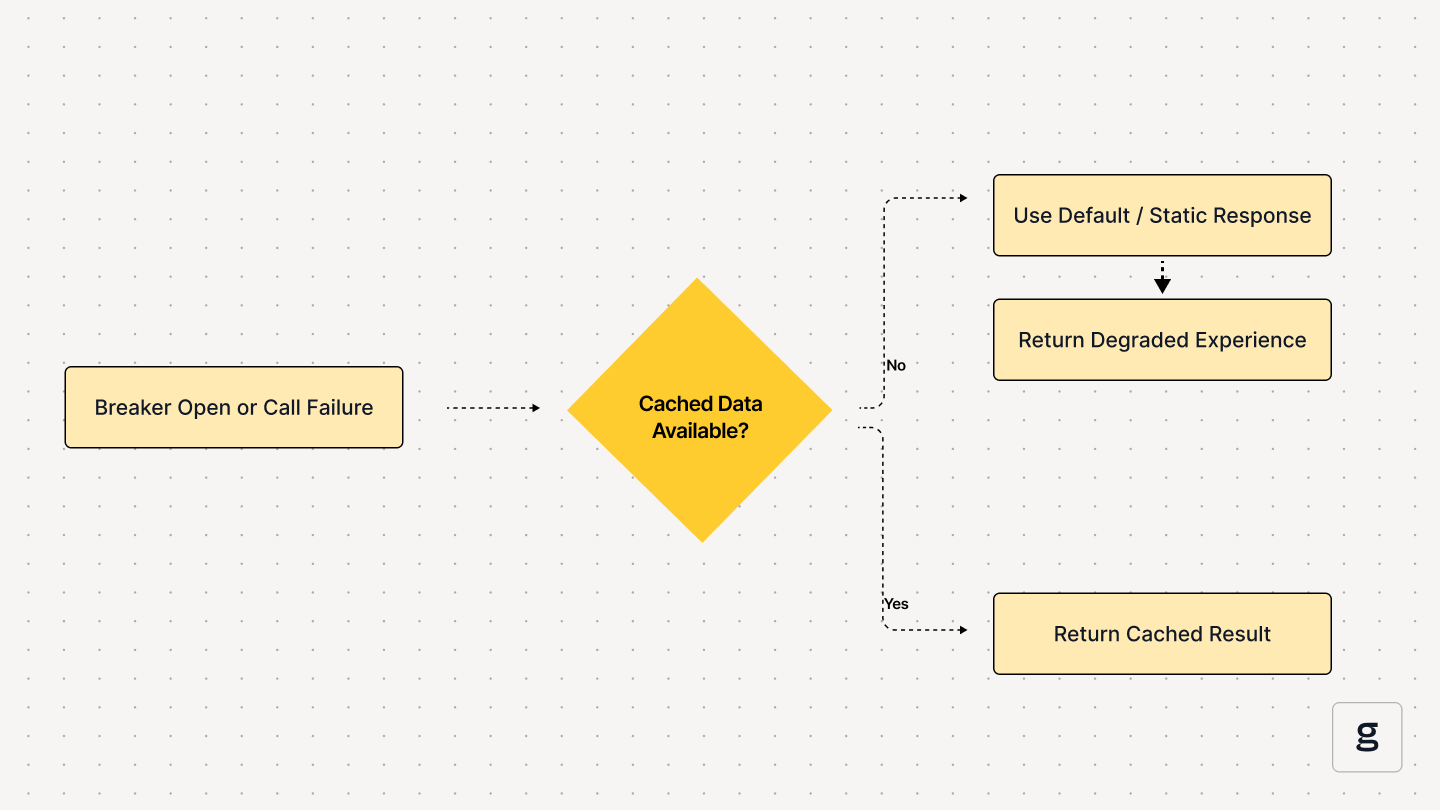
For permanent failures or when all retries are exhausted, we need a fallback. This means providing an alternative, "degraded" experience instead of a hard error.
The flowchart below shows a typical fallback mechanism. If the primary operation fails (our model inference), the system checks for an alternative (like cached data) or returns a default response. This ensures the user-facing application remains functional.
Hands-On Task: Making Your Prediction API Resilient
In this task, you will refactor your prediction API to be fully resilient. This involves three major steps:
- Creating an endpoint to check the result of a task.
- Adding a timeout to your prediction task.
- Configuring automatic retries for transient failures and ensuring a fallback for permanent ones.
Step 1: Create a Result-Checking Endpoint
First, the client needs a way to get the prediction result. You'll modify your API to return a task_id and create a new endpoint to poll for the result.
-
Modify the
DiabetesPredictionAPIView:
Update your view to store theAsyncResultobject returned by.delay()and include itsidin the response.# predictions/views.py from rest_framework.views import APIView from rest_framework.response import Response from .tasks import run_diabetes_prediction class DiabetesPredictionAPIView(APIView): def post(self, request): data = request.data features = [ data.get('preg'), data.get('plas'), data.get('pres'), data.get('skin'), data.get('test'), data.get('mass'), data.get('pedi'), data.get('age') ] # .delay() returns an AsyncResult object which has the task_id task = run_diabetes_prediction.delay(features) response_dict = { "message": "Prediction task has been queued.", "task_id": task.id # Return the task ID to the client } return Response(response_dict, status=202) -
Create the
PredictionResultView:
Add a new view that takes atask_idand returns the status and result.# predictions/views.py # ... other imports from celery.result import AsyncResult class PredictionResultView(APIView): def get(self, request, task_id): result = AsyncResult(task_id) if result.ready(): if result.successful(): response_dict = { "status": "SUCCESS", "result": result.get() } return Response(response_dict, status=200) else: # The task failed # This is our fallback! response_dict = { "status": "FAILURE", "message": "Prediction task failed. Please try again later.", "error": str(result.info) # result.info contains the exception } return Response(response_dict, status=500) else: # Task is not ready yet response_dict = { "status": "PENDING", "message": "Prediction task is still processing." } return Response(response_dict, status=202) -
Update
urls.py:
Add a URL pattern for the new result view.# your_project/urls.py (or your app's urls.py) from django.urls import path from predictions.views import DiabetesPredictionAPIView, PredictionResultView urlpatterns = [ path('api/predict/diabetes/', DiabetesPredictionAPIView.as_view(), name='diabetes_prediction'), path('api/predict/result/<str:task_id>/', PredictionResultView.as_view(), name='prediction_result'), ]
Step 2: Implement Timeouts and Retries
Now, let's make the task itself more robust. We'll add a soft time limit and configure automatic retries for a simulated transient error.
The article "Error Handling and Retry Policies in Celery Tasks" is an excellent guide for this.
Error Handling and Retry Policies in Celery Tasks - Reintech
This article dives deep into Celery's error handling capabilities. We will use it to implement both retries and selective error handling.
First, read the section on basic retries to understand the core mechanism, even though we will use a more modern syntax. Then, focus on the section on autoretry_for, which shows a cleaner way to achieve the same result. This is the pattern we will implement.
Let's modify the run_diabetes_prediction task in predictions/tasks.py.
# predictions/tasks.py
import time
from celery import shared_task
from celery.exceptions import SoftTimeLimitExceeded
from .apps import PredictionsConfig


# A custom exception to simulate a transient error
class TransientInferenceError(Exception):
    pass

@shared_task(
    bind=True,  # Makes 'self' available in the task
    autoretry_for=(TransientInferenceError,),  # Retry on this exception
    max_retries=3,
    retry_backoff=True,  # Exponential backoff
    soft_time_limit=30  # Soft time limit of 30 seconds
)
def run_diabetes_prediction(self, features):
    """
    Runs the diabetes prediction model as a background Celery task
    with timeout and retry logic.
    """
    try:
        print(f"Task started. Attempt: {self.request.retries + 1}")


        # Simulate a transient error for the first 2 attempts
        if self.request.retries < 2:
            print("Simulating a transient failure...")
            time.sleep(2) # Simulate some work before failing
            raise TransientInferenceError("Model service temporarily unavailable.")


        # Simulate a long-running task to test timeouts
        # To test, uncomment the line below and make a new request
        # time.sleep(35)

        model = PredictionsConfig.model
        prediction_result = model.predict([features])
        prediction = prediction_result[0]

        result_text = "Diabetic" if prediction == 1 else "Not Diabetic"

        print(f"Prediction Task Complete: The result is '{result_text}'")
        return result_text

    except SoftTimeLimitExceeded:
        print("Task exceeded soft time limit.")


        # When this is raised, Celery will mark the task as failed.
        # Our result view will then return the 'FAILURE' fallback response.
        raise  # Re-raise the exception to ensure the task is marked as failed
    except Exception as e:
        print(f"An unexpected error occurred: {e}")


        # Let Celery handle retries for TransientInferenceError,
        # and fail on any other unexpected exception.
        raise
Step 3: Test the Resilient Flow
Now, test all the scenarios. Make sure your Django server and Celery worker are running.
-
Test the Success Path:
- Make a
POSTrequest to/api/predict/diabetes/. You'll get back atask_id. - Make a
GETrequest to/api/predict/result/<task_id>/. - Observe the worker logs. You will see it fail twice with
TransientInferenceErrorand then retry. On the third attempt, it should succeed. - Poll the result endpoint again. You should now get a
SUCCESSstatus with the prediction.
- Make a
-
Test the Timeout Path:
- Uncomment the
time.sleep(35)line in your task. - Restart your Celery worker to pick up the code change.
- Make a new
POSTrequest to get a newtask_id. - After about 30 seconds, you will see the "Task exceeded soft time limit" message in your worker logs.
- Poll the result endpoint. You should get the
FAILUREfallback response.
- Uncomment the
You have now built a robust, asynchronous system that can handle timeouts and transient failures, providing a graceful fallback when things go wrong.
Advanced Concept: The Circuit Breaker
For services that might be down for an extended period, even retrying with backoff can be wasteful. The Circuit Breaker pattern solves this. After a certain number of consecutive failures, the circuit "opens," and subsequent calls fail immediately without even trying to contact the failing service. After a timeout, the circuit moves to a "half-open" state, allowing one test request through. If it succeeds, the circuit "closes" and normal operation resumes.
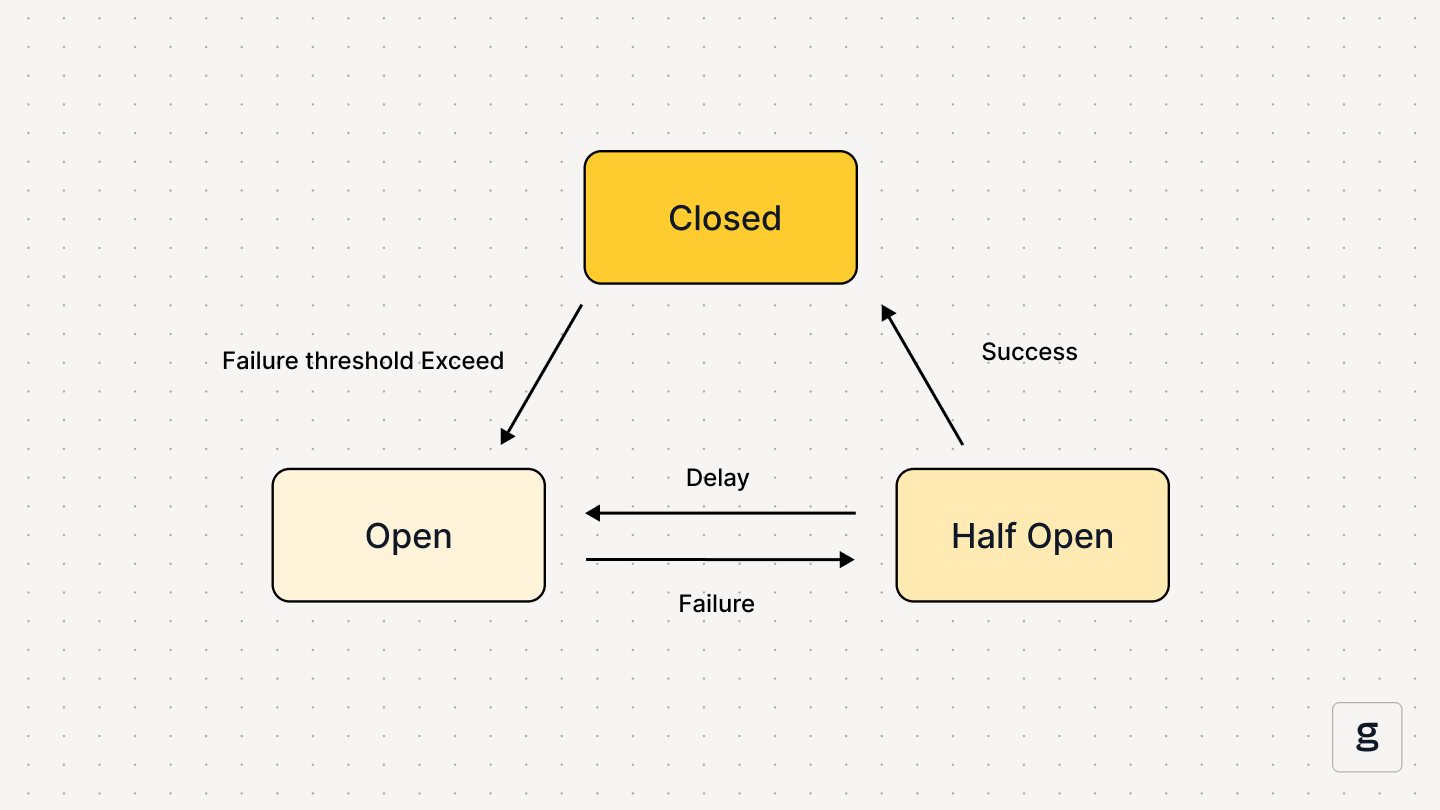
While we won't implement this pattern today, understanding it is crucial for designing highly resilient, large-scale systems.
Conclusion
In this lesson, you moved beyond a simple asynchronous task and built a truly resilient API endpoint. You learned how to use timeouts to prevent hanging tasks, how to automatically retry on transient errors with autoretry_for, and how to provide a graceful fallback to the user when a task ultimately fails.
Key Takeaways:
- Always plan for failure in distributed systems.
- Use
soft_time_limitto gracefully handle tasks that run too long. - Use
autoretry_forwith exponential backoff to handle transient errors cleanly. - Provide a mechanism for clients to poll for task results (e.g., a separate result endpoint).
- When a task fails permanently, return a "fallback" response to maintain a good user experience.
In our next lesson, we will explore how to mock ML inference results. This is an essential technique for writing fast and reliable tests for your backend logic, allowing you to validate your API and Celery workflows without the overhead of loading and running a real ML model.