Welcome to the final lesson of our first module on Python fundamentals. In our last session, we learned how to make our programs interact with the file system, reading data from and writing data to files. We saw how to process a log file line by line, which is a common task in backend development. However, each line was just a raw string.
This lesson introduces a more powerful way to work with data: Object-Oriented Programming (OOP). We will tackle the learning outcome of defining simple classes and instantiating objects to represent basic entities. Instead of treating data as loose collections of strings and numbers, you'll learn to create your own custom data types that bundle related data and functionality together. This is a foundational concept for building the complex, scalable backend systems required for the Infilect role, where you'll model everything from retail products to machine learning datasets.
1. Why Do We Need Classes? From Data Chaos to Structured Objects
So far, we've used Python's built-in data structures like lists and dictionaries to group related information. This works for simple cases, but as complexity grows, it quickly becomes messy and error-prone.
Imagine you're the market seller from our previous error-handling example, and you want to manage your inventory. You might start with several lists:
items = ["Coffee", "Tea", "Chocolate", "Sandwich"]
cost_price = [1.1, 0.5, 0.9, 1.7]
selling_price = [2.5, 1.5, 1.75, 3.5]
stock = [30, 50, 35, 17]
To update the stock for "Coffee", you first need to find its index in the items list and then use that same index to update the stock list. The data for a single product is scattered, and it's your job to manually keep everything in sync. This approach is fragile. What if one list gets out of order?
You might then try to improve this using a dictionary, which is a step in the right direction. But as the following reading illustrates, even that has its own problems.
7 | Object-Oriented Programming - The Python Coding Book
This chapter from "The Python Coding Book" uses a market seller example to perfectly demonstrate the limitations of using basic data structures like lists and dictionaries for managing complex, related data. It sets the stage for why a new approach is needed.
Read the sections titled Market Seller’s First Attempt and The Market Seller’s Second Attempt. As you read, notice how accessing data like items[item_sold][1] is not very readable and how you have to remember the order of items in the list value (cost price, selling price, stock).
The core issue is that we are trying to represent a "Product," which is a single conceptual entity, but our code is treating its name, price, and stock as separate, disconnected pieces of data. Object-Oriented Programming solves this by allowing us to create a Product object, a single unit that holds all its related data and behaviors together.
2. Classes as Blueprints and Objects as Instances
The fundamental idea of OOP is to distinguish between a class and an object.
- A Class is a blueprint or a template. It defines the structure and behavior for a type of entity. For example, we can define a
Personclass that specifies every person must have a name and a profession, and that every person canwork()andstudy(). - An Object (or Instance) is a concrete creation from that blueprint. "Jessa" and "Jon" are specific objects created from the
Personclass. Each has its own distinct data (instance variables) but shares the same structure and behaviors (instance methods) defined by the class.
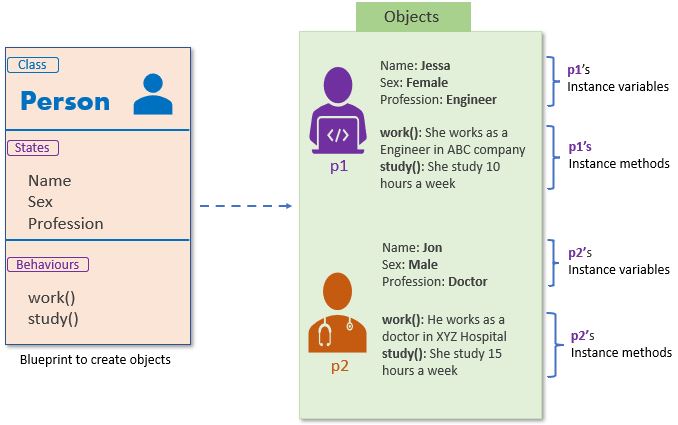
This diagram shows the relationship between a Person class (the blueprint on the left) and two distinct Person objects (the instances on the right). Each object has its own values for the instance variables defined in the class.
The following video provides an excellent, concise explanation of this crucial distinction.
Python OOP Tutorial 1: Classes and Instances
Corey Schafer clearly explains the motivation for using classes and distinguishes between a class (the blueprint) and an instance (the actual object).
Watch the segment from the beginning until this timestamp. Pay close attention to the terms attributes (data) and methods (functions) associated with a class.
3. Defining a Class: The __init__ Method and self
Now, let's translate this concept into Python code. We define a class using the class keyword. To ensure every object created from our class has the necessary starting data, we use a special method called __init__.
The __init__ method is often called the constructor. It runs automatically every time you create a new instance of the class. Its primary job is to set up the initial state of the object.
Here’s a simple Employee class:
class Employee:
    def __init__(self, first_name, last_name, pay):
        # These are instance variables
        self.first = first_name
        self.last = last_name
        self.email = first_name + '.' + last_name + '@company.com'
        self.pay = pay
Let's break this down:
def __init__(self, ...): This defines the initializer. Methods with double underscores like__init__are special "dunder" methods in Python.self: This is the most important and often most confusing part for beginners.selfrefers to the specific instance of the class being created. When you later create an employee object likeemp_1,selfinside__init__is a reference toemp_1. This allows Python to attach data to that specific object.self.first = first_name: This line takes thefirst_namevalue passed to the constructor and assigns it to an instance variable calledfirst. This variable is now "stuck" to the specific employee object being created.
The following video segment walks through this exact process, explaining how the manual assignment of attributes is automated and improved by using __init__.
Python OOP Tutorial 1: Classes and Instances
This part of the tutorial transitions from manually setting attributes on an object to using the __init__ method for clean and reliable initialization.
Watch from this section. Focus on: The problems with setting attributes manually (manual setup). How __init__ serves as a constructor to set initial values (using init). How the arguments you pass when creating an object map to the parameters in __init__ (passing arguments).
4. Creating and Using Objects (Instantiation)
Once you have a class (the blueprint), creating an object is called instantiation. You do this by calling the class name as if it were a function, passing the arguments required by the __init__ method (except for self, which Python handles automatically).
# Create two instances of the Employee class
emp_1 = Employee('Corey', 'Schafer', 50000)
emp_2 = Employee('Test', 'User', 60000)

# Access the instance variables using dot notation
print(emp_1.email)
print(emp_2.email)
Output:
Corey.Schafer@company.com
Test.User@company.com
Notice that emp_1 and emp_2 are separate, independent objects. Each has its own email attribute with a different value, determined by the arguments passed when it was created.
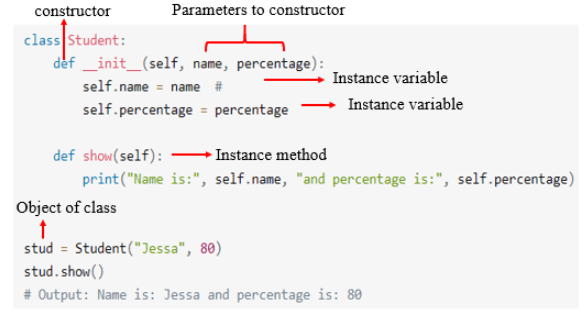
This image provides a complete, annotated example, showing the class definition, the __init__ constructor, instance variables, an instance method, and finally, the creation (instantiation) of an object from the class.
5. Adding Behavior with Instance Methods
Classes don't just hold data; they bundle data with the functions that operate on that data. A function defined inside a class is called a method.
Let's add a method to our Employee class to get the full name.
class Employee:
    def __init__(self, first_name, last_name, pay):
        self.first = first_name
        self.last = last_name
        self.email = first_name + '.' + last_name + '@company.com'
        self.pay = pay

    # This is an instance method
    def fullname(self):
        return f'{self.first} {self.last}'

# --- Usage ---
emp_1 = Employee('Corey', 'Schafer', 50000)
print(emp_1.fullname()) # Note the parentheses to call the method
Output:
Corey Schafer
The fullname method automatically gets the instance (emp_1) passed as self, so it can access self.first and self.last to construct the full name. This is powerful because the logic for getting a full name is now part of the Employee blueprint itself, ensuring it's done consistently for every employee object.
This final video segment demonstrates how to add methods and highlights a common error beginners make.
Python OOP Tutorial 1: Classes and Instances
Here, you'll see how to define methods that act on an instance's data and understand why self is a required parameter.
Watch the following segments: Defining a method: This part shows how to create the fullname method. Why self is necessary: This part explains the error you get if you forget self and what Python does behind the scenes when you call a method on an instance.
6. Hands-On Practice: Structuring Log Data
Let's apply these concepts by refactoring the log processor from our previous lesson. Instead of treating each log line as a simple string, we will model it as a LogEntry object.
Setup:
- Create a new Python file for this exercise (e.g.,
oop_log_processor.py). - You will need the
system_logs.txtfile from the previous lesson. If you don't have it, create it with this content:INFO: Application startup successful. DEBUG: User authentication request initiated. INFO: User 'admin' logged in. WARNING: Disk space is running low (90% usage). ERROR: Failed to connect to database server at 192.168.1.100. INFO: Data export task started. ERROR: NullPointerException in module 'DataProcessor'. INFO: Data export task completed.
Task:
-
Define a
LogEntryclass.- The
__init__method should accept one argument: a raw stringlog_line. - Inside
__init__, parse thelog_line. Split the line at the first colon (:) to separate the log level from the message. A helpful string method for this is.split(':', 1). - Create two instance variables:
self.level(e.g., "ERROR") andself.message(e.g., " Failed to connect..."). Use the.strip()method to clean up any leading/trailing whitespace from the message. - Add an instance method
is_critical()that returnsTrueifself.levelis either "ERROR" or "WARNING", andFalseotherwise.
- The
-
Update the main script logic.
- Open
system_logs.txtfor reading and a new file,critical_report.txt, for writing. - Iterate through each
linein the log file. - Inside the loop, create a
LogEntryobject from the line:entry = LogEntry(line). - Instead of
line.startswith("ERROR:"), use your new method:if entry.is_critical():. - If it is a critical entry, write a structured line to the report file, like:
outfile.write(f"Level: {entry.level} | Message:{entry.message.strip()}\n").
- Open
This exercise will transform your code from procedural string manipulation to an object-oriented approach, making your logic clearer and more robust.
Click here to see a possible solution
class LogEntry:
    """Represents a single entry from a log file."""
    def __init__(self, log_line):
        """
        Initializes a LogEntry object by parsing a raw log line.
        Example line: 'ERROR: Failed to connect to database.'
        """
        parts = log_line.strip().split(':', 1)
        if len(parts) == 2:
            self.level = parts[0]
            self.message = parts[1].strip()
        else:
            # Handle lines that might not have a colon
            self.level = "UNKNOWN"
            self.message = parts[0].strip()

    def is_critical(self):
        """Returns True if the log level is ERROR or WARNING."""
        return self.level in ["ERROR", "WARNING"]

# Main processing logic
try:
    with open('system_logs.txt', 'r') as infile, open('critical_report.txt', 'w') as outfile:
        for line in infile:
            entry = LogEntry(line)
            if entry.is_critical():
                outfile.write(f"Level: {entry.level} | Message: {entry.message}\n")

    print("Log processing complete. 'critical_report.txt' has been created.")

except FileNotFoundError:
    print("Error: 'system_logs.txt' not found. Please create it in the same directory.")
After running this script, critical_report.txt should contain:
Level: WARNING | Message: Disk space is running low (90% usage).
Level: ERROR | Message: Failed to connect to database server at 192.168.1.100.
Level: ERROR | Message: NullPointerException in module 'DataProcessor'.
Conclusion
You've just taken your first and most important step into Object-Oriented Programming, completing the foundational module of this course. By learning to define your own classes, you've unlocked the ability to create structured, reusable, and intuitive code—a requirement for any professional software engineer.
Key Takeaways:
- Classes are blueprints that define the structure (attributes) and behavior (methods) for a type of object.
- Objects are instances of a class, each with its own data but sharing the class's methods.
- The
__init__method is the constructor, used to set the initial state of an object when it's created. - The
selfkeyword is a reference to the specific instance a method is being called on, giving you access to its attributes. - OOP helps you write cleaner and more maintainable code by grouping related data and functions, moving away from fragile structures like parallel lists.
In our next module, "Advanced Python for Backend Systems," we'll begin by exploring functions in more detail. You'll learn about functions as "first-class citizens," a powerful Python feature that enables advanced patterns like decorators, which are used extensively in backend frameworks like Django.