Welcome back! In our previous lesson, you successfully built a complete authentication system for our TaskMaster project, allowing users to register, log in, and log out. This was a massive step forward. However, there's a crucial missing piece: while users can log in, all pages, including the main task list, are still accessible to anyone.
This lesson addresses that security gap. We will now secure our application's views to ensure that only authenticated users can access sensitive pages. This is a fundamental aspect of building any multi-user application and directly aligns with the job description's requirement for "extensive experience in Django" and building robust backend systems.
By the end of this 60-minute lesson, you will be able to:
- Understand the difference between authentication and authorization.
- Use Django's
LoginRequiredMixinto protect class-based views. - Use the
@login_requireddecorator to protect function-based views. - Conditionally render content in templates based on a user's authentication status.
1. Authentication vs. Authorization
Before we dive into the code, it's important to clarify two related concepts:
- Authentication: This is the process of verifying who a user is. You implemented this in the last lesson with login and registration forms. It answers the question, "Are you who you say you are?"
- Authorization: This is the process of determining what an authenticated user is allowed to do. It answers the question, "Now that I know who you are, what are you permitted to see or do?"
Our goal today is to implement the most basic form of authorization: granting access only if a user is authenticated.
2. Protecting Views with LoginRequiredMixin
In Django, the most common way to protect class-based views (CBVs) is by using the LoginRequiredMixin. A "mixin" is a special kind of Python class that provides a set of methods and functionalities that can be "mixed in" with other classes.
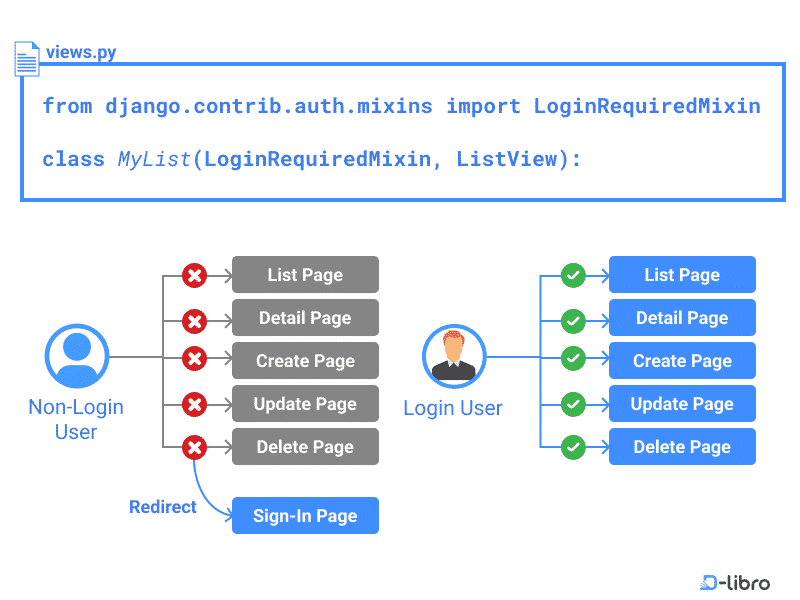
The LoginRequiredMixin does one simple thing: before the view's main logic runs, it checks if the user making the request is authenticated.
- If the user is authenticated, it allows the request to proceed to the view as normal.
- If the user is not authenticated, it redirects them to the login page.
This flow is visualized perfectly in the diagram below.
Let's use a concise guide to see how to implement this.
Restricting Page Access with LoginRequiredMixin - Topic
This article from D-Libro gets straight to the point, explaining what LoginRequiredMixin is and how to apply it to your views.
First, read the main section titled LoginRequiredMixin to understand its purpose and the two-step implementation. Pay close attention to the note about the order of inheritance. Then, review the practical example under the Practice section, which shows how to apply it to a full set of CRUD views, just like we have in our TaskMaster project. We will perform these exact steps next.
Hands-On: Securing TaskMaster's Views
Now, let's apply this knowledge to your tasks app. We want to protect all views related to tasks: the list, detail, create, update, and delete pages.
- Open
tasks/views.py. - Import
LoginRequiredMixinat the top of the file. - Add
LoginRequiredMixinto the inheritance list for each of your class-based views. Remember to place it before the generic view class.
Your tasks/views.py file should now look like this:
# tasks/views.py
from django.shortcuts import render
from django.views.generic import ListView, DetailView, CreateView, UpdateView, DeleteView
from django.urls import reverse_lazy
from .models import Task


# Import the mixin
from django.contrib.auth.mixins import LoginRequiredMixin


# Apply the mixin to each view
class TaskListView(LoginRequiredMixin, ListView):
    model = Task
    context_object_name = 'tasks'

class TaskDetailView(LoginRequiredMixin, DetailView):
    model = Task
    context_object_name = 'task'

class TaskCreateView(LoginRequiredMixin, CreateView):
    model = Task
    fields = ['title', 'description', 'completed']
    success_url = reverse_lazy('task-list')

class TaskUpdateView(LoginRequiredMixin, UpdateView):
    model = Task
    fields = ['title', 'description', 'completed']
    success_url = reverse_lazy('task-list')

class TaskDeleteView(LoginRequiredMixin, DeleteView):
    model = Task
    context_object_name = 'task'
    success_url = reverse_lazy('task-list')
Test your changes:
- Make sure your development server is running (
python manage.py runserver). - Log out of your application if you are currently logged in.
- Try to navigate to your task list at
http://127.0.0.1:8000/tasks/.
You should be immediately redirected to the login page! The URL will look something like http://127.0.0.1:8000/accounts/login/?next=/tasks/. The ?next=/tasks/ parameter is a handy feature that tells Django where to send you after you successfully log in.
- Log in with one of your user accounts. You should now be redirected to the task list and have full access.
3. Securing Function-Based Views (and a Deeper Look)
While we are using class-based views in our project, it's important to know how to protect function-based views (FBVs). For this, Django provides a decorator. A decorator is a special function that wraps another function to add new behavior.
The video below demonstrates how to use the @login_required decorator.
How to Handle User Authentication in Django
This clip from a JustDjango tutorial clearly demonstrates how to apply the decorator and what happens when an unauthenticated user tries to access the protected view.
Watch the section from the beginning to see how the @login_required decorator is imported and applied to a function-based view, and how it automatically redirects the user.
The implementation would look like this:
from django.contrib.auth.decorators import login_required

@login_required
def my_function_based_view(request):


    # ... view logic here ...
This is the equivalent of LoginRequiredMixin for functions. Now that you've seen the practical side, let's read a more detailed explanation that covers both approaches and conditional logic in templates.
Django Tutorial Part 8: User authentication and permissions
The Mozilla Developer Network (MDN) provides some of the best documentation available. This section gives a robust overview of restricting access.
Read the entire section on Testing against authenticated users. It will reinforce what you just did with LoginRequiredMixin, show you the @login_required decorator again, and introduce how to use the user.is_authenticated variable in templates, which we will do next.
4. Conditional Rendering in Templates
Securing the view is the most important step, but a good user experience means we shouldn't show links to pages that a user can't access. In our base.html from the last lesson, we already did this for the Login/Logout links. Let's extend that logic.
The user object is available in every Django template context. We can check the user.is_authenticated boolean attribute to decide what to render.
Hands-On: Hiding the "Tasks" Link
Let's modify our base.html so that the main "Tasks" link in the navigation bar only appears for users who are logged in.
- Open
templates/base.html. - Find the link to your task list.
- Wrap it in an
{% if user.is_authenticated %}block.
Your nav element might look something like this:
<!-- templates/base.html -->
<nav>
    <a href="/">Home</a>
    {% if user.is_authenticated %}
        | <a href="{% url 'task-list' %}">Tasks</a>
    {% endif %}
    <hr>
    {% if user.is_authenticated %}
        <p>Hi {{ user.username }}!</p>
        <form action="{% url 'logout' %}" method="post">
            {% csrf_token %}
            <button type="submit">Log Out</button>
        </form>
    {% else %}
        <p>You are not logged in.</p>
        <a href="{% url 'login' %}">Log In</a> |
        <a href="{% url 'signup' %}">Sign Up</a>
    {% endif %}
</nav>
Refresh your home page while logged out. The "Tasks" link should be gone. Log in, and it will reappear. This simple check makes your application's interface cleaner and more intuitive.
Conclusion
Congratulations! You have now properly secured your application. You've gone beyond simple authentication and implemented authorization, ensuring that only logged-in users can access the core functionality of TaskMaster.
Key Takeaways:
LoginRequiredMixinis the standard way to protect class-based views in Django. It must be listed first in the inheritance order.- The
@login_requireddecorator provides the same protection for function-based views. - The
{{ user.is_authenticated }}template variable allows you to conditionally show or hide parts of your UI, creating a better experience for both authenticated and anonymous users.
Our application is now secure, but there's one more big problem to solve. If you create multiple user accounts, you'll notice that every logged-in user can see and edit every task. In our next lesson, we will fix this by associating data with users, ensuring that users can only view and manage their own tasks.