Hello! Welcome to the second lesson in our module on Amazon Ads.
In our last session, we demystified how Amazon's advertising system works. You learned that ads are a powerful tool for driving traffic to your book's page, creating a "flywheel" effect that can boost both your paid and organic sales.
However, driving traffic is only half the battle. If that traffic arrives at a product page that isn't compelling, customers will leave without buying. This lesson is about ensuring your "storefront" is ready for visitors before you pay to bring them there.
Today, your goal is to verify that your book's listing is fully optimized (cover, keywords, reviews) before investing in ads. We'll consolidate everything you've learned about creating a high-quality listing into a final pre-flight checklist. This critical step will prevent you from wasting money and give your ads the best possible chance of success.
1. Ads Amplify, They Don't Fix
Imagine your book's product page is a bucket. Your ad campaign is the hose you'll use to fill that bucket with water (potential customers). If your bucket has holes—a weak cover, a confusing title, a poor description—the water will leak out as fast as you pour it in. You'll pay for the water, but the bucket will remain empty.
Amazon ads work the same way. They don't magically sell a book that customers don't want. They simply show a book to more people. If the book's listing isn't optimized to convert those views into sales, your ad spend will be wasted.
To hear this crucial concept explained, watch the following short video clip.
Full Beginner Amazon Ads Tutorial for Amazon KDP (Step-by-Step Guide)
Sean Dollwet gets straight to the point about the true purpose of ads in this clip from his "Full Beginner Amazon Ads Tutorial".
Watch from 01:41 to 02:38. Focus on the core idea that ads only increase visibility; they don't fix a fundamentally unappealing book.
As Sean states, "ADS do not sell books, it only shows your books to more people." Our job in this lesson is to make sure that when people see your book, they are compelled to click, and when they click, they are convinced to buy.
2. The Ad-Ready Optimization Checklist
So, what does a "good book" or a fully optimized listing look like? Over the past several modules, you've already learned how to build each component. Now, we'll bring it all together into a final verification checklist.
Think of this as the final inspection before you launch your ad campaigns. For each item, you'll assess your current coloring book and decide if it's "ad-ready."
The following article provides a superb overview of these optimization fundamentals.
Optimize Coloring Books for Amazon KDP - Colorin AI
The article "Optimize Coloring Books for Amazon KDP" from Colorin AI breaks down the key elements of a successful listing. We'll use it as a guide for our checklist.
Read the section titled 'Amazon KDP Optimization Fundamentals'. It covers the five core areas we'll be auditing: Title, Keywords, Description, Categories, and Cover.
Based on that reading and what you've learned in the course, here is your ad-readiness checklist.
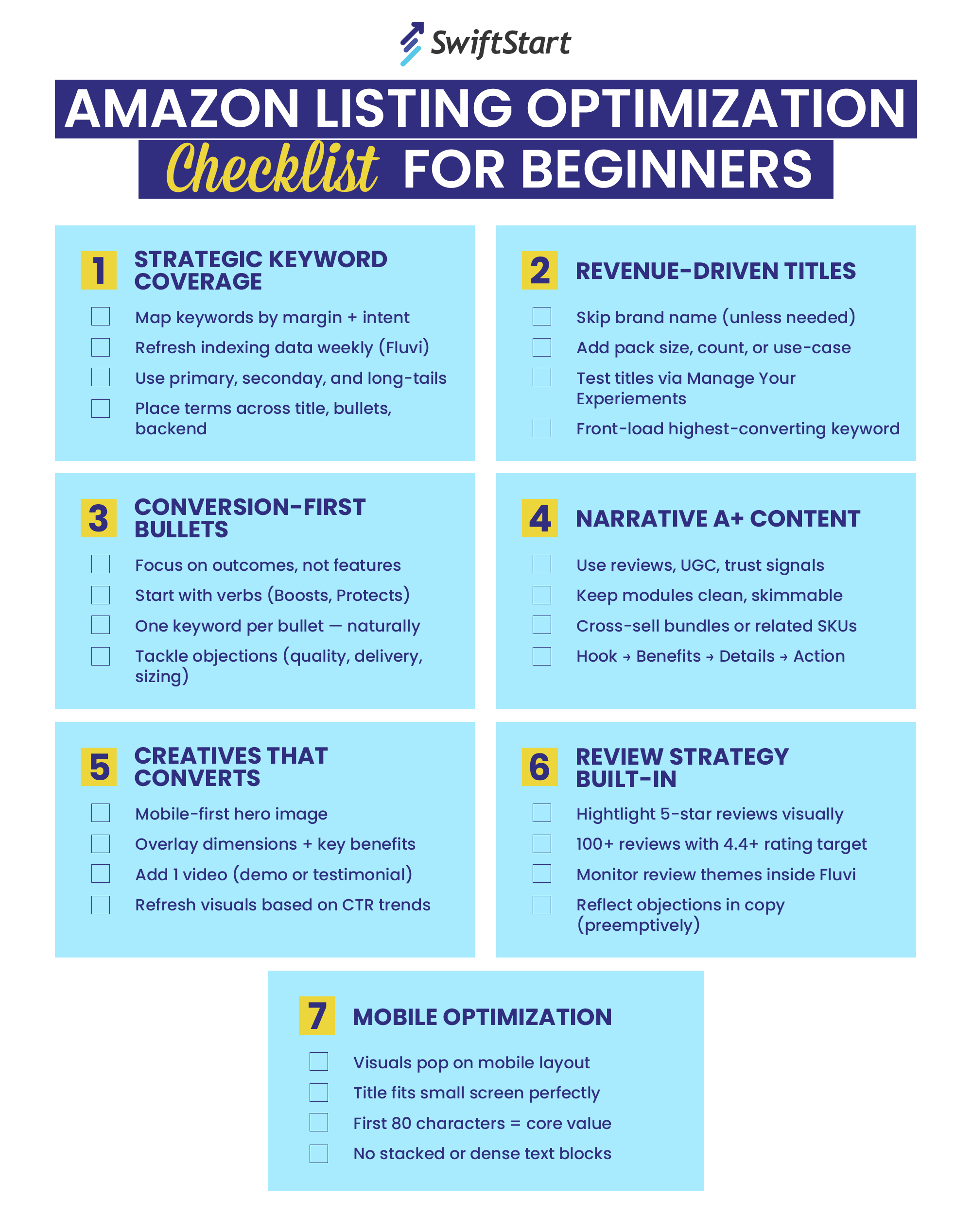
Let's walk through each point, connecting it back to your previous work.
1. A High-Converting Cover (Module 4)
- Check: Does your cover stand out in thumbnail size? Is it professional and aligned with the top sellers in your niche? Does the text clearly state what the book is?
- Why it Matters for Ads: The cover is the first thing a customer sees. If it's not attractive, they won't click on your ad, resulting in impressions but no clicks. This tells Amazon your ad isn't relevant, hurting your ad performance.
2. A Keyword-Rich, Compelling Title & Subtitle (Module 4)
- Check: Does your title and subtitle include your main keywords? Do they clearly communicate the book's benefit and target audience (e.g., "Stress Relief," "For Adults")?
- Why it Matters for Ads: Along with the cover, the title is what earns the click. It also heavily influences Amazon's automatic targeting, helping the algorithm show your ad to the right people.
3. Strategic Backend Keywords & Categories (Modules 3 & 5)
- Check: Are your 7 backend keyword slots filled with relevant, researched phrases? Have you selected the two most accurate and commercially viable categories?
- Why it Matters for Ads: This metadata is the primary information Amazon's algorithm uses for automatic campaigns. Strong keywords and correct categories mean your ads are shown to shoppers who are actually looking for a book like yours, making your ad spend far more efficient.
4. A Persuasive, Formatted Description (Module 5)
- Check: Does your description have a strong hook? Does it use bullet points and bold text to list features and benefits? Does it end with a clear call to action (e.g., "Buy now and start coloring today!")?
- Why it Matters for Ads: If a customer clicks your ad, the description is your sales pitch. A weak, unformatted block of text will fail to convert interest into a sale, leading to clicks but no sales.
5. Social Proof (Reviews) (Module 7)
- Check: Does your book have any reviews? Ideally, you'd want at least a few positive ones.
- Why it Matters for Ads: Reviews are one of the most powerful conversion factors. Many shoppers will not buy a product with zero reviews. While getting your first reviews is a classic chicken-and-egg problem, it's a critical piece of the puzzle. An ad for a book with 5 positive reviews will convert far better than the same ad for a book with none.
3. Diagnosing Problems Before You Spend Money
Understanding how these elements affect ad performance allows you to diagnose issues with your listing before you even launch a campaign. Better yet, once you do launch a campaign, you can interpret the data to pinpoint exactly which part of your listing needs improvement.
The final video clip provides a perfect framework for this.
Full Beginner Amazon Ads Tutorial for Amazon KDP (Step-by-Step Guide)
Let's return to Sean Dollwet's tutorial, where he explains how to troubleshoot common ad problems by looking at your listing's optimization.
Watch from 19:59 to 21:24. Pay close attention to the two main scenarios: 'impressions but no clicks' and 'clicks but no sales'. Understand what each scenario tells you about your book's listing.
Here is a summary of that diagnostic framework:
- If you get Impressions but NO Clicks: Your ad is being shown to people, but they aren't interested. The problem is with the elements they see before clicking:
- Your Cover
- Your Title
- Your Price
- Your Review Count/Rating
- If you get Clicks but NO Sales: People are interested enough to click, but something on your product page is turning them away. The problem is with the elements they see after clicking:
- Your Book Description
- Your A+ Content (if you have it)
- The "Look Inside" Preview of your interior pages
- The Content of your Reviews
By keeping this framework in mind, your ad data becomes a powerful diagnostic tool for improving your book.
4. Practical Exercise: Audit Your Book
It's time to apply this checklist to your existing coloring book. This exercise will give you a clear, actionable list of improvements to make before you proceed to the next lesson.
Open your book's product page on Amazon. Then, honestly assess each component using the table below. Score each element from 1 (Needs a complete overhaul) to 5 (Fully optimized and ad-ready).
| Component | My Score (1-5) | Notes for Improvement (What specific actions will I take?) |
|---|---|---|
| Cover Design | e.g., "Increase title font size," "Use brighter colors to match competitors." | |
| Title & Subtitle | e.g., "Add 'for anxiety relief' to subtitle," "Include a primary keyword." | |
| 7 Backend Keywords | e.g., "Review all 7 slots to ensure they are relevant phrases, not single words." | |
| Book Description | e.g., "Rewrite with a hook and bullet points," "Add bold formatting." | |
| Categories | e.g., "Research if my current categories are the best fit for my niche." | |
| Reviews / Social Proof | e.g., "Reread Module 7 on ethically requesting initial reviews." | |
| "Look Inside" Preview | e.g., "Ensure the first few pages are high-quality and representative." |
Take your time with this audit. The more thorough and honest you are here, the more money you will save and the faster you will get your first sales.
Conclusion
You now understand that running ads is not the first step to fixing a book with no sales; it's the last. Advertising simply pours gasoline on the fire. If you have a well-optimized book that's ready to convert, ads will accelerate its success. If the book's listing is weak, ads will only accelerate your spending.
Key Takeaways:
- Ads amplify, they don't fix. A book must be fundamentally good to sell.
- A listing is "ad-ready" when its cover, title, keywords, description, and reviews are all optimized to attract and convert customers.
- You can diagnose listing weaknesses by analyzing ad metrics: "no clicks" points to issues with your cover/title, while "no sales" points to issues with your description/interior.
- Auditing your book against the optimization checklist is a non-negotiable step before launching a campaign.
In our next lesson, assuming you have completed your audit and made the necessary improvements, we will finally dive into the KDP dashboard. You will set up your first automatic targeting ad campaign with a small, controlled budget to start gathering real data.