Welcome back. In our previous lesson, we delved into templates, the C++ mechanism for writing generic code that works across different data types. We saw how this feature is not merely about convenience but is fundamental to building high-performance numerical libraries that offer clean syntax without sacrificing speed, as exemplified by expression templates.
This lesson continues our exploration of modern C++ features that enhance code expressiveness and safety. We will focus on two powerful tools from the C++17 standard: std::optional and structured bindings. You'll learn how std::optional provides a type-safe way to represent values that may not be present, a common scenario in any complex software. Then, you'll see how structured bindings offer an elegant way to unpack data from pairs, tuples, and structs, making your code cleaner and more intuitive. For someone with your Python background, these features will feel familiar and highly welcome, echoing Python's handling of None and tuple unpacking, but with the full power and type safety of C++.
Part 1: Handling Optional Values with std::optional
A frequent challenge in programming is how to handle functions that might not be able to return a valid result. For instance, a function designed to find an element in a data structure might not find it. A function that parses a number from a string might be given invalid input. How should the function signal this failure?
A common but flawed approach is using "sentinel values"—special values like -1, nullptr, or an empty string to indicate an error. This approach has significant drawbacks.
12.15 — std::optional – Learn C++
This article from Learn C++ does an excellent job of motivating the need for a better solution than sentinel values.
Please read the introduction, up to the part that mentions returning two values. Focus on the discussion of sentinel values and the "semipredicate problem", where a returned value is ambiguous—it could be a valid result or an error signal. This context is key to understanding why std::optional was introduced.
As the article explains, sentinel values are often ambiguous and require the caller to remember and check for a specific magic value. C++17 provides a much more robust and expressive solution: std::optional.
A Type-Safe Wrapper for Optional Values
std::optional<T> is a template class that acts as a wrapper. An instance of std::optional<T> either contains a value of type T or it contains nothing. It explicitly models the possibility of an absent value in the type system itself.
Let's watch a short video that demonstrates its practical use.
How to Deal with OPTIONAL Data in C++
The Cherno provides a clear, practical example of refactoring a function to use std::optional.
Watch the first two sections of the video: The initial segment explains the problem using a file-reading scenario, contrasting std::optional with returning empty strings or using boolean flags. The second segment shows the refactoring process. Pay close attention to how the function's return type is changed to std::optional<std::string> and how it returns either the string result or an empty optional ({}).
As you saw, using std::optional makes the function's contract clear: it might not return a value, and the caller is forced by the type system to consider this possibility.
Working with std::optional
Once you have a std::optional object, you need to interact with it safely. There are several ways to check for and access the contained value.
How to Deal with OPTIONAL Data in C++
This part of the video covers the "how-to" of using an optional value.
Watch the section from here, which demonstrates checking for a value with .has_value() (and its more idiomatic equivalent, if (data)), and accessing it with the dereference operator (*). Then, watch the segment on .value_or() from here. This is a particularly useful method when you have a sensible default value, a common pattern when parsing configurations or handling optional parameters.
To formalize this, here's a summary of the main operations:
- Checking for a value:
if (opt.has_value()) { ... }if (opt) { ... }(More idiomatic; uses an explicitoperator bool)
- Accessing the value:
*opt: Dereference operator. Fast, but results in undefined behavior if the optional is empty. Use only after you have checked that it contains a value.opt.value(): Returns the value, but throws astd::bad_optional_accessexception if the optional is empty. Safer than*if you aren't certain.opt.value_or(default_value): Returns the contained value if one exists, otherwise returnsdefault_value. This is both safe and convenient.
Finally, for a deeper dive into the semantics and a comparison with pointers, the learncpp.com article provides excellent detail.
12.15 — std::optional – Learn C++
This reading will solidify your understanding of how std::optional works and when to use it.
Please read the following sections: The main example shows the complete doIntDivision function and how the caller handles the optional result. The comparison with pointers is crucial. Understand the difference between std::optional's value semantics and a pointer's reference semantics. Finally, read the pros/cons and the best practice recommendation. This summarizes the trade-offs nicely.
Part 2: Deconstructing Data with Structured Bindings
Another common task is dealing with functions that return multiple values. In Python, you can do this very naturally with tuples: min_val, max_val = find_min_max(data). Before C++17, the equivalent in C++ was significantly more cumbersome, often involving std::pair or std::tuple and awkward access functions like std::get.
C++17 introduced structured bindings to solve this problem, providing a syntax that is just as clean as Python's.
This video by The Cherno perfectly illustrates the "before" and "after" of structured bindings.
Please watch from the beginning to this point. The video will take you through: The motivation for structured bindings. The old, verbose way of getting values from a std::tuple using std::get. A slightly better, but still clunky, method using std::tie. The new, clean C++17 syntax: auto [name, age] = createPerson();.
The new syntax is a dramatic improvement in readability and conciseness.
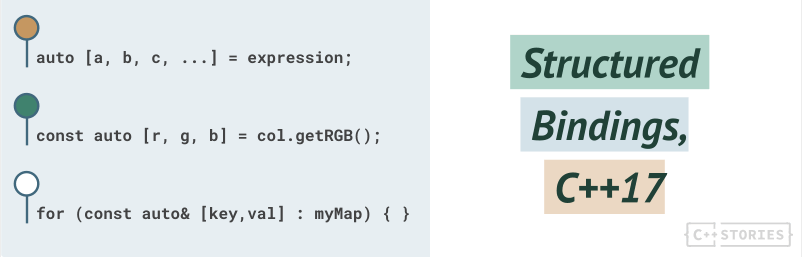
Key Use Cases
Structured bindings are versatile and can be used in several common scenarios.
Structured bindings in C++17, 8 years later - C++ Stories
This article from C++ Stories covers the core use cases and provides a conceptual model for how structured bindings work.
First, read the section "Iterating through maps". This is one of the most celebrated uses of structured bindings, turning a clumsy loop into an elegant one. The for (const auto& [key, val] : myMap) pattern is modern C++ at its best. Next, read "The Syntax" section to understand the basic declaration form and the conceptual model of how the compiler creates the bindings.
In essence, a structured binding declaration introduces new names that are bound to the elements or members of an object. This works for:
- C-style arrays.
- Tuple-like types that support
std::get(e.g.,std::tuple,std::pair,std::array). - Structs and classes with all public, non-static data members.
Where It Matters: Real Code from Deep Learning Frameworks
These features aren't just academic curiosities; they are used extensively in modern, high-performance codebases, including the deep learning frameworks you're interested in. Using them makes your own code more robust and easier to read.
Let's look at some examples from ONNX Runtime, a popular inference engine.
Structured bindings in C++17, 8 years later - C++ Stories
This section showcases the practical application of structured bindings in real-world, performance-critical code.
Please read the section titled "Real code". As you read, pay special attention to these examples: From chars handling: Notice the auto [_, ec] = ... syntax. The underscore _ is a convention to indicate a value that is intentionally being ignored. Unmap: A function GetErrnoInfo() returns a std::pair, which is immediately and cleanly unpacked into err_no and err_msg. Softmax: This is a direct example from a deep learning context. A function returns quantization parameters (scale and zero-point), which are unpacked into named variables scale_tensor and zero_tensor. This is far more readable than using .first and .second.
These examples demonstrate that modern C++ features for expressiveness are not at odds with performance; they are essential tools used by developers writing the fast, low-level code you aim to master.
Putting It All Together
Let's combine std::optional and structured bindings in a single, practical example. Imagine we want to write a function that finds the minimum and maximum values in a range of data. If the range is empty, there is no minimum or maximum. This is a perfect use case for std::optional. The function can return an optional pair.
#include <iostream>
#include <vector>
#include <optional>
#include <utility> // For std::pair
#include <span>
#include <algorithm> // For std::minmax_element

// A function to find the min and max element in a span.
// It returns an optional pair of iterators. If the span is empty,
// it returns an empty optional.
std::optional<std::pair<int, int>> find_min_max(std::span<const int> data) {
    if (data.empty()) {
        return std::nullopt; // or just return {};
    }

    // std::minmax_element is a standard algorithm that does this efficiently.
    // It returns a pair of iterators to the min and max elements.
    const auto [min_it, max_it] = std::minmax_element(data.begin(), data.end());

    // We dereference the iterators to get the actual values.
    return std::make_pair(*min_it, *max_it);
}

int main() {
    std::vector<int> numbers = {10, 5, 42, 17, -5, 100, 3};
    std::vector<int> empty_vec = {};

    // Use a C++17 "if-statement with initializer"
    if (auto result = find_min_max(numbers)) {
        // Here, result is a std::optional<std::pair<int, int>> that is NOT empty.

        // Use a structured binding to unpack the pair from the optional.
        // Note we have to dereference the optional with * first.
        auto [min_val, max_val] = *result;

        std::cout << "Numbers: Min = " << min_val << ", Max = " << max_val << std::endl;
    } else {
        std::cout << "Could not find min/max for non-empty vector (this shouldn't happen)." << std::endl;
    }

    if (auto result = find_min_max(empty_vec)) {
        auto [min_val, max_val] = *result;
        std::cout << "Empty: Min = " << min_val << ", Max = " << max_val << std::endl;
    } else {
        std::cout << "Could not find min/max for empty vector, as expected." << std::endl;
    }

    return 0;
}
This example combines multiple modern C++ idioms: std::span for a non-owning view of the data, std::optional to handle the failure case (empty input), an if-statement with an initializer to scope the result variable, and a structured binding to elegantly unpack the final values.
Conclusion
In this lesson, you've added two powerful C++17 features to your toolkit that significantly improve code clarity and robustness.
Key Takeaways:
std::optionalfor optional values: Usestd::optional<T>for functions that may fail to return a value. It's a type-safe, explicit alternative to ambiguous sentinel values.- Structured Bindings for unpacking: Use
auto [a, b] = ...to cleanly deconstruct tuple-like objects, pairs, and simple structs. This makes code more readable, especially when iterating over maps or handling functions with multiple return values. - Modern C++ is expressive: These features are prime examples of how modern C++ enables you to write code that is not only efficient but also safe, clear, and expressive.
We have spent the last few lessons learning to write more correct and expressive code. However, even with the best intentions, bugs happen. In our next lesson, we will shift focus from writing code to verifying it. You will learn how to use powerful tools like AddressSanitizer and UndefinedBehaviorSanitizer to automatically detect subtle and dangerous memory errors and undefined behavior in your programs.