Hello again. In our last session, we explored the essential STL containers for managing numerical data—std::vector, std::array, and std::span—and distinguished between owning containers and non-owning views. We concluded by noting a key limitation: if we write a function like void process(std::span<float> data), it can't be used with a std::span<double> without modification.
This lesson introduces the solution: templates. Templates are the cornerstone of generic programming in C++, allowing us to write code that is independent of any particular data type. You will learn to write function and class templates, enabling you to create flexible, reusable components. This is not just about avoiding code duplication; for numerical computing, it's a powerful mechanism for generating highly optimized code that can operate on various precisions (float, double, int8_t, etc.), a fundamental requirement for the high-performance deep learning libraries you aim to build.
The Motivation: Writing Clean and Fast Code
In your work with Python, you've benefited from libraries like NumPy that provide a clean, high-level syntax for mathematical operations while delivering high performance. This combination of expressive code and speed is highly desirable. In C++, achieving this balance is a central challenge. Naively, one might assume a trade-off: either you write clean, abstract code that is slow, or you write fast, low-level code that is complex and hard to maintain.
Templates are the C++ feature that allows us to resolve this dilemma. They enable the creation of libraries that offer high-level, mathematical syntax which the compiler then transforms into highly optimized, low-level code.
[PDF] Armadillo: C++ Template Metaprogramming for Compile-Time ...
This presentation on the Armadillo linear algebra library perfectly frames the problem that templates solve in high-performance computing.
Please read the introductory slides, from the section titled "fast and clean". Pay attention to the contrast between the ugly but fast assembly code and the clean but potentially slow high-level syntax. The authors' proposed solution—using C++'s generic programming facilities—is precisely what we are about to study.
As you can see, the goal is to get the best of both worlds. Let's now explore the mechanism that makes this possible.
Function Templates: A Blueprint for Code
The simplest use of templates is to create generic functions. A function template is not a real function itself, but rather a blueprint that the compiler uses to generate a specific function when you call it with a particular type.
Let's start with a foundational video that explains this core concept clearly.
This video by The Cherno provides an excellent and clear introduction to the fundamentals of templates.
Please watch the following two segments: The Motivation: This section demonstrates the core problem of code duplication when you need the same logic for different types (e.g., int, string, float). The Template Solution: Here, you will see the syntax template <typename T> for the first time. Focus on how T is used as a placeholder for a type and how the compiler "materializes" or "instantiates" a real function from the template based on how it's used. Notice that the compiler can often deduce the type automatically from the function arguments.
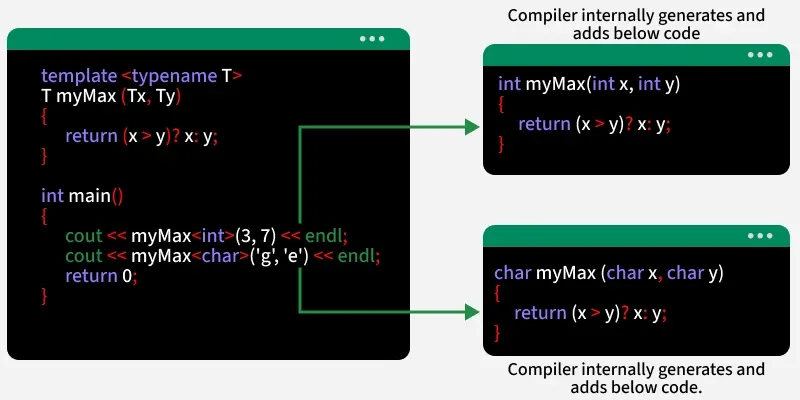
As the video explains, when you write template <typename T>, you are telling the compiler: "I am defining a pattern. T is a placeholder for any type. When you see me use this pattern with a specific type, generate the code for that type."
The compiler's process of generating a concrete function from a template is called template instantiation. For example, given a template myMax, when the compiler sees a call like myMax(3, 7), it instantiates an int version. When it sees myMax('g', 'e'), it instantiates a char version.
Class Templates: Generic Data Structures
The power of templates extends beyond functions to entire classes. You've already been using class templates extensively! std::vector, std::array, and std::shared_ptr are all class templates. When you write std::vector<float>, you are instantiating the std::vector class template with the type float.
A class template allows you to define a generic data structure that can store and operate on elements of any type.

In addition to type parameters (typename T), templates can also accept non-type parameters, which are compile-time constant values like integers. This is how std::array is defined: std::array<T, N> takes a type T and a value N (the size).
Let's return to the video to see how class templates, including those with non-type parameters, are defined.
This next segment builds upon the function template concept and applies it to classes.
Please watch the section on class templates. The video walks through creating a custom Array class that takes both a type parameter T and a non-type size parameter n, effectively recreating the essence of std::array.
To summarize the key points:
- A function template is a blueprint for generating functions. The compiler can often deduce the template arguments from the function call (e.g.,
myMax(5, 10)deducesTasint). - A class template is a blueprint for generating classes. You typically must explicitly provide the template arguments when creating an object (e.g.,
MyStack<double> s;).- Since C++17, Class Template Argument Deduction (CTAD) can sometimes deduce the type from the constructor, allowing for
std::vector v{1, 2, 3};instead ofstd::vector<int> v{1, 2, 3};, which is a convenient modern feature.
- Since C++17, Class Template Argument Deduction (CTAD) can sometimes deduce the type from the constructor, allowing for
A Deeper Look: Compile-Time Computation
Now that you understand the basic mechanics, let's explore how templates enable the powerful optimizations mentioned at the beginning of the lesson. Consider a simple mathematical expression: mat Z = W + X + Y;.
A naive C++ implementation using operator overloading might evaluate this as:
tmp = W + X(allocates a temporary matrixtmp, loops over W and X, stores result intmp).Z = tmp + Y(allocates memory for Z, loops overtmpand Y, stores result in Z).tmpis destroyed.
This involves two full loops and a temporary memory allocation, which is very inefficient. This is the problem that high-level numerical libraries must solve. Expression Templates are an advanced C++ technique that uses the template system to parse and optimize these expressions at compile time.
[PDF] Armadillo: C++ Template Metaprogramming for Compile-Time ...
The goal here is not to memorize the implementation, but to grasp the core concept of expression templates. This is a prime example of how templates facilitate the "zero-cost abstractions" C++ is famous for.
First, read slides 11-21 to understand the problem: naive C++ operator overloading can be very inefficient, creating many temporary objects. Next, skim slides 22-38 which show the solution. Focus on the core idea: operator+ no longer performs any computation. Instead, it returns a placeholder op<> object that just stores references to its operands. A chain of additions like a + b + c builds a complex, nested template type like op<op<mat, mat>, mat>, which is effectively a compile-time representation of the expression's syntax tree. The actual computation is deferred until the very end, inside the assignment operator=. This operator "unwraps" the expression tree and generates a single, optimal loop (Z[i] = W[i] + X[i] + Y[i]) with no temporary matrices.
This technique allows libraries like Armadillo, Eigen, and others to provide a clean, mathematical syntax that compiles down to code as efficient as a hand-written C loop. This is a powerful demonstration of templates enabling compile-time analysis and optimization, a concept that will be central to building high-performance kernels.
Putting It Together: A Generic Dot Product
Let's write a practical example that combines templates with the std::span view from our previous lesson. Here is a generic dot_product function that can work on any contiguous container of any numerical type.
#include <iostream>
#include <vector>
#include <array>
#include <span>
#include <numeric> // For std::inner_product
#include <stdexcept>

// Generic dot product using a simple for-loop.
// 'T' is the placeholder for the numerical type (float, double, etc.).
template <typename T>
T dot_product(std::span<const T> a, std::span<const T> b) {
    if (a.size() != b.size()) {
        throw std::invalid_argument("Spans must have the same size for dot product.");
    }

    T result = T{0}; // Initialize result to zero of type T
    for (size_t i = 0; i < a.size(); ++i) {
        result += a[i] * b[i];
    }
    return result;
}

// A more idiomatic C++ version using the standard library's std::inner_product.
// This is functionally equivalent and often preferred.
template <typename T>
T dot_product_stl(std::span<const T> a, std::span<const T> b) {
    if (a.size() != b.size()) {
        throw std::invalid_argument("Spans must have the same size for dot product.");
    }
    return std::inner_product(a.begin(), a.end(), b.begin(), T{0});
}

int main() {
    std::vector<float> v1 = {1.0f, 2.0f, 3.0f};
    std::vector<float> v2 = {4.0f, 5.0f, 6.0f};

    // The compiler instantiates dot_product<float> here.
    std::cout << "Dot product of two float vectors: "
              << dot_product(v1, v2) << std::endl;

    std::array<double, 3> a1 = {1.0, 2.0, 3.0};
    std::array<double, 3> a2 = {4.0, 5.0, 6.0};

    // The compiler instantiates dot_product<double> here.
    std::cout << "Dot product of two double arrays (STL version): "
              << dot_product_stl(a1, a2) << std::endl;

    return 0;
}
This example beautifully demonstrates the power of combining modern C++ features. The function dot_product is completely generic thanks to templates, and it can safely and efficiently operate on data from any contiguous source (std::vector, std::array, C-style arrays) thanks to std::span.
Conclusion
In this lesson, we have unlocked one of the most powerful features of C++. Templates allow you to move beyond writing code for specific types and start thinking in terms of generic algorithms and data structures.
Key Takeaways:
- Templates enable generic programming: They are blueprints used by the compiler to generate type-specific code.
- Function templates create generic functions. The compiler often deduces the type (
T) from the arguments. - Class templates create generic classes, like
std::vector<T>. They can also take non-type parameters like sizes (std::array<T, N>). - Templates are a "zero-cost abstraction." They are resolved at compile time, introducing no runtime overhead.
- Advanced techniques like Expression Templates leverage the template system to perform complex compile-time optimizations, fusing operations and eliminating temporary allocations, which is critical for high-performance numerical code.
In our next lesson, we will explore two more modern C++ features that enhance code expressiveness and safety: std::optional for representing values that may or may not be present, and structured bindings for unpacking data from tuples and structs cleanly.