Welcome to the final lesson of our first module. Over the past several lessons, we've focused on writing C++ code that is safer and more expressive, using tools like RAII, smart pointers, std::optional, and structured bindings. These features help you state your intent clearly and prevent entire classes of bugs. However, C++ is a language that trusts the programmer, and with that trust comes the responsibility to manage memory and behavior correctly. Even with modern idioms, subtle bugs can slip through, leading to crashes, data corruption, or silent incorrect results—the most dangerous kind in numerical computing.
Today, we shift from bug prevention to bug detection. You will learn how to use powerful, compiler-integrated tools called Sanitizers to automatically find some of the most insidious bugs in C++ at runtime. We will focus on two key tools: AddressSanitizer (ASan) for diagnosing memory errors like buffer overflows and use-after-free, and UndefinedBehaviorSanitizer (UBSan) for catching other forms of undefined behavior, such as signed integer overflow. Mastering these tools is a crucial step towards writing the reliable, high-performance code required for deep learning applications.
The Hidden Dangers in "Working" Code
In languages like Python, accessing an array out of bounds or using a variable that has been deleted typically results in a clear, immediate error, like an IndexError or AttributeError. C++ is different. Such actions often fall into the category of Undefined Behavior (UB). This means the C++ standard does not prescribe what must happen. The program might crash, it might produce a wrong result, it might appear to work correctly, or it might, as a classic C++ saying goes, "make demons fly out of your nose."
The most dangerous aspect of UB is that code containing it can seem to work perfectly during testing, only to fail catastrophically in a different environment, under a different compiler, or with a slightly different input. Let's look at a concrete example.
Address Sanitizer (ASan) Demonstration
This video presents a short C++ program that uses a std::vector. The code looks plausible, but it contains a serious memory bug.
Please watch from the beginning up to this point. Pay close attention to the code itself and the incorrect output it produces. The narrator will explain the bug, but try to spot it yourself first. It's a classic issue involving iterator invalidation, which we briefly touched upon when discussing std::vector.
The bug shown in the video is a use-after-free error. The iterator it points to memory managed by the std::vector. When the loop calls v.push_back(), the vector might need to reallocate its internal storage to make more room. If a reallocation occurs, the old memory block is freed, and all iterators (including it) pointing into it become invalid, or "dangling." Later, when the code dereferences this invalid iterator, it's accessing freed memory—a classic example of undefined behavior.
Without a special tool, this bug might only manifest as an incorrect value, or it might not show up at all, making it incredibly difficult to track down in a large codebase. This is where AddressSanitizer comes in.
AddressSanitizer (ASan): Your Memory Detective
AddressSanitizer, or ASan, is a runtime memory error detector built into modern compilers like Clang and GCC. It's not a static analysis tool that just reads your code; it instruments your compiled program to check every memory access as it happens.
How Does It Work? Shadow Memory
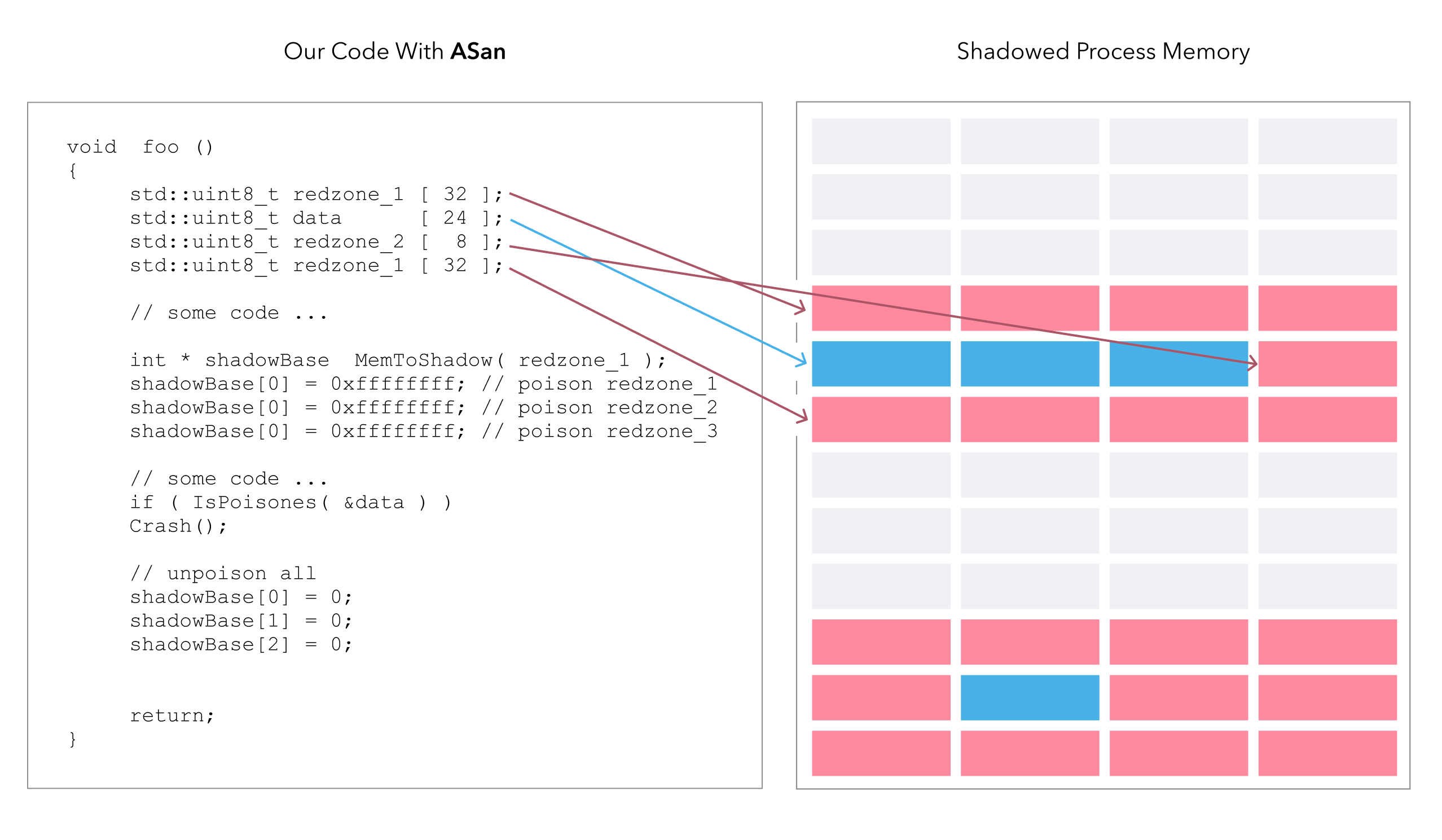
At a high level, ASan works by creating a region of "shadow memory" that maps to your program's actual memory. For every byte of memory your program can access, there's a corresponding bit or byte in the shadow memory.
When you allocate memory (e.g., on the stack for a local variable or on the heap with new), the compiler inserts code that marks the corresponding shadow memory as "addressable." When you free memory, the shadow memory is marked as "unaddressable" or "poisoned." Before every memory read or write in your code, the compiler adds a check to see if the target address is marked as addressable in the shadow map. If you try to access a poisoned region, ASan halts the program and prints a detailed report.
Address Sanitizer in C++ (A Tutorial)
This video provides a great conceptual explanation of shadow memory and compiler instrumentation.
Please watch the section from How does it work?. The visual analogy of red "poisoned" zones and green "valid" zones is very effective for building a mental model of ASan's mechanism.
This "shadow memory" concept is what allows ASan to be so effective. It transforms subtle, silent memory errors into loud, immediate crashes with actionable diagnostic information.
Enabling and Using ASan
Using ASan is remarkably simple. You just need to add a single flag to both your compiler and linker commands.
Address Sanitizer (ASan) Demonstration
This segment shows how to modify a CMakeLists.txt file to enable ASan.
Watch the short clip from here to see the necessary flags being added.
To enable ASan for a typical CMake project, you would add the following to your CMakeLists.txt:
# Add this for Clang or GCC
add_compile_options(-fsanitize=address)
add_link_options(-fsanitize=address)


# It's also good practice to add -g to include debug symbols
add_compile_options(-g)
Adding -g is crucial because it instructs the compiler to include debug information (like line numbers and variable names) in the executable. This allows ASan to produce much more useful reports.
Now, let's see what happens when we run the buggy iterator program with ASan enabled.
Address Sanitizer (ASan) Demonstration
This is the payoff. The video shows the program being run with ASan and the resulting report.
Watch from this point. Observe how ASan doesn't just let the program print an incorrect value. It stops the program and provides a report identifying the error type (heap-use-after-free) and the exact line of code where the invalid access occurred.
The ASan report is the key. It tells you three vital pieces of information:
- What happened: The type of error (e.g.,
heap-use-after-free). - Where it happened: The exact file and line number of the illegal memory access.
- Context: The stack trace where the memory was originally allocated and where it was freed.
This turns a needle-in-a-haystack debugging session into a clear, direct path to the bug.
A Tour of Common Memory Errors
ASan can detect a wide variety of memory errors. Let's look at a few of the most common ones.
Address Sanitizer in C++ (A Tutorial)
This video provides a comprehensive tour of different memory bugs and how ASan catches each one.
Watch the "actual examples" section from here. You don't need to memorize every detail, but try to get a feel for the different kinds of errors and the corresponding ASan report titles (e.g., heap-buffer-overflow, stack-buffer-overflow, double-free, memory leak).
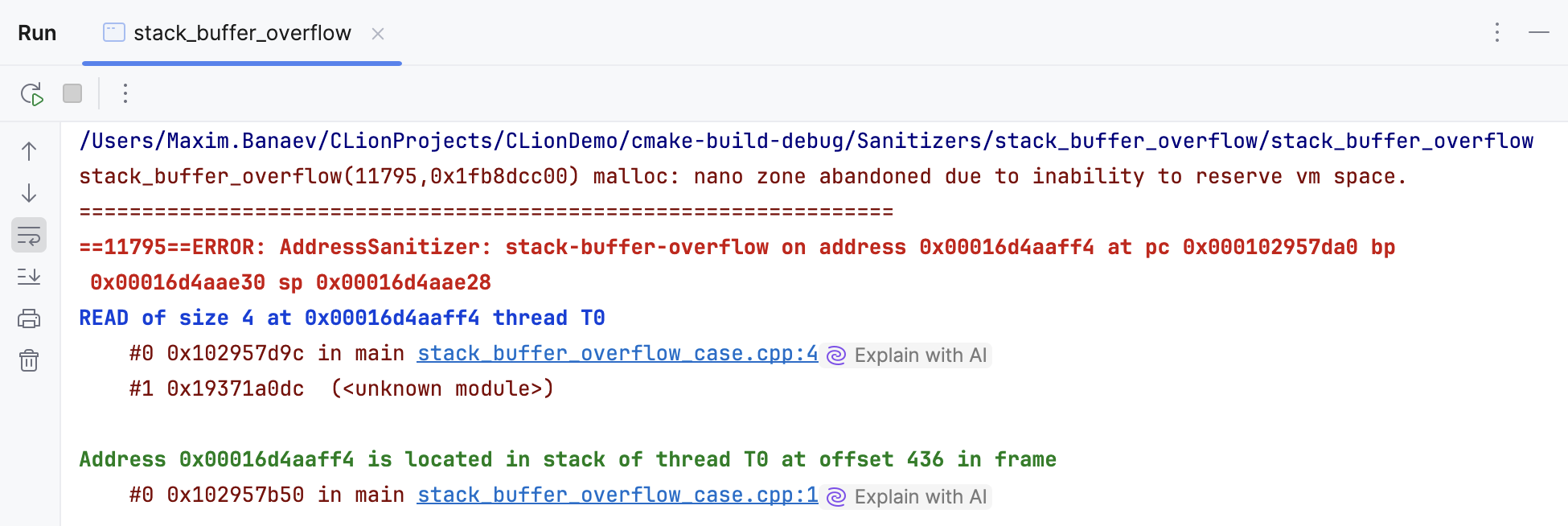
Let's look at the structure of a couple of those reports more closely.
- Stack Buffer Overflow: This happens when you access an array on the stack outside of its declared bounds. This is a very common bug for beginners.
- Memory Leak: This occurs when you allocate memory on the heap (e.g., with
new) but forget to deallocate it (withdelete). In modern C++, RAII and smart pointers largely prevent this, but it's still possible with raw pointers. ASan's leak detector, LeakSanitizer (LSan), is often bundled with it.
How to solve C++ memory problems efficiently - DEV Community
This article from the Apache Doris team shows a real-world example of a LeakSanitizer report.
Read the short section titled "memory leak". Notice how the report tells you the total amount of leaked memory and provides the stack trace of where that memory was originally allocated, giving you a direct clue as to who was responsible for freeing it.
Beyond Memory: UndefinedBehaviorSanitizer (UBSan)
Not all undefined behavior involves memory errors. Consider this simple code:
int i = 2000000000; // 2 billion
i = i * 2;          // What happens here?
The maximum value for a typical 32-bit signed integer is around 2.1 billion. Multiplying i by 2 will cause it to overflow. In C++, signed integer overflow is undefined behavior. The result might wrap around (as it does in many modern systems, producing a negative number), or it could be anything else.
This is where UndefinedBehaviorSanitizer (UBSan) comes in. It's a sibling to ASan that detects non-memory-related undefined behavior.
To enable it, you use the flag -fsanitize=undefined:
# Add UBSan
add_compile_options(-fsanitize=undefined)
add_link_options(-fsanitize=undefined)
You can, and often should, use both ASan and UBSan together:-fsanitize=address,undefined
If we compile the integer overflow code with UBSan, we'll get a runtime error like this:
runtime error: signed integer overflow: 2000000000 * 2 cannot be represented in type 'int'
UBSan can detect a range of other issues, including:
- Invalid bit shifts (e.g., shifting by more bits than the type has).
- Misaligned pointer access.
- Invalid boolean conversions.
- Unreachable code being executed.
Given your mathematics background, the importance of ensuring arithmetic operations are correct and not silently overflowing should be particularly apparent. UBSan is an indispensable tool for this.
Practical Integration and Best Practices
Sanitizers are most effective when integrated directly into your daily development workflow.
- Use them in Debug builds: Always compile and run your code with Sanitizers enabled during development and testing. The small performance cost is well worth the instant feedback on bugs.
- Integrate into Continuous Integration (CI): Your automated test suite should always be run with Sanitizers enabled. This ensures that no code with detectable memory errors or UB gets merged into your main branch.
- Understand the Overhead: ASan typically slows down a program by about 2x and increases memory usage by 2-3x. UBSan has a much lower overhead. Because of this cost, Sanitizers are not usually enabled in production
Releasebuilds, but they are absolutely essential forDebugandTestbuilds.
Conclusion
In this lesson, you've learned about a critical part of the modern C++ toolkit for writing robust software. C++'s performance comes from giving you low-level control, but this control comes with risks. Sanitizers act as your safety net, transforming silent, dangerous bugs into loud, obvious, and fixable reports.
Key Takeaways:
- Undefined Behavior (UB) is a major risk in C++, where incorrect operations don't guarantee a crash.
- AddressSanitizer (ASan) is a runtime tool that detects memory errors like buffer overflows, use-after-free, and memory leaks.
- ASan works via compiler instrumentation and shadow memory, checking every memory access at runtime.
- UndefinedBehaviorSanitizer (UBSan) detects non-memory UB, such as signed integer overflow.
- Enable Sanitizers with compiler flags (
-fsanitize=address,undefined) in your debug and test builds to catch bugs early.
This lesson concludes our foundational module on modern C++. You've built a solid base, from setting up your toolchain to managing resources with RAII, using core STL containers, writing generic code with templates, and now, diagnosing the toughest bugs with Sanitizers.
In the next module, "Advanced C++: Templates, Concurrency, and Performance," we will dive deeper into the mechanics of C++ that are crucial for optimization. Our first topic will be move semantics, a key C++11 feature that allows for highly efficient transfer of resources, which is fundamental to writing high-performance numerical code.