Hello! Welcome back to our course on Go.
In our last lesson, you learned how to declare variables with var and := and got a feel for Go's static type system. We established that once a variable's type is set, it cannot be changed. This is a core principle for writing reliable and bug-resistant code.
Today, we'll dive into the values these variables can hold. This lesson is dedicated to exploring Go's basic data types: strings, integers, floats, and booleans. Mastering these is fundamental to building any DevOps tool, whether you're parsing configuration, calculating metrics, or managing system state.
Let's start with a visual map of the landscape.
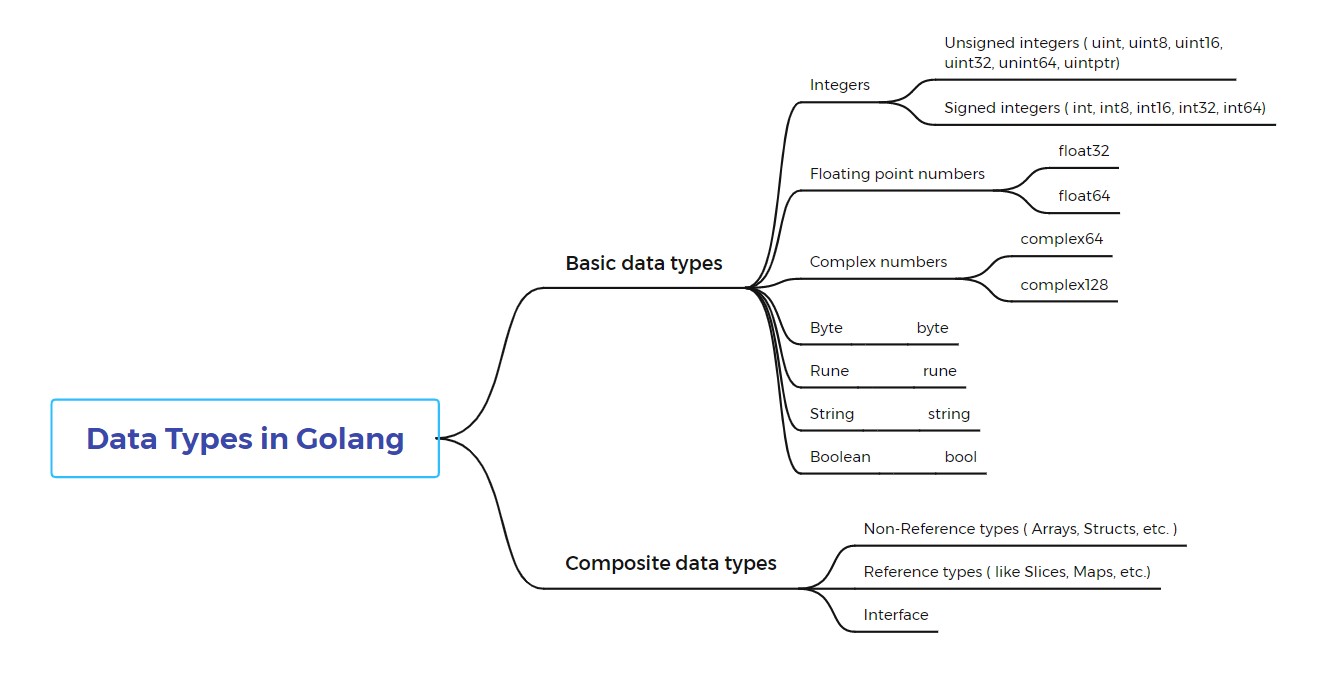
Comparing Data Types: Python vs. Go
Given your background in Python, it's helpful to see a direct comparison. In Python, data types are flexible. In Go, they are explicit and fixed.
Go (Golang) for Python developers
This resource provides a quick, side-by-side comparison of how Python and Go handle basic data types. It's a great way to bridge your existing knowledge.
On the GitHub page, scroll down to the 'Examples' section and find the 'Data Types' heading. Review the Python and Go code snippets to see the differences in declaration and type specificity.
Now, let's explore each of Go's basic types in detail. The following article from DigitalOcean will be our main guide. It offers clear explanations and practical examples.
Understanding Data Types in Go
We will be referencing sections of this 'Understanding Data Types in Go' article throughout the lesson. It's a comprehensive guide to Go's primitive types.
You don't need to read the whole article at once. I will point you to specific sections as we cover each topic.
Numeric Types: Integers and Floats
When building automation tools, you'll constantly work with numbers—for counting resources, measuring performance, or specifying ports. Go provides a precise set of numeric types for these tasks.
Integers (int, uint)
Integers are whole numbers. Unlike Python's single int type that can grow as large as needed, Go offers a variety of integer types with different sizes and signedness (positive/negative vs. positive-only).
Understanding Data Types in Go
Let's read about how Go handles integers and, more importantly, the different sizes available.
First, read the short section titled 'Integers'. Then, jump to 'Sizes of Numeric Types'. Pay close attention to the table listing the various int and uint types (like int8, uint32, etc.) and their ranges. Also, read the subsection 'Picking Numeric Data Types' for practical advice.
Key Concepts for Integers:
intvs. Sized Integers:int: The general-purpose integer type. Its size (32or64bits) depends on your system's architecture. You should use this most of the time unless you have a specific reason not to.int8,int16,int32,int64: Use these when you need to control memory usage precisely or interface with a system that expects a specific integer size (e.g., a database record or a C library).
- Signed (
int) vs. Unsigned (uint):inttypes can hold both positive and negative numbers.uinttypes can only hold non-negative numbers (zero and positive). This effectively doubles their positive range. For example, auint8can hold values from0to255, while anint8holds-128to127.uintis perfect for things that can never be negative, like a count of pods or a port number.
- Overflow: Go's compiler will error if you try to assign a value that is clearly too large for a type. For example,
var count uint8 = 300will fail to compile. Be aware that if an overflow happens at runtime (during program execution), the value will "wrap around," which can lead to subtle bugs.
Example Use Cases:
var podCount uint = 5         // A count can't be negative, so uint is suitable.
var userID int64 = 1234567890 // A large ID from a web service might require 64 bits.
var port int = 8080           // A standard int is fine for a port number.
Floating-Point Numbers (float32, float64)
Floats are used for numbers with a decimal point.
Understanding Data Types in Go
Now, let's briefly cover floating-point numbers.
Read the section titled 'Floating-Point Numbers'.
The simple rule for floats is: use float64 unless you have a very good reason not to. It offers greater precision and is the default type inferred by Go for decimal literals.
Example Use Cases:
cpuUsage := 0.75         // Go infers this as a float64
timeoutSeconds := 10.5   // Another float64
Booleans (bool)
Booleans represent one of two states: true or false. They are the foundation of conditional logic.
Understanding Data Types in Go
Booleans are straightforward. Let's quickly review them.
Read the section titled 'Booleans'.
Example Use Cases:
enableMonitoring := true
isProduction := false
backupSucceeded := (err == nil) // The result of a comparison is a bool
Strings (string)
Strings are arguably one of the most important types in DevOps, used for configurations, logs, script commands, and API payloads.
Understanding Data Types in Go
Go has powerful features for handling strings. Pay close attention to the two different ways to create them.
Read the section titled 'Strings', including the subsections on 'Raw String Literals' and 'Interpreted String Literals'.
Key Concepts for Strings:
- Interpreted Strings (
"..."): Created with double quotes. They process escape sequences like\n(newline) and\t(tab). This is your standard string. - Raw Strings (
`...`): Created with backticks. They treat all characters literally. Escape sequences are ignored. This is incredibly useful for multi-line strings or for holding code snippets like JSON, YAML, or shell scripts without having to escape special characters.
Example Use Cases:
// Interpreted string
statusMessage := "Service is 'running'\nCheck logs for details."

// Raw string for a multi-line script
script := `
#!/bin/bash
echo "Updating system..."
apt-get update -y
`
Bytes, Runes, and the Nature of Strings
This is where Go's approach to strings differs significantly from Python 3. In Go, a string is fundamentally a read-only slice of bytes. For ASCII text, 1 byte = 1 character. But for international characters (UTF-8), one character can be composed of multiple bytes.
Go provides two special aliases to handle this:
byte: An alias foruint8. Used for handling raw binary data, file contents, or network streams.rune: An alias forint32. Used to represent a single Unicode character, regardless of how many bytes it takes.
The following video explains these concepts and the underlying structure of a Go string very clearly.
Go Basic Types (Golang basic types) (Go Basics #4)
This video breaks down Go's string implementation and clarifies the important distinction between bytes and runes.
Watch from 12:28 to 20:45. This covers the rune and byte type aliases, and then dives into the string type itself, explaining its structure and declaration styles.
Understanding this distinction is crucial when you need to process text character-by-character, especially if it might contain non-ASCII characters, which is common in modern systems.
Test your understanding!
You are writing a utility to provision a small server on a cloud provider. You need to store its vCPU count. The provider's API documentation states that the vCPU count will always be a positive whole number between 1 and 128.
Which Go data type is the most memory-efficient and correct choice to store this value?
intint8uint8int16
Show answer
The best choice is 3. uint8.
- It's an integer, which is correct for a CPU count.
- It's unsigned (
u) because the count cannot be negative. - Its range is
0to255, which comfortably covers the required1to128range and is more memory-efficient thanint16orint. Whileint8has the same size, its range is-128to127, so it technically can't hold the value128.
Hands-On Practice
Let's put this all together. Create a new file named datatypes.go and add the following code. It declares several variables relevant to a DevOps context.
package main

import "fmt"

func main() {
	// DevOps Configuration Variables
	var serviceName string = "auth-api"
	var port uint16 = 8080
	var cpuThreshold float64 = 0.85
	var isMonitored bool = true

	// A raw string for a simple configuration block
	config := `
{
  "retries": 3,
  "timeout": "5s"
}
`

	// Use fmt.Printf to inspect types and values
	// %T prints the type, %v prints the value in a default format
	fmt.Printf("Service: %v (type: %T)\n", serviceName, serviceName)
	fmt.Printf("Port: %v (type: %T)\n", port, port)
	fmt.Printf("CPU Threshold: %v (type: %T)\n", cpuThreshold, cpuThreshold)
	fmt.Printf("Monitoring Enabled: %v (type: %T)\n", isMonitored, isMonitored)
	fmt.Printf("Config Block:\n%v\n(type: %T)\n", config, config)
}
- Save the file and run it from your terminal with
go run datatypes.go. - Observe the output. Notice how
%Tcorrectly reports the types you specified (or that Go inferred). - Experiment: Change the
portvariable type fromuint16touint8. Now, change its value to300. What happens when you try to run the code? This demonstrates the compile-time overflow checking we discussed.
Conclusion
In this lesson, you've taken a detailed tour of Go's basic data types. While simpler than complex data structures, a solid grasp of these primitives is non-negotiable for writing effective and efficient Go programs.
Key Takeaways:
- Numeric Precision: Go requires you to be deliberate about numeric types (
int,int64,uint8, etc.). This helps optimize performance and memory, which is critical for high-performance services. - Boolean Logic: The
booltype is the simple but essential foundation for controlling your program's logic. - Powerful Strings: Go's strings come in two flavors: interpreted (
") for general use and raw (`) for multi-line text or code snippets. - Strings are Bytes: A Go
stringis a sequence of bytes. Therunetype is your tool for correctly handling individual characters in a Unicode world.
Next Up
You now know how to declare variables and what kinds of basic data they can hold. The next logical step is to make your program do something with that data. In our next lesson, we will cover control structures: if statements, for loops, and switch statements, which will allow you to build logic and create dynamic, responsive tools.