Hello! Welcome back.
In our last lesson, we covered Go's basic data types—string, int, float, and bool—which are the building blocks for storing information. Now that you know how to store data, it's time to learn how to make your programs act on it.
This lesson focuses on control structures. You'll learn how to implement if statements, for loops, and switch statements. These are the fundamental tools that allow you to direct the flow of your program, making decisions and repeating actions. Mastering them will enable you to move from writing simple scripts to building intelligent DevOps tools that can react to different conditions.
Conditional Logic with if-else
Conditional statements allow your program to execute certain blocks of code only if a specific condition is met. Coming from Python and Bash, you're already very familiar with if/elif/else and if/elif/else/fi constructs. Go's syntax is similar but has a few key distinctions.
The most notable difference is that Go does not use parentheses () around conditions. Another powerful and idiomatic feature is the ability to include a "short statement" before the condition. This lets you initialize a variable that is scoped only to the if and any associated else blocks. This pattern is extremely common for error handling, which is central to robust Go programming.
Conditional Statements in Go: A Deep Dive into if-else and ...
This article provides a clear explanation of if-else statements in Go, with a particular focus on the short statement feature that is so prevalent in Go code.
Read the section titled 'The if-else Construct: Straightforward Decision Making'. Pay close attention to the 'optional short statement' and the error handling example using strconv.Atoi. This pattern is fundamental to writing idiomatic Go.
As you saw in the article, this pattern is perfect for DevOps tasks where you might try to parse a configuration value or a command-line argument and need to handle the case where it fails.
// A common pattern for parsing input that might fail
if num, err := strconv.Atoi("10"); err == nil {
    // This block only runs if the conversion succeeded.
    // 'num' and 'err' are only accessible inside this if/else.
    fmt.Printf("Successfully converted to: %d\n", num)
} else {
    // This block runs if strconv.Atoi returned an error.
    fmt.Printf("Failed to convert: %v\n", err)
}
Looping with for
Go takes a minimalist approach to loops. Unlike Python, which has for and while, Go has only one looping keyword: for. However, it's versatile enough to cover all common looping scenarios.
- The "while" loop:
for condition { ... } - The traditional C-style loop:
for init; condition; post { ... } - The "for-each" loop (most similar to Python's
for..in):for index, value := range collection { ... } - The infinite loop:
for { ... }
The following video breaks down these forms clearly.
Go (Golang) Tutorial #7 - Loops
This video from the Net Ninja provides an excellent breakdown of the for loop's different forms, from simple conditional loops to iterating over collections.
Watch from the beginning up to 07:53. This covers: Using for like a while loop (0:02) The traditional C-style for loop (2:02) Looping over a slice (3:05) Using for...range to get the index and value (4:36) Ignoring the index or value with _ (6:58)
Iterating with for...range
The for...range construct is likely to feel the most familiar to you. It's the idiomatic way to iterate over collections like slices, arrays, and maps.
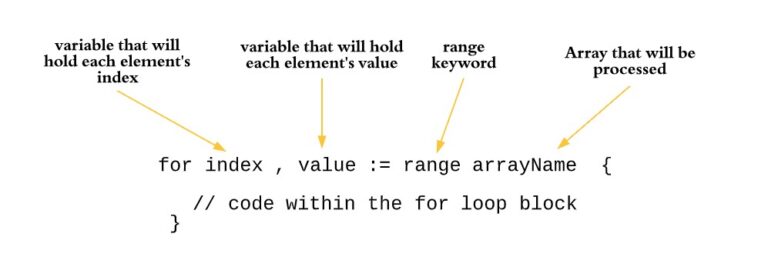
A key detail from the video worth re-emphasizing is that when you use for index, value := range mySlice, the value variable is a copy of the element in the slice, not a reference to it. Modifying value inside the loop will not change the original slice.
Test your understanding!
You need to write a script to check the health of three API endpoints: "http://api.service1/health", "http://api.service2/health", and "http://api.service3/health".
Which for loop structure would be the most idiomatic and readable for iterating through this list of endpoint URLs?
- A
forloop that functions like awhileloop, with a manual counter. - A traditional
forloop with an initializer, condition, and post statement (for i := 0; i < 3; i++). - A
for...rangeloop. - An infinite
forloop with abreakstatement.
Show answer
The best choice is 3. A for...range loop.
You would first put the URLs into a slice of strings, and then for...range provides the cleanest and most readable way to process each item in that slice. While a traditional for loop (option 2) would also work, for...range is generally preferred for iterating over collections as it's less prone to off-by-one errors and more directly expresses the intent of processing each element.
Multi-way Branching with switch
When you have to check a variable against a series of possible values, a long chain of if-else if-else statements can become clumsy. Go's switch statement provides a cleaner, more readable alternative.
A crucial feature of Go's switch is that, unlike C or Java, it does not "fall through" from one case to the next. A break is automatically applied at the end of each case. If you explicitly want fallthrough behavior, you must use the fallthrough keyword.
Go's switch is also very flexible:
- You can list multiple values in a single
case. - You can use it without an expression (a "tagless switch"), where each
caseis simply a boolean condition. This provides a very clean alternative to a complexif-else ifchain.
Conditional Statements in Go: A Deep Dive into if-else and ...
Let's return to the article from leapcell.io to explore how switch statements can simplify your code.
Read the sections 'The switch Statement: Elegant Multi-way Branching' and 'Advanced switch Capabilities'. Focus on: The basic syntax and automatic break behavior. Using multiple values in a single case. The 'tagless switch' for creating clean if-else if-style logic. The purpose of the fallthrough keyword. (You can skim the 'Type Switches' part for now; we'll cover that topic in depth when we get to interfaces).
The combination of for and switch is very powerful for processing lists of items, as shown in this classic "FizzBuzz" example.
Hands-On Practice: Server Status Checker
Let's apply these concepts to a practical DevOps scenario. Create a new file named status_checker.go and write a program that simulates checking the status of several servers.
Your task:
- Create a slice of strings containing a few server hostnames (e.g.,
web-01,db-01,cache-01,web-02). - Use a
for...rangeloop to iterate over the slice. - Inside the loop, use a
switchstatement on the server name.- If the server name contains "db", print
"[db-01] is in a critical state.". - If the server name is "cache-01", print
"[cache-01] is running but has high memory usage.". - For any other server name, use the
defaultcase to print"[hostname] is running normally.".
- If the server name contains "db", print
Example Code Structure:
package main

import "fmt"

func main() {
    servers := []string{"web-01", "db-01", "cache-01", "web-02"}

    fmt.Println("--- Server Status Report ---")

    // Your for...range loop goes here
    for _, server := range servers {
        // Your switch statement goes here
        switch { // A tagless switch might be useful here if checking substrings!
        case server == "db-01": // Or something more flexible
            fmt.Printf("[%s] is in a critical state.\n", server)
        // Add more cases...
        default:
            fmt.Printf("[%s] is running normally.\n", server)
        }
    }
}
Hint: The strings.Contains() function might be useful for checking if a hostname includes "db". You'll need to add "strings" to your import statement to use it.
Run your code with go run status_checker.go and verify the output. Experiment by adding more servers to the slice.
Conclusion
You've now learned the essential tools for controlling the logic in your Go programs. These structures are the backbone of any non-trivial application.
Key Takeaways:
ifwith Short Statements: Theif statement; conditionpattern is idiomatic Go for handling operations that might fail, keeping initialization and error-checking logic tightly scoped.- The All-in-One
forLoop: Go's singleforkeyword is flexible enough to act as awhileloop, a traditional C-styleforloop, and an iterator withfor...range. - Clean Branching with
switch:switchstatements offer a more readable alternative to longif-elsechains, with safe, defaultbreakbehavior and powerful "tagless" and multi-value case options.
Next Up
In this lesson, you saw how functions like strconv.Atoi or strings.Contains can be used within control structures. In the next lesson, you'll learn how to define and call your own functions. We will pay special attention to Go's ability to return multiple values, which is the mechanism that enables the clean error-handling pattern you practiced with if statements today.