Welcome back! In our last lesson, we explored the physical and logical foundations of Wi-Fi, covering the RF principles that allow signals to travel through the air and the 802.11 standards that govern their use. You now have a firm grasp of the "what" and "how" of wireless communication at a fundamental level.
Today, we shift our focus from the signal to the system. We will investigate the different architectural blueprints used to build and manage wireless networks. By the end of this lesson, you will be able to compare and contrast the three primary wireless architectures: autonomous, cloud-based, and the split-MAC model featuring a Wireless LAN Controller (WLC). Understanding these designs is crucial for deploying a wireless network that is scalable, manageable, and efficient.
Three Ways to Build a Wireless Network
When deploying more than a handful of access points, managing them individually becomes a significant challenge. How do you ensure consistent security policies, manage RF channels to avoid interference, and provide seamless roaming for users moving around a building? The answer lies in the network's architecture. There are three main approaches to this problem, each with its own trade-offs.
Let's begin our exploration with a video from Jeremy's IT Lab, which provides an excellent overview of the three architectures we will discuss.
Free CCNA | Wireless Architectures | Day 56 | CCNA 200-301 Complete Course
This video provides a great introduction to the core concepts of wireless architectures. We'll watch it in segments as we work through each model.
For now, watch the introduction to get an overview of the topics. Then, watch the detailed explanation of the first model, the autonomous AP architecture. Pay close attention to how it's managed and the implications for the underlying wired network, particularly regarding VLANs and trunking.
1. Autonomous AP Architecture
As you just saw, the autonomous AP architecture is the most straightforward design. Each access point is a self-contained, independent device, often called a "fat AP" because it contains all the intelligence needed to manage wireless clients, apply security policies, and make forwarding decisions.
- Management: Each AP is configured and managed individually, typically through a command-line interface (CLI) or a web-based graphical user interface (GUI). While simple for a home or small office with one or two APs, this model does not scale. Imagine having to manually update the configuration on hundreds of APs across a university campus—it would be an operational nightmare.
- Traffic Flow: In an autonomous setup, the AP acts as a bridge between the wireless and wired mediums. Client data is forwarded directly onto the wired network via the AP's switch port. To support multiple SSIDs, each mapped to a different VLAN, the AP's connection to the switch must be configured as an 802.1Q trunk port. This leads to a design where user VLANs must be extended across your entire switching infrastructure to every AP's location, which can complicate network management and increase the size of broadcast domains.
This model is simple and effective for very small-scale deployments but lacks the centralized control and scalability required for enterprise environments.
2. Split-MAC Architecture: Lightweight APs and WLCs
To solve the scalability issues of the autonomous model, the split-MAC architecture was developed. This is the dominant architecture in enterprise campus networks. The core idea is to centralize the network's intelligence by "splitting" the functions of a traditional AP between two components:
- Lightweight Access Point (LAP): A "thin AP" that handles only the real-time, time-sensitive MAC layer functions.
- Wireless LAN Controller (WLC): A centralized appliance that manages all the LAPs, handling complex management, security, and roaming functions.
This division of labor is the essence of the "split-MAC" name.

The communication between the LAPs and the WLC is facilitated by a tunneling protocol called CAPWAP (Control and Provisioning of Wireless Access Points). Each LAP forms a secure CAPWAP tunnel back to the WLC. This tunnel has two primary channels:
- Control Tunnel (UDP Port 5246): Used for managing and configuring the LAPs, pushing policies, and monitoring status. This traffic is encrypted by default.
- Data Tunnel (UDP Port 5247): Used to encapsulate and forward wireless client data from the LAP to the WLC. This traffic is not encrypted by default but can be.
Traffic Flow in a Split-MAC World
The use of a CAPWAP data tunnel fundamentally changes how user traffic flows. Instead of being switched locally onto the wired network, all client traffic is first sent through the tunnel to the WLC. The WLC then de-encapsulates the traffic and forwards it to its final destination on the wired network. This is known as central switching.
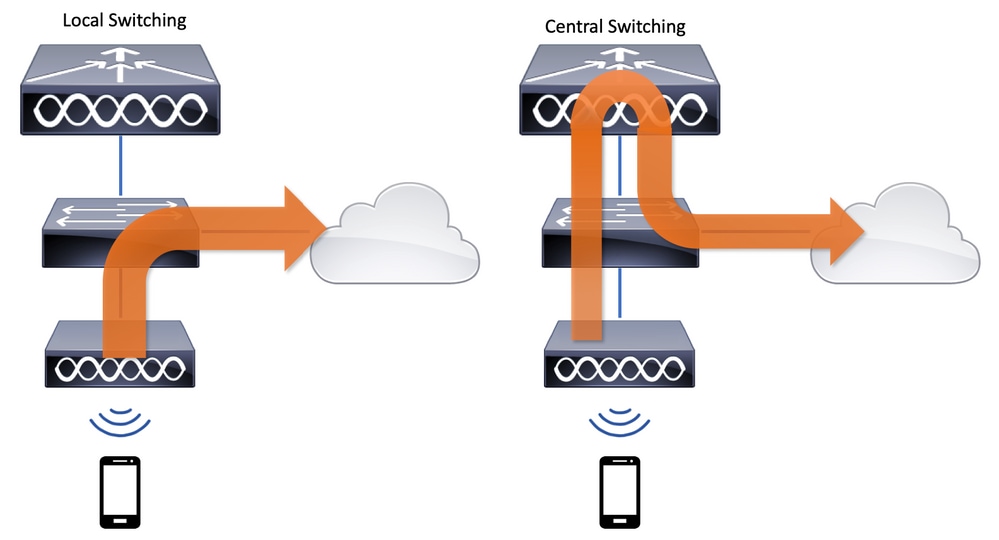
This centralized model provides immense benefits:
- Scalability: A single WLC can manage thousands of APs.
- Centralized Management: All configuration, security policies, and software updates are handled in one place.
- RF Management: The WLC can dynamically assign channels and adjust power levels for all APs to optimize performance and minimize interference.
- Seamless Roaming: The WLC manages client handoffs between APs, enabling fast and seamless roaming.
Let's return to the Jeremy's IT Lab video to see this architecture explained.
Free CCNA | Wireless Architectures | Day 56 | CCNA 200-301 Complete Course
This segment of the video masterfully explains the split-MAC architecture, CAPWAP, and its benefits.
Please watch the following sections: Start with the introduction to lightweight APs and CAPWAP. Continue with the excellent comparison of traffic flow between autonomous and split-MAC designs. Finish with the summary of the key benefits of using a WLC.
3. Cloud-Based Architecture
The cloud-based architecture offers a compelling middle ground. It combines the centralized management benefits of a WLC model with the distributed data forwarding of an autonomous model.
- Management: APs are managed from a centralized cloud platform, such as Cisco Meraki. Administrators use a web-based dashboard to configure, monitor, and troubleshoot the entire wireless network, no matter where the APs are physically located. The APs securely connect to the cloud to pull their configurations and report status.
- Traffic Flow: This is the key difference from the split-MAC model. The control plane (management traffic) goes to the cloud, but the data plane (user traffic) is handled locally. Client data is switched directly from the AP to the local wired network, just as with an autonomous AP. This avoids tunneling all user traffic to a central point, which can be inefficient for geographically distributed locations.
This architecture is ideal for organizations with many distributed sites (e.g., retail stores, branch offices) where deploying an on-premise WLC at each location would be costly and complex.
Free CCNA | Wireless Architectures | Day 56 | CCNA 200-301 Complete Course
Now, let's watch the final segment of the video on the cloud-based model.
Watch the section explaining cloud-based APs. Notice the clear distinction made between the path of management traffic and user data traffic.
Comparing the Architectures
To solidify your understanding, let's review the architectures in a comparative table.
| Feature | Autonomous AP | Split-MAC (WLC) | Cloud-Based |
|---|---|---|---|
| AP Intelligence | High ("Fat" AP) | Low ("Lightweight" AP) | High ("Fat" AP) |
| Management | Individual (per AP) | Centralized (On-premise WLC) | Centralized (Cloud Dashboard) |
| Data Plane | Distributed (Local Switching) | Centralized (Tunneled to WLC) | Distributed (Local Switching) |
| Control Plane | Distributed (On AP) | Centralized (WLC via CAPWAP) | Centralized (Cloud via secure tunnel) |
| Scalability | Low | Very High | High (especially for distributed sites) |
| Typical Use Case | Home, Small Office | Enterprise Campus, Large Venues | Distributed Enterprise, Retail, Branch Offices |
| Wired Port | Trunk Port | Access Port (typically) | Trunk Port |
For a more in-depth textual summary of these concepts, you can refer to the following resource.
CCNA: Wireless Fundamentals, Architecture and Security
This article from the telecomHall Forum provides a solid written summary of the three main deployment methods.
Focus on these sections under the "APs deployment methods" heading: Read the subsection on Autonomous APs. Read the introduction to the Lightweight model and the split-MAC concept. Read the description of the Cloud-based architecture, noting how it balances the other two models.
Conclusion
In this lesson, we have moved beyond the physics of RF to the architectural design of wireless networks. You can now confidently compare the three primary models for deploying and managing Wi-Fi.
Key Takeaways:
- Autonomous APs are self-contained and managed individually, making them suitable only for small-scale deployments. They switch traffic locally.
- Split-MAC architecture centralizes network intelligence in a Wireless LAN Controller (WLC), which manages "lightweight" APs via CAPWAP tunnels. This model offers maximum control and scalability but centralizes data traffic by default.
- Cloud-Based architecture (like Cisco Meraki) provides centralized management from the cloud while allowing user data to be switched locally at the AP. This offers the best of both worlds for geographically distributed organizations.
The split-MAC model is foundational to modern enterprise wireless. In our next lesson, we will zoom in on its core component: the WLC. We will explore its functions, its various deployment models (e.g., unified, embedded), and the critical role CAPWAP plays in tying the entire system together.