Hello! Over the past few lessons, we've dived deep into the world of IPv6, culminating in troubleshooting complex inter-VLAN routing scenarios. You now have a solid methodology for diagnosing connectivity issues in modern wired networks.
Today, we pivot from the structured world of cables and switches to the invisible medium of wireless communication. We will explore the fundamental principles of Radio Frequency (RF) that make Wi-Fi possible and survey the key 802.11 standards that define its operation. By the end of this lesson, you will understand the physics behind wireless signals and be able to identify the capabilities and characteristics of different Wi-Fi technologies.
The Physics of Wi-Fi: Understanding RF Fundamentals
Wireless LANs don't use physical cables; they use electromagnetic waves propagating through the air. To understand how Wi-Fi works, we first need to grasp the basic properties of these waves. The three most important characteristics of a Radio Frequency (RF) wave are its frequency, amplitude, and phase.
Frequency, Amplitude, Phase: 3 RF Characteristics
This article from CBT Nuggets provides clear, concise definitions for the core properties of RF signals. It's a great starting point before we see these concepts in action.
Read the following sections to build your foundational vocabulary: Start with the section "What is Wireless Network Frequency?" to understand frequency and its relation to data capacity. Continue to the section "What is a Wireless Network Signal Amplitude?" for a definition of signal power. Read the section on RF Phase to understand the relationship between multiple signals. Finally, read the first section, "What is Attenuation?", to understand why signals get weaker.
Let's consolidate these key terms:
- Frequency: The number of wave cycles that occur in one second, measured in Hertz (Hz). A 2.4 GHz signal oscillates 2.4 billion times per second. Higher frequency allows for more data to be carried but often comes with trade-offs.
- Amplitude: The "height" or power of the wave. Higher amplitude means a stronger signal that can travel farther and better penetrate obstacles.
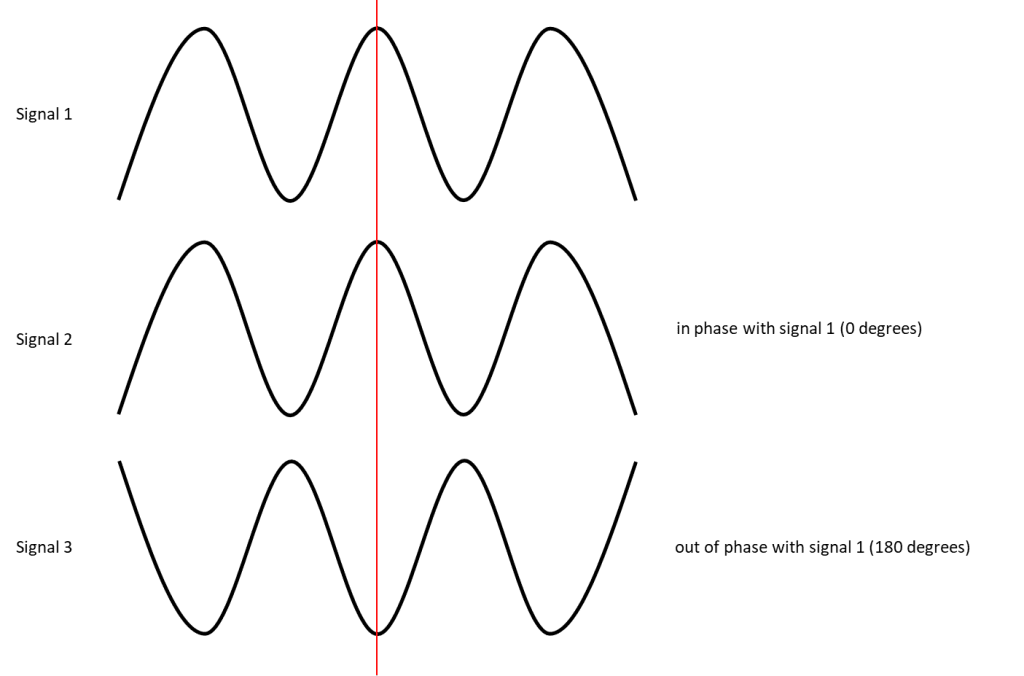
- Phase: The relative position of two waves of the same frequency. Two waves can be "in phase" (constructively interfering, boosting the signal) or "out of phase" (destructively interfering, weakening or canceling the signal).
- Wavelength: The physical distance a wave travels during one complete cycle. It has an inverse relationship with frequency. As frequency goes up, wavelength gets shorter. This can be expressed with the formula , where is wavelength, is the wave's velocity (the speed of light for RF waves, approx. m/s), and is the frequency.
For a 2.4 GHz signal, the approximate wavelength is:
For a 5 GHz signal, the wavelength is shorter:
This physical difference helps explain why higher frequency signals (like 5 GHz) are more easily blocked by obstacles—their shorter waves have more difficulty penetrating solid objects.
The following video provides an excellent visual recap of these concepts and demonstrates the wavelength calculation.
Radio Frequency (RF) Fundamentals
This video from Kevin Wallace Training offers a clear, animated explanation of RF fundamentals, which will help solidify your understanding.
Watch the first five minutes of the video, focusing on these two segments: The introduction to waveforms, where frequency, wavelength, and amplitude are defined. The calculation of wavelength for the 2.4 GHz, 5 GHz, and 6 GHz bands.
Wi-Fi Bands and Channels
Now that we have the physics down, let's apply it. Wi-Fi operates in specific, unlicensed frequency bands. The two most common are the 2.4 GHz and 5 GHz bands. They have distinct characteristics that make them suitable for different situations.
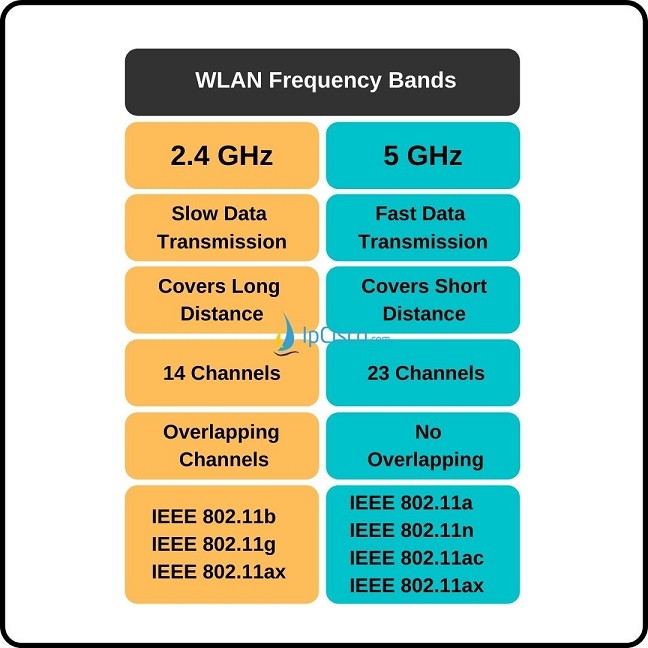
As the chart shows, there's a fundamental trade-off:
- 2.4 GHz: Slower speeds, but longer range and better object penetration. It's also a crowded band, used by Bluetooth devices, microwaves, and cordless phones, leading to more interference.
- 5 GHz: Faster speeds and less interference, but shorter range and poorer object penetration.
Each band is subdivided into smaller frequency ranges called channels. When you configure a wireless Access Point (AP), you assign it a specific channel to operate on. The crucial issue here is channel overlap.
In the 2.4 GHz band, the channels are packed closely together and significantly overlap. If two nearby APs are configured on overlapping channels (e.g., channel 3 and channel 4), their signals will interfere with each other, degrading performance for all connected clients. This is known as co-channel interference. To avoid this, best practice dictates using only the channels that do not overlap: 1, 6, and 11.
The 5 GHz band is much wider and was designed with non-overlapping channels from the start, which makes channel planning far simpler.
The following video segment provides a superb visual explanation of why channels 1, 6, and 11 are so important in the 2.4 GHz band and how to use them in a multi-AP deployment.
Radio Frequency (RF) Fundamentals
Let's continue with the Kevin Wallace video to see how channels work in practice.
Watch these two segments: This section introduces the concept of non-overlapping channels and contrasts the limitations of the 2.4 GHz band with the advantages of the 5 GHz and 6 GHz bands. This part provides an excellent visual breakdown of the 2.4 GHz channels, explaining exactly why channels 1, 6, and 11 do not overlap and how to arrange them in a "honeycomb" pattern for optimal coverage.
The 802.11 Standards: Wi-Fi's Evolution
The rules that govern how devices use these RF bands and channels are defined by the IEEE 802.11 family of standards. Over the years, new amendments have been released to improve speed, efficiency, and security. The Wi-Fi Alliance, an industry consortium, certifies that products comply with these standards and markets them with more user-friendly generational names (like Wi-Fi 5, Wi-Fi 6).
For the CCNA, you need to be familiar with the key standards, the bands they use, and their maximum data rates.
Wireless Standards > Wireless Concepts | Cisco Press
This article from Cisco Press contains two excellent tables that summarize the evolution of the 802.11 standards and their corresponding Wi-Fi Alliance names.
Read the section 802.11 Standards. As you review the tables, focus on the progression: The originals: 802.11a/b/g set the stage, establishing the 54 Mbps benchmark and the use of both bands. The throughput jump: 802.11n (Wi-Fi 4) introduced MIMO (Multiple Input, Multiple Output) antennas, dramatically increasing speeds and allowing operation in both bands. The gigabit era: 802.11ac (Wi-Fi 5) pushed speeds into the gigabit range but was exclusive to the cleaner 5 GHz band. The efficiency era: 802.11ax (Wi-Fi 6/6E) focuses not just on top speed, but on better performance in dense environments with many devices, operating across all bands (2.4, 5, and now 6 GHz).
Conclusion
In this lesson, we moved from the wired to the wireless physical layer, establishing the foundational knowledge needed for the rest of this module.
Key Takeaways:
- Wireless signals are RF waves with three key properties: frequency (determines data capacity), amplitude (signal strength), and phase (relationship between signals).
- Wi-Fi primarily uses the 2.4 GHz and 5 GHz bands, which offer a trade-off between range/penetration and speed/interference.
- The 2.4 GHz band is limited to three non-overlapping channels (1, 6, and 11), making careful channel planning essential to avoid interference.
- The IEEE 802.11 standards (a, b, g, n, ac, ax) have evolved to offer progressively higher speeds, better efficiency, and more advanced features like MIMO.
In our next lesson, we will build upon this foundation to compare different ways of building and managing a wireless network, looking at autonomous, cloud-based, and Wireless LAN Controller (WLC) architectures.