Hello, and welcome back to our course.
In the previous lesson, we contrasted the three primary wireless architectures: autonomous, cloud-based, and split-MAC. You learned that the split-MAC model, which uses a central Wireless LAN Controller (WLC), is the foundation of modern enterprise wireless networks due to its scalability and centralized management capabilities.
This lesson zooms in on that critical split-MAC architecture. We will dissect the specific roles of its two main components—the Wireless LAN Controller (WLC) and the Lightweight Access Point (LAP). We will then explore in detail the protocol that enables their partnership: the Control and Provisioning of Wireless Access Points (CAPWAP). By the end of this lesson, you will be able to explain exactly how a WLC and its LAPs work together to create a unified, manageable wireless network.
The Division of Labor: Real-Time vs. Management Functions
The term "split-MAC" refers to the intelligent division of the 802.11 MAC layer functions. A standalone autonomous AP has to do everything itself, but in a large network, this is inefficient. The split-MAC architecture solves this by assigning tasks based on their time-sensitivity.
- Lightweight Access Points (LAPs) handle the real-time, time-critical functions that must happen at the network edge, right where the client connects.
- Wireless LAN Controllers (WLCs) handle the complex, less time-sensitive management and processing functions from a centralized location.
This division of labor is illustrated perfectly in the diagram below:
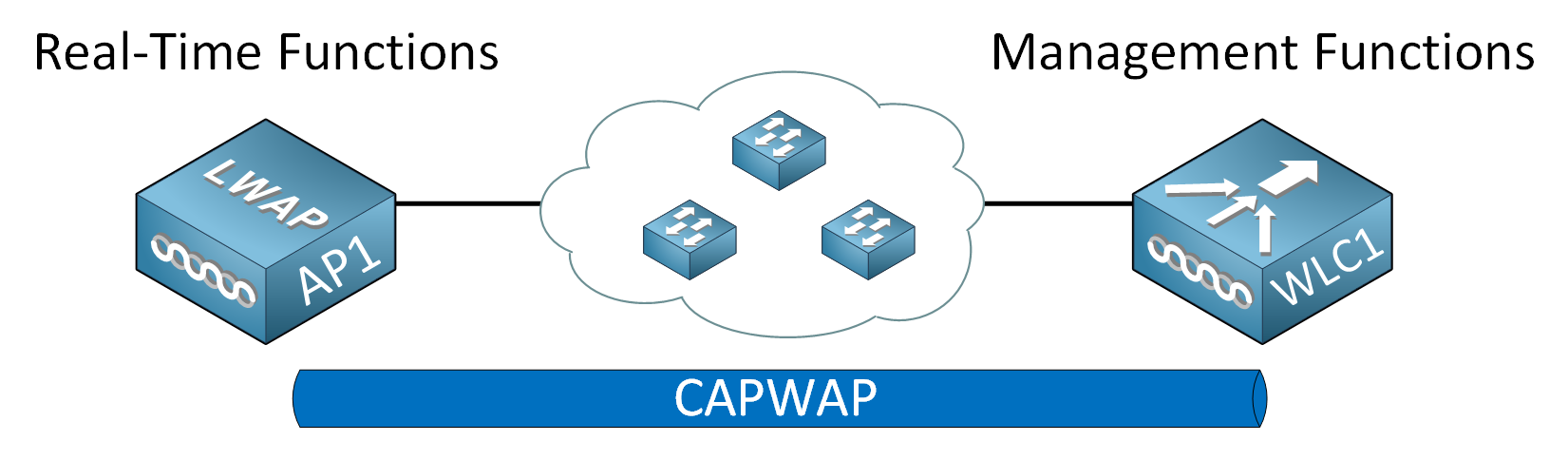
The specific functions are divided as follows:
Real-Time Functions (on the LAP):
- Transmitting and receiving 802.11 frames (beacons, probe responses).
- Handling MAC-layer acknowledgments and retransmissions.
- Encrypting and decrypting frames for connected clients.
Management Functions (on the WLC):
- Authentication: Verifying client identities before allowing them on the network.
- Association/Roaming: Managing which AP a client connects to and facilitating smooth handoffs as the client moves.
- Security & QoS Policy: Enforcing consistent security rules and quality of service policies across the entire network.
- RF Management: Centrally monitoring the radio environment and dynamically adjusting AP channel and power settings to optimize performance.
To explore this division of labor in more detail, let's turn to a resource from NetworkLessons.
Cisco Wireless Network Architectures - NetworkLessons.com
This article clearly explains the rationale behind the split-MAC architecture and lists the specific functions that are offloaded from the AP to the WLC.
Read the introductory section and the section titled "Split-MAC Architecture". Pay close attention to the bulleted lists that categorize the real-time and management functions.
CAPWAP: The Protocol That Connects It All
The separation of functions between the LAP and WLC would be impossible without a standardized way for them to communicate. This is the role of CAPWAP (Control and Provisioning of Wireless Access Points). CAPWAP is an IETF standard tunneling protocol that creates a logical connection between an AP and a WLC, allowing them to be on different IP subnets and even in different physical locations.
A CAPWAP connection consists of two distinct tunnels, both of which use UDP for transport:
-
CAPWAP Control Tunnel: This tunnel is used for all management and control traffic between the WLC and the LAP. This includes pushing configurations, firmware updates, and RF settings to the AP, as well as receiving status and monitoring information from the AP. This traffic is critical and sensitive, so it is encrypted by default using DTLS (Datagram Transport Layer Security). It operates on UDP port 5246.
-
CAPWAP Data Tunnel: By default, all traffic from wireless clients is encapsulated by the LAP and sent through this tunnel to the WLC. The WLC then de-encapsulates the traffic and forwards it onto the wired network. This traffic is not encrypted by default, although DTLS encryption can be enabled. It operates on UDP port 5247.
The video from Jeremy's IT Lab provides an excellent visual and verbal explanation of these two tunnels.
Free CCNA | Wireless Architectures | Day 56 | CCNA 200-301 Complete Course
This segment of the video clearly explains the CAPWAP protocol and its two tunnels.
Please watch the section covering CAPWAP from the introduction to the tunnels. Focus on the purpose of the control and data tunnels, their respective UDP port numbers, and their default encryption status.
The CAPWAP Discovery and Join Process
An LAP cannot function on its own; it must discover and "join" a WLC to become operational. This process is secured with X.509 digital certificates pre-installed on both the AP and WLC, which prevents unauthorized or "rogue" APs from joining your network.
The process generally follows these steps:
- Discovery: The LAP boots up and sends CAPWAP Discovery Request messages to find available WLCs. It can do this using several methods, including DNS, DHCP options, or Layer 3 broadcasts.
- Join: Once a WLC responds with a Discovery Response, the LAP selects a WLC and sends a Join Request. This request contains information about the AP, such as its model, software version, and name.
- Configuration: The WLC sends a Join Response. If there's a mismatch in software versions, the WLC will push the correct firmware image to the AP. The WLC then sends the AP its specific configuration, including the SSIDs to broadcast, security policies, and radio settings.
- Run State: Once configured, the AP enters the "Run" state and begins serving clients, with both the control and data tunnels fully established.
For a deeper look into the CAPWAP protocol's messages and operational modes, the following reading is highly recommended.
CAPWAP Protocol | Access Point Discovery & Join WLC ⋆ IPCisco
This article from IPCisco provides a detailed look at the CAPWAP protocol, including the messages exchanged during the join process and the different operational modes.
Please read the following sections: The overview of the protocol. The details of the discovery and join process. Note the specific information exchanged in the Join Request and Response messages. The brief explanation of the two operational modes, Split MAC and Local MAC. We are primarily discussing Split MAC mode, which is the default.
Traffic Flow in a Centralized World
Understanding the CAPWAP data tunnel is essential for grasping how client traffic traverses the network. In a default split-MAC deployment (also known as central switching), the data path is fundamentally different from that of an autonomous AP.
Consider a wireless client sending data to a server on the wired network.
- The client sends a standard 802.11 frame to the LAP.
- The LAP receives this frame. Instead of forwarding it directly, it encapsulates the entire frame within a CAPWAP packet. The new packet has the LAP's IP as the source and the WLC's IP as the destination.
- This CAPWAP packet is sent across the wired network to the WLC. To any intermediate switches and routers, this just looks like UDP traffic between the AP and the WLC; they are completely unaware of the original client packet inside.
- The WLC receives the CAPWAP packet, strips off the CAPWAP header (de-encapsulation), and retrieves the original client's frame.
- The WLC then acts as the logical entry point for the client onto the wired network. It places the client's traffic onto the appropriate VLAN and forwards it toward its final destination.
This process is visualized in the following diagram.

This central switching model has profound implications for network design and management. It means that all client traffic is funneled through a central point (the WLC), which is ideal for applying consistent security and QoS policies. It also simplifies the access layer, as the switch ports connecting to LAPs typically only need to be simple access ports in a single management VLAN, rather than complex trunks carrying multiple client VLANs.
Conclusion
In this lesson, we dissected the powerful split-MAC architecture that underpins modern enterprise Wi-Fi. You now have a detailed understanding of the distinct yet complementary roles of the WLC and its LAPs, and the critical protocol that enables their cooperation.
Key Takeaways:
- Split-MAC Architecture: Divides 802.11 functions between a central WLC (management) and distributed LAPs (real-time RF).
- WLC Functions: Handles authentication, roaming, security/QoS policy, and centralized RF management.
- LAP Functions: Manages the radio interface, including beaconing, frame transmission, and encryption. It is fully dependent on the WLC.
- CAPWAP Protocol: The standard tunneling protocol that connects LAPs to a WLC. It consists of two tunnels:
- Control Tunnel (UDP 5246): Encrypted; used for management.
- Data Tunnel (UDP 5247): Unencrypted by default; used for client data traffic.
- Central Switching: By default, all client traffic is tunneled from the LAP to the WLC, which then forwards it to the wired network. This centralizes policy enforcement and simplifies switch configuration.
Now that we understand the architecture and how the components communicate, the next logical step is to secure it. In our next lesson, we will explore the essential wireless security protocols, including WPA2, WPA3, and the enterprise-grade 802.1X/EAP framework.