Hello! In our last lesson, we explored the split-MAC architecture, establishing how Wireless LAN Controllers (WLCs) and Lightweight Access Points (LAPs) collaborate using the CAPWAP protocol. We now have a solid understanding of the physical and logical structure of a modern enterprise wireless network. The critical next step is to learn how to secure it.
This lesson addresses that need directly. We will explore the essential wireless security protocols that protect our data as it travels through the air. You will learn about the evolution from older standards to the robust WPA2 and WPA3 protocols. We'll differentiate between the "Personal" mode used in homes and the "Enterprise" mode that is fundamental to corporate networking. A significant portion of our lesson will be dedicated to the enterprise-grade 802.1X/EAP framework, a topic that will resonate with your security and network engineering focus. By the end of our session, you'll be able to describe how these protocols provide authentication, confidentiality, and integrity for wireless networks.
The Evolution of Wireless Security
Securing a wireless network is fundamentally about three things:
- Authentication: Verifying that only legitimate users and devices can connect.
- Confidentiality (Privacy): Encrypting data so that eavesdroppers cannot read it.
- Integrity: Ensuring that data has not been altered in transit.
The standards for achieving these goals have evolved significantly over time to counter emerging threats. The diagram below provides an excellent roadmap of this evolution, which we will follow throughout this lesson.
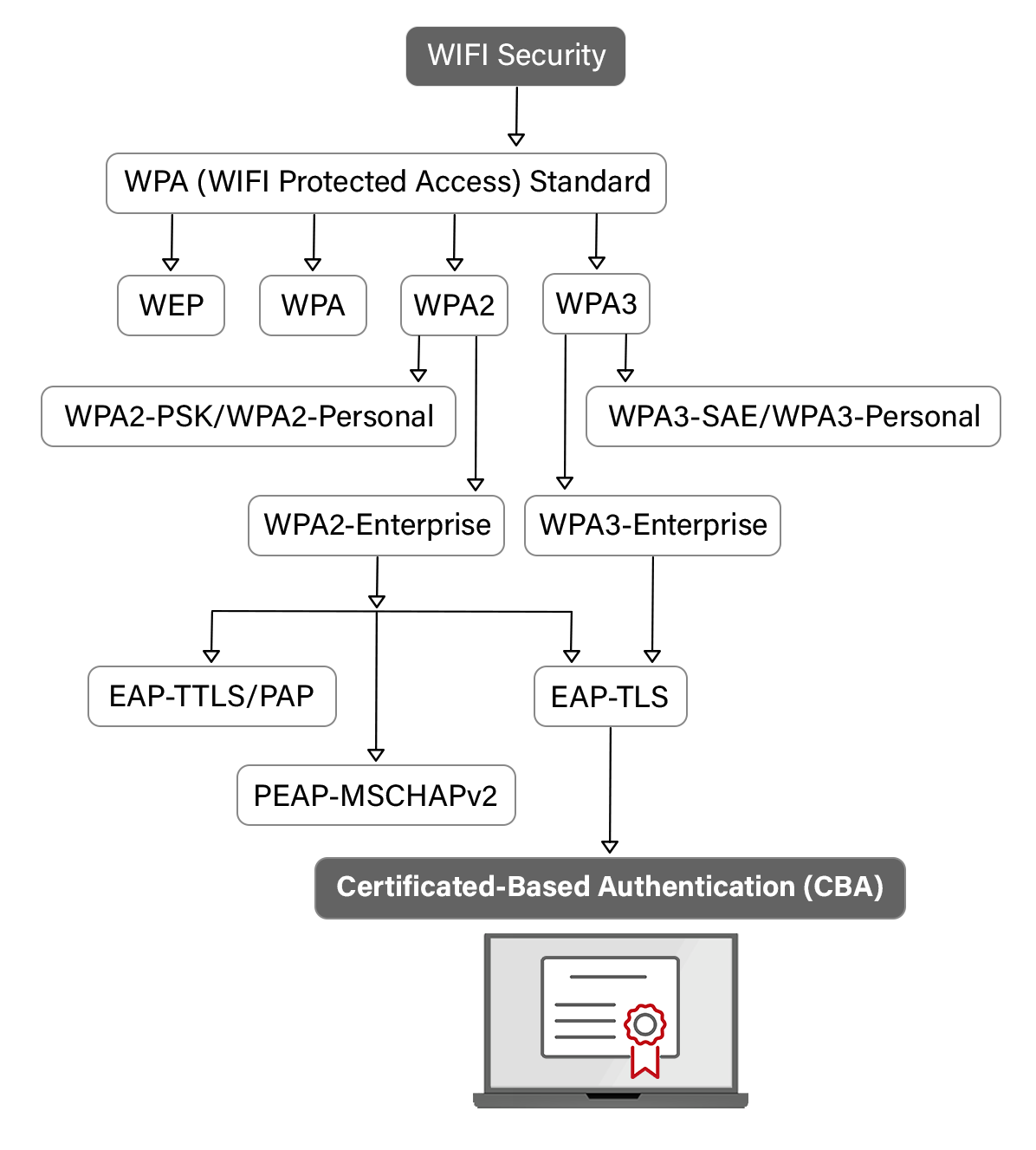
The earliest attempt at security, WEP (Wired Equivalent Privacy), was deeply flawed due to its use of a static encryption key and weaknesses in its RC4 encryption algorithm. It is now considered completely insecure and has been deprecated. Its failure led to the development of the much more robust Wi-Fi Protected Access (WPA) family of protocols.
WPA2: The Long-Standing Standard
For many years, WPA2 has been the industry standard for securing wireless networks. It dramatically improved upon previous protocols by mandating the use of a strong encryption protocol based on the Advanced Encryption Standard (AES). WPA2 operates in two distinct modes:
-
WPA2-Personal: Also known as WPA2-PSK (Pre-Shared Key), this mode is designed for home and small office use. All users authenticate to the network using the same password. While simple, it has a significant vulnerability: an attacker can capture the initial connection handshake and then perform an offline "brute-force" or dictionary attack to discover the password.
-
WPA2-Enterprise: This mode is designed for corporate environments. Instead of a single shared password, it integrates with the IEEE 802.1X standard to authenticate each user individually against a central server. This provides far greater security and control, and it will be our main focus in the next section.
WPA3: The Modern Standard
WPA3 is the latest generation of Wi-Fi security, designed to address the weaknesses of WPA2 and strengthen security for all types of networks.
-
WPA3-Personal: This mode eliminates the brute-force vulnerability of WPA2-Personal by replacing the PSK handshake with a new method called Simultaneous Authentication of Equals (SAE). Also known as the "Dragonfly Handshake," SAE creates a secure key exchange without ever exposing information that could be used in an offline attack.
-
WPA3-Enterprise: This mode continues to use the 802.1X framework but enforces even stronger cryptographic standards, making it suitable for high-security environments. It also makes Protected Management Frames (PMF) mandatory, which protects against attacks that try to disrupt the network by spoofing management traffic like deauthentication frames.
To get a clearer picture of these protocols and the critical differences between WPA2 and WPA3, the following video from Professor Messer is an excellent resource.
Wireless Security Settings - CompTIA Security+ SY0-701 - 4.1
This video provides a concise explanation of the security flaw in the WPA2 handshake and how WPA3's SAE mechanism resolves it.
Please watch the first two segments. The first part covers the WPA2 handshake vulnerability, and the second explains the advancements in WPA3, particularly the introduction of SAE.
Enterprise Authentication: 802.1X and EAP
While PSK-based security is adequate for a home network, it's unmanageable and insecure for an enterprise. You don't want to share a single password with hundreds or thousands of employees, and you need a way to revoke access for an individual who leaves the company without changing the password for everyone. This is where 802.1X comes in.
802.1X is an IEEE standard for Port-Based Network Access Control (PNAC). It provides a framework for authenticating devices before they are granted access to the network. In a wireless context, it's not a physical port on a switch, but a virtual port on the Access Point.
The 802.1X framework involves three key components:
- Supplicant: The client device attempting to connect to the network (e.g., your laptop or smartphone).
- Authenticator: The network device that controls access—in our split-MAC architecture, this is the AP/WLC system. It acts as an intermediary, passing authentication messages between the supplicant and the authentication server. It doesn't make the final decision itself.
- Authentication Server (AS): The centralized brain of the operation, almost always a RADIUS (Remote Authentication Dial-In User Service) server. It maintains the user database (usernames, passwords, certificates) and policies, and it makes the final decision to grant or deny access.
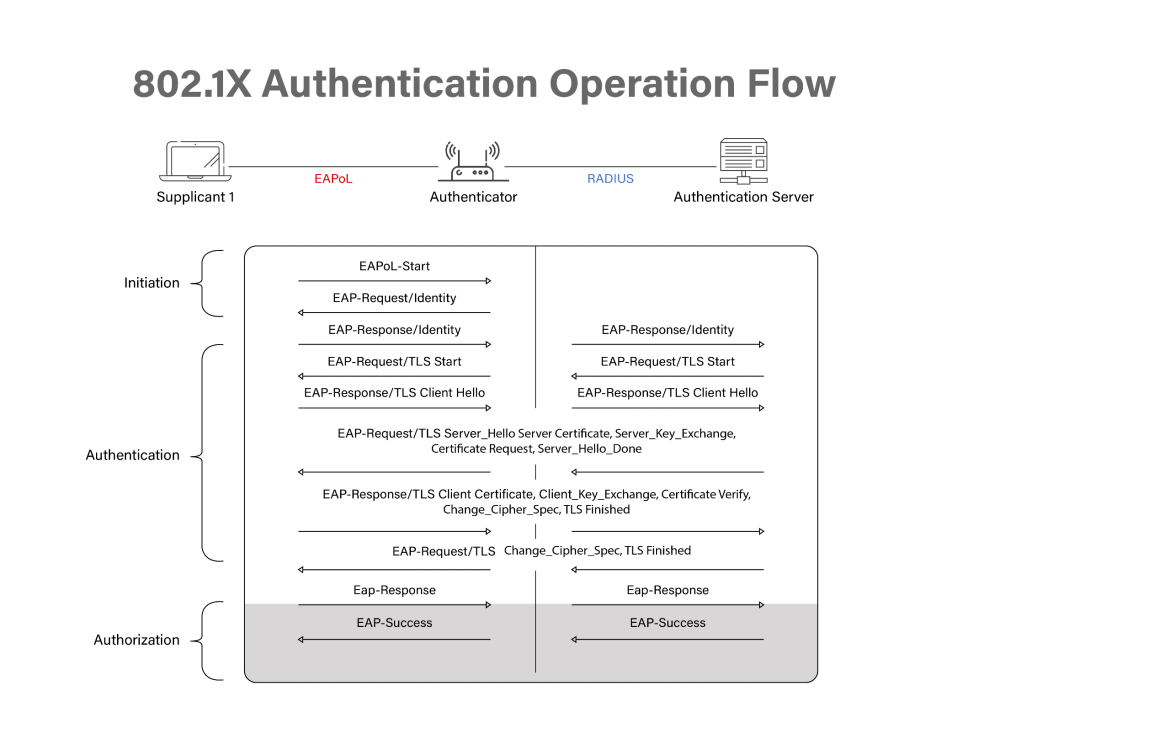
The authentication messages themselves are formatted using the Extensible Authentication Protocol (EAP). EAP is a flexible framework that supports various authentication methods, or "EAP types." The communication flow looks like this:
- The Supplicant sends an EAP message to the Authenticator (e.g., EAP-Request/Identity).
- The Authenticator encapsulates this EAP message within a RADIUS packet and forwards it to the Authentication Server.
- The Authentication Server processes the EAP message, makes a decision, and sends a RADIUS response (containing another EAP message) back to the Authenticator.
- The Authenticator de-encapsulates the EAP message and sends it to the Supplicant.
- This exchange continues until the Authentication Server sends a final RADIUS Access-Accept or Access-Reject message. If accepted, the Authenticator opens the virtual port, allowing the supplicant full network access.
The diagram below illustrates this multi-stage communication flow.
Common EAP Methods
Because EAP is a framework, several methods can be used within it. The two most important for you to know are:
-
PEAP (Protected EAP): One of the most common methods. It first establishes an encrypted TLS tunnel between the supplicant and the authentication server. To do this, the server proves its identity to the client using a digital certificate. Once the tunnel is built, the client authenticates itself inside the secure tunnel, often using simpler credentials like a username and password (specifically, MS-CHAPv2). This is popular because it only requires the server to have a certificate, not every single client device.
-
EAP-TLS (EAP-Transport Layer Security): Considered the most secure EAP method. It requires mutual authentication, meaning both the server and the client must have a digital certificate. They exchange certificates to prove their identities to each other before any access is granted. While highly secure, this method adds administrative overhead, as it requires a Public Key Infrastructure (PKI) to issue and manage certificates for all client devices.
For a comprehensive written guide covering the evolution of security, the 802.1X framework, and the different EAP methods, the following article is an excellent resource.
Wireless network security - IT Networking Skills
This blog post provides a detailed, well-structured explanation of all the concepts we are discussing, from the basics of authentication to the specifics of WPA versions and EAP types.
Please read the following sections: "Wireless client authentication methods" to understand the 802.1X/EAP framework and the roles of supplicant, authenticator, and authentication server. The subsection on EAP methods to compare LEAP, EAP-FAST, PEAP, and EAP-TLS. The section "WPA, WPA2, and WPA3" which provides a fantastic summary and comparison of the WPA certifications and their Personal vs. Enterprise modes.
Encryption Protocols: TKIP, CCMP, and GCMP
Once a client is authenticated, its data must be encrypted to ensure confidentiality and integrity. The WPA version you use dictates which encryption protocol is available.
-
TKIP (Temporal Key Integrity Protocol): Associated with the original WPA. It was designed as a transitional protocol to fix WEP's flaws while still being able to run on older hardware. It uses the same underlying RC4 cipher as WEP but wraps it with features like per-packet key mixing and a message integrity check (MIC). TKIP is now considered insecure and deprecated.
-
CCMP (Counter Mode with CBC-MAC Protocol): This is the mandatory protocol for WPA2 and is vastly more secure than TKIP. It is based on the AES (Advanced Encryption Standard), the same strong encryption algorithm used by governments and corporations worldwide to protect sensitive data. CCMP provides both encryption (confidentiality) and a strong message integrity check.
-
GCMP (Galois/Counter Mode Protocol): This is the protocol associated with WPA3. Like CCMP, it is based on AES, but it uses a more modern and efficient mode of operation. GCMP offers even stronger authenticated encryption and can provide higher performance than CCMP, making it ideal for the latest generation of high-speed wireless networks.
The following video from Jeremy's IT Lab provides a good summary of these encryption methods and how they fit into the WPA certifications.
Free CCNA | Wireless Security | Day 57 | CCNA 200-301 Complete Course
This video offers a clear review of the encryption protocols and ties them together with the WPA, WPA2, and WPA3 certifications.
Please watch these two sections: The review of encryption and integrity methods, which covers TKIP, CCMP, and GCMP. The final section on WPA, WPA2, and WPA3, which explains how the Wi-Fi Alliance bundles these protocols into standard certifications.
Conclusion
In this lesson, we navigated the landscape of modern wireless security. You have seen how protocols have evolved to counter threats and provide robust protection for data transmitted over the air.
Key Takeaways:
- Wireless security has progressed from the broken WEP standard to the robust WPA family, with WPA2 being the long-time standard and WPA3 being the modern, more secure successor.
- WPA protocols offer two modes: Personal (PSK) for simple password-based access in small networks, and Enterprise (802.1X) for scalable, user-based authentication in corporate environments.
- WPA3-Personal fixes a major vulnerability in WPA2-Personal by using SAE (Simultaneous Authentication of Equals).
- The 802.1X framework is the cornerstone of enterprise security, utilizing three roles: the Supplicant (client), Authenticator (AP/WLC), and Authentication Server (RADIUS).
- EAP is the authentication protocol framework used by 802.1X, with PEAP and EAP-TLS being the most common and secure methods.
- The WPA version determines the encryption protocol: WPA uses the deprecated TKIP, WPA2 uses the strong CCMP (AES), and WPA3 uses the even more efficient GCMP (AES).
With this knowledge of wireless architecture, communication, and security, you are now ready to apply it. In our next lesson, we will move into practical configuration, starting with how to access a Cisco WLC's interface and set up a new wireless network using WPA2-PSK.