Welcome to your first lesson on Quality of Service. In our last session, we focused on troubleshooting wireless connectivity, ensuring that clients can successfully join the network. Now that we have established connectivity, we will shift our focus to ensuring the quality of that connection.
This lesson introduces the fundamental purpose of Quality of Service (QoS). You will learn why the default "best-effort" approach of network devices is insufficient for modern applications and how QoS addresses the problems caused by network congestion. We will explore the different characteristics of voice, video, and data traffic and understand why they require different treatment to ensure a good user experience.
The Problem: Best-Effort Forwarding and Congestion
By default, network devices like routers and switches operate on a First-In, First-Out (FIFO) basis. This is also known as "best-effort" delivery. It means that all packets are treated equally; they are processed in the order they arrive, regardless of their content or importance.
Imagine a single-lane road where every vehicle—ambulances, commuter cars, and delivery trucks—is stuck in the same line of traffic. The ambulance (carrying time-sensitive voice data) is delayed by the delivery truck (a large file download) in front of it. This is how a network without QoS operates during periods of congestion.
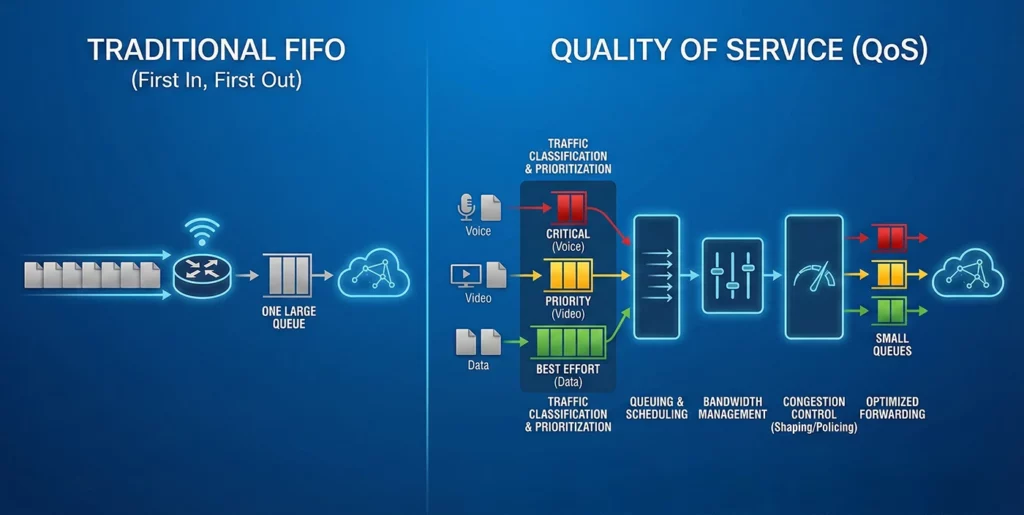
This best-effort model works fine when there is plenty of bandwidth. However, congestion occurs whenever more traffic is sent to an interface than it can transmit. This is common in several scenarios:
- Speed Mismatches: When traffic from a fast link (e.g., a 1 Gbps LAN) must be sent out a slower link (e.g., a 100 Mbps WAN connection).
- Aggregation Points: When multiple links feed into a single link of the same speed (e.g., traffic from several 1 Gbps access switch ports converging on a single 1 Gbps uplink).
When congestion occurs, the router's interface queue begins to fill up. Once the queue is full, any new incoming packets are simply dropped. For some applications, this is disastrous.
Introduction to QoS (Quality of Service) - NetworkLessons.com
The article "Introduction to QoS" from NetworkLessons.com provides a great starting point by explaining the limitations of the default best-effort model.
Please read the first part of the article, from the beginning down to the start of the "Characteristics of network traffic" section. This will solidify your understanding of why FIFO is a problem when congestion arises.
Different Traffic, Different Needs
The core reason best-effort forwarding fails is that not all network traffic is created equal. The impact of network performance issues depends entirely on the application. To understand this, we need to look at four key traffic characteristics that QoS aims to manage.
- Bandwidth: The data rate or capacity of a link, measured in bits per second (bps).
- Delay (Latency): The time it takes for a packet to travel from a source to a destination.
- Jitter: The variation in delay between packets in a single stream. A consistent delay is manageable, but an inconsistent, jittery one can corrupt real-time streams.
- Loss: The percentage of packets that are dropped and never reach their destination, often due to full queues during congestion.
The following video provides an excellent explanation of these parameters and how they impact different types of network traffic.
How Quality Of Service (QoS) Helps Enhance The User/Client Experience In A Network | CCNA 200-301
This video from KBTrainings With Guy Bisuku clearly defines the critical network parameters that QoS is designed to control.
Please watch the segment from this point, which covers bandwidth, latency, jitter, and packet loss. Pay close attention to the example of how high jitter can cause voice packets to arrive out of order, garbling the conversation.
As you just saw, different applications have vastly different tolerances for these issues.

Let's categorize applications based on their sensitivity:
- Voice Traffic (e.g., VoIP): Extremely sensitive to delay and jitter. For a natural conversation, one-way delay should be less than 150ms and jitter less than 30ms. It doesn't require much bandwidth, but that bandwidth must be reliably available with minimal delay.
- Video Traffic (e.g., video conferencing): Also very sensitive to delay and jitter, though slightly more tolerant than voice. It is much more bandwidth-intensive.
- Interactive Data (e.g., SSH, remote desktops): These don't use much bandwidth, but they are sensitive to delay because a laggy connection is frustrating for the user. They are not very sensitive to jitter.
- Bulk Data (e.g., FTP, email, file backups): These applications are bandwidth-hungry but are largely insensitive to delay and jitter. A file transfer that takes 60 seconds instead of 50 is rarely a problem. They use TCP, which reliably retransmits any lost packets.
The following resource further explores this concept by comparing how a file transfer and a VoIP call are affected by network performance issues.
QoS Overview | Cisco CCNA 200-301
In this video, Keith Barker uses a practical scenario to highlight why an application like FTP can easily handle network delay, while a real-time voice conversation cannot.
Watch the segment from this section. This effectively contrasts a robust, delay-tolerant application with a fragile, delay-sensitive one, cementing the need for differentiated treatment.
The Purpose of QoS: Intelligent Congestion Management
Now that we understand the problem, the solution becomes clear. The purpose of QoS is to implement a policy that treats traffic differently based on its requirements, especially during times of congestion.
QoS does not create more bandwidth. Instead, it intelligently manages the existing bandwidth. If a link is congested 100% of the time, the only real solution is to upgrade the link. QoS is a tool for managing periodic congestion, ensuring that when resources are scarce, they are allocated according to business priorities.
This is achieved through a series of mechanisms:
- Classification: The router first identifies and categorizes packets into different classes (e.g., voice, video, bulk data).
- Marking: The router "tags" these packets with a specific value (e.g., a DSCP value in the IP header) so that other devices in the path can quickly identify their class without having to re-inspect them.
- Queuing: Instead of one FIFO queue, the router uses multiple queues. High-priority traffic (like voice) is placed in a dedicated priority queue, while lower-priority traffic is placed in other queues.
- Policing/Shaping: The router enforces rate limits on traffic to prevent any single application from consuming too much bandwidth.
This process ensures that when congestion occurs, critical applications get the resources they need, while less-critical applications experience the delays or packet drops.
How Quality Of Service (QoS) Helps Enhance The User/Client Experience In A Network | CCNA 200-301
The KBTrainings video now brings everything together by showing how QoS solves the congestion problem in a practical VoIP vs. email scenario and lists the overall benefits.
First, watch the whiteboard explanation from this segment. It clearly demonstrates how QoS prioritizes voice packets and allows email packets to be queued during congestion. Then, watch the summary of QoS advantages, such as application prioritization and better resource management.
This proactive management of network resources is the essence of Quality of Service.
Quality of Service (QoS) - Relentless Coding
This article from Relentless Coding provides a concise summary of the problems QoS addresses and introduces the core tools it uses.
Please read the section What Is QoS?. This reinforces the four characteristics of network traffic and lists the four main tools that we will be exploring in our upcoming lessons.
Conclusion
In this lesson, you have learned the fundamental purpose of Quality of Service. We've moved beyond simply establishing connectivity to understanding how to manage its quality for a diverse range of applications.
Key Takeaways:
- Networks default to a best-effort (FIFO) model, which treats all traffic equally and is inadequate during periods of congestion.
- Network performance is defined by bandwidth, delay, jitter, and loss. Different applications have different sensitivities to these factors.
- Real-time traffic (voice, video) is highly sensitive to delay and jitter, while data traffic (file transfers, email) is much more tolerant.
- The purpose of QoS is not to create bandwidth, but to intelligently manage existing bandwidth during congestion.
- QoS works by classifying, marking, and queuing traffic to provide preferential treatment to critical applications, ensuring a better user experience.
You now understand why QoS is essential. In our next lesson, we will begin to explore how it works by diving into its core mechanisms: classification, marking, queuing, and the use of DSCP and CoS values to tag traffic for differentiated treatment.