Following our exploration of the virtualized environment inside a server, let's now shift our focus to the physical network infrastructure that connects these servers and all other devices within an organization. In this lesson, we will examine the foundational blueprints for designing campus networks.
Our objective is to compare the traditional three-tier hierarchical design with the more streamlined two-tier, or "collapsed core," design. Understanding the principles, advantages, and trade-offs of these architectures is crucial for building scalable, resilient, and cost-effective networks.
The Cisco Hierarchical Network Model
Before comparing specific designs, it's important to understand why we use a hierarchical model. By dividing a large, complex network into smaller, more manageable layers, we gain several benefits:
- Scalability: The modular design allows the network to grow without a major redesign.
- Resilience: Redundancy can be built into each layer, improving fault tolerance.
- Performance: Traffic flows are predictable, and high-performance devices can be placed where they are most needed.
- Manageability: Troubleshooting is simplified because the function of each layer is well-defined.
The classic hierarchical model consists of three distinct layers: Access, Distribution, and Core.
The Three-Tier Architecture
The three-tier architecture is the traditional, go-to design for large enterprise and campus networks. It provides maximum scalability and resilience by dedicating a separate layer to each of the primary network functions.
The following video from Kevin Wallace Training provides a clear explanation of this model and the role of each layer.
CCNA R&S version 3 Topic: Collapsed Core vs. Three-Tier Architectures
This video introduces the three-tier architecture and explains the function of the access, distribution, and core layers.
Please watch the segment that details the three-tier model. As you watch, focus on the specific responsibilities of each layer and the types of devices typically found in them.
To solidify your understanding, let's break down the layers as described in the video:
-
Access Layer: This is the edge of the network where end-user devices (computers, IP phones, printers) and servers connect. Its primary job is to provide network access to these devices.
- Function: Layer 2 switching, port security, VLAN membership, Power over Ethernet (PoE).
- Devices: Typically Layer 2 switches.
-
Distribution Layer: This layer aggregates traffic from the access layer switches and serves as the boundary between the Layer 2 access domain and the Layer 3 core. This is where most policy enforcement happens.
- Function: Inter-VLAN routing, applying access control lists (ACLs) and QoS policies, redundancy and load balancing.
- Devices: High-performance multilayer switches capable of both switching and routing.
-
Core Layer (Backbone): The core is the high-speed heart of the network. Its sole purpose is to forward packets between distribution layer devices as quickly and reliably as possible. It should not be burdened with complex tasks like policy filtering.
- Function: Fast and reliable Layer 3 switching (routing).
- Devices: The fastest and most powerful switches in the network.
The following image provides a clear visual of this hierarchical structure.
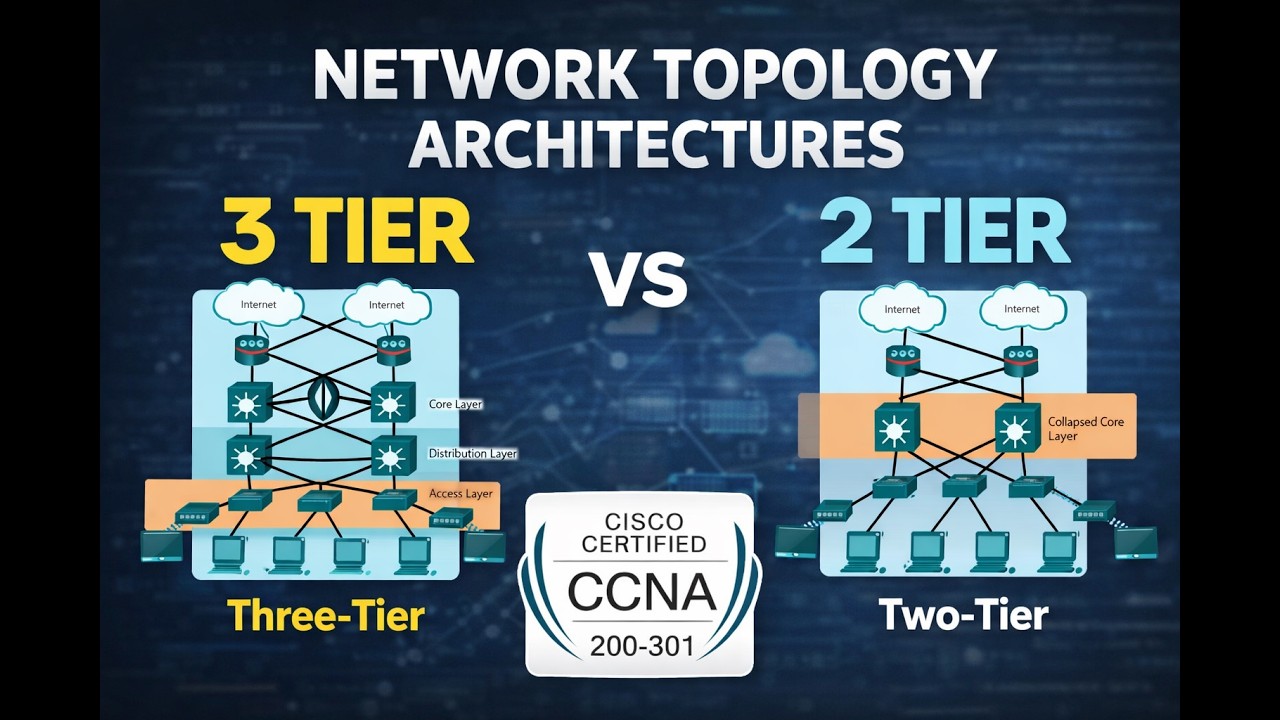
The Two-Tier (Collapsed Core) Architecture
For small to medium-sized networks, a full three-tier implementation can be overkill in terms of both cost and complexity. In these scenarios, a two-tier or collapsed core architecture is a common and practical alternative.
In this design, the functions of the core and distribution layers are combined into a single layer, which is handled by one set of switches.

This simplified design has two layers: the access layer remains the same, while the new collapsed core/distribution layer handles aggregation, policy enforcement, and high-speed transport.
The following reading from Study CCNA explains this model and its benefits and limitations.
Collapsed Core and Three-Tier Network Architectures - Study CCNA
This article provides concise definitions of the network layers and then describes the collapsed core architecture, including its pros and cons.
First, quickly review the key terminologies to ensure you're clear on the role of each layer. Then, read the section on Collapsed Core Architecture, paying attention to the discussion of costs, simplicity, scalability, and resiliency.
Comparing the Architectures: A Matter of Trade-offs
The choice between a two-tier and a three-tier design is fundamentally about balancing cost and simplicity against scalability and resilience. There is no single "best" answer; the right choice depends on the specific needs of the organization.
The following resource from Network Journey provides a detailed, side-by-side comparison that is extremely helpful for understanding these trade-offs.
Complete Guide with EVE-NG Lab & CLI [CCNP Enterprise]
This guide offers a direct comparison of the two models, including clear tables summarizing their characteristics, pros and cons, and typical use cases.
Begin with the Theory in Brief section for a quick summary of both models. Next, carefully study the tables in the Comparison section. These tables directly contrast the architectures on criteria like complexity, scalability, and cost. Finally, review the Use Cases table to see concrete examples of when each architecture is the appropriate choice.
As you can see from the resources, the decision boils down to these key points:
- Three-Tier: Best for large, sprawling campus networks with thousands of users across multiple buildings. It provides the modularity needed for future growth and the high availability required for critical operations. The cost and complexity are justified by the scale.
- Two-Tier: Ideal for small to medium-sized businesses, branch offices, or any network where the scale does not warrant a dedicated core layer. It offers significant cost savings and is simpler to manage, but it may become a bottleneck if the network grows unexpectedly.
Conclusion
In this lesson, we have compared the two most common hierarchical designs for campus networks. We analyzed the distinct roles of the access, distribution, and core layers in the traditional three-tier model and saw how the two-tier model simplifies this by collapsing the core and distribution functions into a single layer.
Key Takeaways:
- Hierarchical design provides scalability, resilience, and manageability by dividing the network into functional layers.
- The three-tier architecture (Access, Distribution, Core) is the standard for large, complex enterprise networks, offering maximum performance and scalability.
- The two-tier (collapsed core) architecture is a cost-effective and simpler solution for small to medium-sized networks, sacrificing some scalability for reduced complexity.
- The choice of architecture is a critical design decision that involves a trade-off between scalability, resilience, cost, and complexity, tailored to an organization's specific requirements.
In our next lesson, we will move from the campus to the data center and explore the spine-leaf architecture, a design that has become the standard for building the high-performance, east-west traffic patterns required by modern virtualized environments.