Hello! In our last lesson, we focused on measuring the effectiveness of your VLSM plans by calculating address utilization efficiency. This put a number on our goal of minimizing IP address waste.
Today, we'll zoom in on a very specific but common type of network segment: the point-to-point link. These are the connections that tie your core network devices together. Wasting addresses here, even a few at a time, adds up across a large architecture.
Our learning outcome is to plan subnets for point-to-point links using /30 or /31 prefixes. Mastering this is a key step in creating a truly efficient and professional IP address management (IPAM) plan.
1. Point-to-Point Links: The Traditional /30
A point-to-point link is a direct connection between two, and only two, network devices. In your environment, this will typically be the link between two Layer 3 switches that are routing traffic for your network.
For decades, the standard practice has been to use a /30 subnet for these links. Let's break down why.
- A
/30subnet has a block size of 4 IP addresses. - These 4 addresses are broken down into:
- 1 Network Address (e.g.,
10.0.0.0) - 1 Broadcast Address (e.g.,
10.0.0.3) - 2 Usable Host Addresses (e.g.,
10.0.0.1and10.0.0.2)
- 1 Network Address (e.g.,
This works perfectly: you have exactly two usable addresses, one for the interface on each switch.
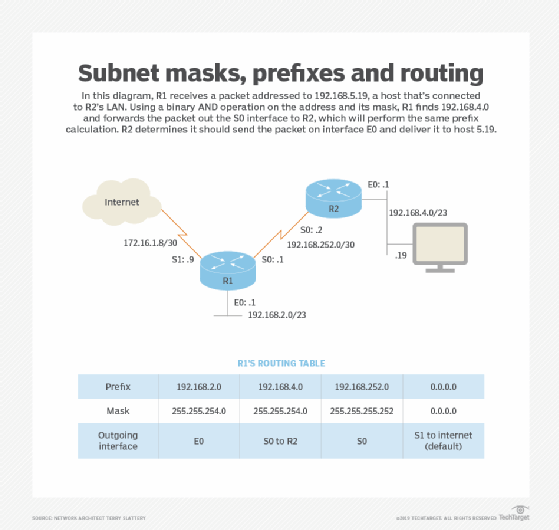
While this method is functional and widely supported, it's not perfectly efficient. For every link, you are consuming 4 addresses from your pool to use only 2. That's a 50% waste. In a large network with many routed links, this can consume a significant amount of address space.
2. The Modern, Efficient Approach: The /31
To address this inefficiency, RFC 3021 was introduced. It allows for the use of a /31 prefix (a subnet mask of 255.255.255.254) for point-to-point links.
The logic is simple: on a true point-to-point link, there are no other hosts. There is no need for a network address or a broadcast address. Any packet sent by one device on the link can only be destined for the device on the other end.
A /31 subnet gives you a block of 2 addresses, and RFC 3021 allows both to be used as host addresses.

This simple change has a huge impact on efficiency.
Point-to-Point links with /31 – RFC-3021
The article 'Point-to-Point links with /31' provides a great comparison and demonstrates the impact of this technique.
Read the first few paragraphs, down to and including the comparison table. Note how using a /31 doubles the number of point-to-point links you can create from a parent block like a /24.
By using /31s, you cut the number of addresses required for your infrastructure links in half. This frees up valuable address space for your user VLANs and future growth.
3. Practical Use and Configuration
You're a hands-on CLI guy, so let's see what this looks like in practice. Using /31 masks has been supported on Cisco IOS for a long time.
Point-to-Point links with /31 – RFC-3021
The same article provides a full configuration example on Cisco IOS routers. This is identical to how you would configure it on Layer 3 switches.
Please read the sections titled 'Configuration on Router IOSV-1', 'Configuration on router IOSV-2', and 'Verification'. Pay close attention to two things: The % Warning message the CLI gives you when applying the /31 mask. The verification ping, which shows a ping to what would traditionally be a network address (172.16.16.0).
As you saw in the configuration:
- The IPs assigned were
172.16.16.0and172.16.16.1. Traditionally,.0would be an unusable network address. Here, it's a valid host IP. - The ping from
iosv-2to172.16.16.0is successful, proving that the router treats it as a standard host address. - The warning message (
% Warning: use /31 mask on non point-to-point interface cautiously) appears because Ethernet is historically a broadcast-capable, multi-access medium. The OS is reminding you that this mask should only be used on links where you know there are only two devices. For a dedicated link between two switches, this is perfectly safe and recommended.
The article "Designing a Scalable Enterprise IP Scheme" from Cisco Jedi also has a great "BATTLE TIP" on this, confirming its use and vendor support. It's a useful technique to have in your arsenal.
4. Your Turn: Address Planning Exercise
Let's put this into practice. Imagine you're building out a new distribution layer for your network. You need to connect three new buildings, which will require three new point-to-point routed links.
You have been allocated the address block 172.25.100.16/28 to address these three links.
Your Task:
- Create an addressing plan for the three links using the traditional
/30method. Can you fit all three links into the allocated block? - Now, create a plan for the same three links using the modern
/31method. - How many addresses would be wasted in total using the
/30plan vs. the/31plan for these three links?
Take a few minutes to work this out. Document the network address, prefix, and usable IPs for each link in both scenarios.
Click here to see the solution.
The allocated block is 172.25.100.16/28, which contains 16 addresses (from 172.25.100.16 to 172.25.100.31).
1. /30 (4 addresses per link) Plan:
With a block of 16 addresses, you can create 16 / 4 = 4 subnets of /30 size. So yes, you can fit the three links.
- Link 1:
172.25.100.16/30- Usable IPs:
.17,.18
- Usable IPs:
- Link 2:
172.25.100.20/30- Usable IPs:
.21,.22
- Usable IPs:
- Link 3:
172.25.100.24/30- Usable IPs:
.25,.26
- Usable IPs:
This plan uses the address space from 172.25.100.16 through 172.25.100.27.
2. /31 (2 addresses per link) Plan:
With a block of 16 addresses, you could create 16 / 2 = 8 subnets of /31 size.
- Link 1:
172.25.100.16/31- Usable IPs:
.16,.17
- Usable IPs:
- Link 2:
172.25.100.18/31- Usable IPs:
.18,.19
- Usable IPs:
- Link 3:
172.25.100.20/31- Usable IPs:
.20,.21
- Usable IPs:
This plan uses the address space from 172.25.100.16 through 172.25.100.21.
3. Waste Calculation:
-
/30Plan:- You allocated 3 subnets * 4 addresses/subnet = 12 total addresses.
- You needed 3 links * 2 addresses/link = 6 addresses.
- Total Wasted Addresses = 12 - 6 = 6 addresses.
-
/31Plan:- You allocated 3 subnets * 2 addresses/subnet = 6 total addresses.
- You needed 3 links * 2 addresses/link = 6 addresses.
- Total Wasted Addresses = 6 - 6 = 0 addresses.
The /31 plan is 100% efficient, saving 6 addresses compared to the /30 plan and leaving a larger contiguous block (172.25.100.22 to .31) free for future use.
Conclusion
Excellent work. You now have the complete toolset for efficient IP allocation with VLSM, right down to the infrastructure links that form the backbone of your network.
Key Takeaways:
- Point-to-point links are traditionally addressed with
/30subnets, which provide 2 usable IPs but waste 2 addresses per link. - The modern, highly efficient method is to use a
/31subnet (as per RFC 3021), which provides 2 usable IPs in a 2-address block, eliminating waste. - Most modern network operating systems, including Cisco IOS, fully support
/31addressing on point-to-point interfaces. - Using
/31s for your infrastructure links preserves the maximum amount of address space for your user and server subnets.
This lesson concludes our module on Variable Length Subnet Masking. You now have a solid foundation in how to design and document a highly efficient IPv4 addressing scheme.
In our next lesson, we will shift our focus from Layer 3 addressing to Layer 2 segmentation. We will start by exploring how VLANs create separate Layer 2 broadcast domains, which is the first step in building the secure, segmented architecture you need.