Welcome back. In our last lesson, we established the commercial framework for our SaaS by designing the subscription model and feature gates. We made a critical distinction between entitlements—what a company has paid for—and permissions—what a user is allowed to do.
Today, we drill down into that second concept. We will architect the core of our application's security and user management: the Role-Based Access Control (RBAC) system. Your prior experience implementing RBAC in Django will serve as a strong foundation, but we will be adding layers of complexity to accommodate multi-tenancy and the dynamic, per-tenant customization that is a hallmark of modern, enterprise-ready SaaS products. Our objective is to define a clear role hierarchy and map the permission boundaries for each role, setting the stage for a secure and flexible system.
The Role Hierarchy: Platform vs. Tenant
In a multi-tenant system, not all roles are created equal. Their power is defined by their scope. We will establish a three-tiered hierarchy:
-
Super Admin (Platform Scope): This is you, the platform owner. There is only one type of Super Admin. Their scope is global, spanning across all tenants. They are the operators of the entire SaaS platform. Their permissions are absolute and hard-coded; they can manage tenants, oversee system health, and handle platform-wide configurations. We will design the system to essentially bypass all permission checks for this role.
-
Company Admin (Tenant Scope): This is the owner or primary administrator of a single tenant (a company). When a new company signs up, the first user is automatically assigned this role. Their scope is strictly limited to their own tenant. They wield significant power within that tenant, including managing users, assigning roles, and configuring tenant-specific settings. Crucially, they are the ones who can create and manage custom roles for their own team.
-
Custom Roles (Tenant Scope): These are the roles created by a Company Admin to model their organization's internal structure—for example, "Project Manager," "Foreman," "Accountant," or "Site Inspector." Like the Company Admin, their scope is confined to the tenant. The flexibility to create these roles is a powerful feature and one that we gated behind the "Business" subscription tier in our previous lesson.

Architectural Patterns for Multi-Tenant RBAC
Now for the senior architect decision: how do we model this in a way that is secure, scalable, and maintainable? A naive RBAC implementation can quickly lead to data leaks or a "role explosion" that becomes impossible to manage. We need to choose the right pattern from the start.
There are three common architectural patterns for multi-tenant RBAC. The choice among them is one of the most critical you'll make in designing the system's foundation.
How to design an RBAC model for multi-tenant SaaS
This article from WorkOS is an exceptional guide to the core architectural patterns for multi-tenant RBAC. It provides the "why" behind the design, which is central to your goal of thinking like an architect.
Start by reading the introduction to understand the core challenges. Then, carefully study the three patterns described in the section "Common patterns for multi-tenant RBAC." Pay close attention to the schema diagrams and the pros and cons of "Global roles" vs. "Tenant-scoped roles."
As you've just read, "Global roles" are too rigid for our needs, as they don't support per-tenant customization. "Tenant-scoped roles" offer maximum flexibility but can lead to chaos and complexity.
This leads us to our chosen architecture: the Hybrid/Role Templates model.
This model provides the best of both worlds:
- We will define global, system-level "role templates" for common roles like Company Admin and a default Member. These provide sane defaults.
- We will then empower Company Admins (on the correct subscription plan) to create their own Custom Roles. These roles will live in the
rolestable and be explicitly linked to atenant_id.
This hybrid approach gives us a stable, predictable foundation while delivering the powerful customization required by enterprise clients.
Defining Permissions: Atomic Actions and Bitmasks
A role is simply a collection of permissions. To build a flexible system, we must first define our permissions as granular, atomic units. The standard practice is to use a resource:action format.
For our Construction Management System, these would look like:
project:createproject:readtask:assign_userdocument:deleteuser:invite
A Company Admin would then create a "Project Manager" role by bundling permissions like project:create, task:create, task:assign_user, etc.
Now, how do we store these efficiently? A role might have dozens of permissions. Storing this as a list of strings and running JOIN queries across multiple tables (user_roles, role_permissions, permissions) for every single API request is a classic performance bottleneck.
This is where a clever optimization comes in: bitmasks (or bitfields). By assigning each unique permission a value that is a power of two (1, 2, 4, 8, 16...), we can represent a role's entire permission set as a single integer.
project:read= 1 (binary0001)project:create= 2 (binary0010)project:update= 4 (binary0100)project:delete= 8 (binary1000)
A "Project Read-Only" role would have a permission value of 1. A "Project Editor" role (read + update) would be 1 + 4 = 5 (binary 0101). An "Admin" role for projects would be 1 + 2 + 4 + 8 = 15 (binary 1111).
To check if a role has a specific permission, we perform a bitwise AND operation.if (role_permissions & required_permission) != 0:
This is an incredibly fast, O(1) check that avoids expensive database joins on the hot path of request authorization.
RBAC for Multi-Tenant Platforms Using Bit Masks - Medium
This article provides a focused look at the bitmask technique, explaining both the "why" and the "how."
Read the sections Introducing Permission Bit Masks and Why Bit Masks Fix the Pain to solidify your understanding of this concept. Then, briefly review the FastAPI implementation example to see how this translates into Python code.
We will adopt this bitmask approach for storing the permissions of our custom roles. For a 64-bit integer (bigint in PostgreSQL), this gives us 64 unique permissions, which is more than enough for our V1. If we ever exceed that, we can use multiple integer columns.
Putting It All Together: Role and Permission Boundaries
Let's consolidate our design.
-
Super Admin:
- Scope: Global (platform-wide).
- Permissions: All permissions on all resources across all tenants. This will be handled by a special case in our authorization logic, effectively bypassing the RBAC check.
-
Company Admin:
- Scope: Tenant-wide.
- Source: A system-defined, non-deletable role template.
- Permissions: A pre-configured set of high-privilege permissions, including:
user:invite,user:remove,user:update_rolesrole:create,role:update,role:delete(gated by subscription entitlement)billing:read,billing:update- Full CRUD on core resources like
project,task,document.
-
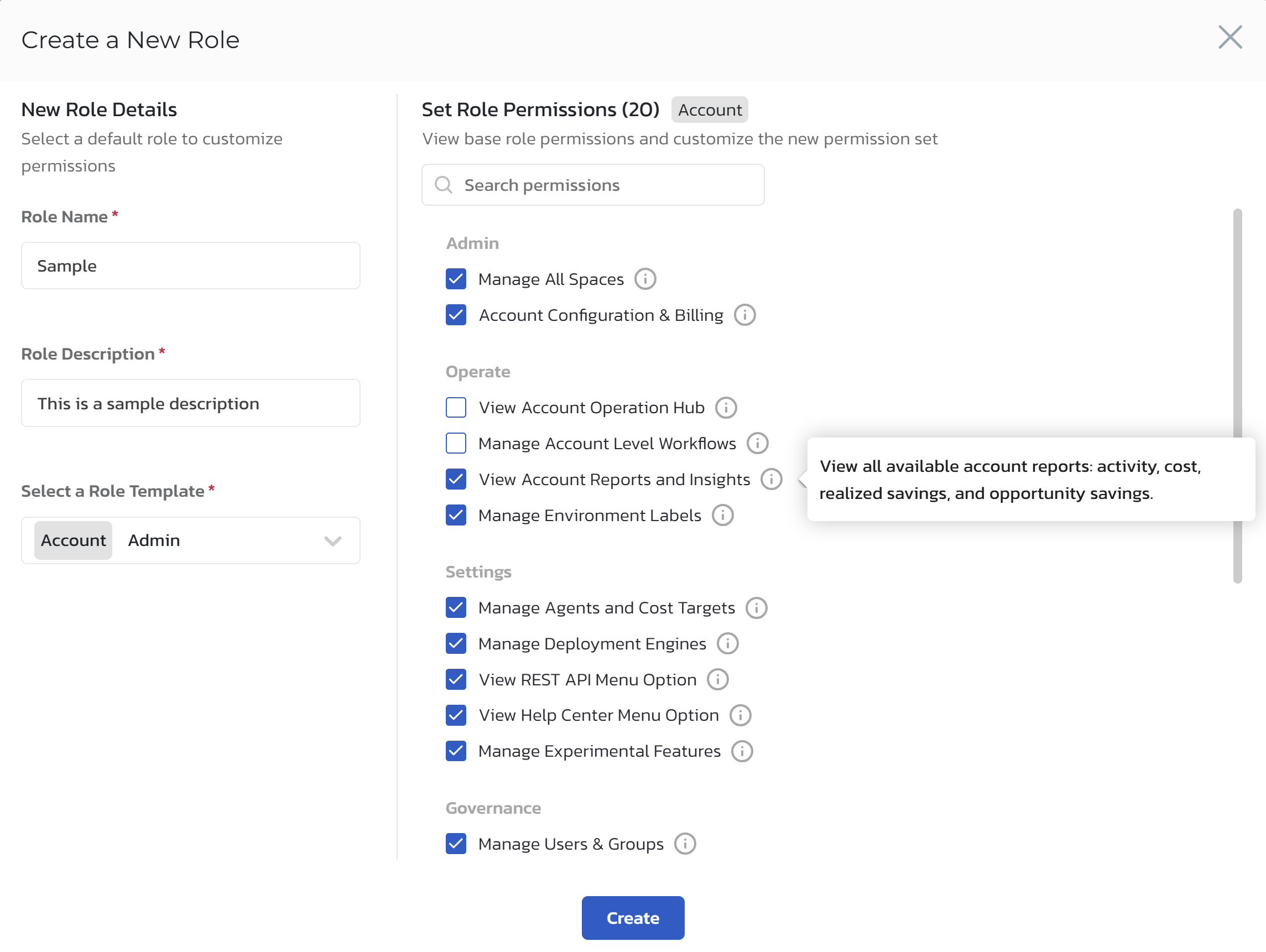
Custom Roles (e.g., "Foreman"):
- Scope: Tenant-wide.
- Source: Created by a Company Admin. Stored in a
rolestable with atenant_id. - Permissions: A custom combination of atomic permissions, selected by the Company Admin through the UI and stored as a bitmask integer.
Beyond RBAC: Attribute-Based Access Control (ABAC)
Finally, as a senior engineer, it's important to know the limits of your chosen pattern. Pure RBAC answers "Can a role perform this action?" But what if the answer depends on the object itself? For example: "A user can edit a task only if they are the author" or "A user can delete a project only if it has no active tasks."
This is the domain of Attribute-Based Access Control (ABAC). ABAC policies are rules that evaluate attributes of the user, the resource, and the environment to make an access decision.
Our system will be a hybrid. It will be primarily RBAC, but our permission checks can evolve into functions that consider the attributes of the resource being accessed.
How To Handle Permissions Like A Senior Dev
This video from Web Dev Simplified provides a fantastic, practical overview of different permission systems, culminating in a powerful ABAC implementation.
First, watch the explanation of standard RBAC from the introduction of RBAC. This will be familiar, but it cleanly defines the action:resource pattern. Next, jump to the introduction of ABAC from attribute based access control to understand the conceptual shift. Finally, see how this is implemented from the ABAC implementation walkthrough. Notice how permissions are no longer just booleans but can be functions that receive the user and the resource, allowing for checks like comment.authorId === user.id. This is the pattern we will adopt for complex permissions.
By designing our permission checks as functions that can optionally receive the resource in question, we build a system that starts simple (RBAC) but can gracefully evolve to handle complex, attribute-based rules (ABAC) without a major architectural rewrite.
Conclusion
In this lesson, we have designed a sophisticated, multi-tenant RBAC system that is both powerful and scalable. We've moved beyond simple role checks to architect a system fit for a production SaaS product.
Key Takeaways:
- Role Hierarchy & Scope: We defined a clear hierarchy of Super Admin (platform scope), Company Admin (tenant scope), and Custom Roles (tenant scope).
- Hybrid Architectural Pattern: We chose the Hybrid/Role Templates model, providing both stable defaults and per-tenant customization, a crucial feature for enterprise clients.
- Atomic Permissions & Bitmasks: Permissions are defined as
resource:actionand will be stored efficiently as a bitmask integer, ensuring high-performance authorization checks. - Path to ABAC: Our design is primarily RBAC but incorporates the flexibility to evolve into ABAC by allowing permission checks to be functions that evaluate resource attributes.
Preview of the Next Lesson:
We've established the what and the who of our authorization system. In the next lesson, we will transition from abstract design to concrete implementation planning. We will create a low-level design for the tenant management and authentication services, specifying API endpoints and data flows. This is where we define the API contracts that will allow users to register, log in, and interact with the permission system we've just designed.