Hello! Welcome to the fourth module of our course.
In the last lesson, we gave our application a professional look by setting up and serving static files like CSS. While our task list looks much better now, the data itself is still just a hard-coded list in our Python code. To build a real, functional web application, we need to store our data in a database so it can be saved, changed, and retrieved.
This lesson is our first step into the back-end data layer. We will explore Django Models, which are the cornerstone of how Django interacts with databases. You'll learn how to define the structure for your application's data—in our case, for the tasks in our task manager project.
By the end of this lesson, you will be able to achieve the learning outcome: Define Django models with various field types (CharField, TextField, DateTimeField, etc.).
1. What is a Django Model? The ORM Explained
At its core, a web application like ours needs to talk to a database to store and retrieve information. You could write raw SQL queries to do this, but Django provides a much more powerful and Pythonic way: the Object-Relational Mapper (ORM).
The ORM is a programming technique that lets you interact with your database using an object-oriented paradigm. Instead of writing SQL, you work with Python objects.
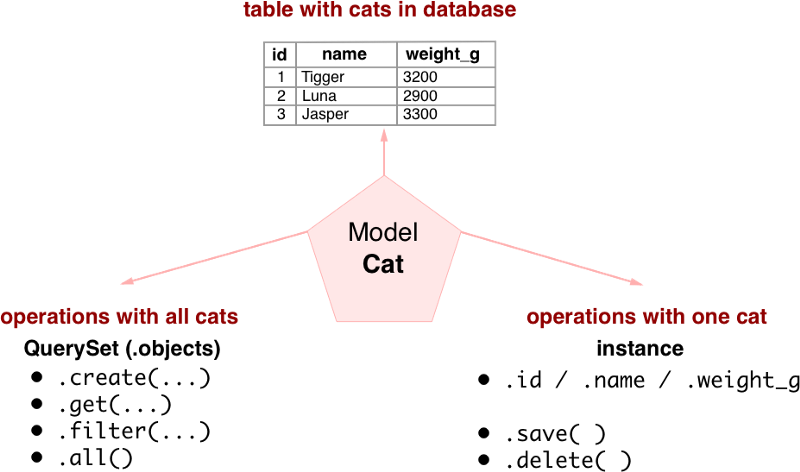
- Model: A Python class that defines the structure of your data. It is the single, definitive source of information about your data. Each model maps to a single database table.
- Model Instance: An object of your model class. Each instance represents a single row in the database table.
- Field: An attribute of your model. Each field maps to a column in the database table and tells Django what type of data to store (e.g., text, numbers, dates).
This approach means you can focus on your application's logic in Python, and Django will handle the translation to database commands for you. All your models for an app typically live in that app's models.py file.
The following diagram provides a great visual summary of this relationship:
2. Defining the Task Model
Let's apply this concept directly to our portfolio project. We need to create a Task model that will define what a task looks like in our database. We'll start by defining the essential attributes a task should have:
- A title (a short piece of text).
- A description (longer, optional text).
- A status indicating if it's completed (a true/false value).
- A timestamp for when it was created.
We define this structure in the tasks/models.py file using Django's built-in model fields.
The following video shows a developer creating a similar Task model. It's a great practical demonstration of how to translate requirements into a model definition.
To-do list with Django | Build a task application | Django projects | #3
Watch this segment from the "To-do list with Django" tutorial by Cloud With Django. It demonstrates the exact process of creating a Task model class and defining its fields.
Watch from 23:22 to 26:16. Pay close attention to: How the class Task is created and inherits from models.Model. The different field types used: CharField, BooleanField, and DateTimeField. The options passed to each field, like max_length, default, and auto_now_add. The __str__ method and its purpose.
3. A Closer Look at Common Field Types
As you saw in the video, Django provides a rich set of model fields to handle different types of data. Let's explore the ones we'll use for our Task model and a few other common ones.
Django Model Fields – Common Use Cases and How They ...
This article from freeCodeCamp, "Django Model Fields – Common Use Cases", gives clear, bite-sized explanations for the most common field types. It's a great reference to have.
Read the following sections to understand the fields we'll use in our Task model: The CharField Model Field: For short strings, like our task title. Note the required max_length parameter. The TextField Model Field: For long-form text, perfect for our task description. The BooleanField Model Field: For true/false values, which we'll use for the completed status. Note the default option. The DateTimeField Model Field: For storing date and time. We'll use this with the auto_now_add option to automatically record the creation time.
Each field type has specific options you can pass to it to control its behavior. Here are a few of the most important ones:
max_length: Required forCharField, it defines the maximum number of characters.default: Sets a default value for the field.auto_now_add=True: Automatically sets the field to the current timestamp when an object is first created. Useful forcreated_atfields.auto_now=True: Automatically updates the field to the current timestamp every time the object is saved. Useful forlast_updatedfields.null=True: Allows the database to store aNULLvalue for this field. This is a database-level setting.blank=True: Allows the field to be left blank in forms (like the Django admin). This is a validation-level setting.
You typically use null=True and blank=True together for fields that are truly optional, like our task's description.
4. Putting It All Together in models.py
Now, let's write the code. Open your project in your code editor and navigate to the tasks/models.py file. Replace its contents with the following:
# tasks/models.py

from django.db import models

class Task(models.Model):
    title = models.CharField(max_length=200)
    description = models.TextField(null=True, blank=True)
    completed = models.BooleanField(default=False)
    created_at = models.DateTimeField(auto_now_add=True)

    def __str__(self):
        return self.title
Let's break this down:
class Task(models.Model):: Defines our model, inheriting from Django's baseModelclass.title = models.CharField(...): A field for the task's title, with a maximum length of 200 characters.description = models.TextField(...): A field for a longer description. By settingnull=Trueandblank=True, we make this field optional.completed = models.BooleanField(...): A true/false field to track completion status. By default, new tasks will be marked as not completed (default=False).created_at = models.DateTimeField(...): A date and time field that will automatically be set to the current timestamp when a new task is created (auto_now_add=True).def __str__(self):: This is a special Python method. Defining it tells Django how to display aTaskobject in a human-readable way (e.g., in the admin interface). Here, we're simply returning the task's title. Without this, you'd see unhelpful displays like<Task object (1)>.
Test your understanding!
Imagine you want to add a priority level to your tasks. The priority should be a number from 1 (lowest) to 5 (highest), and every task must have a priority.
Which field type would you use for this priority attribute, and what default value might you set to ensure all new tasks start with a medium priority?
Show answer
You would use models.IntegerField. To set a medium priority by default, you would add default=3.
The field definition would look like this:priority = models.IntegerField(default=3)
Conclusion
Great job! You have successfully defined the data structure for your first Django model. This is a crucial step in building any data-driven application. You've created a Python blueprint that Django can use to understand and manage your application's data.
Key Takeaways:
- A Django Model is a Python class that maps to a database table, abstracting away raw SQL through the ORM.
- Model fields (
CharField,TextField,BooleanField,DateTimeField, etc.) define the columns of the database table and their data types. - Field options (
max_length,default,auto_now_add,null,blank) provide fine-grained control over the data's constraints and behavior. - The
__str__method provides a human-readable representation of your model instances.
Preview of the Next Lesson:
Our Task model exists as Python code, but our database is still empty and has no idea this model exists. In the next lesson, we will learn how to use Django migrations to analyze our models.py file and generate the necessary commands to create and update our database schema.