Hello! In our last lesson, we established the crucial difference between development and production environments and adopted a professional strategy of splitting our settings.py file. We ended on a critical point: hardcoding sensitive data like the SECRET_KEY into our source code is a major security risk, even with separate settings files.
Today, we'll solve that problem. This lesson focuses on using environment variables to manage your application's secrets securely. This is a fundamental skill for any web developer, as it keeps your passwords, API keys, and other sensitive data out of your version control system (like Git).
By the end of this 60-minute lesson, you will be able to use environment variables to manage your Django project's SECRET_KEY and DEBUG status, keeping your secrets safe and your configuration flexible.
1. Why Secrets Don't Belong in Your Code
Before we jump into the "how," let's solidify the "why." Storing secrets directly in your code makes your application vulnerable. If you push your code to a public repository like GitHub, those secrets are exposed to the world.
To understand the gravity of this, please watch the first few seconds of the following video.
How to HIDE Your API Keys in Python Projects
John Watson Rooney's video immediately highlights the danger of committing secrets to GitHub and the drastic measures required to fix such a mistake.
Watch only from the beginning to 00:18. Pay close attention to the warning about what to do if you accidentally commit a secret key.
The solution is to store configuration that varies between environments—like secrets—in the environment itself. This principle is part of a widely respected methodology called the Twelve-Factor App, which outlines best practices for building robust and scalable web applications.
Let's explore the benefits of this approach.
Using Environment Variables Securely in Django
The article 'Using Environment Variables Securely in Django' provides a great summary of why this practice is so important.
Read the sections 'Why Use Environment Variables in Django?' and 'Understanding Environment Variables in Django'. Focus on the key benefits, such as improved security and easier collaboration.
As the article explains, using environment variables allows you to:
- Improve Security: Keep secrets out of your codebase and version control.
- Manage Environment-Specific Settings: Easily use a different database or API key in development versus production.
- Simplify Collaboration: Team members can work on the project without sharing sensitive credentials.
2. Managing Environment Variables in Development
So, how do we use environment variables, especially on our local development machine? The most common approach is to use a special file named .env in combination with a Python library that knows how to read it.
For this, we'll use python-dotenv. This library reads key-value pairs from a .env file and adds them to the environment when your application starts.
The following video provides a complete walkthrough of setting this up in a Django project. We will work through it step-by-step.
Django Python Environment Variables | Django Project | djblogger | 5
This video from Very Academy is a practical, step-by-step guide to using python-dotenv specifically within a Django project. It covers installation, configuration, and a common pitfall.
This video is the core of our lesson. Please watch from 00:22 to 08:08. I will break down the key steps below, but watching the full segment will give you the complete context.
Step 1: Install python-dotenv and Create Your .env File
First, you need to install the library and create the file that will hold your secrets.
-
Install the library: Open your terminal (with your virtual environment activated) and run:
pip install python-dotenv -
Create the
.envfile: In the root directory of your project (the same level asmanage.py), create a new file named.env. -
Add your secrets: Open the
.envfile and add yourSECRET_KEYandDEBUGvalues. The format isKEY=VALUE, with no quotes.SECRET_KEY=your-django-secret-key-goes-here DEBUG=TrueNote: For the
SECRET_KEYvalue, copy the one currently in yoursettings.pyfile.
Step 2: Load the Variables in Your Settings
Now, you need to modify your settings to read these values from the environment instead of having them hardcoded. We'll make these changes in your settings/base.py file (or settings.py if you haven't split your files yet).
-
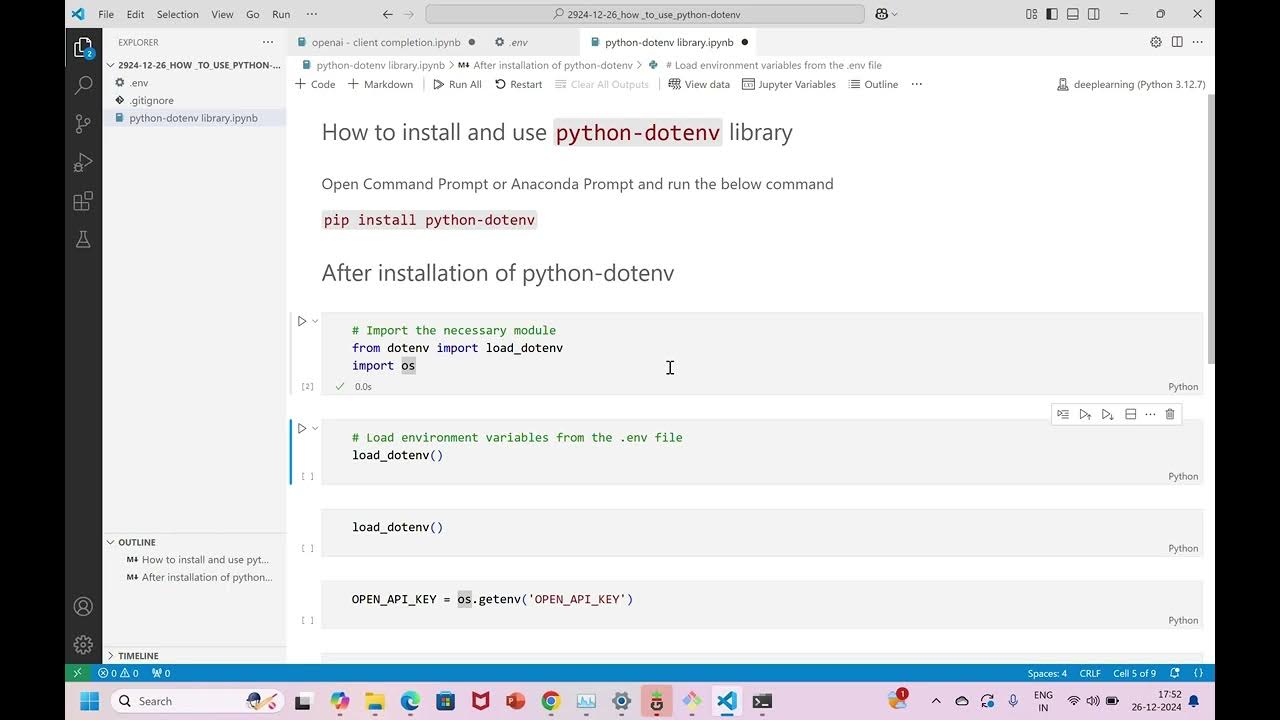
Import the necessary modules: At the top of the file, add imports for
os(to access environment variables) andload_dotenv.import os from dotenv import load_dotenv -
Load the
.envfile: Immediately after the imports, call theload_dotenv()function. This will read your.envfile and make the variables available.load_dotenv() -
Update the settings variables: Find the
SECRET_KEYandDEBUGlines and change them to useos.environ.get().# Before SECRET_KEY = 'your-django-secret-key-goes-here' DEBUG = True # After SECRET_KEY = os.environ.get('SECRET_KEY') DEBUG = os.environ.get('DEBUG') # We will fix this in the next step!
Step 3: Handling Non-String Values (The DEBUG Gotcha)
If you run your server now, you might notice something strange. Even if you set DEBUG=False in your .env file, Django might still run in debug mode. Why?
Environment variables are always read as strings. In Python, any non-empty string is considered True when converted to a boolean. So bool("False") actually evaluates to True!
We must perform an explicit comparison to get a real boolean value.
# Incorrect
# DEBUG = bool(os.environ.get('DEBUG'))
# Correct
DEBUG = os.environ.get('DEBUG') == 'True'
This line of code now correctly compares the string "True" from your .env file with the literal string 'True', resulting in a proper boolean True or False. The video you watched explains this common issue clearly between 05:58 and 08:08.
3. Keep Your .env File Secret
You've successfully moved your secrets out of your code, but there's one final, crucial step: you must tell Git to ignore the .env file.
Open your .gitignore file (create it in your project root if it doesn't exist) and add a new line:
# .gitignore
# Environment variables
.env
This ensures your .env file will never be committed to your repository. As a courtesy to other developers (or your future self), it's a good practice to create a file named .env.example that lists the variables the project needs, but with placeholder values. This file is committed to version control.
# .env.example
SECRET_KEY=
DEBUG=
Test your understanding!
Your project needs to connect to a database. You have the following in your .env file:
DATABASE_URL="postgres://user:password@host:port/dbname"
SECRET_KEY="a-very-secret-key"
DEBUG=False
Modify the following settings.py snippet to correctly and securely load all three values from the environment. Pay close attention to the DEBUG variable.
# settings.py
import os
from dotenv import load_dotenv
# TODO: Load environment variables
SECRET_KEY = "hardcoded-key"
DEBUG = True
DATABASE_URL = None
Show answer
# settings.py
import os
from dotenv import load_dotenv

# Load environment variables
load_dotenv()

SECRET_KEY = os.environ.get("SECRET_KEY")
DEBUG = os.environ.get("DEBUG") == 'False' # Note: In the .env file, it's False. Comparing to 'True' would also work.
DATABASE_URL = os.environ.get("DATABASE_URL")
Correction and clarification: The provided answer DEBUG = os.environ.get("DEBUG") == 'False' is incorrect if the value in .env is False. The string from the environment will be "False", so os.environ.get("DEBUG") == 'False' evaluates to True. The correct way is DEBUG = os.environ.get("DEBUG") == 'True'. Since the value in the .env file is False, "False" == 'True' correctly evaluates to False. Let's stick to the == 'True' convention for consistency.
Corrected Answer:
# settings.py
import os
from dotenv import load_dotenv

# Load environment variables
load_dotenv()

SECRET_KEY = os.environ.get("SECRET_KEY")
# The string from .env is "False". "False" == 'True' correctly evaluates to False.
DEBUG = os.environ.get("DEBUG") == 'True'
DATABASE_URL = os.environ.get("DATABASE_URL")
Conclusion
Fantastic work! You have now mastered one of the most important security practices in modern web development. By separating your configuration from your code using environment variables, you've made your application more secure, flexible, and professional.
Key Takeaways:
- Sensitive data like
SECRET_KEYandDATABASE_URLmust never be hardcoded or committed to version control. - For local development, the
python-dotenvlibrary allows you to manage secrets in a.envfile. - The
.envfile must be added to your.gitignoreto keep it out of your repository. - Environment variables are read as strings, so you must explicitly compare them (e.g.,
os.environ.get('DEBUG') == 'True') to get boolean values.
Preview of the Next Lesson:
Now that our project uses external packages like django and python-dotenv, how does our production server know which packages it needs to install to run our app? In the next lesson, we will learn how to create a requirements.txt file to list all project dependencies, making our application portable and ready for deployment.