Hello! In our last lesson, we built a solid foundation by writing tests for your application's authentication flow, ensuring users can register and log in reliably. Now that we know who the user is, we need to control what they are allowed to do.
Today, we shift our focus from authentication to authorization. This lesson is dedicated to testing the rules that enforce data privacy between users. For your Task Manager project, this is one of the most important features: you must guarantee that a user can only see and manage their own tasks, and not anyone else's. Failing to do so creates a major security vulnerability.
By the end of this 60-minute lesson, you will be able to write tests that verify your authorization rules, ensuring each user's data is kept private and secure.
1. The Threat: Broken Object-Level Authorization (BOLA)
Before we write any tests, let's understand the problem we're trying to solve. The most common authorization failure in applications like our Task Manager is called Broken Object-Level Authorization (BOLA).
Imagine User A is logged in and views their task at the URL /tasks/15/. What stops them from simply typing /tasks/16/ into their browser to see a task that might belong to User B? If nothing prevents this, your application has a BOLA vulnerability. Our tests must prove that our application is not vulnerable.
The following article provides an excellent overview of this security risk and how to approach testing for it.
Testing API Security on a Django DRF Backend
This article, 'Testing API Security on a Django DRF Backend', clearly explains the BOLA vulnerability. We will focus on its definition and the testing strategy it proposes.
Please read the first section, 'API1:2023 — Broken Object Level Authorization (BOLA)'. Focus on understanding the risk and the manual and automated testing approaches. Don't worry about the DRF-specific 'Fixing the Issue' code for now; we're focused on the testing concept.
As the article highlights, our testing strategy must cover two fundamental scenarios:
- Positive Case: A user can access and modify the data they own.
- Negative Case: A user cannot access or modify data owned by another user.
Our tests will programmatically simulate these scenarios.
2. Setting Up the Test Environment
To test authorization, we need a setup that mimics a multi-user environment. In our test file (e.g., tests/test_views.py or a new tests/test_authorization.py), we'll expand our setUp method to create the necessary users and objects.
Here’s how you would set up the test class:
# tests/test_authorization.py
from django.test import TestCase, Client
from django.contrib.auth import get_user_model
from django.urls import reverse

# Assuming you have a 'Task' model
from tasks.models import Task

User = get_user_model()

class AuthorizationTests(TestCase):
    def setUp(self):
        # Create User A
        self.user_a = User.objects.create_user(
            username='userA',
            password='password123'
        )

        # Create User B
        self.user_b = User.objects.create_user(
            username='userB',
            password='password123'
        )

        # Create a task owned by User A
        self.task_a = Task.objects.create(
            title='Task for User A',
            user=self.user_a
        )

        # Create a task owned by User B
        self.task_b = Task.objects.create(
            title='Task for User B',
            user=self.user_b
        )

        # Create a client instance
        self.client = Client()
This setup gives us two distinct users and a task that belongs to each one, creating the perfect scenario to test our privacy rules.
3. Testing the Task List View
First, let's ensure the main task list page only shows tasks belonging to the currently logged-in user. In your ListView, you would typically filter the queryset like this: Task.objects.filter(user=self.request.user). Our test will verify this filter works correctly.
The MDN Web Docs provide a great example of this testing pattern, which we will adapt. In their example, they test that a user only sees books they have borrowed. We will do the same for tasks.
Django Tutorial Part 10: Testing a Django web application
The Django documentation on the Mozilla Developer Network (MDN) has a superb section on testing views. It demonstrates exactly how to test that a list view only contains items belonging to the logged-in user.
Read the section titled 'Views that are restricted to logged in users'. Pay close attention to the LoanedBookInstancesByUserListViewTest class. See how it sets up multiple users and books, and then how the test_only_borrowed_books_in_list method logs in a user and checks the contents of the list.
Here is the test, applying that same logic to our Task Manager:
# In the AuthorizationTests class
    def test_task_list_shows_only_own_tasks(self):
        # ARRANGE: Log in as User A
        self.client.login(username='userA', password='password123')

        # ACT: Request the task list page
        response = self.client.get(reverse('task-list')) # Assuming 'task-list' is the URL name

        # ASSERT:
        # The page loads successfully
        self.assertEqual(response.status_code, 200)

        # The context contains User A's task
        self.assertContains(response, self.task_a.title)

        # The context DOES NOT contain User B's task
        self.assertNotContains(response, self.task_b.title)

        # A more robust check on the queryset in the context
        tasks_in_context = response.context['task_list']
        self.assertEqual(len(tasks_in_context), 1)
        self.assertEqual(tasks_in_context[0].user, self.user_a)
This test proves that userA can see their own task but is completely unaware of userB's task on the list page.
4. Testing Detail, Update, and Delete Views
Now for the BOLA test. We need to check that a user cannot access the detail, update, or delete pages for an object they don't own, even if they know the URL.
When a user tries to access a page they aren't authorized to see, your application should respond with an HTTP error code. Typically, this will be:
- 403 Forbidden: The user is authenticated, but does not have permission.
- 404 Not Found: The application pretends the object doesn't exist to avoid leaking information.
Both are valid responses. Django's generic views with LoginRequiredMixin and a custom UserPassesTestMixin often result in a 403, which is what we'll test for.
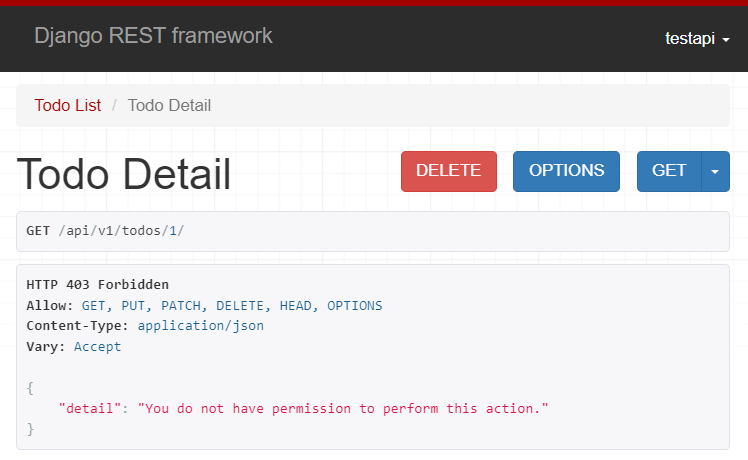
Let's write a test to confirm this behavior.
# In the AuthorizationTests class
    def test_user_cannot_view_other_users_task_detail(self):
        # ARRANGE: Log in as User A
        self.client.login(username='userA', password='password123')

        # ACT: Try to access the detail page for User B's task
        url = reverse('task-detail', kwargs={'pk': self.task_b.pk})
        response = self.client.get(url)

        # ASSERT: Access is denied
        self.assertEqual(response.status_code, 403) # Or 404, depending on your implementation
This simple test is incredibly powerful. It directly checks for the BOLA vulnerability. You should write similar tests for your UpdateView and DeleteView URLs.
The following video, though focused on Django REST Framework, provides a great walkthrough of the logic for setting up tests with multiple users and checking for correct data access.
Django REST Framework - Permissions and Testing Permissions
This video on testing permissions in DRF visually demonstrates the testing strategy we're using. The underlying logic is the same, even though the syntax is for an API.
Watch from 04:31 to 12:38. Focus on these key concepts: The setUp method creating multiple users and orders (our 'tasks'). The test function that logs in one user. The assertion that the API response only contains data belonging to that logged-in user. This mirrors the logic of our test_task_list_shows_only_own_tasks.
Test your understanding!
You have written test_user_cannot_view_other_users_task_detail, which sends a GET request. How would you adapt this test to verify that User A cannot delete User B's task? The delete URL is typically a POST request.
Show answer
The test would be almost identical, but you would use self.client.post() instead of self.client.get().
def test_user_cannot_delete_other_users_task(self):
    # ARRANGE: Log in as User A
    self.client.login(username='userA', password='password123')

    # ACT: Try to POST to the delete confirmation page for User B's task
    url = reverse('task-delete', kwargs={'pk': self.task_b.pk})
    response = self.client.post(url)

    # ASSERT:
    # 1. Access is denied (403 Forbidden)
    self.assertEqual(response.status_code, 403)

    # 2. Crucially, User B's task still exists in the database
    self.assertTrue(Task.objects.filter(pk=self.task_b.pk).exists())
The second assertion is vital—it confirms that the unauthorized POST request did not result in a data change.
Conclusion
Congratulations! You have now learned how to write tests for one of the most important security features of a multi-user application. By verifying your authorization rules, you can confidently build your Task Manager portfolio project knowing that your users' data will be private and secure.
Key Takeaways:
- Authorization vs. Authentication: Authentication confirms who a user is; authorization determines what they can do.
- Test for BOLA: Always test to ensure a user cannot access or modify objects they don't own by manipulating URLs.
- Create a Multi-User Environment: Your test setup should include at least two users and objects owned by each to simulate real-world conditions.
- Test Both Positive and Negative Cases:
- Verify that users can see their own data in list views.
- Verify that users cannot see, update, or delete another user's data, checking for a
403 Forbiddenor404 Not Foundresponse.
- Assert Database State: When testing
POSTrequests for unauthorized actions (like delete), always assert that the database was not changed.
Preview of the Next Lesson:
We have now concluded our module on testing. You have the skills to ensure your application's core logic, forms, authentication, and authorization are all working as expected. In the next module, "Enhancing the Application," we will shift our focus from backend logic to the user experience. Our first lesson will be on integrating a CSS framework like Bootstrap to style your application and make it look professional.