Hello! Welcome to the next lesson in our Python Fundamentals Refresher.
In the last lesson, we explored comprehensions, a powerful and concise way to create lists and dictionaries. You learned how to replace multi-line for loops with a single, readable line of code, a skill that helps keep your data transformation logic clean and efficient.
Today, we shift our focus from writing efficient code to writing robust code. In any real-world application, especially a web application, things can go wrong. Users might enter invalid data, a file might be missing, or a network connection could fail. Our goal is to anticipate these issues and handle them gracefully instead of letting our program crash.
This lesson covers the learning outcome: Handle exceptions using try-except blocks. We'll learn what exceptions are and how to use Python's try...except structure to build more resilient and user-friendly programs.
1. What is an Exception?
An exception is an error that occurs during the execution of a program. When Python encounters a situation it can't cope with, it "raises" an exception, which interrupts the normal flow of the code and, if unhandled, stops the program entirely.
You've likely already seen exceptions in action. For example:
- Trying to divide by zero raises a
ZeroDivisionError. - Trying to convert a non-numeric string like
"hello"to an integer raises aValueError. - Trying to add a number and a string raises a
TypeError.
To get a quick overview of what exceptions are and see a few common types, let's watch the first minute of this video.
Learn Python EXCEPTION HANDLING in 5 minutes! 🚦
This short video from Bro Code provides a fast-paced introduction to exceptions and some common error types you'll encounter.
Watch from the beginning until 01:02. Pay attention to the examples of ZeroDivisionError, TypeError, and ValueError.
As you can imagine, in your task manager web app, you'll face many situations where exceptions could occur, such as a user trying to submit a form with missing information or your application trying to connect to a database that is temporarily offline. We need a way to manage these scenarios.
2. The try...except Block: Catching Errors
Instead of letting an exception crash our program, we can "catch" it and execute some fallback code. We do this using a try...except block.
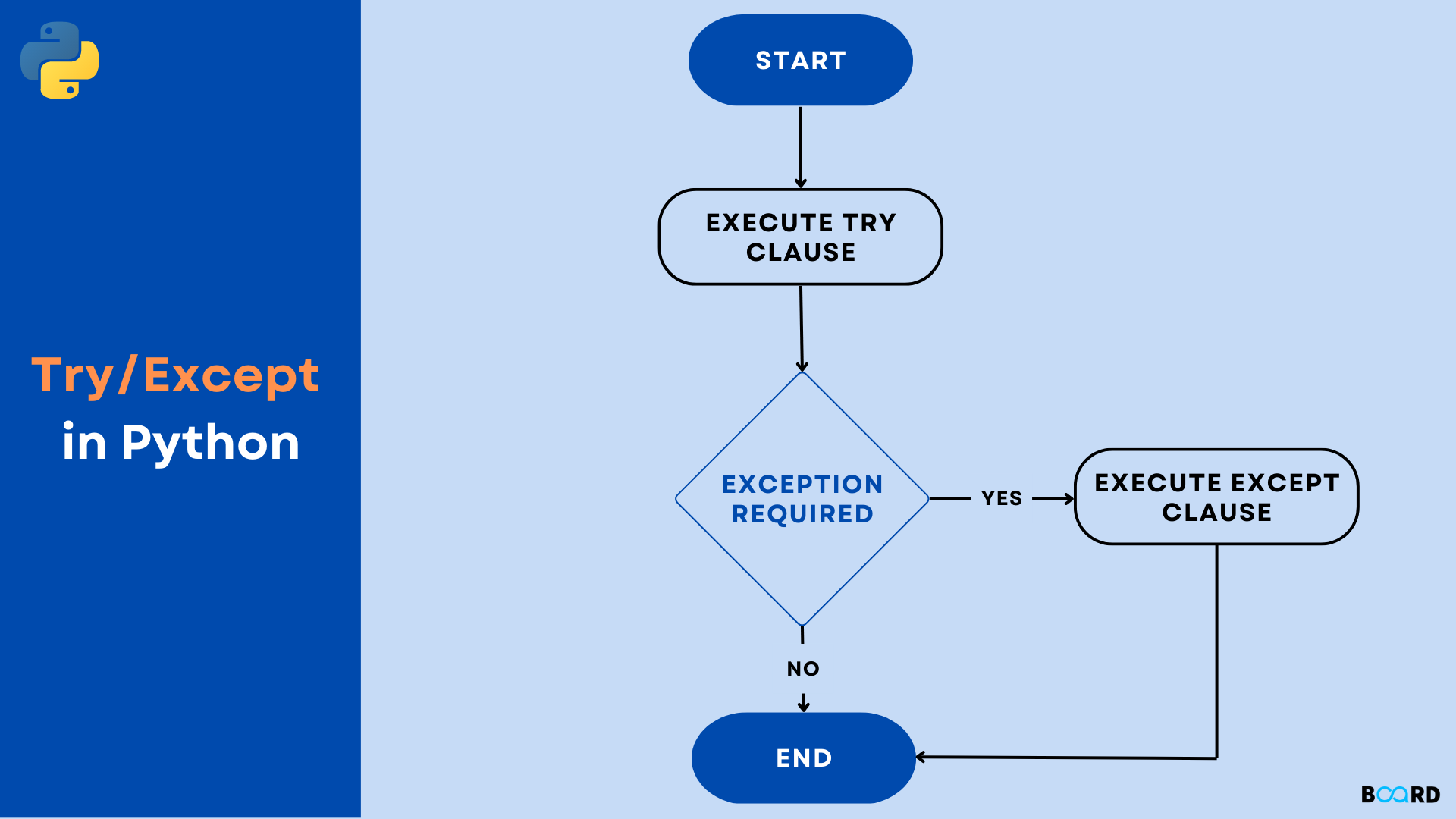
The logic is straightforward:
- The code that might cause an error is placed inside the
tryblock. - If an error occurs, Python immediately jumps to the
exceptblock. - If no error occurs, the
exceptblock is skipped entirely.
Here's a simple flowchart illustrating this process:
Let's look at a classic example: getting numerical input from a user.
try:
    age = int(input("Enter your age: "))
    print(f"Next year, you will be {age + 1}.")
except ValueError:
    print("Invalid input. Please enter a number.")
If you run this code and enter 25, the output will be Next year, you will be 26.. The except block is ignored. However, if you enter twenty-five, the int() conversion will fail and raise a ValueError. Instead of crashing, the program will execute the except block and print Invalid input. Please enter a number..
Handling Specific Exceptions
It's a very important best practice to specify the exact type of exception you expect to handle (like ValueError in the example above). Catching every possible exception can hide bugs and make your code harder to debug.
The following video from Corey Schafer provides an excellent explanation of why being specific is crucial and demonstrates how to handle different types of exceptions.
Python Tutorial: Using Try/Except Blocks for Error Handling
This video provides a more detailed look at try-except blocks. It clearly illustrates the danger of catching overly general exceptions and shows how to handle multiple, specific exceptions.
Watch from the beginning to 05:39. Focus on: The basic try-except structure. Why except Exception: can be problematic. How to stack multiple except blocks to handle different errors. How to access the exception object itself using as e.
As you saw, you can handle multiple exception types by stacking except blocks:
numerator_str = input("Enter the numerator: ")
denominator_str = input("Enter the denominator: ")

try:
    numerator = int(numerator_str)
    denominator = int(denominator_str)
    result = numerator / denominator
    print(f"The result is {result}.")
except ValueError:
    print("Error: Please enter valid numbers.")
except ZeroDivisionError:
    print("Error: Cannot divide by zero.")
This code is now robust against two common user errors: non-numeric input and division by zero.
3. Going Further: The else and finally Clauses
The try...except structure can be extended with two more optional clauses: else and finally.
else: The code in theelseblock runs only if no exceptions were raised in thetryblock. It's useful for code that should only execute on the "happy path."finally: The code in thefinallyblock runs no matter what. It executes whether an exception occurred or not. This is perfect for cleanup actions, like closing a file or a database connection, ensuring that these actions happen even if the program runs into an error.
Let's complete the Corey Schafer video to see how these work in practice.
Python Tutorial: Using Try/Except Blocks for Error Handling
Let's continue with the video to understand the else and finally blocks. The file handling example is particularly relevant, as it shows a common use case for finally.
Watch from 05:39 to 08:35. Pay close attention to when the code inside the else and finally blocks gets executed in the examples.
Here's the full structure:
try:
    # Risky code that might raise an exception
    f = open('my_file.txt')
    data = f.read()
except FileNotFoundError as e:
    # Runs only if FileNotFoundError occurs
    print(f"Error: {e}")
else:
    # Runs only if the try block succeeds
    print("File read successfully.")
    print(data)
finally:
    # Always runs, regardless of success or failure
    print("Executing cleanup...")
    # This check is needed because 'f' might not be defined if open() failed
    if 'f' in locals() and not f.closed:
        f.close()
Test your understanding!
You are writing a function to update a user's score in a game. The scores are stored in a dictionary.
scores = {"player1": 100, "player2": 250}
Write a function get_score(player_name) that returns the score of a given player. The function should handle the case where the player does not exist in the dictionary and return 0 instead of crashing.
Show answer
scores = {"player1": 100, "player2": 250}

def get_score(player_name):
    try:
        # Try to access the score for the given player
        return scores[player_name]
    except KeyError:
        # If the player's name is not a key in the dictionary, a KeyError is raised.
        # We catch it and return 0.
        print(f"Player '{player_name}' not found. Returning a score of 0.")
        return 0

# Test cases
print(f"Player1's score: {get_score('player1')}") # Should print 100
print(f"Player3's score: {get_score('player3')}") # Should handle the error and print 0
4. A Pythonic Philosophy: EAFP
In Python, there's a common coding style for handling errors known as EAFP: "Easier to Ask for Forgiveness than Permission."
This approach contrasts with LBYL: "Look Before You Leap."
- LBYL: You first check if something is possible, then you do it.
import os file_path = 'data.txt' if os.path.exists(file_path): os.remove(file_path) else: print("File not found.") - EAFP: You just try to do something, and if it fails, you handle the resulting error.
import os
file_path = 'data.txt'
try:
    os.remove(file_path)
except FileNotFoundError:
    print("File not found.")
In many cases, the EAFP approach is preferred in Python because it's often more readable and avoids potential issues (like the file being deleted by another process between your check and your action). It embraces exceptions as a normal part of program flow rather than something to be avoided at all costs.
To deepen your understanding of this important concept, the following article provides a great explanation.
The Ultimate Guide to Error Handling in Python
This article from Miguel Grinberg's blog introduces the two key patterns for error handling: 'Look Before You Leap' (LBYL) and 'Easier to Ask Forgiveness than Permission' (EAFP).
Read the introduction and the sections 'Look Before You Leap (LBYL)' and 'Easier to Ask Forgiveness than Permission (EAFP)'. Focus on understanding why EAFP (using try-except) is often the preferred, more 'Pythonic' approach.
Conclusion
Well done! You've just learned a fundamental skill for writing professional, production-ready code. By handling exceptions, you can create applications that are more reliable and provide a better experience for your users.
Key Takeaways:
- Exceptions are errors that interrupt the normal flow of a program. If unhandled, they cause a crash.
- The
try...exceptblock allows you to "catch" exceptions and handle them gracefully. - It's crucial to catch specific exceptions (e.g.,
ValueError,FileNotFoundError) rather than using a genericexcept:. - The
elseblock contains code that runs only if thetryblock was successful. - The
finallyblock contains cleanup code that runs every time, regardless of whether an error occurred. - The EAFP ("Easier to Ask Forgiveness than Permission") principle, which relies on
try...except, is a common and idiomatic way to handle errors in Python.
In our next lesson, we'll dive into file handling. You'll learn how to read from and write to files using the with statement. You may have noticed that managing file resources with try...finally can be a bit verbose. The with statement provides a much cleaner and safer way to do this, building directly on the concepts of resource management we touched on today.