Hello! Welcome to your second lesson.
In our last session, we refreshed our understanding of Python's fundamental data structures: strings, lists, tuples, and dictionaries. You learned how to create and manipulate them, which gives us the building blocks for handling data.
Now, we need a way to organize our logic into reusable pieces. That's where functions come in. In any programming project, especially a web application like our Task Manager, functions are essential for creating clean, modular, and maintainable code.
Today's lesson addresses the learning outcome: Write Python functions with parameters, return values, and default arguments. By the end of this session, you'll be able to create flexible and powerful functions that can take in data, process it, and give back a result.
1. What Are Functions?
At its core, a function is a named block of code that performs a specific task. You define it once and can then call (or execute) it as many times as you need. This principle is often called DRY (Don't Repeat Yourself), a cornerstone of good programming.
Your IT background has likely exposed you to functions in JavaScript or PHP, and the concept in Python is very similar. The syntax is built around the def keyword and indentation.
Let's start with a video that walks through creating your first function.
Python Functions | Python Tutorial for Absolute Beginners #1
This video from Programming with Mosh provides an excellent introduction to defining and calling functions in Python.
Watch from 00:34 to 02:34. Pay close attention to: The def keyword used to define a function. The importance of parentheses () after the function name. How indentation determines which lines of code belong to the function.
As you saw, a basic function looks like this:
# Function Definition
def greet_user():
    print("Hello there!")
    print("Welcome to the Task Manager application.")

# Function Call
greet_user()
2. Passing Information to Functions: Parameters and Arguments
The greet_user function is a bit rigid; it does the same thing every time. To make functions more dynamic, we need to pass data into them. This is done using parameters and arguments.
- A parameter is a variable name listed in the function's definition. It's a placeholder for the data you expect to receive.
- An argument is the actual value you pass to the function when you call it.
Python Functions | Python Tutorial for Absolute Beginners #1
Let's continue with the same video to see how parameters and arguments work. The instructor clearly explains the difference between these two terms.
Watch from 02:34 to 04:43. Notice how the parameters first_name and last_name are defined, and then how string arguments like "Maab" and "Hamadani" are passed during the function call.
Let's adapt this to our project. Imagine a function to greet a specific user:
# 'username' is the parameter
def greet_user(username):
    print(f"Hello, {username}! Welcome back.")

# '"Alex"' is the argument
greet_user("Alex")
# '"Casey"' is the argument
greet_user("Casey")
Positional vs. Keyword Arguments
When you have multiple parameters, you can pass arguments in two ways:
- Positional Arguments: The arguments are matched to parameters based on their order. This is what we've seen so far.
- Keyword Arguments: You explicitly name the parameter you're providing the value for (e.g.,
name="Alex"). This makes your code more readable and you don't have to remember the order.
The next segment of the video demonstrates this.
Python Functions | Python Tutorial for Absolute Beginners #1
Watch this short clip to understand how keyword arguments can make your function calls clearer.
Watch from 08:29 to 11:06. Focus on the increment function example and see how by=1 makes the call increment(2, by=1) much easier to understand than increment(2, 1).
3. Getting Information Back: The return Statement
So far, our functions have only performed an action (printing to the screen). More often, we want a function to perform a calculation or a transformation and give us back the result. This is done using the return keyword.
A function that prints a value is like telling a colleague an answer. A function that returns a value is like handing them a piece of paper with the answer written on it, which they can then use for something else.
Python Functions | Python Tutorial for Absolute Beginners #1
This part of the video explains the crucial difference between functions that perform a task and those that return a value.
Watch from 04:43 to 08:29. Pay attention to: How the return statement sends a value back from the function. How you can store this returned value in a variable (e.g., message = get_greeting(...)). What happens when a function doesn't have a return statement (it implicitly returns None).
Let's create a function that formats a task title, instead of just printing it:
def format_task_title(title):
    cleaned_title = title.strip().capitalize()
    return cleaned_title

raw_title = "  reVIew the quarterly report   "
formatted_title = format_task_title(raw_title)

# Now we can do whatever we want with the result
print(f"Formatted Task: {formatted_title}")
# We could also save it to a database, etc.
A function can also return multiple values. Python handles this elegantly by automatically packaging them into a tuple.

def get_user_details():
    name = "Jane Doe"
    user_id = 101
    is_active = True
    return name, user_id, is_active

# Unpacking the returned tuple into separate variables
user_name, id_num, status = get_user_details()

print(f"User: {user_name} (ID: {id_num})") # Output: User: Jane Doe (ID: 101)
4. Making Functions Flexible: Default Arguments
Sometimes you want a parameter to have a default value if no argument is provided for it. This makes the parameter optional.
For our Task Manager, maybe most tasks have a "Pending" status when created. We can set this as a default.
Python Functions | Python Tutorial for Absolute Beginners #1
Let's explore how to set default values for parameters, making them optional.
Watch from 11:06 to 12:22. This clip shows you the syntax for creating an optional parameter and mentions an important rule about their ordering.
Here's the syntax:def create_task(title, status="Pending"):
Now, you can call this function in two ways:create_task("Finish the report") # status will be "Pending"create_task("Deploy to server", status="In Progress") # status is overridden
The Golden Rule of Parameter Order
There's one critical rule: Required parameters must be listed before optional (default) parameters.
Python needs to know which argument maps to which parameter. If you put an optional parameter first, it creates ambiguity.
# This is WRONG and will cause a SyntaxError
def create_task_wrong(status="Pending", title):
    # ... function body ...

# This is CORRECT
def create_task_correct(title, status="Pending"):
    return {"title": title, "status": status}
This next short video provides a very clear example of this rule in practice.
Python default arguments are awesome! 👍
This video from Bro Code reinforces the concept of default arguments and clearly explains the rule about parameter ordering.
Watch from 00:28 to 05:43. The first part shows a practical net_price example. The second part, with the count function, is especially important as it demonstrates why non-default arguments must come before default arguments.
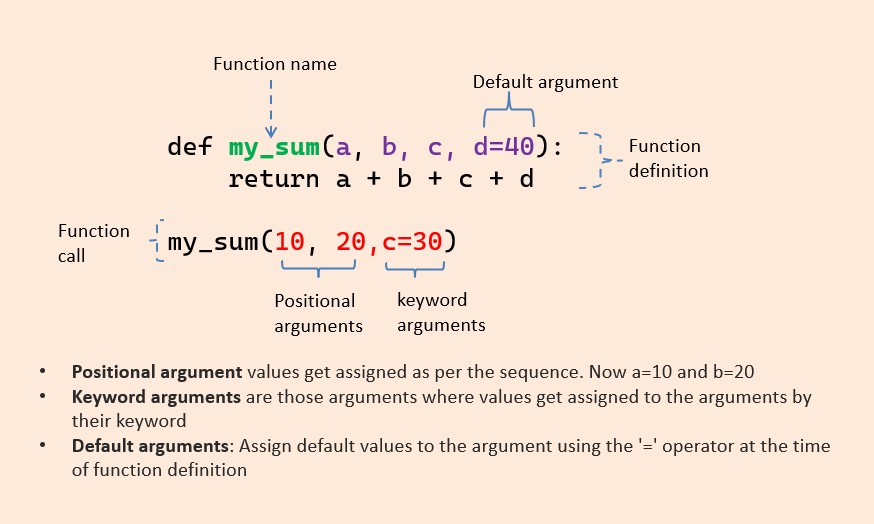
Here's a visual summary of the different argument types we've discussed.
Test your understanding!
Your goal is to write a function create_task_entry() for our Task Manager. It should take a title (required string), a priority (optional string, defaults to 'Medium'), and return a dictionary representing the task.
- Define the function with the correct parameter order.
- The function should return a dictionary with keys
'title','priority', and'completed'(which should always beFalseinitially). - Call the function once providing only a title, and a second time providing both a title and a priority of
'High'.
Show answer
# 1. Function definition with required parameter first, then optional.
def create_task_entry(title, priority='Medium'):
    """Creates a dictionary for a new task."""
    task = {
        'title': title,
        'priority': priority,
        'completed': False
    }
    return task

# 3. Calling the function in two ways.
# Call with only the required argument
task1 = create_task_entry("Write lesson plan")
print(task1)
# Expected output: {'title': 'Write lesson plan', 'priority': 'Medium', 'completed': False}

# Call with both arguments
task2 = create_task_entry("Fix critical bug", priority='High')
print(task2)
# Expected output: {'title': 'Fix critical bug', 'priority': 'High', 'completed': False}
Conclusion
Excellent work! You've now mastered one of the most fundamental concepts in programming. Organizing your code into functions is the first major step toward building applications that are robust, readable, and easy to expand upon.
Key Takeaways:
- Functions are defined with
defand are blocks of reusable code. - Parameters are placeholders in a function's definition, while arguments are the actual values you pass in.
- You can pass arguments by position or by keyword. Keyword arguments improve readability.
- The
returnstatement sends a value back from a function, allowing you to use the result elsewhere in your code. Functions withoutreturnimplicitly returnNone. - Default arguments make parameters optional and must always come after required parameters in the function definition.
In our next lesson, we'll look at a powerful and "Pythonic" way to work with lists and dictionaries. You will learn to apply list comprehensions and dictionary comprehensions to transform data. You'll see how these constructs often provide a concise alternative to writing a full for loop, and they frequently involve simple, function-like operations.