Hello! Welcome to the next lesson in our journey with Django REST Framework.
In the last lesson, we successfully built API endpoints for our tasks using APIView and then refactored them into much more concise generic views like ListCreateAPIView. You saw how much boilerplate code generic views save you. Today, we're going to take that principle of efficiency one step further.
Our goal is to use ViewSets and Routers to automatically generate URL configurations for API endpoints. This powerful combination is a cornerstone of professional DRF development and will significantly speed up the creation of your Task Manager portfolio project. We will combine our separate ListCreate and RetrieveUpdateDestroy views into a single, elegant class and let DRF handle the URL wiring for us.
1. The Case for ViewSets and Routers
In our last lesson, we ended up with two separate classes and two URL patterns to handle the full set of CRUD operations for our tasks:
TaskListCreateforGET(list) andPOSTrequests.TaskRetrieveUpdateDestroyforGET(detail),PUT, andDELETErequests.
While this is a huge improvement over writing everything manually with APIView, we can still ask: can we do better? What if we could combine the logic for all task-related actions into a single class? And what if we didn't have to write the URL patterns by hand at all?
This is precisely the problem that ViewSets and Routers solve.
- A
ViewSetis a type of class-based view that combines the logic for a set of related views into a single class. Instead of providing method handlers like.get()and.post(), it provides actions like.list(),.create(), and.retrieve(). - A
Routerworks with aViewSetto automatically generate the URL configuration for you. It understands the standard actions and creates the appropriate URL patterns to map to them.
The result is remarkably clean and efficient code.

2. Introducing the ModelViewSet
DRF provides several types of ViewSet, each offering a different level of functionality.
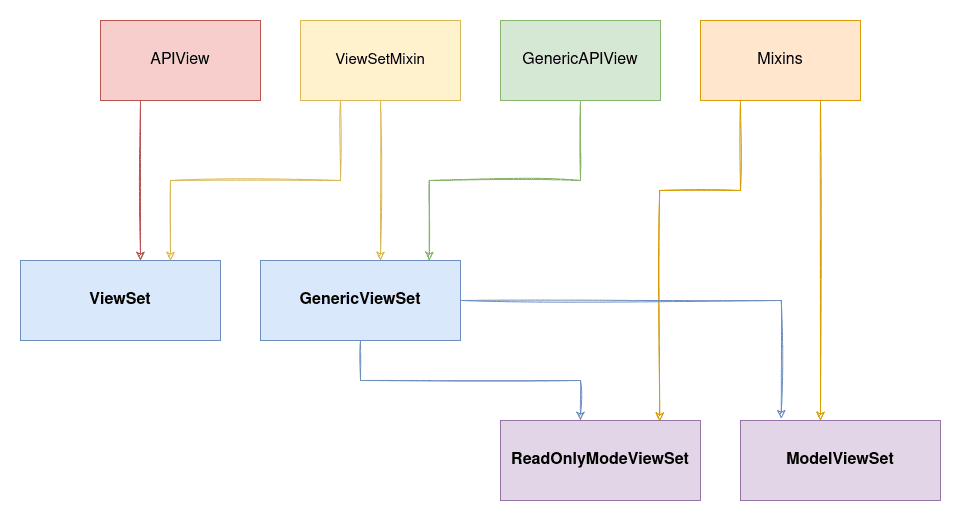
As you can see, the ModelViewSet inherits from GenericViewSet and includes implementations for all the standard CRUD actions (list, create, retrieve, update, partial_update, and destroy). For building a standard API based on a Django model, the ModelViewSet is almost always what you want. It gives you a complete set of CRUD endpoints with minimal code.
Let's watch a video that explains these concepts and shows a ModelViewSet in action.
Viewsets & Routers in Django REST Framework
This video from BugBytes provides an excellent introduction to ViewSets and Routers, focusing on the highly practical ModelViewSet.
Watch the first three minutes of the video (00:00 - 02:44). Pay attention to: How a ViewSet combines logic into a single class with 'actions'. The role of Routers in automatically wiring up URLs. The introduction of ModelViewSet as the class that provides a full set of default CRUD actions.
3. Let's Refactor: From Generic Views to a ModelViewSet
Now it's time to apply this to our project. We will refactor the api/views.py and api/urls.py files to use a TaskViewSet and a DefaultRouter.
The following article provides a concise, step-by-step example that is very similar to what we need to do. We'll use it as our guide.
How to Use the Django REST Framework
This guide from freeCodeCamp walks through creating a simple API. We will focus on the sections that create a ModelViewSet and wire it up with a DefaultRouter.
Read the subsection under 'Verify DRF Installation' that starts with 'Create a view (api/views.py):' and ends just before 'Test the API...'. Notice how the ModelViewSet is defined and how the DefaultRouter is used in urls.py.
Inspired by that example, let's update our code.
1. Update api/views.py
Replace the two generic view classes (TaskListCreate and TaskRetrieveUpdateDestroy) with this single TaskViewSet:
# api/views.py
from rest_framework import viewsets
from tasks.models import Task
from .serializers import TaskSerializer

# You can remove or comment out the old generic views.
# from rest_framework import generics
# class TaskListCreate(generics.ListCreateAPIView): ...
# class TaskRetrieveUpdateDestroy(generics.RetrieveUpdateDestroyAPIView): ...

class TaskViewSet(viewsets.ModelViewSet):
    """
    This viewset automatically provides `list`, `create`, `retrieve`,
    `update` and `destroy` actions.
    """
    queryset = Task.objects.all()
    serializer_class = TaskSerializer
That's it! This one class replaces our two previous classes. It contains all the logic for every CRUD operation on the Task model.
2. Update api/urls.py
Now, let's tell DRF to automatically generate the URLs for our TaskViewSet. Replace the entire contents of api/urls.py with the following:
# api/urls.py
from django.urls import path, include
from rest_framework.routers import DefaultRouter
from . import views

# Create a router and register our viewset with it.
router = DefaultRouter()
router.register(r'tasks', views.TaskViewSet, basename='task')

# The API URLs are now determined automatically by the router.
urlpatterns = [
    path('', include(router.urls)),
]
A quick breakdown of what's happening here:
- We import
DefaultRouterfromrest_framework.routers. - We create an instance of the router.
- We call
router.register():- The first argument,
'tasks', is the URL prefix for this set of routes. - The second argument,
views.TaskViewSet, is the viewset we want to register. - The
basenameis used to create the URL names. It's good practice to set it, though often DRF can infer it.
- The first argument,
- Finally, we include
router.urlsin oururlpatterns. This single line adds all the generated URLs to our API.
Your main project core/urls.py should still have the line path('api/', include('api.urls')), to point to your app's URLs.
4. What Did the Router Just Do?
By registering the TaskViewSet, the DefaultRouter automatically generated a full set of RESTful URL patterns for us. You don't have to see them or write them, but they are there:
| URL | HTTP Method | Action | URL Name |
|---|---|---|---|
/api/tasks/ |
GET |
list |
task-list |
/api/tasks/ |
POST |
create |
task-list |
/api/tasks/<pk>/ |
GET |
retrieve |
task-detail |
/api/tasks/<pk>/ |
PUT |
update |
task-detail |
/api/tasks/<pk>/ |
PATCH |
partial_update |
task-detail |
/api/tasks/<pk>/ |
DELETE |
destroy |
task-detail |
Run your development server (python manage.py runserver) and navigate to http://127.0.0.1:8000/api/. Because we used DefaultRouter, you'll see a root API view that lists all registered endpoints. Click the link for /api/tasks/ to explore the familiar browsable API, which now supports all CRUD actions through this single, powerful setup.
Test your understanding!
Imagine your project manager asks for a "read-only" version of the Task API. This version should only allow users to list all tasks and retrieve a single task, but not create, update, or delete them.
Based on the ViewSet hierarchy chart, which class would you use instead of ModelViewSet to achieve this?
Show answer
You would use viewsets.ReadOnlyModelViewSet. This class provides only the .list() and .retrieve() actions out of the box. Your view definition would look like this:
from rest_framework import viewsets
# ...

class TaskReadOnlyViewSet(viewsets.ReadOnlyModelViewSet):
    queryset = Task.objects.all()
    serializer_class = TaskSerializer
You would then register this new ViewSet with the router under a different prefix, like router.register(r'readonly-tasks', views.TaskReadOnlyViewSet).
Conclusion
Congratulations! You've just implemented one of the most powerful and time-saving features of Django REST Framework. This approach is the standard for building clean, consistent, and maintainable APIs.
Key Takeaways:
- ViewSets consolidate logic for related views (like list and detail) into a single class using
actions. - Routers automatically generate URL patterns for
ViewSets, saving you from writing boilerplate URL configuration. - The combination of
ModelViewSetandDefaultRouteris the fastest and most common way to build full CRUD APIs for a Django model. It embodies the "Don't Repeat Yourself" principle.
This is a massive productivity boost that will be invaluable as you build out the Task Manager application for your portfolio.
Preview of the Next Lesson:
Our API endpoints are now fully functional. But how do we interact with them from outside the browsable API, or write automated tests for them? In the next lesson, we will learn how to test API endpoints using a tool like Postman. This will allow you to simulate requests from a front-end application and ensure your backend is working exactly as expected.