Hello! Welcome back.
In our last lesson, you created a TaskSerializer that acts as the translator between your Django Task model and the JSON format used by APIs. That was a crucial step, and now we're ready to use it to build the actual API endpoints.
Today, we will bring your API to life by creating the views that handle web requests. Our goal is to build API endpoints using DRF's APIView or generic views. We'll start with a more manual, explicit approach using APIView to understand the mechanics, and then progress to DRF's powerful generic views, which will help you build your Task Manager project much faster.
1. The Two Main Approaches to Building Views in DRF
When building views in Django REST Framework, you have a spectrum of choices that balance control and convenience. For this lesson, we'll focus on two key points on that spectrum:
APIView: A class-based view that gives you full control. You explicitly define how your view responds to each HTTP method (GET, POST, PUT, DELETE). It's great for custom endpoints that don't map directly to a model's CRUD operations.- Generic Views: A set of pre-built views that provide common functionality for CRUD (Create, Retrieve, Update, Delete) operations. They drastically reduce boilerplate code for standard API endpoints, embodying the "Don't Repeat Yourself" (DRY) principle.
This diagram shows how different view types in DRF relate, with "Ease of use" increasing as you move towards more abstract, specialized views. We'll be focusing on APIView and the Concrete APIView classes.
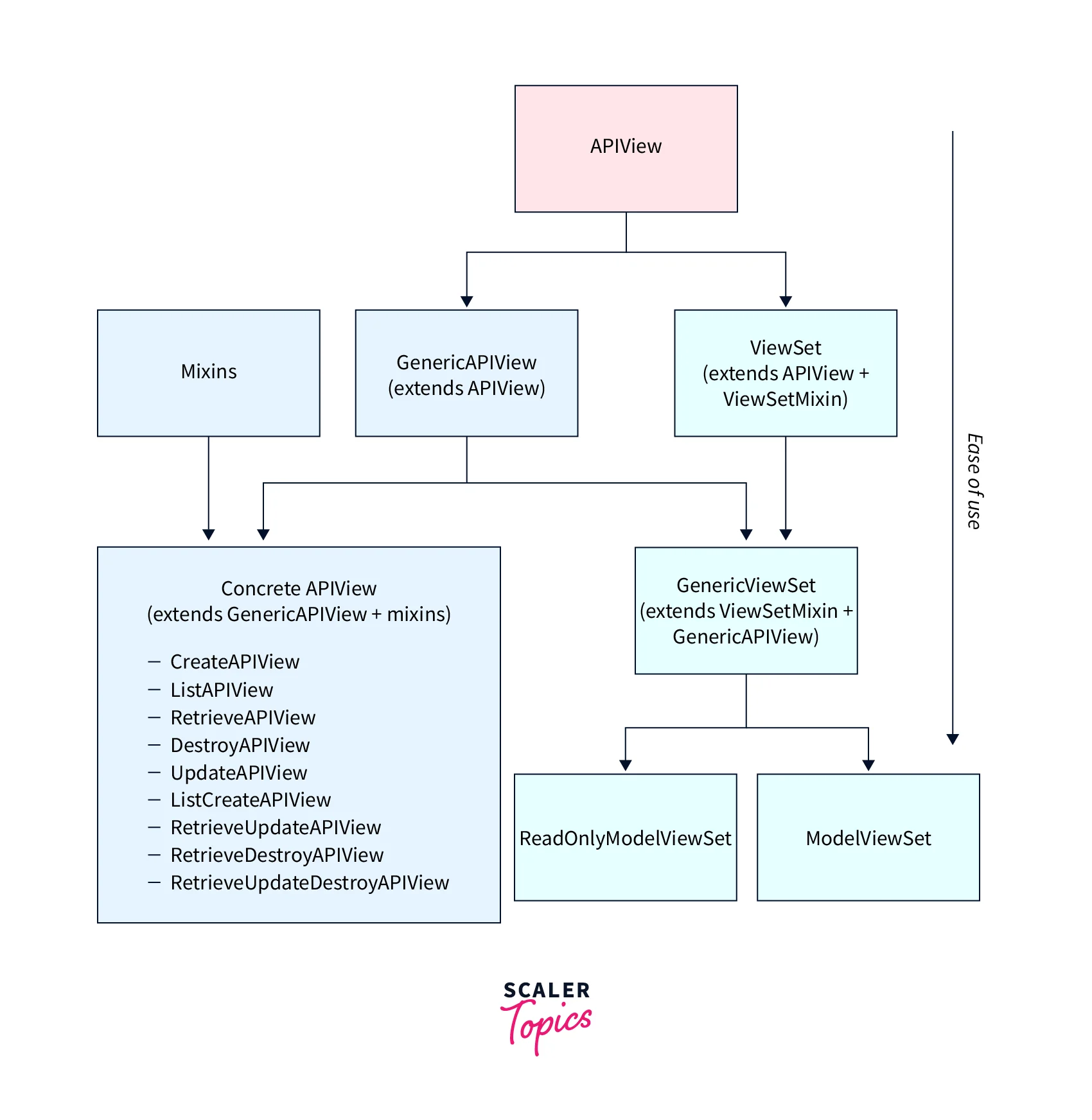
2. The Ground Floor: Building with APIView
Let's start by building our task endpoints using APIView. This approach requires more code, but it makes the process very clear, as you have to wire everything up yourself.
In APIView, you create a class that inherits from rest_framework.views.APIView, and then you add methods that match the names of the HTTP methods you want to handle, like get(), post(), put(), and delete().
To see how this works in practice, let's watch a demonstration.
Class Based Views. (Generic API Views And Model Mixins) | Learn Django REST Framework #5
The following video from the 'Learn Django REST Framework' series by Ssali Jonathan shows how to build two class-based views from scratch using APIView. One view handles listing and creating items, and the other handles retrieving, updating, and deleting a single item.
Watch the following segments: 00:32 - 08:20: Pay close attention to how the PostListCreateView is constructed. Notice the separate get and post methods. The get method queries all objects, serializes them (many=True), and returns a response. The post method deserializes incoming data, validates it, and saves it. 08:10 - 08:52: See how the class-based view is added to urls.py using the .as_view() method. 10:03 - 18:01: Observe the implementation of PostRetrieveUpdateDeleteView. Notice the helper method to get a single object and the implementation of get, put, and delete methods for a single instance.
Now, let's apply this to our Task Manager project. Open your api/views.py file and add the following code. Remember to import your Task model and TaskSerializer.
# api/views.py
from rest_framework.views import APIView
from rest_framework.response import Response
from rest_framework import status
from django.http import Http404

from tasks.models import Task
from .serializers import TaskSerializer

# View for listing all tasks and creating a new one
class TaskList(APIView):
    """
    List all tasks, or create a new task.
    """
    def get(self, request, format=None):
        tasks = Task.objects.all()
        serializer = TaskSerializer(tasks, many=True)
        return Response(serializer.data)

    def post(self, request, format=None):
        serializer = TaskSerializer(data=request.data)
        if serializer.is_valid():
            serializer.save()
            return Response(serializer.data, status=status.HTTP_201_CREATED)
        return Response(serializer.errors, status=status.HTTP_400_BAD_REQUEST)

# View for retrieving, updating, or deleting a single task
class TaskDetail(APIView):
    """
    Retrieve, update or delete a task instance.
    """
    def get_object(self, pk):
        try:
            return Task.objects.get(pk=pk)
        except Task.DoesNotExist:
            raise Http404

    def get(self, request, pk, format=None):
        task = self.get_object(pk)
        serializer = TaskSerializer(task)
        return Response(serializer.data)

    def put(self, request, pk, format=None):
        task = self.get_object(pk)
        serializer = TaskSerializer(task, data=request.data)
        if serializer.is_valid():
            serializer.save()
            return Response(serializer.data)
        return Response(serializer.errors, status=status.HTTP_400_BAD_REQUEST)

    def delete(self, request, pk, format=None):
        task = self.get_object(pk)
        task.delete()
        return Response(status=status.HTTP_204_NO_CONTENT)
Finally, let's create a urls.py file inside your api app directory and wire up these views.
# api/urls.py
from django.urls import path
from . import views

urlpatterns = [
    path('tasks/', views.TaskList.as_view(), name='task-list'),
    path('tasks/<int:pk>/', views.TaskDetail.as_view(), name='task-detail'),
]
Don't forget to include these URLs in your main project's urls.py file.
While APIView works perfectly, you can see there's a lot of repeated logic for getting an object, serializing it, checking if it's valid, and saving it. This is where generic views shine.
Test your understanding!
In the TaskList view above, what is the purpose of the many=True argument when instantiating TaskSerializer inside the get method? Why isn't it needed in the get method of the TaskDetail view?
Show answer
The many=True argument is required because the get method in TaskList is serializing a queryset (Task.objects.all()), which contains multiple task objects. It tells the serializer to treat the input as a list of items to be serialized.
In contrast, the get method in TaskDetail retrieves only a single task object using get_object(pk). Since it's serializing a single instance, not a list, many=True is not needed.
3. The Fast Lane: Building with Generic Views
Generic views are designed to eliminate the boilerplate code we just wrote. They provide the core implementation for standard CRUD patterns, so you only need to tell them which model and serializer to use.
Let's explore this powerful feature.
Choosing Between FBVs, APIView, Generics, and ViewSets
This article, 'Django REST Framework Views Decoded', clearly explains the different types of views. Focus on the section about Concrete Generic Views, which are the ones you'll use most often.
Read 'Level 4: Concrete Generic Views - The Sweet Spot'. Pay attention to the code example for ListCreateAPIView and RetrieveUpdateDestroyAPIView and see how few lines of code are needed.
The article highlights that for most standard API endpoints, concrete generic views are the "sweet spot." They combine the GenericAPIView base class with various "mixin" classes that provide the list, create, retrieve, update, and destroy actions.

Let's see a practical refactoring from function-based views to generic views. The principle is the same as refactoring from our APIView.
Django REST Framework - Generic Views | ListAPIView & RetrieveAPIView
This video from BugBytes provides a concise demonstration of refactoring to generic views.
Watch the following segments: 01:34 - 06:11: See how a view for listing items is simplified into a ListAPIView subclass, requiring only queryset and serializer_class attributes. 06:11 - 08:38: Observe the same pattern applied to create a RetrieveAPIView for a single item. Notice how DRF automatically handles the primary key (pk) lookup from the URL.
Inspired by this, let's refactor our api/views.py. You can comment out the APIView classes we wrote and replace them with this much shorter version:
# api/views.py (Refactored with Generic Views)
from rest_framework import generics
from tasks.models import Task
from .serializers import TaskSerializer

class TaskListCreate(generics.ListCreateAPIView):
    queryset = Task.objects.all()
    serializer_class = TaskSerializer

class TaskRetrieveUpdateDestroy(generics.RetrieveUpdateDestroyAPIView):
    queryset = Task.objects.all()
    serializer_class = TaskSerializer
And update your api/urls.py to point to the new view names:
# api/urls.py (Updated)
from django.urls import path
from . import views

urlpatterns = [
    path('tasks/', views.TaskListCreate.as_view(), name='task-list-create'),
    path('tasks/<int:pk>/', views.TaskRetrieveUpdateDestroy.as_view(), name='task-retrieve-update-destroy'),
]
That's it! With just a few lines of code, you have fully functional CRUD endpoints for your Task model. All the logic we wrote manually in APIView is handled for you by ListCreateAPIView and RetrieveUpdateDestroyAPIView. This is the power and efficiency you'll leverage for your portfolio project.
Conclusion
You've made excellent progress today! You've learned how to create API endpoints using two different but related methods, giving you both a deep understanding and a fast, practical toolset.
Key Takeaways:
APIViewis your tool for full control. You defineget,post,put, etc., methods to handle HTTP requests manually. It's best for custom logic that doesn't fit the standard CRUD pattern.- Generic Views (like
ListCreateAPIView) are your tool for speed and convention. You simply specify aquerysetandserializer_class, and DRF handles all the standard CRUD logic for you. - For most standard API development, start with Generic Views. They provide the perfect balance of power and simplicity, allowing you to build robust APIs quickly.
Preview of the Next Lesson:
We can make our view code even more concise. In the next lesson, we will explore ViewSets and Routers. ViewSets allow you to combine the logic for both list and detail views into a single class, and Routers can automatically generate the URL patterns for you, further reducing boilerplate and speeding up development.