Introduction
In our last lesson, you learned the methodical, iterative cycle of analysis-driven optimization: profile, identify, hypothesize, implement, and re-profile. This process is the core of a kernel engineer's workflow. A central strategy within this cycle is to maximize the utilization of all available hardware resources. So far, however, the CUDA code we've written has been largely sequential from the GPU's perspective: we copy data to the GPU, run a kernel, and then copy the data back, with each step waiting for the previous one to finish. This leaves valuable hardware, like the GPU's copy engines, idle while kernels are running, and vice versa.
This lesson introduces the fundamental CUDA feature for overcoming this limitation: CUDA streams. You will learn how streams function as independent queues for GPU work, enabling you to manage operations asynchronously. The primary goal is to overlap data transfers (copying) with computation (kernel execution), effectively hiding the latency of moving data and significantly increasing the overall throughput of your application. This is a crucial step towards writing truly high-performance code.
The Default Sequential Behavior
Before we can appreciate concurrency, we must first understand the default behavior. While a kernel launch like my_kernel<<<...>>>() is asynchronous with respect to the host CPU (meaning the CPU code continues immediately), all operations submitted without a specific stream are placed into a single, implicit default stream on the GPU.
From the GPU's point of view, operations within this default stream are strictly ordered and execute sequentially. A cudaMemcpy must finish before the kernel begins, and the kernel must finish before the next cudaMemcpy begins.
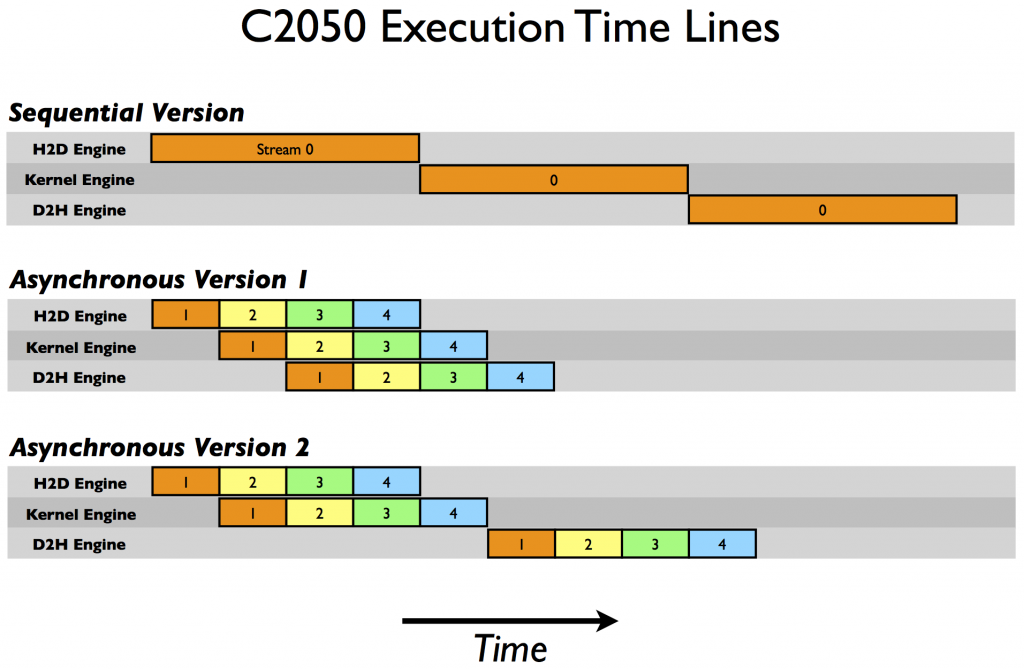
This sequential execution represents a major opportunity for optimization. While the kernel engine is busy, the two copy engines (one for H2D, one for D2H) are idle. Our goal is to keep all three engines working in parallel as much as possible.
CUDA Streams: Enabling Concurrency
A CUDA stream is a sequence of operations that execute on the device in the order they are issued by the host. The crucial insight is that you can create and manage multiple streams. While operations within a single stream are sequential, operations in different streams can execute concurrently, provided the GPU has sufficient hardware resources.
Think of it as having multiple assembly lines instead of one. You can send copy tasks to one line and compute tasks to another, and they can run in parallel.
To see how this works in practice, let's start with the fundamental API calls.
2.3. Asynchronous Execution — CUDA Programming Guide
The official CUDA Programming Guide provides the formal definitions and syntax for using streams.
Please read the following sections to get familiar with the core API: CUDA Streams: First, read the introductory definition of a stream as a work-queue in this section. Creating and Destroying: Look at the code for how to create and destroy a stream object. Launching Kernels: See the modified triple-chevron syntax for launching a kernel. Launching Memory Transfers: Review the cudaMemcpyAsync() function for asynchronous copies. Stream Synchronization: Understand the difference between blocking (cudaStreamSynchronize) and non-blocking (cudaStreamQuery) synchronization in this section.
To summarize the key functions:
cudaStream_t stream;: Declares a stream handle.cudaStreamCreate(&stream);: Creates a new, non-default stream.my_kernel<<<grid, block, 0, stream>>>(...);: Launches a kernel into the specified stream.cudaMemcpyAsync(dst, src, size, kind, stream);: Initiates an asynchronous memory copy in the specified stream.cudaStreamSynchronize(stream);: Blocks the host CPU thread until all preceding operations in the specified stream have completed.cudaStreamDestroy(stream);: Destroys the stream.
The Strategy: Pipelining Work with Streams
With the tools to create and manage streams, we can now design a concurrent execution strategy. The most common approach is to break a large problem into smaller, independent chunks and pipeline their processing.
Imagine processing a large array. Instead of copying the whole array, processing it, and copying it back, we can:
- Divide the array into
Nchunks. - Create
Nstreams. - For each chunk
i, issue the following sequence of operations intostream[i]:cudaMemcpyAsync: Copy chunkifrom host to device.kernel: Process chunki.cudaMemcpyAsync: Copy the result for chunkifrom device to host.
Because these operations are in different streams, the GPU's scheduler can overlap them. For example, while stream[1] is executing its kernel, stream[2] can be performing its H2D copy, and stream[0] can be performing its D2H copy. This is illustrated in the "Asynchronous Version I" timeline in the diagram we saw earlier.
The following blog post from NVIDIA provides an excellent, detailed walkthrough of this exact strategy, including code and analysis of how it performs on different generations of hardware.
How to Overlap Data Transfers in CUDA C/C++
This article is a classic guide to implementing stream-based concurrency. It shows how to structure your code to achieve overlap and explains the underlying hardware behavior.
Please read the entire section Overlapping Kernel Execution and Data Transfers. Focus on these key points: The two different code structures for issuing work: looping over streams vs. batching operations. The explanation of copy engines. Modern GPUs have dedicated hardware for H2D and D2H transfers, allowing one of each to happen simultaneously with kernel execution. This is why the "Asynchronous Version 1" strategy in the timeline diagram is effective. How the performance of these strategies can differ based on the GPU's compute capability and hardware features.
When implemented correctly, the result is a timeline where the gaps between operations are filled in, dramatically improving hardware utilization. The following video shows what this looks like inside the Nsight Systems profiler.
Performance Analysis with NVIDIA Nsight Systems Timeline | CUDA Developer Tools
This video demonstrates the performance impact of asynchronous operations using Nsight Systems.
Watch the segment from the second attempt. Notice how the timeline is now densely packed. The kernel executions (blue) are happening at the same time as Host-to-Device copies (green) and Device-to-Host copies (purple). This is the visual proof of effective latency hiding. The total runtime is nearly halved compared to the sequential version.
The Critical Prerequisite: Pinned Memory
There is one crucial detail required to make this work. If you call cudaMemcpyAsync with a pointer to standard host memory (allocated with malloc or new), the copy will not be truly asynchronous. It will revert to blocking behavior, preventing any overlap.
The reason for this is deeply rooted in how operating systems manage memory. Standard host memory is pageable, meaning the OS can move it around in physical RAM or even swap it out to disk at any time. The GPU's Direct Memory Access (DMA) engine, which performs data transfers, cannot work with pageable memory because it requires a stable, physical address.
To handle this, the CUDA driver performs a hidden, synchronous operation: it first copies your data from its pageable location to a special, temporary pinned (or page-locked) staging buffer on the host, and then initiates the asynchronous transfer from that pinned buffer to the GPU. This initial synchronous copy stalls the pipeline and kills performance.
The solution is to allocate our host-side buffers as pinned memory directly. This tells the OS not to move the memory, allowing the GPU's DMA engine to access it directly and asynchronously.
Asynchrony and CUDA Streams | CUDA C++ Class Part 2
The presenter in this video ran into this exact problem and explains the cause and solution clearly.
Please watch the section on pinned memory. It explains the concept of pageable vs. pinned memory, why the staging buffer makes cudaMemcpyAsync synchronous, and how to use a thrust::universal_host_pinned_vector (or cudaMallocHost in raw CUDA) to allocate pinned memory and enable true overlap.
Using pinned memory is a trade-off. It's a more scarce system resource than pageable memory, and allocating too much can degrade overall system performance by reducing the amount of memory the OS can flexibly manage. However, for the input/output buffers in a high-throughput pipeline, it is absolutely essential.
Conclusion
You have now learned the theory and practice of one of the most fundamental optimization techniques in CUDA. By moving beyond the default stream and managing concurrency explicitly, you can transform an inefficient, sequential process into a highly parallel, pipelined workflow that keeps the entire GPU busy.
Key Takeaways:
- By default, all CUDA operations are issued to a single default stream and execute sequentially on the GPU.
- CUDA streams are independent queues of work that enable concurrent execution of kernels and data transfers.
- The primary strategy for overlap is to pipeline work by breaking a problem into smaller chunks and processing them in different streams.
- True asynchronous data transfers with
cudaMemcpyAsyncrequire the use of pinned (page-locked) host memory, which can be allocated withcudaMallocHost. - You can wait for a specific stream to finish using
cudaStreamSynchronize(stream), which is more precise than waiting for the entire device.
While cudaStreamSynchronize allows us to wait for an entire pipeline to finish, it's often too coarse. What if we need to time a specific kernel within a stream, or trigger a new operation as soon as a specific data transfer is complete, without waiting for the rest of the stream? In our next lesson, we will explore CUDA events, which provide exactly this fine-grained control over timing and synchronization.