Hello! Welcome to your next lesson in the "Troubleshooting, Recovery, and Maintenance" module.
In our last lesson, we tackled a critical local system recovery task: resetting a forgotten root password. You learned how to use the GRUB bootloader to gain root access before the system's normal authentication checks kick in.
Today, we're shifting our focus from securing the local machine to securing communications between machines over the network. This lesson directly addresses the learning outcome: Explain the role of SSL/TLS certificates in securing network communications. You will learn why unencrypted communication is risky and how Transport Layer Security (TLS), the modern successor to Secure Sockets Layer (SSL), uses a system of certificates and cryptography to provide trust and security on the internet.
By the end of this lesson, you will understand the three core security guarantees of TLS—confidentiality, authentication, and integrity—and the roles that encryption, certificates, and Certificate Authorities play in delivering them.
1. The Problem: The Internet as a Postcard
Imagine sending your bank details through the mail on a postcard. Anyone who handles it—the postal worker, your neighbor who gets your mail by mistake—can read it. This is exactly what happens when you use an unencrypted protocol like HTTP (Hypertext Transfer Protocol). The data is sent in plain text.
As you're familiar with the command line, you can imagine how a tool like tcpdump or Wireshark could be used to "sniff" network traffic and read this plain text data as it travels across a network.
To see just how exposed this data is, let's watch a quick explanation.
HTTPS, SSL, TLS & Certificate Authority Explained
The video "HTTPS, SSL, TLS & Certificate Authority Explained" by Laiture starts by clearly demonstrating the vulnerability of unencrypted HTTP traffic.
Watch from 09:49 to 11:49. This segment explains why transmitting data over HTTP is insecure and how easily an attacker can intercept and read sensitive information.
This vulnerability is why you see the "Not Secure" warning in your browser. To solve this, we need to put the information in a sealed, tamper-proof envelope. In the digital world, this envelope is created using encryption.
2. Building the Solution: Encryption and The Key Exchange Problem
The technology that secures HTTPS is Transport Layer Security (TLS). It provides security through three main guarantees:
- Confidentiality: Prevents eavesdropping by encrypting the data.
- Authentication: Verifies that you are talking to the correct server and not an imposter.
- Integrity: Ensures the data has not been modified in transit.
Let's build up our understanding of how this works, starting with confidentiality through encryption.
Symmetric vs. Asymmetric Encryption
There are two main types of encryption used in TLS:
-
Symmetric Encryption: Uses a single, shared secret key to both encrypt and decrypt data. It's very fast and efficient, making it ideal for encrypting the large amounts of data in a web session. But it has a major challenge: how do you and the server agree on the secret key without an eavesdropper also getting a copy?
-
Asymmetric Encryption: Uses a key pair: a public key (shared with everyone) and a private key (kept secret). Data encrypted with the public key can only be decrypted by the corresponding private key. This is perfect for solving the key-sharing problem, but it's much slower than symmetric encryption.
TLS cleverly uses both. The slow, secure asymmetric encryption is used at the beginning of a session (the "handshake") to securely exchange a fast, temporary symmetric key. This symmetric key is then used to encrypt all the data for the rest of the session.
The following video segments walk through this logic, highlighting how each step improves security but also reveals a new challenge.
HTTPS, SSL, TLS & Certificate Authority Explained
Let's continue with the Laiture video, which does an excellent job of building the concepts step-by-step.
First, watch the segment on symmetric encryption (12:02 - 17:22) to understand its function and the problem of sharing the key. Then, watch the segment on asymmetric encryption (17:22 - 24:31). Pay close attention to how it solves the key exchange problem, but is still vulnerable to a 'Man-in-the-Middle' (MITM) attack.
As the video explains, even with asymmetric encryption, a problem remains: when a server sends you its public key, how do you know it's really from your-bank.com and not from an attacker who intercepted the connection and substituted their own public key? This is where certificates come in.
3. Establishing Trust: Certificates and Certificate Authorities (CAs)
To solve the identity problem, we need a trusted third party—someone both your browser and the server trust to vouch for identities. In the TLS world, this role is played by Certificate Authorities (CAs).
A TLS/SSL certificate is a digital file that acts like a passport. It contains:
- The domain name it was issued for (e.g.,
www.comptia.org). - The organization that owns the domain.
- The server's public key.
- A digital signature from the CA that issued it.
This digital signature is the crucial part. The CA uses its own private key to "sign" the certificate. Your web browser comes pre-installed with the public keys of all major, trusted CAs. When your browser receives a certificate from a server, it uses the CA's public key to verify the signature. If the signature is valid, your browser knows that a trusted CA has verified that the public key in the certificate truly belongs to the server you're trying to connect to. This thwarts the Man-in-the-Middle attack.
The following article explains this model of trust in a very clear, step-by-step fashion.
The article "SSL/TLS beginner's tutorial" from Medium provides an excellent conceptual breakdown of why authentication is critical and how the CA model solves the trust problem.
Read the section "Basics of authentication in TLS". Pay attention to the progression from the flawed "Solution #1" (self-signed certificates) to "Solution #3" (the Certificate Authority model). This will solidify your understanding of why CAs are necessary.
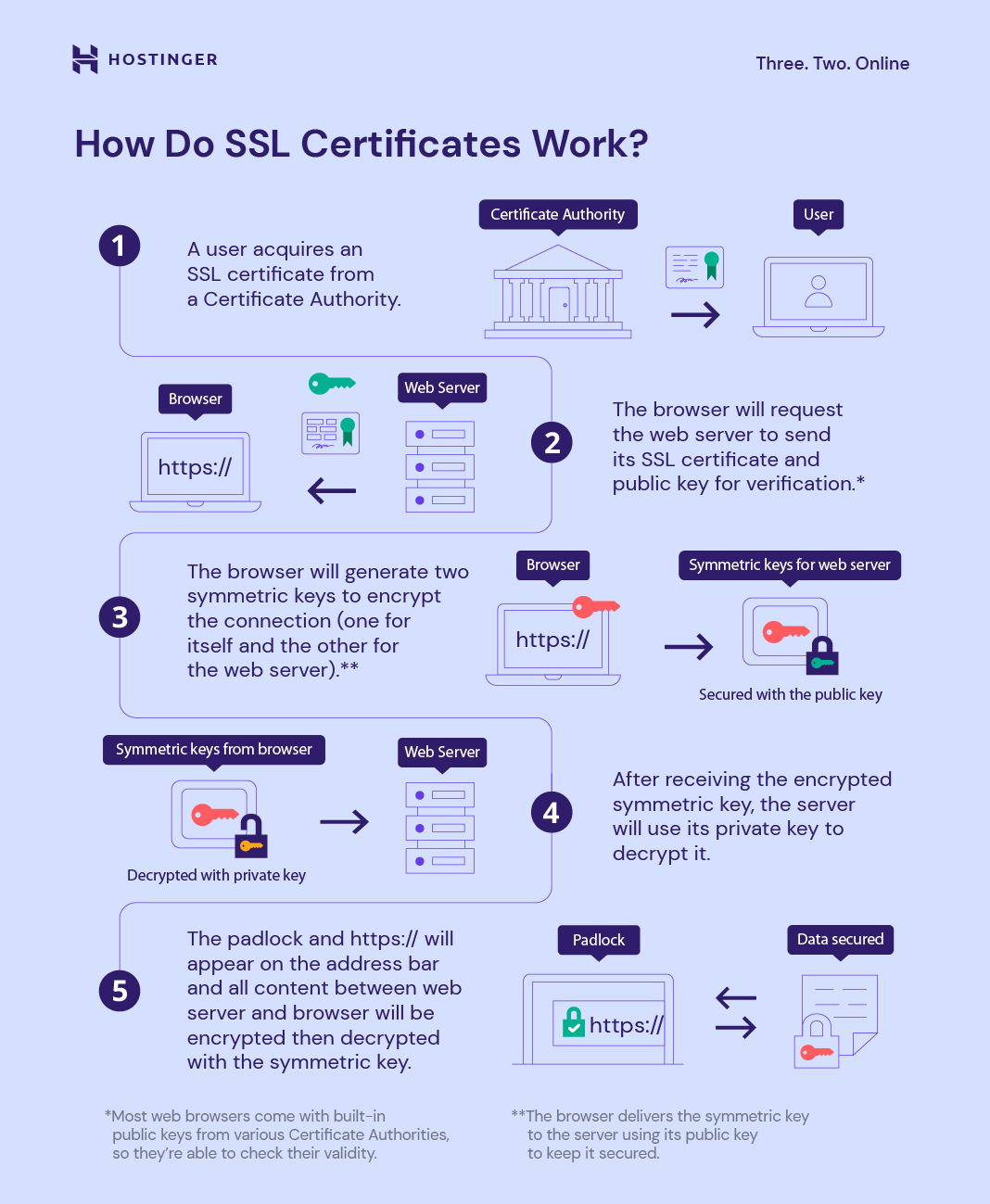
This entire process of your browser connecting to a server, receiving the certificate, verifying it, and securely generating a session key is called the TLS Handshake.
The following infographic provides a great visual summary of the handshake process.
The Chain of Trust
In practice, CAs use a tiered system for security. The ultimate "root" CA's private key is kept extremely secure and offline. This root CA signs certificates for a handful of "intermediate CAs." These intermediate CAs then issue and sign the certificates for end-user servers.
When your browser validates a certificate, it checks the entire chain:
- Is the server's certificate signed by a trusted intermediate CA?
- Is that intermediate CA's certificate signed by a trusted root CA?
This is known as the chain of trust.
HTTPS, SSL, TLS & Certificate Authority Explained
Let's return to the Laiture video to see a detailed explanation of the CA's role and the chain of trust.
Watch the segment explaining Certificate Authorities (24:31 - 33:21) and then the segment on the Chain of Trust (33:21 - 39:32). This will connect the concepts from the article to the complete, real-world model.
Test your understanding!
A colleague sets up a new internal web server for your team and creates a "self-signed certificate" for it. When you try to access the site, your browser shows a big security warning saying the connection is not private. Why does the browser show this warning, even though the connection will be encrypted?
Show answer
The browser shows the warning because it cannot authenticate the server. A self-signed certificate is signed by its own private key, not by a trusted Certificate Authority (CA). Since your browser doesn't have a pre-existing trust relationship with the server itself, it has no way to verify that the server is who it claims to be. It's warning you that you could be the victim of a Man-in-the-Middle attack. The data might be encrypted, but you can't be sure you're sending it to the right place.
4. See it in Action: Inspecting a Certificate
These concepts become much clearer when you see them in your own browser. Every time you connect to a secure site (one with https:// and a padlock icon), you can inspect the certificate and its chain of trust.
HTTPS, SSL, TLS & Certificate Authority Explained
The final segment of the Laiture video demonstrates how to find and inspect certificate details in a web browser.
Watch from 39:32 to 43:01. Then, try it yourself! Go to a secure website like your bank, an e-commerce site, or comptia.org, click the padlock icon in the address bar, and explore the certificate details. See if you can identify the server (Common Name), the issuer (CA), and the chain of trust.
Conclusion
You now understand the fundamental mechanisms that secure most of the modern web. By combining different types of cryptography and a framework of trusted authorities, TLS provides the security we rely on every day.
Key Takeaways:
- The Problem: Unencrypted protocols like HTTP are insecure because data is sent in plain text, making it vulnerable to eavesdropping and modification.
- The Goal: TLS provides three key security features: Confidentiality (encryption), Authentication (identity verification), and Integrity (tamper detection).
- The Process: TLS uses slow asymmetric encryption during the initial handshake to authenticate the server via its certificate and to securely negotiate a fast symmetric encryption key for the rest of the session.
- The Trust Anchor: TLS certificates act as digital passports, binding a public key to a server's identity.
- The Verifier: Certificate Authorities (CAs) are trusted third parties that issue and digitally sign certificates, allowing browsers to verify a server's identity and prevent Man-in-the-Middle attacks. The validity of this signature is checked against a chain of trust back to a root CA.
Preview of the Next Lesson:
In our next lesson, we will move on to a new topic that has revolutionized how applications are developed and deployed: "Explain container concepts and manage the container lifecycle using Docker or Podman." We will explore how containers provide process isolation and help create portable, efficient application environments.