Hello! Welcome to your next lesson in the CompTIA Linux+ preparation course.
In our last two lessons, we focused on the practical commands for managing users (useradd, usermod) and groups (groupadd, gpasswd). We established that these command-line tools are the correct way to manage accounts. Today, we're going to pull back the curtain and look at the fundamental files these tools manipulate.
Your learning outcome for this lesson is to interpret the structure and contents of the /etc/passwd, /etc/shadow, and /etc/group files. Understanding these files is crucial for troubleshooting, performing security audits, and gaining the deep, foundational knowledge of the Linux operating system that the Linux+ exam requires. This fits perfectly with your preference for understanding the underlying theory before moving on.
1. The User Account File: /etc/passwd
Every user on a Linux system has an entry in the /etc/passwd file. This file acts as a public-facing database of user account information. It needs to be readable by all users on the system so that commands like ls -l can translate a file's owner User ID (UID) into a human-readable username.
Let's begin by reading a brief overview of this file's structure.
How to manage users and groups in Linux
This article from Red Hat provides a clear, concise breakdown of the /etc/passwd file. It explains the purpose of each of the seven fields in a standard entry.
Please read the first section, titled "1. Understand the /etc/passwd file." Focus on memorizing the order and purpose of the seven colon-separated fields.
As the article explained, each line in /etc/passwd represents one user and has seven fields separated by colons (:).
username:password:UID:GID:comment:home_directory:shell
Let's break that down with a visual aid.

Here is a summary of the fields:
- Username: The name you use to log in (e.g.,
dgarn). - Password: A placeholder, almost always an
x. This indicates that the actual encrypted password is stored securely in another file, which we'll discuss next. - User ID (UID): A unique number that the kernel uses to identify the user. The
rootuser always has a UID of0. Regular user UIDs typically start at1000. - Group ID (GID): The GID of the user's primary group.
- Comment (GECOS): Optional information, often the user's full name. You saw this field when we used the
-coption withuseradd. - Home Directory: The absolute path to the user's home directory (e.g.,
/home/dgarn). - Login Shell: The program that runs when the user logs in, typically a command-line shell like
/bin/bash. If this is set to/sbin/nologinor/bin/false, the user is a system account that cannot be used for interactive login.
The fact that this file is world-readable but contains sensitive information (like home directories and login shells) led to a critical security evolution: the shadow password system.
2. The Secure Password File: /etc/shadow
Long ago, the encrypted password hash was stored directly in /etc/passwd. Because the file was world-readable, any user could copy the hashes and try to crack them offline. To fix this major security vulnerability, the password hashes were moved to a separate file, /etc/shadow.
This file is only readable by the root user, providing a robust layer of security. It not only stores the password hash but also enforces password aging policies.
6.6. Linux Password & Shadow File Formats
To get a detailed understanding of the /etc/shadow file, we'll turn to The Linux Documentation Project (TLDP). This resource offers a more in-depth look at each field, especially those related to password expiration.
First, read the introductory paragraphs of the document (up to the pwconv command example) to understand the security rationale for shadow passwords. Then, scroll down and read the detailed breakdown of the /etc/shadow file format. Focus on the meaning of the seven password aging fields.
The /etc/shadow file has nine colon-separated fields:
- Username: Must match an existing username in
/etc/passwd. - Encrypted Password: The hashed password. If this field contains a single asterisk (
*) or an exclamation mark (!), the account is locked and cannot be logged into with a password. - Last Password Change: The number of days since January 1, 1970, that the password was last changed. The
chagecommand manages this. - Minimum Password Age: The minimum number of days that must pass before the user can change their password again. A value of
0means they can change it at any time. - Maximum Password Age: The number of days after which the password must be changed. A common default is
99999. - Warning Period: The number of days before the password expires that the user will receive a warning message.
- Inactivity Period: The number of days after a password expires that the account is still accessible before being disabled.
- Expiration Date: The date the account itself will expire, expressed in days since January 1, 1970.
- Reserved Field: Unused.
Test your understanding!
You see the following entry in the /etc/shadow file:
bfranklin:$6$salt$...:19182:7:60:7:10::
Based on this, what is the maximum number of days bfranklin can use his current password before it expires?
Show answer
The maximum password age is the 5th field, which is 60. The user must change their password after 60 days. The warning period (6th field) will begin 7 days before that.
3. The Group Database: /etc/group
Just as /etc/passwd defines users, /etc/group defines groups. This file lists all the groups on the system, their Group IDs (GIDs), and their members.
How to manage users and groups in Linux
Let's complete our tour with the /etc/group file. The same Red Hat article we started with has a great section explaining this file's simpler structure.
Read the section "1. Understand the /etc/group file." Note the four fields and pay attention to how members are listed.
The format of /etc/group is straightforward, with four fields per line:
group_name:password:GID:members
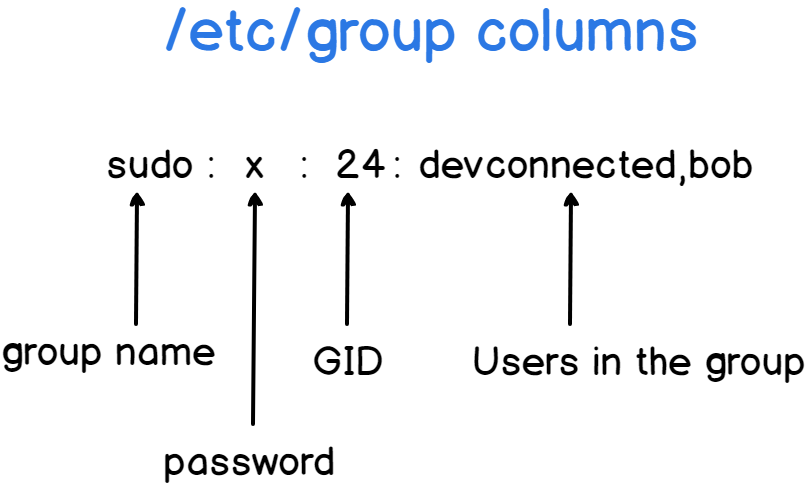
- Group Name: The name of the group (e.g.,
developers). - Password: An
xplaceholder. Group passwords are rarely used, but the field remains for legacy reasons. - Group ID (GID): The unique numeric ID for the group.
- Members: A comma-separated list of usernames who are secondary members of this group.
A crucial point: A user's primary group is defined in /etc/passwd (the GID field). That user's name does not need to be listed in the /etc/group entry for their primary group. The member list in /etc/group is only for supplementary/secondary group memberships.
Test your understanding!
You are examining the following files:
/etc/passwd:marie:x:1001:1001:Marie Curie:/home/marie:/bin/bashpierre:x:1002:1002:Pierre Curie:/home/pierre:/bin/bash
/etc/group:marie:x:1001:pierre:x:1002:scientists:x:2000:marie,pierre
Based on these entries, what is the primary group for the user marie, and what are her secondary groups?
Show answer
- Primary Group: The GID in
marie's/etc/passwdentry is1001. Looking at/etc/group, GID1001corresponds to the groupmarie. So, her primary group ismarie. - Secondary Groups: Her username appears in the member list for the
scientistsgroup. So,scientistsis her secondary group.
Conclusion
You have now inspected the three core configuration files that underpin all user and group management in Linux. While you should always use commands like useradd and groupmod to modify these files safely, being able to read and interpret them directly is a vital skill for any system administrator.
Key Takeaways:
- /etc/passwd: A public database mapping usernames to UIDs, GIDs, home directories, and shells. Its password field is just an
x. - /etc/shadow: A root-only file that securely stores encrypted password hashes and password aging policies.
- /etc/group: A public database mapping group names to GIDs and listing all secondary members of each group.
- The Link: The UID in
/etc/passwdlinks to a user, the primary GID in/etc/passwdlinks to a primary group in/etc/group, and the member list in/etc/groupdefines secondary memberships.
In our next lesson, we will build directly on this knowledge. Now that you understand how users and groups are structurally defined, we will explore how they are used to control access to files and directories by interpreting and modifying file permissions.