Introduction
Hello! In our previous lesson, we wrapped up our study of advanced storage by mastering the art of resizing LVM logical volumes. You learned how to dynamically grow your storage, a crucial skill for any system administrator.
Today, we pivot from storage to networking. This lesson marks the beginning of a new topic, where we'll build the conceptual foundation you need to connect your Linux system to the world. As you requested during our initial conversations, we'll start with the theoretical overview before moving on to practical configuration.
This lesson is designed to help you explain fundamental networking concepts: IP addresses, subnets, gateways, and DNS. Understanding these four pillars is non-negotiable for network configuration, troubleshooting, and for your CompTIA Linux+ exam. By the end of our 60 minutes, you'll be able to describe what each component is and how they work together to enable communication.
1. IP Addresses and DNS: The 'What' and 'Where' of the Internet
At its core, a network is about sending data from one device to another. To do this, every device needs a unique address. This is the role of the IP (Internet Protocol) address. Think of it as the postal address for your computer.
To get a quick and clear overview of how IP addresses work and how we use the Domain Name System (DNS) to make them user-friendly, let's start with a short video.
Every Networking Concept Explained In 20 Minutes
The following clip from TechWorld with Nana uses a great analogy to explain the fundamental roles of IP addresses and DNS.
Watch the segment from 00:50 to 02:28. Focus on the 'house address' analogy for IP addresses and the 'phone contacts' analogy for DNS.
As the video explained, DNS translates human-friendly names (like google.com) into computer-friendly IP addresses. You don't need to memorize a string of numbers; DNS acts as the internet's phonebook.
Now, let's look a little closer at the structure of an IP address and the difference between public and private addresses.
IP Addresses, Subnets, and the Protocols That Power the Internet
This article from dev.to provides a clear, written explanation of the structure of an IPv4 address.
Please read the sections titled 'IP Addresses Explained' and 'Public vs Private IP Addresses'. You can find the second section by scrolling down past 'How Hosts Use Subnet Masks'. Focus on understanding that an IPv4 address is made of four 8-bit numbers (octets) and the distinction between private addresses (used inside your local network) and public addresses (used on the global internet).
So, to recap:
- IP Address: A unique numerical label assigned to each device on a network. The most common format, IPv4, consists of four numbers from 0-255, separated by dots (e.g.,
192.168.1.100). - DNS: A system that translates domain names (e.g.,
comptia.org) into their corresponding IP addresses, making the internet navigable for humans.
2. Subnets: Organizing the Neighborhood
Imagine a city where every single house had a completely random address number. It would be impossible for the postal service to deliver mail efficiently. Instead, we have zip codes, states, and streets to create a hierarchy.
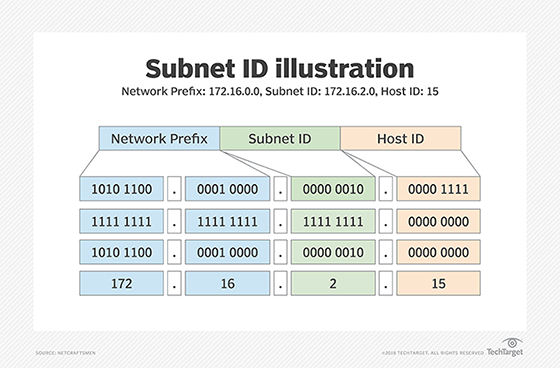
Networks do the same thing using subnets. A subnet (or subnetwork) is a logical subdivision of a larger network. To define the boundaries of a subnet, we use a subnet mask.
The subnet mask splits an IP address into two parts:
- Network portion: Identifies the subnet. All devices on the same subnet share the same network portion.
- Host portion: Identifies a specific device on that subnet.
This is often represented using "slash notation" or CIDR (Classless Inter-Domain Routing) notation, like /24 or /16. This number tells you how many bits of the 32-bit IP address are used for the network portion.
Let's dive into the details.
IP Addresses, Subnets, and the Protocols That Power the Internet
The same dev.to article we just looked at has an excellent section explaining subnet masks.
Read the sections 'Subnet Masks: Understanding Slash Notation', 'Common Subnet Sizes', and 'How Hosts Use Subnet Masks'. Pay close attention to the diagrams showing the network vs. host bits and the 'Decision process' example, which is key to understanding why subnets matter.
The key takeaway is that a device uses the subnet mask to answer a crucial question for every packet it sends: "Is the destination on my local network, or do I need to send this to a router to reach it?"

Test your understanding!
Your computer has the IP address 10.20.30.50 with a subnet mask of 255.255.255.0 (which is a /24 network). It wants to send data to a device with the IP address 10.20.40.100.
Will your computer send the data directly to the destination on the local network, or will it send the data to the default gateway? Why?
Show answer
It will send the data to the default gateway.
Here's why: The /24 subnet mask means the first 24 bits (or the first three numbers) define the network.
- Your computer's network is
10.20.30.x. - The destination's network is
10.20.40.x.
Since 10.20.30 is different from 10.20.40, your computer knows the destination is on a different network and must use the gateway to get there.
3. The Default Gateway: The Door to Other Networks
We've just established that when a device wants to communicate with an IP address outside its own subnet, it needs to send the data to a router. The specific router that a device uses for all external traffic is called its default gateway.
Think of a small office network. All the computers can talk to each other directly. But to access a website on the internet, they all send their requests to the office's one internet router. That router is their default gateway. It acts as the single entry/exit point for the entire local network.
This animated video provides a fantastic explanation of what a gateway is and how devices use it.
This video from PowerCert Animated Videos clearly illustrates the role of the default gateway and reinforces how subnet masks are used to decide when to use it.
Watch the video from the beginning to 06:24. It will cover: The definition of a default gateway. How a computer uses the subnet mask to determine if a destination is local or remote. A step-by-step example of communication on the same network vs. a different network.
The video brings together everything we've discussed. A device looks at the destination IP, uses its own subnet mask to compare the destination network with its own network, and then decides:
- Same Network: Send directly.
- Different Network: Send to the default gateway.
Putting It All Together: The Four Things a Host Needs
You've now been introduced to the core concepts. For any device to function on a modern network, it needs four pieces of information, which are typically assigned automatically by a service called DHCP (Dynamic Host Configuration Protocol).
- IP Address: Its unique identity.
- Subnet Mask: Defines its local neighborhood.
- Default Gateway: The door to all other neighborhoods.
- DNS Server: The phonebook to translate names into IP addresses.
Without all four of these, your Linux server can't communicate properly.
Conclusion
In this lesson, we established the conceptual groundwork for Linux networking. You now have a solid theoretical understanding of the fundamental components that make network communication possible.
Key Takeaways:
- An IP address is a unique address for a device on a network.
- DNS translates human-readable domain names into IP addresses.
- A subnet mask divides an IP address into a network portion and a host portion, defining the local network's boundaries.
- A default gateway is a router that serves as the exit point for all traffic destined for other networks.
- A device uses its subnet mask to decide whether to send traffic directly to a local host or forward it to the default gateway.
Preview of the Next Lesson:
Now that you understand what these four settings are and why they are important, our next lesson will put this theory into practice. You will learn how to manage network interfaces and IP addresses using the ip and nmcli commands. We'll move from concepts to the command line, where you'll configure, view, and troubleshoot these very settings on a live Linux system.