Hello! Welcome back to your course on preparing for the CompTIA Linux+ exam.
In our last lesson, we mastered the find command, learning how to locate files based on a wide range of criteria like name, size, and modification time. We also saw how to execute commands on our search results, often by piping the output of find to another tool.
Today, we'll dive deeper into that idea of processing output. We will focus on two essential "filter" commands: cut and sort. These tools allow you to take line-oriented text—whether from a file or the output of another command—and manipulate it by extracting specific columns of data or reordering the lines. Mastering these commands is a crucial step toward automating tasks and handling data efficiently on the command line.
1. Extracting Columns with cut
The cut command is your precision tool for slicing up lines of text. It's designed to work with structured data, where information is organized into columns or fields. You can tell cut to extract sections based on characters, bytes, or, most commonly, fields separated by a specific delimiter.
Let's watch a video that breaks down these different modes of operation.
How to Use the cut Command in Linux | Top Docs with LearnLinuxTV
This video from Akamai Developer's "Top Docs" series provides a clear and practical introduction to the cut command. It will walk you through the primary ways to use it.
Watch from the beginning to 10:23. Pay close attention to: The -c option for cutting by character position. The crucial difference between character (-c) and byte (-b) selection. The -f (field) and -d (delimiter) options, which are the most common way to use cut for structured files like /etc/passwd.
Key Concepts for cut:
- Cutting by Character (
-c): This mode lets you extract text based on its exact position in a line. You can specify a single character (-c 5), a range (-c 1-10), or a combination (-c 1,5,10-15). This is useful for fixed-width data formats. - Cutting by Field (
-f): This is the most powerful mode. It treats each line as a series of fields. To use it effectively, you must tellcutwhat character separates the fields using the-d(delimiter) option.
A classic example, as shown in the video, is working with the /etc/passwd file. Each line in this file contains information about a user account, with fields separated by a colon (:).
For example, to get a list of just the usernames (the first field) from /etc/passwd, you would use:cut -d':' -f1 /etc/passwd
-d':'sets the delimiter to a colon.-f1tellscutto extract the first field.
If you don't specify a delimiter with -d, cut defaults to the Tab character, which is why you must specify it for files like /etc/passwd.
Test your understanding!
The /etc/passwd file stores a user's default shell in the 7th and final field. Which command would correctly extract a list of default shells for all users?
cut -f7 /etc/passwdcut -d' ' -f7 /etc/passwdcut -d':' -f7 /etc/passwdcut -c7 /etc/passwd
Show answer
The correct command is 3. cut -d':' -f7 /etc/passwd.
- Option 1 is incorrect because it relies on the default Tab delimiter, which is not used in
/etc/passwd. - Option 2 is incorrect because it uses a space as a delimiter.
- Option 4 is incorrect because it only extracts the single character at the 7th position of each line, not the entire seventh field.
2. Ordering Lines with sort
Once you've extracted the data you need, the next logical step is often to organize it. The sort command is a powerful utility that arranges lines from a file or standard input. By default, it sorts alphabetically, but a few simple options allow you to tailor its behavior for numbers, specific columns, and more.
For a comprehensive overview, let's turn to another helpful video.
LCL 32 - sort - Linux Command Line tutorial for forensics
This tutorial from BlueMonkey 4n6 covers the sort command, from basic alphabetical sorting to more advanced numerical and field-based sorting.
Watch from the beginning to 03:10, and then skip to 08:41 to watch until the end (11:59). Focus on these key options: The default alphabetical sort. -r for reverse order. -n for correct numerical sorting. -t to specify a field delimiter and -k to specify the key (column) to sort by. -u to output only unique lines (which also sorts them).
Key Concepts for sort:
- Default Sort: Without any options,
sortperforms an ASCII-based lexicographical sort. This means numbers come before uppercase letters, which come before lowercase letters. A line starting with "2" will come after a line starting with "10". - Numerical Sort (
-n): To sort numbers based on their actual value (e.g., 2, 10, 100), you must use the-noption. - Sorting by Column (
-k): Much likecut,sortcan operate on specific fields. Use-kfollowed by the column number. - Specifying a Delimiter (
-t): To use column-based sorting on a file that doesn't use whitespace as a separator, you need to tellsortwhat the delimiter is with the-toption. Note: a common point of confusion is thatcutuses-dfor the delimiter, whilesortuses-t.
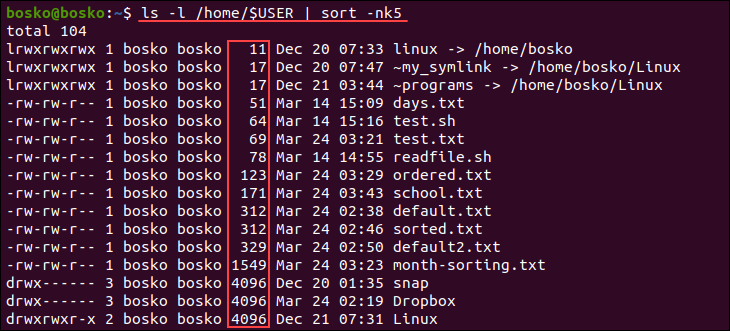
3. Combining cut and sort in Pipelines
The true power of these commands is realized when you chain them together using the pipe (|). This allows you to create sophisticated, one-line commands to extract, format, and analyze data on the fly.
Let's try a practical example. Suppose we want a unique, alphabetized list of all shells being used on our system.
We can achieve this in two steps:
- First,
cutout the 7th field (the shell) from/etc/passwd. - Then, pipe that list of shells to
sortand use the-uoption to both sort the list and remove any duplicate entries.
The command would look like this:
cut -d':' -f7 /etc/passwd | sort -u
This single line of code efficiently answers our question by combining the strengths of two separate tools. This pattern of piping command output through various filters is fundamental to working effectively in the Linux shell.

Test your understanding!
Your task is to produce a list of all user IDs (UIDs) from /etc/passwd, sorted numerically from smallest to largest. The UID is the third field.
Which command pipeline accomplishes this?
cut -d':' -f3 /etc/passwd | sortcut -d':' -f3 /etc/passwd | sort -nsort -nk3 /etc/passwdsort -t':' -k3 /etc/passwd | cut -f3
Show answer
The correct command is 2. cut -d':' -f3 /etc/passwd | sort -n.
- Option 1 is close, but
sortwithout-nwould sort the UIDs alphabetically (e.g., 1000 would come before 2). - Option 3 sorts the entire file based on the third field, but it prints every line, not just the UIDs.
- Option 4 is unnecessarily complex. It's more efficient to
cutfirst to reduce the data thatsortneeds to process.
Conclusion
In this lesson, you've added two of the most fundamental text-filtering commands, cut and sort, to your Linux toolkit. You now have the ability to not just find files, but to dissect and reorganize their contents or the output from other commands.
Key Takeaways:
cutextracts vertical slices (columns) of text based on characters (-c), fields (-f), and a specified delimiter (-d).sortreorders lines of text alphabetically (default), numerically (-n), or in reverse (-r).- Both commands can operate on specific columns using a key (
-kforsort) and a delimiter (-tforsort). - The true power of these commands is unlocked when you combine them in a pipeline (
|) to perform multi-step data processing.
In our upcoming lessons, we'll continue to build on this foundation. While cut and sort are excellent for simple filtering, you'll eventually encounter tasks that require more complex logic, like searching and replacing text within a line. For that, we'll need our next tool: sed.