In our previous lesson, we established the strategic foundation for our task management application by defining your target user—a software developer or tech student—and crafting a product vision. This gave us the "who" and the "why." Now, it's time to translate that high-level vision into concrete, actionable requirements.
This lesson focuses on defining the "what." We will break down the core functionality of our application into user stories, which are descriptions of features from the perspective of your target user. Crucially, we will also write detailed acceptance criteria for each story. These criteria are the specific conditions that must be met for a feature to be considered complete, eliminating ambiguity and creating a clear contract for development. This process is the bridge between product vision and engineering execution.
From Vision to Features: An Introduction to User Stories
A user story is a concise, informal description of a feature told from the perspective of the person who desires the new capability. It's a fundamental tool in Agile development that keeps the focus on user value.
User Stories and Acceptance Criteria EXAMPLE (Agile Story Tutorial)
The YouTube channel The Business Analysis Doctor provides an excellent, concise introduction to user stories and their structure.
Watch the video to understand the definition of a user story and its role in Agile. Pay close attention to the explanation of the "Three Cs" (Card, Conversation, and Confirmation), which highlights their collaborative nature. Finally, internalize the standard Connextra format: "As a [role], I want to [feature], so that [value]".
As you saw, the format forces you to connect the user (your persona from the last lesson), the action they want to perform, and the benefit they receive. Let's look at a practical example of how a product manager deconstructs a familiar feature into these requirement statements.
Webinar: How to Write Great Product Requirements by Amazon Sr PM, Elly Newell
In this talk from Product School, an Amazon Senior PM explains how to write requirements. Her process perfectly illustrates how to think in user stories.
First, watch the segment on how to structure a requirement. Notice the "who, how, and when" format is just a slight variation of the user story template. Then, watch the detailed walkthrough where she breaks down the Instagram "like" feature into specific user actions. Observe how a single feature ("liking") is deconstructed into multiple stories covering different contexts (public vs. private accounts) and interaction methods (double-tap vs. heart icon).
Defining the MVP Features with User Stories
For our task management app, the Minimum Viable Product (MVP) will focus on a core set of features. Based on our learning outcome, these are:
- Task creation, reading, updating, and deleting (CRUD)
- Task categorization
- Task prioritization
- Due date tracking
Using the persona you developed and the user story format, we can start drafting the stories for these features. For example:
- Create: As a developer, I want to create a new task with a title so that I can quickly capture my to-dos.
- Read: As a developer, I want to view a list of all my tasks so that I can get an overview of my workload.
- Prioritization: As a developer, I want to assign a priority level to a task so that I can focus on what's most important first.
These stories define the intent, but they lack the detail needed for implementation. That's where acceptance criteria come in.
Acceptance Criteria: The Definition of "Done"
Acceptance Criteria (AC) are the conditions that a product must satisfy to be accepted by a user, customer, or, in the case of system-level functionality, the consuming system. They transform a user story from a high-level idea into a testable specification. This is a concept you'll appreciate from your backend development experience, as it's the foundation for both manual QA and automated testing.
Acceptance Criteria: How to Define and Deliver User Stories
This article from Taskford provides a thorough overview of acceptance criteria and their role in bridging the gap between user expectations and development reality.
Start by reading the introduction to understand what AC are and how they bridge the gap between requirements and delivery. After the user story refresher, focus on the section defining AC and who should be involved in writing them. Finally, study the two primary formats: scenario-oriented (Given/When/Then) and rule-oriented (checklist).
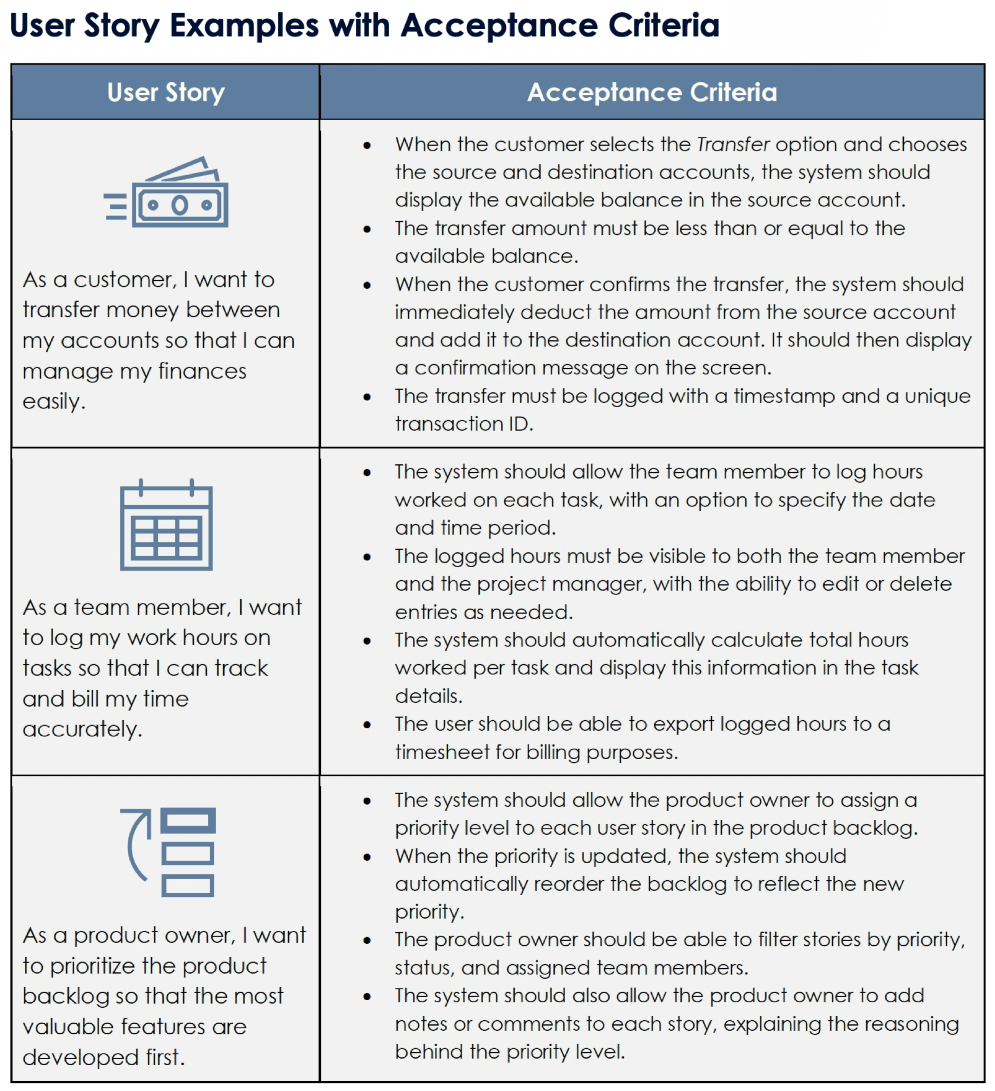
Writing Effective Acceptance Criteria
Writing good AC is a skill. They must be specific, measurable, and unambiguous. Let's examine some best practices and common pitfalls.
80+ Free User Story Examples with Acceptance Criteria by ...
This guide from Smartsheet includes a fantastic section on what to avoid when writing acceptance criteria.
Please read the section titled Bad Acceptance Criteria Examples. Pay close attention to the table that identifies common problems like vague language, being overly prescriptive, and having contradictory criteria. Understanding these pitfalls will help you write much clearer requirements.
Activity: Authoring the MVP User Stories & Acceptance Criteria
Now it's your turn to continue building the Product Requirements Document (PRD). Your task is to write the user stories and detailed acceptance criteria for the core features of our MVP. This will form the "Functional Requirements" section of your PRD.
For each feature area below, write at least one user story and a corresponding set of acceptance criteria. Use the "rule-oriented" checklist format for clarity. Try to think of both the "happy path" (what happens when everything works correctly) and potential edge cases or validations.
1. Task CRUD (Create, Read, Update, Delete)
- Create a Task: What fields are needed? What validation is required? What feedback does the user get?
- View a List of Tasks: How are tasks displayed? In what order?
- Update a Task: What parts of a task can be edited? How does the user save changes?
- Delete a Task: How does a user initiate deletion? Is there a confirmation step? What happens after deletion?
2. Task Categorization
- How does a user assign a category to a task?
- Can they create new categories?
- Can a task belong to more than one category? (For the MVP, let's assume a task has only one category).
3. Task Prioritization
- What are the priority levels? (e.g., Low, Medium, High)
- How does a user set or change a task's priority?
- How does priority affect the task's display in the list?
4. Due Date Tracking
- How does a user add or edit a due date?
- What is the format of the due date?
- Is there any visual indicator for overdue tasks?
Example for "Create a Task":
User Story: As a developer, I want to create a new task with a title and an optional description so I can capture all the necessary details.
Acceptance Criteria:
- Given the user is on the main task view, there must be a button or form to add a new task.
- When creating a new task, the 'title' field is mandatory.
- The system should prevent saving a task if the title is empty and display an error message like "Title is required."
- The system should allow the user to provide an optional 'description' for the task.
- When the user saves a new task, it should immediately appear in their task list.
- A temporary success notification (e.g., "Task created successfully") should be displayed for 3 seconds after creation.
Take your time with this activity. The more thorough your acceptance criteria are now, the smoother the development and testing phases will be.
Conclusion
In this lesson, you've taken the critical step of translating your product vision into tangible, developer-ready requirements. You learned how to frame features as user stories to maintain a user-centric focus and how to define the boundaries of those stories with precise acceptance criteria. This process establishes a shared understanding of what "done" looks like and is the backbone of a well-managed development process.
Key Takeaways:
- User stories connect a user's role, their desired action, and the value they gain.
- Acceptance criteria make user stories testable and unambiguous by defining specific conditions for completion.
- There are two main formats for AC: rule-oriented (checklists) and scenario-oriented (Given/When/Then).
- Writing clear requirements involves considering happy paths, validations, error states, and user feedback.
In our next lesson, we will finalize the scope of our MVP. You'll learn to distinguish these "must-have" features from "nice-to-have" future enhancements, creating a prioritized backlog that will guide the initial development sprints. This ensures we can deliver value to our target users as quickly as possible.