Hello! Let's continue building on your knowledge of Data Definition Language (DDL).
In the previous lesson, we learned how to use CREATE, ALTER, and DROP to manage the basic structure of tables. You can think of that as framing a house. Today, we're going to furnish it by defining the specific rules for what each "room" or column can hold.
This lesson directly addresses the learning outcome: Define table columns with appropriate data types and constraints (e.g., NOT NULL, UNIQUE).
Just as in C programming, where you must declare a variable with a specific type like int or char* before using it, SQL requires you to define each column with a data type. Constraints are like adding validation logic or assertions to your C code—they are rules that ensure the data being stored is valid, maintaining the integrity of your entire system.
Why Data Types and Constraints Matter
Before diving into the syntax, it's crucial to understand why this is so important. Getting this right from the start prevents countless data quality issues down the line. Let's watch a short video segment that highlights the pitfalls of getting this wrong.
7 Database Design Mistakes to Avoid (With Solutions)
This video from Database Star discusses common database design mistakes. We'll watch two key segments that explain why choosing correct data types and using constraints are fundamental for data quality.
Please watch these two parts: Poor or No Referential Integrity (04:44 - 06:05): This section introduces the concept of constraints and explains why relying only on application-level validation is a risky strategy. Using the Wrong Data Types and Sizes (09:03 - 10:54): This part explains how choosing the right data type affects data quality, performance, and storage—three critical aspects of a well-designed database.
As the video highlighted, choosing the correct data types and constraints is about:
- Data Integrity: Preventing invalid data (like text in a number field).
- Performance: Allowing the database to store, index, and search data efficiently.
- Storage: Using only the necessary amount of disk space.
Part 1: Choosing Appropriate Data Types
Data types specify the kind of data a column can hold. SQL data types can be broadly grouped into three main categories.
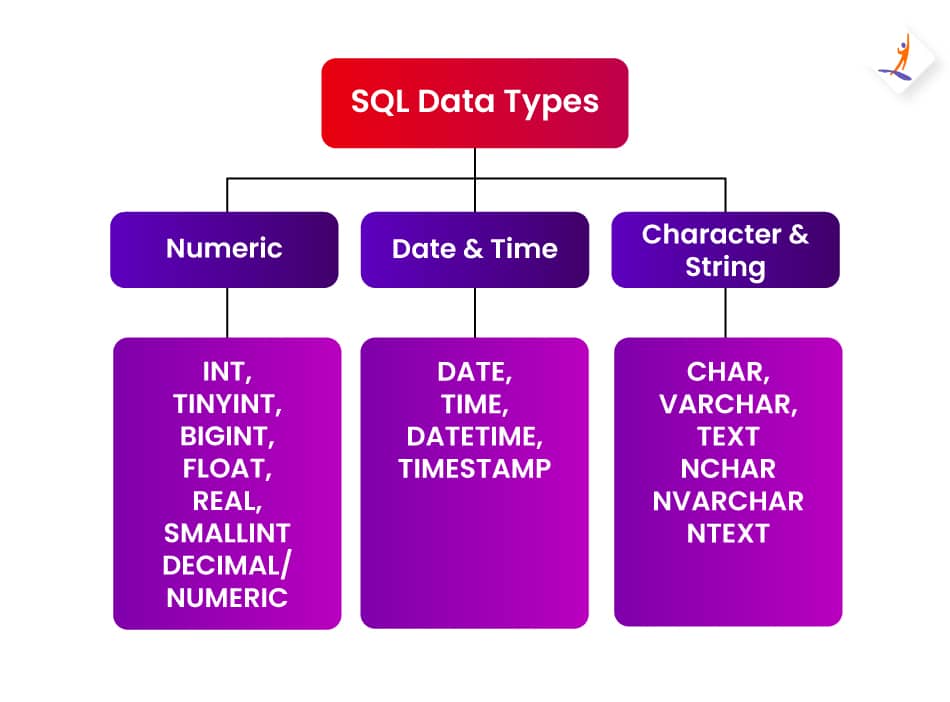
Let's explore these categories in more detail using a comprehensive guide.
This article from GeeksForGeeks provides a clear breakdown of the most common SQL data types. We will use it as a reference for the main categories.
Please review the tables and descriptions in the following sections to familiarize yourself with the common types: Numeric Data Types: Pay attention to the difference between integer types (INT, SMALLINT) and exact decimal types (DECIMAL). Character and String Data Types: Focus on the distinction between fixed-length CHAR and variable-length VARCHAR. Date and Time Data Type: Note the different types for storing dates (DATE), times (TIME), or both (DATETIME).
Here’s a summary of the key takeaways, connecting back to your programming background:
-
Numeric Types:
INT,SMALLINT,BIGINT: For whole numbers. Choosing the smallest one that fits your expected range of values is most efficient (similar to choosingshortvs.intvs.long longin C).DECIMAL(p, s)orNUMERIC(p, s): For numbers where precision is critical, like currency. It stores a number with a fixed precision (p, total digits) and scale (s, digits after decimal). This is for exact arithmetic.FLOAT,REAL: For floating-point numbers where absolute precision is less important (e.g., scientific measurements).
-
Character/String Types:
VARCHAR(n): The most common string type. It stores a variable-length string up to a maximum ofncharacters. It only uses storage for the characters you actually enter. This is analogous to achar*pointing to a dynamically allocated string in C.CHAR(n): A fixed-length string. If you define a column asCHAR(10)and store "SQL", it will still use 10 characters of space (padded with spaces). This can be efficient for data that is always the same length, like country codes ('US', 'IN', 'CA'). This is like achar my_string[10];array in C.TEXT: For very long strings, like product descriptions or article content.
-
Date/Time Types:
DATE: Stores a date (YYYY-MM-DD).TIME: Stores a time (HH:MI:SS).DATETIMEorTIMESTAMP: Stores both date and time.TIMESTAMPis often used for tracking when a row was created or last updated.
Part 2: Enforcing Rules with Constraints
Constraints are rules applied to columns to enforce data integrity. Let's see them in action.
MySQL Constraints Tutorial with 20+ Examples - NOT NULL, UNIQUE, DEFAULT, CHECK, PRIMARYKEY, INDEXES
This video tutorial from Amit Thinks provides clear, practical examples of how to define and use the most common constraints in MySQL. The principles are the same across most SQL databases.
Watch the following sections to see how each constraint works. Pay attention to the CREATE TABLE syntax and the errors that occur when you try to violate a constraint. NOT NULL (02:01 - 06:17): Ensures a column cannot be empty. UNIQUE (06:17 - 08:19): Ensures all values in a column are different. DEFAULT (12:19 - 15:51): Provides a default value if one isn't specified. CHECK (08:19 - 12:19): Ensures values meet a specific condition. PRIMARY KEY (19:46 - 23:12): Briefly review this; it combines NOT NULL and UNIQUE to uniquely identify each row.
Constraint Summary
Let's consolidate what you've just seen.
1. NOT NULL
- Purpose: Guarantees that a column cannot have a
NULL(empty) value. - Example: An
emailorusernamecolumn should always beNOT NULL. - Syntax:
email VARCHAR(100) NOT NULL
2. UNIQUE
- Purpose: Ensures that every value in a column (or a set of columns) is unique across all rows.
- Example: User emails must be unique to prevent duplicate accounts.
- Syntax:
email VARCHAR(100) UNIQUE
UNIQUE vs. PRIMARY KEY
You might notice that PRIMARY KEY also enforces uniqueness. So what's the difference?
Integrity Constraints in SQL: A Guide With Examples
This DataCamp article has an excellent, concise explanation on the difference between a PRIMARY KEY and a UNIQUE constraint.
Read the subsection titled 'NOT NULL UNIQUE vs PRIMARY KEY constraints'. It's very short and directly answers this important question.
The key difference is that a table can have only one PRIMARY KEY, which is its main identifier. However, a table can have multiple UNIQUE constraints to enforce other business rules (e.g., user_id is the PRIMARY KEY, but email and username must also be UNIQUE).
3. DEFAULT
- Purpose: Sets a default value for a column if no value is specified during an
INSERT. - Example: Setting an
account_statuscolumn to'pending'by default. - Syntax:
account_status VARCHAR(20) DEFAULT 'pending'
4. CHECK
- Purpose: Validates that a column's value meets a specific logical condition.
- Example: Ensuring an
agecolumn is greater than 18 or apriceis greater than 0. - Syntax:
age INT CHECK (age >= 18)
Test your understanding!
You are designing a products table for an e-commerce site. Write the CREATE TABLE statement with the following columns and rules:
product_id: An integer that should serve as the primary identifier for each product.product_code: A string of exactly 10 characters that must be unique for every product and cannot be empty. This is for internal tracking.product_name: A string up to 255 characters, which cannot be empty.price: A numeric value that can store up to 10 digits in total, with 2 digits after the decimal point. It must be a positive value.stock_quantity: An integer representing items in stock. It should default to0if not specified.
Think about which data types and constraints are the most appropriate for each column.
Show answer
CREATE TABLE products (
    product_id INT PRIMARY KEY,
    product_code CHAR(10) UNIQUE NOT NULL,
    product_name VARCHAR(255) NOT NULL,
    price DECIMAL(10, 2) CHECK (price > 0),
    stock_quantity INT DEFAULT 0
);
Rationale:
product_id INT PRIMARY KEY:INTis standard for IDs, andPRIMARY KEYmakes it the main identifier (UNIQUEandNOT NULL).product_code CHAR(10) UNIQUE NOT NULL:CHAR(10)is used because the code is always exactly 10 characters.UNIQUEandNOT NULLare specified requirements.product_name VARCHAR(255) NOT NULL:VARCHARis appropriate for variable-length names.NOT NULLis required.price DECIMAL(10, 2) CHECK (price > 0):DECIMALis perfect for currency. TheCHECKconstraint enforces the "positive value" rule.stock_quantity INT DEFAULT 0:INTis for the whole number count, andDEFAULT 0handles the default value requirement.
Conclusion
In this lesson, you've taken a major step in designing robust and reliable databases. By carefully defining column data types and applying constraints, you are enforcing data integrity at the lowest level—the database itself. This makes your data more predictable, your queries more efficient, and your applications more stable.
Key Takeaways:
- Data Types define what kind of data a column can store. Choosing the most appropriate and efficient type is crucial for performance and storage.
- Constraints are rules that enforce data integrity.
NOT NULL: Ensures a value must be provided.UNIQUE: Ensures all values in the column are distinct.DEFAULT: Provides a fallback value during insertion.CHECK: Validates data against a custom condition.
- A
PRIMARY KEYis a special constraint that is implicitlyUNIQUEandNOT NULL, and a table can only have one.
Preview of the Next Lesson:
We have now designed a solid table structure with CREATE TABLE and defined its columns with precise data types and rules. But our tables are still empty. In the next lesson, we will shift from DDL (Data Definition Language) back to DML (Data Manipulation Language) and learn how to populate our tables with data using the INSERT statement.