Hello! Welcome back to our course on SQL.
In our last lesson, we focused on Data Definition Language (DDL). You learned how to define the "blueprint" for our data by creating tables and setting rules for each column with specific data types and constraints. We've essentially built the empty containers; now it's time to fill them.
Today, we transition to Data Manipulation Language (DML) to learn how to add data to those tables. This lesson fulfills the learning outcome: Insert single and multiple rows into a table using INSERT statements. This is the "C" (Create) in the fundamental CRUD (Create, Read, Update, Delete) operations and is a command you will use constantly in any role involving databases.
Part 1: The Basic INSERT Statement
The INSERT statement is used to add new rows of data to a table. The fundamental structure of the command is straightforward, but getting the details right is crucial to avoid errors.
Let's start with a foundational reading that explains the core syntax.
SQL INSERT statement and how to use it
This article from Launch School provides a clear, step-by-step guide to inserting data. It explains the syntax and walks through common scenarios and potential errors.
Please read the section titled 'Insertion Statement Syntax'. It breaks down the three key pieces of information required for any INSERT statement.
As the article explains, the basic syntax is:INSERT INTO table_name (column1, column2, ...) VALUES (value1, value2, ...);
There are three critical parts:
INSERT INTO table_name: The table you want to add data to.(column1, column2, ...): The list of columns you are providing data for.VALUES (value1, value2, ...): The actual data for the new row.
The order and data type of the values in the VALUES clause must correspond directly to the columns in the column list. This is similar to calling a function in C, where the arguments you pass must match the function's parameters in order and type.
Inserting a Single Row
Let's see this in action. The following video gives a concise demonstration of inserting one row of data.
SQL Create Table and Insert Data - A Complete Tutorial
This clip from 'The SQL Guy' provides a quick, practical demonstration of the single-row INSERT syntax.
Watch from 02:42 to 04:44 to see how to insert a single record into an employees table, specifying the columns and their corresponding values.
Best Practice: Always Specify Columns
You might see code where the column list is omitted:INSERT INTO users VALUES (1, 'jsmith', 'jsmith@example.com');
While this works if you provide a value for every column in the exact order they appear in the table's schema, it's considered poor practice. Why?
- Brittleness: If someone later adds, removes, or reorders a column in the table (
ALTER TABLE), this query will either fail or, worse, silently insert incorrect data (e.g., an email into a username column). - Readability: Explicitly listing the columns makes the query self-documenting. Anyone reading it knows exactly which value maps to which column without having to look up the table's schema.
Your background in systems programming will give you an appreciation for this principle: building robust, maintainable systems means avoiding shortcuts that rely on implicit, fragile assumptions.
Part 2: Handling Constraints and Defaults
Your INSERT statements will interact with the constraints we defined in the last lesson.
NOT NULL: If a column has aNOT NULLconstraint, you must provide a value for it in yourINSERTstatement.UNIQUE: The database will reject yourINSERTif the value you provide for aUNIQUEcolumn already exists in another row.DEFAULT: If you don't specify a column in yourINSERTstatement, the database will use its default value if one is defined. If no default exists, it will beNULL(which would violate aNOT NULLconstraint).- Auto-incrementing Keys: For primary key columns that auto-generate their own values (e.g., using
IDENTITYin SQL Server orSERIALin PostgreSQL), you should simply omit them from yourINSERTstatement's column list. The database will handle it for you.
Let's watch a quick video that shows an INSERT into a table with an auto-incrementing ID and a NOT NULL constraint.
SQL Create Table and Insert Data - A Complete Tutorial
Let's return to 'The SQL Guy' video to see how constraints affect the INSERT statement. This demonstrates how the database enforces the rules we defined.
Watch from 10:06 to 11:26. Notice how the ID column is not specified in the INSERT statement, and see what happens when the NOT NULL constraint on last_name is violated.
Test your understanding!
Given the following table definition from our last lesson:
CREATE TABLE products (
    product_id INT PRIMARY KEY, -- (Assume this auto-increments for this question)
    product_code CHAR(10) UNIQUE NOT NULL,
    product_name VARCHAR(255) NOT NULL,
    price DECIMAL(10, 2) CHECK (price > 0),
    stock_quantity INT DEFAULT 0
);
Which of the following INSERT statements would fail, and why?
INSERT INTO products (product_code, product_name, price) VALUES ('A1B2C3D4E5', 'New Gadget', 99.99);INSERT INTO products (product_name, price) VALUES ('Another Gadget', 150.00);INSERT INTO products (product_code, product_name, price) VALUES ('F6G7H8I9J0', 'Broken Gadget', -10.00);
Show answer
- Statement 1: This would succeed. We've provided values for all
NOT NULLcolumns that don't have defaults (product_code,product_name).product_idwill be auto-generated, andstock_quantitywill be set to itsDEFAULTvalue of0. - Statement 2: This would fail. We did not provide a value for
product_code, which has aNOT NULLconstraint and noDEFAULTvalue. - Statement 3: This would fail. The value for
priceis-10.00, which violates theCHECK (price > 0)constraint.
Part 3: Inserting Multiple Rows
Often, you'll need to insert many rows at once. You could execute multiple INSERT statements, but this is inefficient. A much better way is to use a single INSERT statement with multiple value tuples.

The syntax is a simple extension of what you've learned:
INSERT INTO table_name (column1, column2)
VALUES
    (value1a, value2a),
    (value1b, value2b),
    (value1c, value2c);
This is not just cleaner to write; it's also significantly more performant. A single multi-row INSERT statement reduces network latency and transaction overhead compared to many single-row INSERTs.
This graph shows the performance difference when loading one million rows. Notice how performance improves dramatically as you increase the number of rows per INSERT statement (up to an optimal point).
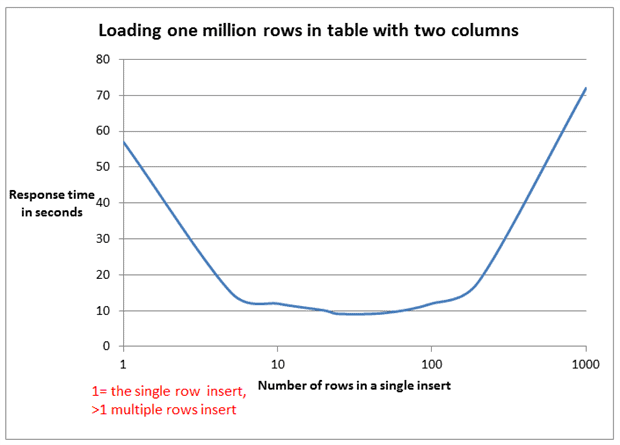
Now, let's read about this syntax and see it in action.
The Basics of Inserting Data into a SQL Server Table
The red-gate.com article provides another excellent explanation, this time focusing on SQL Server, but the multi-row insert syntax is standard across most modern databases.
Read the section 'Add multiple rows to a table using a single INSERT statement'. This section is short and directly covers the syntax and benefits.
Conclusion
You've now mastered the INSERT statement, a cornerstone of database interaction. You can add single or multiple rows of data, and you understand how these operations interact with the table structure and constraints you've defined.
Key Takeaways:
- The
INSERTstatement is used to add new rows to a table. - It's a best practice to always explicitly list the columns you are inserting data into for clarity and robustness.
INSERTstatements must respect all table constraints (NOT NULL,UNIQUE,CHECK). Columns withDEFAULTvalues or auto-incrementing keys can often be omitted.- Inserting multiple rows with a single
INSERTstatement is far more efficient than running multiple separate statements.
Preview of the Next Lesson:
Data is rarely static. Now that you can add records to your tables, the next logical step is to learn how to modify existing records. In the next lesson, we will cover the UPDATE statement, which allows you to change data that is already in your database.