Hello! Welcome back to our SQL journey.
In the last lesson, we learned how to populate our tables with new data using the INSERT statement. This corresponds to the "Create" part of the fundamental CRUD (Create, Read, Update, Delete) operations. However, data is rarely static; it often needs to be corrected, modified, or updated over time.
Today, we'll focus on the "Update" part of CRUD. This lesson will teach you how to update existing records that match a condition using the UPDATE statement. Mastering this command is crucial, as modifying data is a core task in any database-driven application, from changing a user's email address to adjusting product inventory.
The Anatomy of an UPDATE Statement
The UPDATE statement allows you to modify the values of existing rows in a table. Its structure is composed of three main parts:
UPDATE: Specifies the table you want to modify.SET: Specifies which column(s) to change and their new values.WHERE: Specifies the condition that identifies which row(s) to update.
Let's watch a video that walks through the fundamental uses of the UPDATE statement, from changing a single piece of data to modifying multiple columns at once.
SQL UPDATE Statement |¦| SQL Tutorial |¦| SQL for Beginners
This video from Socratica provides a clear and practical demonstration of the UPDATE statement's core syntax and functionality.
Watch from the beginning up to 03:37. This will cover: The basic syntax for updating a single column. How to update multiple columns for a single record.
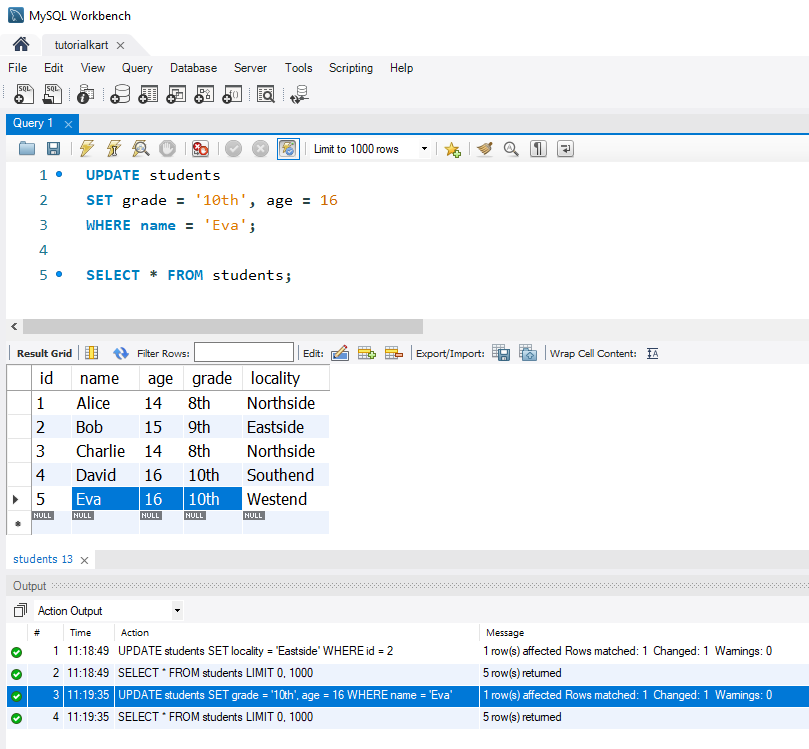
As the video demonstrated, the general syntax is:
UPDATE table_name
SET column1 = new_value1,
    column2 = new_value2,
    ...
WHERE condition;
You can update a single column or multiple columns at the same time by separating the assignments in the SET clause with a comma.
The Golden Rule: The WHERE Clause is Critical
Now for the most important part of using UPDATE. Your experience with network troubleshooting has likely taught you that a single misconfigured command can have widespread consequences. The same is true in SQL. The WHERE clause is your safety mechanism.
Let's watch a short but vital clip that explains why.
SQL UPDATE Statement |¦| SQL Tutorial |¦| SQL for Beginners
Pay close attention to this section from the Socratica video. It covers the single most important rule to remember when writing UPDATE statements.
Watch from 03:37 to 04:10. The video emphasizes the critical role of the WHERE clause.
If you omit the WHERE clause, the UPDATE statement will apply to every single row in the table. This is one of the most common and destructive mistakes a beginner can make. Always double-check your WHERE clause before executing an UPDATE.
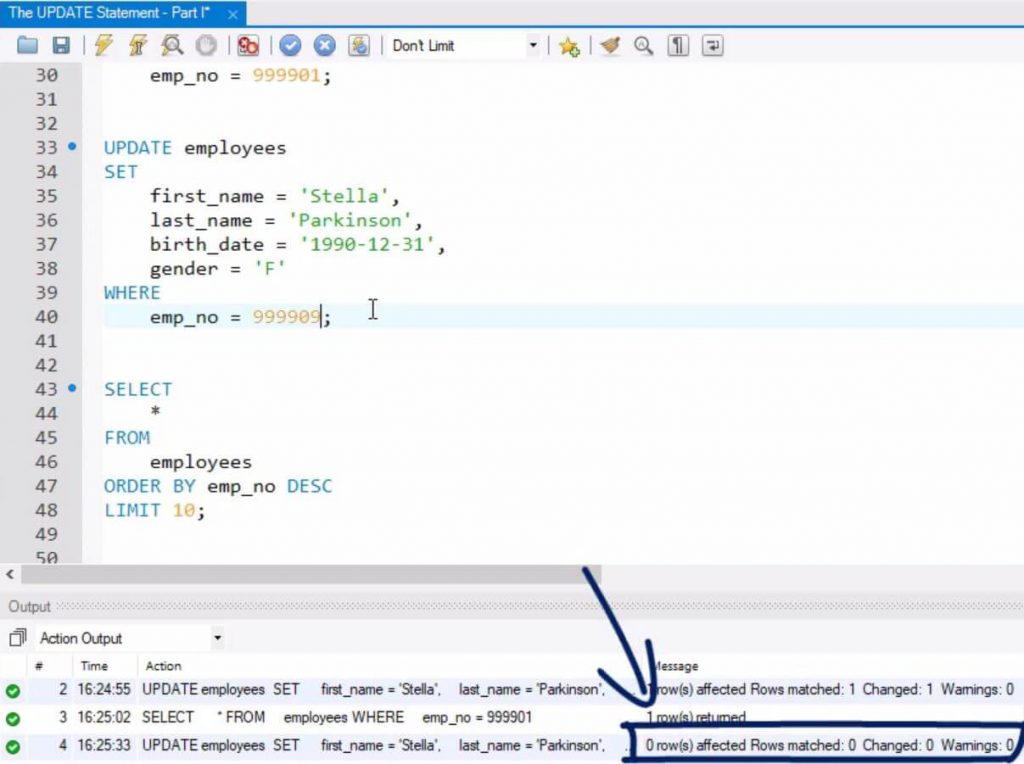
Conversely, the WHERE clause is precise. If its condition doesn't match any rows, no data will be changed.
Test your understanding!
You have a products table with columns product_id, name, price, and in_stock (a boolean). You need to increase the price of the 'SuperWidget' (product_id 101) by 5.00.
What would be the result of the following query?
UPDATE products
SET price = price + 5.00;
Show answer
This query would increase the price of every product in the table by 5.00, not just the 'SuperWidget'. This is because the WHERE clause was omitted.
The correct query would be:
UPDATE products
SET price = price + 5.00
WHERE product_id = 101;
Updating Multiple Rows and Using Expressions
The power of the UPDATE statement comes from its ability to modify sets of data, not just individual records. You can also perform calculations directly within the SET clause, making your updates dynamic.
Let's see how this works in practice.
SQL UPDATE Statement |¦| SQL Tutorial |¦| SQL for Beginners
The WHERE clause isn't limited to a single record. Let's finish the Socratica video to see how to update groups of records and use calculations in the SET clause.
Watch the rest of the video from 04:35 to 07:12. It demonstrates: Updating multiple records based on a common attribute (e.g., all agents in 'MI6'). Using the IN operator to target a specific list of IDs. Performing a calculation (a 10% raise) on a column for all rows.
As you saw, you can:
- Update a group of rows: Use a condition like
WHERE organization = 'MI6'to update all rows that share an attribute. - Use operators like
IN: Provide a list of IDs in theWHEREclause to update a specific, non-contiguous set of rows. - Perform calculations: The
SETclause is very flexible.SET salary = salary * 1.10reads the current value, calculates the new one, and then updates the row.
A Deeper Dive: Efficiency and Set-Based Thinking
Your interest in systems programming and efficiency leads to an important question: if you need to update thousands of records, what's the best way to do it? Should you write a loop in your application (e.g., in C or C#) that sends an UPDATE command for each record, or should you build a single, large UPDATE command?
This is a classic procedural vs. declarative programming question. SQL is a declarative, set-based language. This means you declare what you want to happen, and the database engine figures out the most efficient way to do it for the entire set of data.
SQL UPDATE WHERE IN (List) or UPDATE each individually?
This Stack Overflow discussion provides an excellent real-world perspective on this exact problem. It compares the efficiency of iterative updates versus a single, set-based update.
First, read the original question to understand the problem. Then, read the two answers from users 'Gordon Linoff' and the one starting with 'You should definitely NOT use a loop...'. Focus on their reasoning about network overhead, transaction management, and query compilation.
The consensus is clear: one single, set-based query is almost always more efficient than many individual queries. Each separate query you send to the database involves:
- Network Latency: The time it takes for the query to travel from your application to the database server and back.
- Query Parsing: The database must parse and compile an execution plan for each query.
- Transaction Overhead: Each
UPDATEstatement is typically its own transaction, which has overhead.
By sending one command like UPDATE ... WHERE ID IN (1, 2, 3, ...) you minimize this overhead and let the database do what it does best: operate efficiently on sets of data.
Conclusion
You've now learned how to use the UPDATE statement, a powerful tool for modifying data. This completes another piece of the CRUD puzzle.
Key Takeaways:
- The
UPDATEstatement modifies existing data in a table. - The syntax is
UPDATE table SET column = value WHERE condition. - The
WHEREclause is absolutely critical to ensure you only modify the intended records. Omitting it will update every row in the table. - You can update multiple columns in a single statement and update multiple rows that match a condition.
- The
SETclause can use expressions and calculations to determine the new value. - Thinking in sets and using a single
UPDATEstatement is far more efficient than looping and sending individual commands.
Preview of the Next Lesson:
We've learned to Create, Read (SELECT), and Update data. The final core DML operation is "Delete". In the next lesson, we will cover the DELETE statement, which allows you to permanently remove records from your tables.