Hello! Welcome to the next phase of your SQL journey.
In the last module, we focused entirely on how to read and transform data using SELECT statements, culminating in refactoring complex queries with Common Table Expressions (CTEs). Now, we pivot from reading data to defining the structures that hold it.
This lesson marks the beginning of Module 7, where you'll learn to manage the database schema itself. Our learning outcome is to create, alter, and drop tables using Data Definition Language (DDL). This is a fundamental skill, as tables are the core building blocks of any relational database.
For someone with your interest in low-level systems and C programming, you can think of DDL as the way you declare your data structures. Before you can populate an array of structs in C, you must first define the struct itself—its name and the types of its members. DDL serves the exact same purpose for a database.
The Language of Structure: DDL
SQL commands are often grouped into categories based on their function. The queries you've written so far belong to the Data Query Language (DQL). Today, we focus on Data Definition Language (DDL).
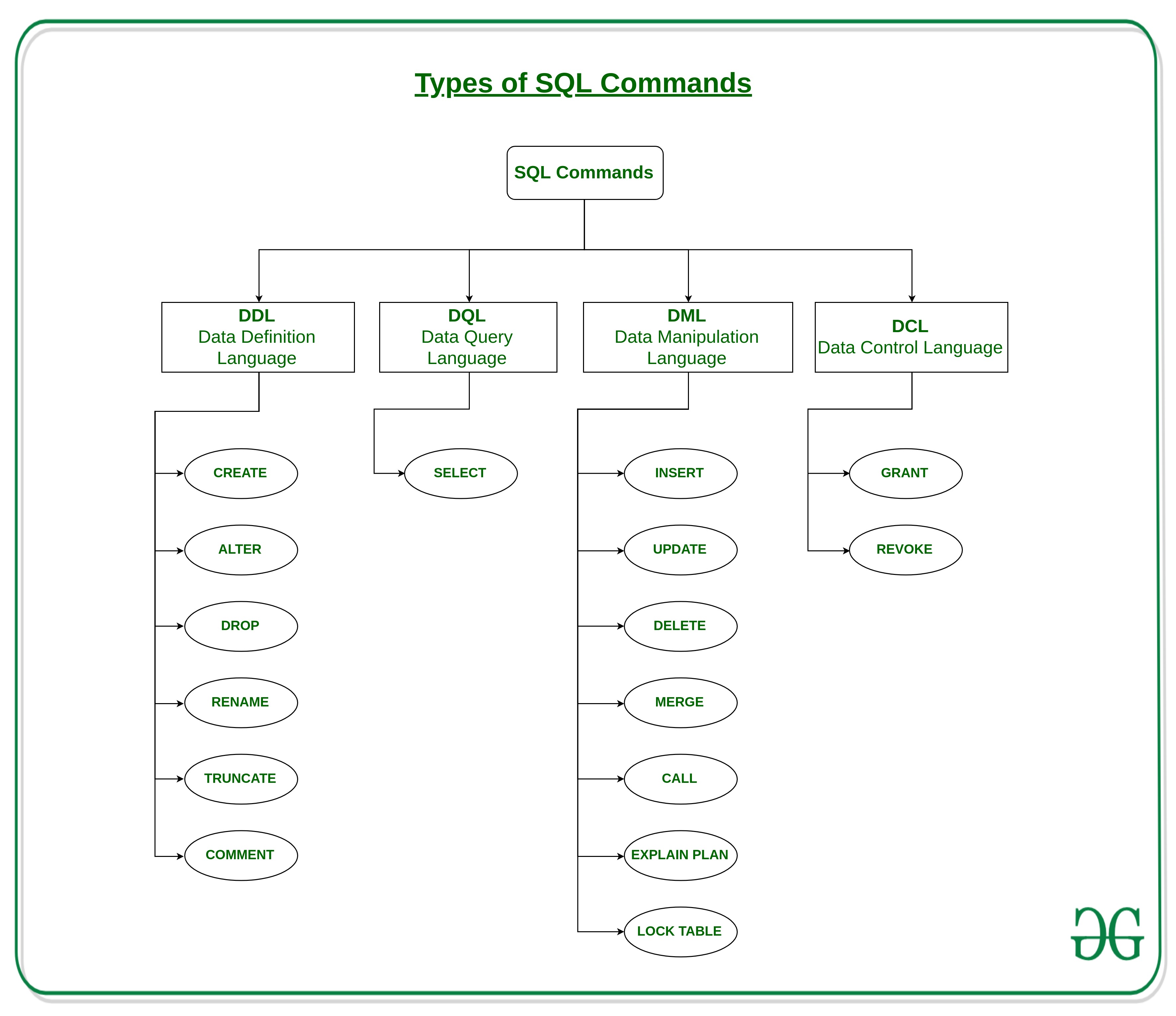
DDL commands don't interact with the data inside the tables; they define, modify, or destroy the tables themselves and other related objects. To get a formal definition, please read the short section on DDL from the provided resource.
This document from Annamalai University provides concise definitions for the different types of database languages. We'll focus on the DDL section.
Please read the section titled 'Data Definition Language'. It's a short section that lists the primary DDL commands and their purpose. Don't worry about TRUNCATE, COMMENT, or RENAME for now; we will focus on the core three: CREATE, ALTER, and DROP.
1. CREATE TABLE: Building the Blueprint
The CREATE TABLE statement is the starting point. It defines a new table, its name, and the columns it will contain. Each column is defined with a name, a data type (e.g., INT, VARCHAR, DATE), and optional constraints (e.g., NOT NULL).
Let's watch a practical demonstration of how to create tables. This video walks through creating two related tables, customers and vehicles.
SQL: DDL and DML Part 1 of 4: CREATE TABLE, Primary Keys and INSERT
This video by Michael Fudge provides a great, practical example of creating tables. Pay close attention to the syntax, the choice of data types, and the reasoning behind using a system-generated ID.
Please watch the following two segments: Creating the customers table (02:28 - 07:14): Observe the syntax for CREATE TABLE, how each column is defined on a new line with its data type (INT, VARCHAR), and the use of the NOT NULL constraint. The instructor also explains the important concept of a surrogate key (INT IDENTITY), which is a great example of database design best practice. Creating the vehicles table (13:17 - 17:20): Watch this second example to reinforce the concepts. Notice again the use of a surrogate key (vehicle_id) and the different data types being used, like DATE.
Let's recap the core syntax from the video:
CREATE TABLE table_name (
    column1_name data_type [constraints],
    column2_name data_type [constraints],
    ...
    columnN_name data_type [constraints]
);
For example, to create a simple Products table, the SQL might look like this:
CREATE TABLE Products (
    product_id INT IDENTITY, -- The DBMS will auto-generate this number
    product_name VARCHAR(100) NOT NULL,
    price DECIMAL(10, 2), -- A number with up to 10 digits, 2 of which are after the decimal
    launch_date DATE
);
We'll cover data types and constraints like PRIMARY KEY in more detail in our next lesson. For now, focus on the overall structure of the CREATE TABLE command.
2. DROP TABLE: Demolishing the Structure
The DROP TABLE command is the counterpart to CREATE TABLE. It is simple, powerful, and irreversible. It completely removes a table, including its structure, all the data it contained, and any associated indexes or constraints.
SQL101 - DDL statements - Create, Alter, Drop
This short clip from Learn at Knowstar demonstrates the DROP TABLE command. It's a straightforward but important command to know.
Watch the segment from 09:02 to 09:45 to see the DROP TABLE syntax and its effect.
The syntax is as simple as it gets:
DROP TABLE table_name;
A very useful variation, especially during development, is DROP TABLE IF EXISTS. You saw this used in the first video by Michael Fudge. This prevents an error if you try to drop a table that has already been deleted.
DROP TABLE IF EXISTS Products;
This command is destructive, so in a production environment, it is used with extreme caution.
Test your understanding!
You need to create a table to store information about employees for a new project. The table should be named Employees and have the following columns:
employee_id: An integer that should be automatically generated.full_name: A string that can hold up to 100 characters.hire_date: A date value.
Write the CREATE TABLE statement for this.
Show answer
CREATE TABLE Employees (
    employee_id INT IDENTITY,
    full_name VARCHAR(100),
    hire_date DATE
);
(Note: INT IDENTITY is common in SQL Server. In PostgreSQL, you would use SERIAL, and in MySQL, INT AUTO_INCREMENT.)
3. ALTER TABLE: Modifying an Existing Blueprint
Requirements change. You might need to add a new column, remove one you no longer need, or change a column's data type. Dropping and recreating the table would cause you to lose all your data. This is where ALTER TABLE comes in. It allows you to modify a table's structure without destroying it.
Let's see the most common uses of ALTER TABLE.
SQL101 - DDL statements - Create, Alter, Drop
The same Learn at Knowstar video has excellent, short segments covering the main ALTER operations. We'll watch them in sequence.
Watch these three short clips to understand how to add, modify, and remove columns: Add a Column (05:48 - 07:08): See how to use ALTER TABLE ... ADD COLUMN .... Alter a Column (07:08 - 08:19): This shows how to change the data type of an existing column with ALTER TABLE ... ALTER COLUMN .... Drop a Column (08:19 - 09:02): Finally, see how to remove a column using ALTER TABLE ... DROP COLUMN ....
Here's a summary of the syntax:
-
To add a new column:
ALTER TABLE Employees ADD COLUMN salary DECIMAL(10, 2); -
To remove an existing column:
ALTER TABLE Employees DROP COLUMN some_old_column; -
To modify a column's data type:
ALTER TABLE Employees ALTER COLUMN full_name VARCHAR(150);
How ALTER TABLE Works Internally
Given your interest in the low-level "how," it's useful to know what the database is often doing behind the scenes when you run ALTER TABLE. It's not just a simple metadata change.
MySQL ALTER TABLE Explained: How It Works and When ...
This article from Medium gives a fantastic, high-level overview of the internal process of an ALTER TABLE command.
Please read the section titled 'How It Works Internally'. This will give you a mental model of why altering a very large table can be a slow and resource-intensive operation.
As the article explains, for many types of changes, the database engine effectively:
- Creates a new, empty table with the desired new structure.
- Copies all the data row by row from the old table to the new one.
- Drops the old table.
- Renames the new table to the original name.
This process ensures data integrity but can be slow and require significant disk space for large tables. This is a critical consideration in your future work, as running an ALTER TABLE on a massive production table can lock it and impact application performance.
Test your understanding!
Imagine you have the Employees table from the previous exercise.
- Your team has decided you also need to store the employee's department. Write the command to add a
department_namecolumn that can store a string of up to 50 characters. - After a few weeks, you realize 50 characters is not enough for some department names. Write the command to change the
department_namecolumn to allow up to 75 characters.
Show answer
- Add the column:
ALTER TABLE Employees ADD COLUMN department_name VARCHAR(50); - Modify the column:
ALTER TABLE Employees ALTER COLUMN department_name VARCHAR(75);
Conclusion
In this lesson, you've learned the fundamental DDL commands for managing table structures. You are no longer just a consumer of data; you are now equipped to define the very containers that hold it.
Key Takeaways:
- Data Definition Language (DDL) is the subset of SQL used to create and manage the structure of database objects.
CREATE TABLEis used to define a new table, its columns, and their data types. This is the blueprint for your data.DROP TABLEis a destructive command that completely removes a table and all its data.ALTER TABLEis used to modify an existing table's structure, such as adding, removing, or changing columns. This is an essential command for evolving a database schema over time.ALTERoperations can be resource-intensive on large tables because the database often has to rebuild the table in the background.
Preview of the Next Lesson:
We briefly touched on data types (INT, VARCHAR) and constraints (NOT NULL, IDENTITY) in this lesson. In the next lesson, we will dive much deeper. You'll learn how to choose the right data types and apply various constraints (UNIQUE, PRIMARY KEY, FOREIGN KEY) to enforce data integrity at the database level. This is a crucial step in designing robust and reliable database schemas.