Hello! Welcome to a new module in our course. In the previous lessons, we mastered the art of manipulating data within tables using commands like INSERT, UPDATE, and DELETE. Now, we're taking a step back to answer a more fundamental question: how do we design the tables and the overall structure of the database in the first place?
This lesson kicks off our module on Database Design and Normalization. We'll address your interest in the "logical and deeper level" of databases by focusing on the first, most critical step of design. The learning outcome for this lesson is to be able to identify entities, attributes, and relationships in a given problem description. This is the conceptual blueprinting stage, much like an architect designs a building before a single brick is laid. It's a foundational skill that lets you build clean, efficient, and logical database systems.
The Three Pillars of Conceptual Modeling
When you receive a set of requirements—a description of what a system needs to do—your first job is to translate that narrative into a structured model. In database design, this model is built on three core components:
- Entities: These are the main "things" or nouns that your database needs to track. Examples include
Customer,Product,Order, orTeacher. - Attributes: These are the properties or characteristics of an entity, like adjectives describing a noun. For a
Customerentity, attributes might includeFirstName,LastName, andEmailAddress. - Relationships: These define how entities are associated with one another, often represented by verbs. For example, a
Customerplaces anOrder.
To get a clear and formal definition of these terms, let's start with a quick read.
What is an Entity Relationship Diagram (ERD)?
This article from Lucidchart provides a concise glossary of the core components of an Entity-Relationship Diagram (ERD), which is the visual model we use for this process.
Please read the section titled 'The components and features of an ER diagram'. Focus on the definitions of Entity, Relationship, Attribute, and Cardinality. Don't worry about memorizing all the sub-types for now; focus on the main concepts.
As the article mentions, a powerful way to think about this is by mapping these components to parts of speech:
- Nouns often become Entities.
- Adjectives often become Attributes.
- Verbs often become Relationships.
This simple heuristic is surprisingly effective for parsing a problem description.
A Practical Walkthrough: The Language School
Theory is great, but the real skill is in the application. Let's work through a realistic example. The following article presents a set of requirements for a language school and then breaks down the process of designing a database for it.
Designing a Relational Database and Creating an Entity ...
This article from Medium, 'Designing a Relational Database...', gives us a problem description and then systematically identifies the entities, attributes, and relationships.
First, read the section 'Defining the requirements'. As you read the gray-boxed requirements for the language school, try to apply the 'noun technique' yourself. What nouns stand out to you as potential entities? Make a quick mental or written list. After you have your list, continue reading the next section, 'Identifying the entities', to see how your list compares to the author's. This is a key part of the process: reading for understanding and extracting the core concepts.
Did your list of entities match the author's (clients, teachers, courses, participants)? This process of sifting through a narrative to find the key nouns is the first major step.
Once you have your entities, the next step is to define their attributes. What information do you need to store about each teacher or course?
Designing a Relational Database and Creating an Entity ...
Let's continue with the same article to see how attributes are defined.
Read the section 'Which attributes do we want to store?'. Pay close attention to the reasoning for adding a teacher_id as a primary key, instead of relying on the teacher's name. This gets at the heart of designing for data integrity.
Test your understanding!
Based on the language school example, imagine the school now wants to track which specific classroom each course is held in.
- Would
Classroombe a new entity or an attribute of theCourseentity? - Justify your answer.
Show answer
Classroom should most likely be a new entity.
Justification: While you could start by adding a classroom_number attribute to the Course entity, a classroom has its own distinct properties that you might want to track. For example, a Classroom entity could have attributes like building_name, capacity, and has_projector. If you only made it an attribute on Course, you would have to repeat this information for every course held in that room, which is inefficient and leads to potential inconsistencies. Creating a Classroom entity allows you to store this information once and then relate it to many courses.
Defining the Connections: Relationships and Cardinality
The final step is to map the relationships between your entities. This is what puts the "relational" in "relational database." It's not enough to know you have Teachers and Courses; you need to formally define how they relate. A teacher teaches a course.
A critical part of defining a relationship is determining its cardinality, which specifies the number of instances of one entity that can be related to instances of another. The main types are:
- One-to-One (1:1): One teacher is assigned exactly one office.
- One-to-Many (1:N): One teacher can teach many courses.
- Many-to-Many (N:M): Many students can enroll in many courses.
Let's see how the language school example handles this.
Designing a Relational Database and Creating an Entity ...
Returning to our Medium article, let's see how the author connects the entities we've identified.
Read the section 'Mapping the relationships'. Focus on how the text from the requirements (e.g., 'each course may have only one teacher', 'a teacher may teach multiple courses') is translated into a 1-to-N relationship.
Visualizing the Model: Entity-Relationship Diagrams (ERDs)
We've now identified all the pieces of our conceptual model. To communicate this design, we use a visual flowchart called an Entity-Relationship Diagram (ERD).
This is where all the concepts come together in a single picture. Let's watch a video that provides a great walkthrough of the whole process, from identifying nouns in a problem statement to drawing the final diagram using the most common notation, "Crow's Foot."
This video by Decomplexify provides a clear, step-by-step guide to creating an ERD, focusing on the practical Crow's Foot notation used in many professional tools.
Please watch the following segments: 00:00 - 03:06: Watch how a simple requirement ('people own pets') is analyzed by identifying the nouns. 03:06 - 06:52: This part is crucial. It explains why you must define cardinality and the thinking process behind it. 13:12 - 18:01: Skip the section on Chen notation and jump here. This provides an excellent explanation of how to read and draw Crow's Foot notation, which is the industry standard you're most likely to encounter.
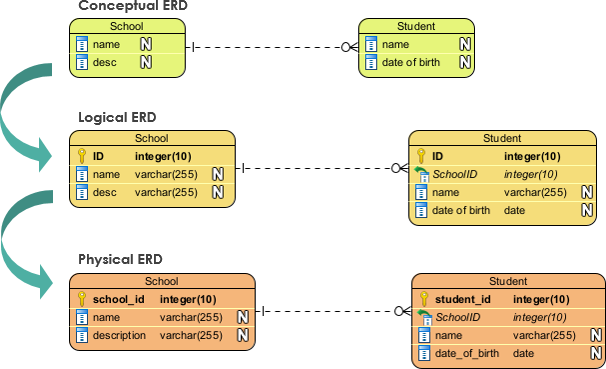
To give you a better sense of how this conceptual model fits into the overall database creation process, look at the diagram below. It shows the evolution from a high-level idea to a concrete physical implementation. The skills you're learning today are for creating the Conceptual and Logical models.
Conclusion
In this lesson, you've learned the conceptual foundation of database design. This is a critical, high-ROI skill because a well-designed database is easier to query, maintain, and scale. This process directly addresses the "why" behind database structure, moving beyond syntax to architectural thinking.
Key Takeaways:
- Database design begins by analyzing a problem description to identify Entities (nouns), Attributes (their properties), and Relationships (verbs).
- Cardinality (one-to-one, one-to-many, many-to-many) is a crucial property of a relationship that dictates how tables will be structured.
- Entity-Relationship Diagrams (ERDs), particularly using Crow's Foot notation, are the standard way to visualize and communicate your conceptual database model.
- This process is about creating a logical blueprint before you write any
CREATE TABLEstatements.
Preview of the Next Lesson:
We've learned how to create a basic model, but are all models created equal? No. It's possible to create a model that "works" but is inefficient and prone to errors. In the next lesson, we will introduce Normalization. You'll learn how to analyze your ERD to spot design flaws like data redundancy and apply the rules of First Normal Form (1NF) to fix them.