Hello! Welcome to the final lesson in our module on Data Manipulation. In the last few lessons, we've built a solid foundation by learning how to create, update, and delete individual records. Today, we'll combine two of these concepts to perform powerful, large-scale data operations.
This lesson focuses on how to use INSERT with a SELECT statement to copy and transform data between tables. This is an incredibly common and efficient technique used for tasks like archiving old data, creating summary tables for reporting, or populating test environments. For someone with your interest in low-level systems, you can think of this as a highly optimized, set-based operation that the database engine performs far more efficiently than an application could by fetching and inserting data row-by-row.
The Power of INSERT INTO ... SELECT
So far, we've used INSERT with a VALUES clause to add a single, new row of data. But what if the data you want to insert already exists in another table? The INSERT INTO ... SELECT statement is the perfect tool for this. It lets you use the full power of a SELECT query—including WHERE clauses, functions, and JOINs—to define a set of rows that you then insert into another table in a single command.
Let's start with a short video that demonstrates the basic syntax.
How to use the SQL INSERT Statement
This video from TechOnTheNet quickly demonstrates how to use a SELECT statement to provide the data for an INSERT command, including filtering the source data with a WHERE clause.
Watch the segment from 01:55 to 03:41. Pay close attention to the syntax and the two crucial rules mentioned: the number of columns and their data types must match between the SELECT list and the target table's columns.
The fundamental syntax is:
INSERT INTO target_table (column1, column2, ...)
SELECT expression1, expression2, ...
FROM source_table
WHERE condition;
As the video highlighted, there are two golden rules for this to work:
- Column Count: The number of columns in your
SELECTlist must match the number of columns in yourINSERTlist. - Data Type Compatibility: The data type of each column in the
SELECTlist must be compatible with the corresponding column in thetarget_table. You can't insert a text string like'hello'into anINTEGERcolumn.
Practical Scenarios: Archiving, Copying, and Transforming
This command is incredibly versatile. You can perform a simple one-to-one copy, or you can get creative and modify the data as you move it. Let's explore some common use cases.
The following article provides excellent examples of how to handle different scenarios, from a simple full-table copy to more complex situations where columns don't perfectly align.
INSERT INTO SELECT statement overview and examples
This article from SQLShack, titled 'INSERT INTO SELECT statement overview and examples', walks through several practical examples. We'll focus on how to manage column lists and combine selected data with static values.
Please read the following sections: Start with 'INSERT INTO SELECT Statement Syntax' to reinforce the structure. Read 'Example 1' to see a simple copy using SELECT *. Read 'Example 2' to understand why it's best practice to explicitly name columns in both the INSERT and SELECT parts. This is crucial for avoiding errors when table structures differ. Finally, read 'Example 4' to see how you can 'transform' data by inserting a hard-coded value (like 'Delhi') alongside data selected from another table.
Transforming Data On-the-Fly
The "transform" part of this technique is where it truly shines. As you saw in Example 4 of the article, you're not limited to just copying existing data. The SELECT statement can include anything that produces a value, such as:
- Static values:
'Active',100,CURRENT_DATE - Calculations:
price * 1.1to add a 10% markup - String manipulation:
first_name || ' ' || last_nameto create a full name (syntax for concatenation varies between SQL dialects, e.g.,+in SQL Server).
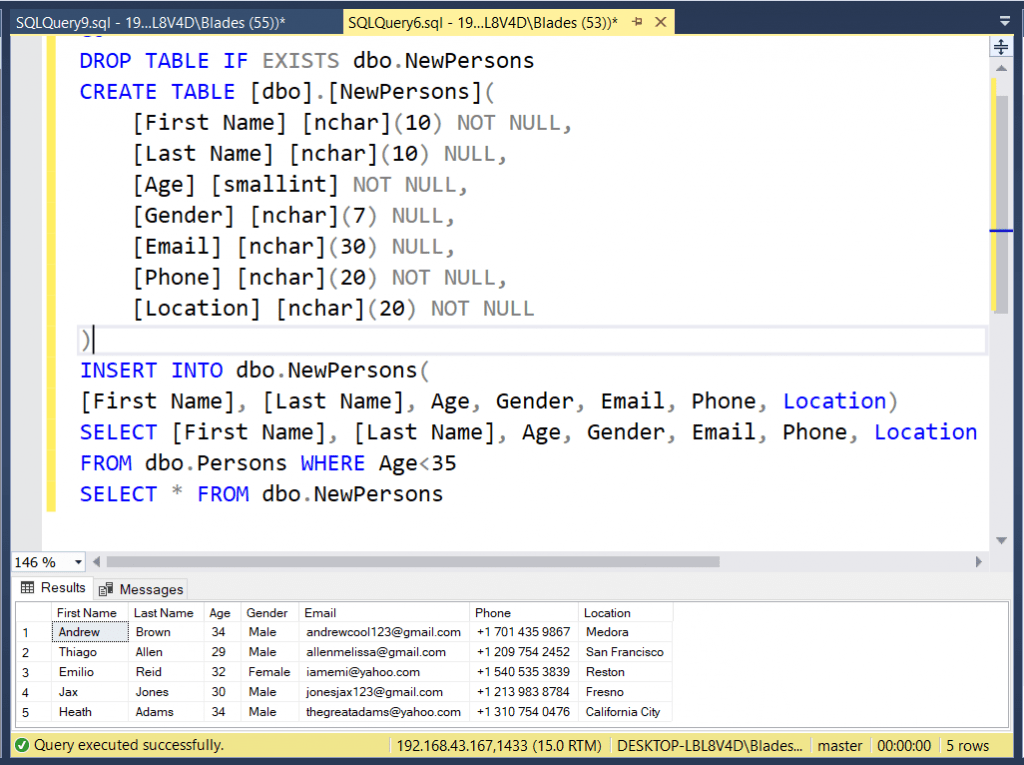
Here is a great visual example of creating a new table and then populating it with filtered and transformed data from another table.
Test your understanding!
You have a products table with columns product_id, name, and price. You also have an on_sale_items table with columns item_name and sale_price.
Write a single SQL statement to copy all products with a price over $100 into the on_sale_items table. As you copy them, you need to transform the data: the sale_price should be 90% of the original price.
Show answer
INSERT INTO on_sale_items (item_name, sale_price)
SELECT name, price * 0.9
FROM products
WHERE price > 100;
This query selects the name and a calculated sale_price from the products table for the specified items and inserts them into the corresponding columns of the on_sale_items table.
A Critical Distinction: INSERT INTO vs. SELECT INTO
In your journey to understand the "why" behind database operations, it's vital to know about a similar-looking but functionally different command: SELECT INTO. This is a common point of confusion.
INSERT INTO ... SELECT ...: Inserts data into an existing table.SELECT ... INTO ...: Creates a new table and populates it with data.
Let's watch a video that clearly demonstrates both commands, so you can see the difference in action.
How to Copy Data from One Table to Another Table in SQL Server Management Studio
This video from Dr. Cecelia Allison shows how to use both SELECT INTO and INSERT INTO ... SELECT.
Watch the entire video (up to 04:26). The first part (until 01:59) demonstrates SELECT INTO to create a new table on the fly. The second part (from 01:59 onwards) demonstrates INSERT INTO ... SELECT to populate a table that already exists.
To deepen this understanding, let's look at how professional developers discuss this topic. This connects directly to your goal of being job-ready.
INSERT INTO vs SELECT INTO - sql server
This Stack Overflow thread, 'INSERT INTO vs SELECT INTO', is a great discussion of the practical differences, performance implications, and best-practice use cases for each command. This gives you insight into real-world considerations.
Read the top two answers (the ones with the highest vote counts). Focus on understanding when you would choose one over the other. The first answer gives a concise summary, while the second provides excellent context on permanent tables vs. 'throwaway' temp tables.
In summary:
- Use
INSERT INTO ... SELECTfor routine DML operations on your permanent, well-designed tables. - Use
SELECT INTOprimarily for creating temporary tables for a specific procedure or for making quick, one-off backups. It's more of a DDL (Data Definition Language) operation as it creates a database object.
Advanced Application: Consolidating Data with JOINs
The real power of INSERT INTO ... SELECT is that the SELECT statement can be as complex as you need. You can use JOINs to gather data from multiple tables and consolidate it into a single summary or archive table.
For instance, you could join customers, orders, and products tables to create a new quarterly_sales_summary table.
The SQLShack article we looked at earlier has a great example of this.
INSERT INTO SELECT statement overview and examples
Let's revisit the SQLShack article to see how a JOIN can be used within the SELECT statement to pull data from many tables at once.
Read 'Example 5: INSERT INTO SELECT statement with Join clause...'. You don't need to memorize this complex query. The key takeaway is understanding the principle: a complex SELECT query, complete with multiple JOINs, serves as the data source for the INSERT.
Conclusion
You've now learned one of the most practical and powerful commands in SQL for bulk data management. This completes our module on the essentials of Data Manipulation Language.
Key Takeaways:
- The
INSERT INTO ... SELECTstatement copies rows from a source and inserts them into a target table. - The source data can be filtered with a
WHEREclause and transformed using functions and expressions. - It is crucial that the number of columns and their data types are compatible between the
SELECTandINSERTclauses. Explicitly naming columns is a best practice. INSERT INTO ... SELECTworks on an existing table (a DML operation).SELECT ... INTOcreates a new table (a DDL-like operation) and is typically used for temporary tables.
Preview of the Next Lesson:
We've spent a lot of time working with data inside tables. But how do we decide what tables we need and what columns should go in them? In the next module, we will shift our focus to Database Design and Normalization. You'll learn the principles behind designing a clean, efficient, and robust database schema, starting with how to identify entities, attributes, and relationships—a topic that strongly appeals to your preference for logical, foundational learning.