Hello! Welcome to the first lesson of Module 2.
In our last lesson, we established the crucial difference between a logical data model (the abstract blueprint) and the physical storage structure (the concrete implementation). We concluded that as developers, we primarily interact with the logical model, trusting the DBMS to handle the physical complexities.
Today, we dive into the most prevalent logical model in the world: the Relational Model. Your interest in fundamentals and "low-level theory" will be well-served here, as the relational model is the conceptual bedrock upon which SQL is built. Understanding this structure is essential before you can manipulate data effectively.
By the end of this lesson, you will be able to explain how the relational model organizes data into the core components of tables, rows, and columns.
What is the Relational Model?
The relational model was proposed in 1970 by Edgar F. Codd, a researcher at IBM. His key idea was to use a simple, consistent structure—the "relation"—to store and manage data. In everyday terms, a relation is just a table.
The model describes the world as a collection of these tables, which can be linked to one another. This was a revolutionary departure from the messy, pointer-based systems that preceded it, which were difficult to query and maintain.
To start, let's get a formal introduction to the model and its basic concepts.
Introduction to Relational Data Model
This video from Neso Academy provides a concise overview of the relational data model, its history, and its foundational terminology.
Please watch from the beginning to 03:00. Focus on the core idea of organizing data into tables and the initial introduction of terms like 'relation', 'tuple', and 'attribute'.
Why Organize Data in Tables?
Before diving deeper into the terminology, it's worth asking why this structure is so effective. Why not just keep all related information in one big file or a single spreadsheet?
Consider this simple example of storing staff and department information:
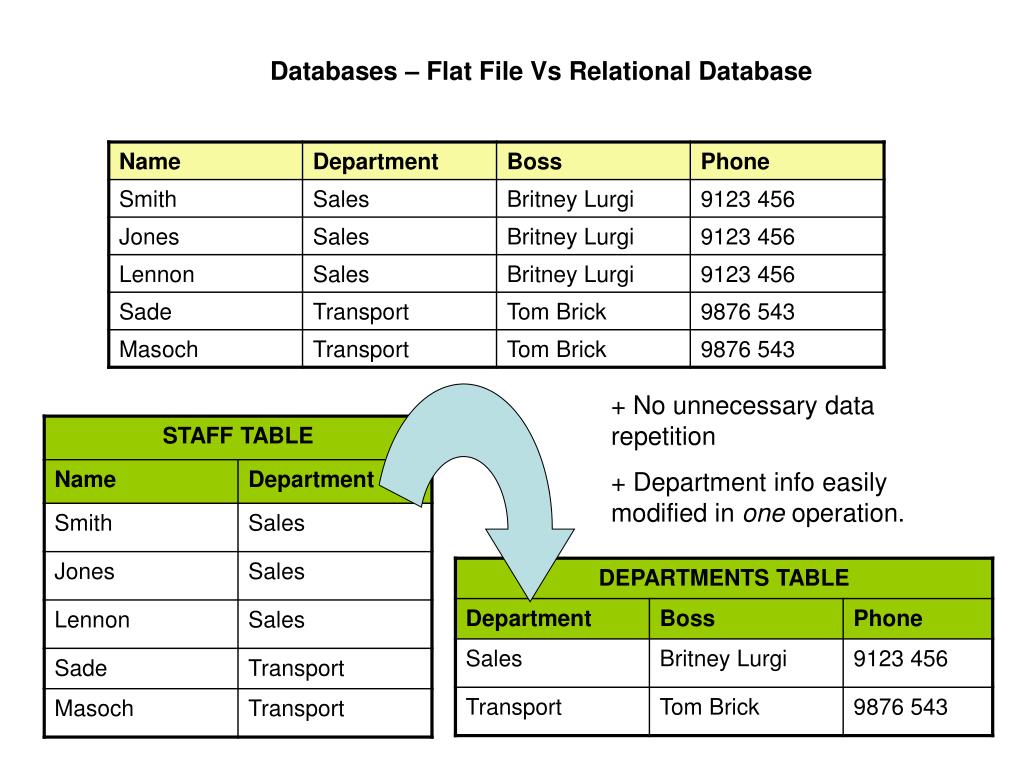
In the "flat-file" approach on the left, if the Sales department's phone number changes, you would have to find and update it in multiple places. Missing even one instance would lead to data inconsistency.
The relational model solves this by organizing data into separate tables for each "thing" (or entity)—like Staff and Departments. The data is no longer repeated, and a change only needs to be made in one place. This principle of reducing redundancy and improving data integrity is a central benefit of the relational model.
The Building Blocks: Relations, Tuples, and Attributes
Now that we understand the "what" and "why," let's formalize the components. The relational model has its roots in set theory and mathematics, so it comes with some formal terminology. However, in practice, you'll often hear simpler, equivalent terms used. Knowing both is important.
Chapter 7 The Relational Data Model
The following text from the 'Database Design' textbook by Adrienne Watt clearly defines the core components and provides a helpful key for the synonymous terms.
Please read the sections titled 'Relation', 'Column', and the 'Terminology Key' table. This will clarify the relationship between the formal and common terms.
As you just read, here is the essential mapping of terms:
| Formal Relational Term | Common Equivalent | Description |
|---|---|---|
| Relation | Table | The primary structure, containing all the data. |
| Tuple | Row or Record | A single entry or item within a table. |
| Attribute | Column or Field | A specific piece of information for each entry. |
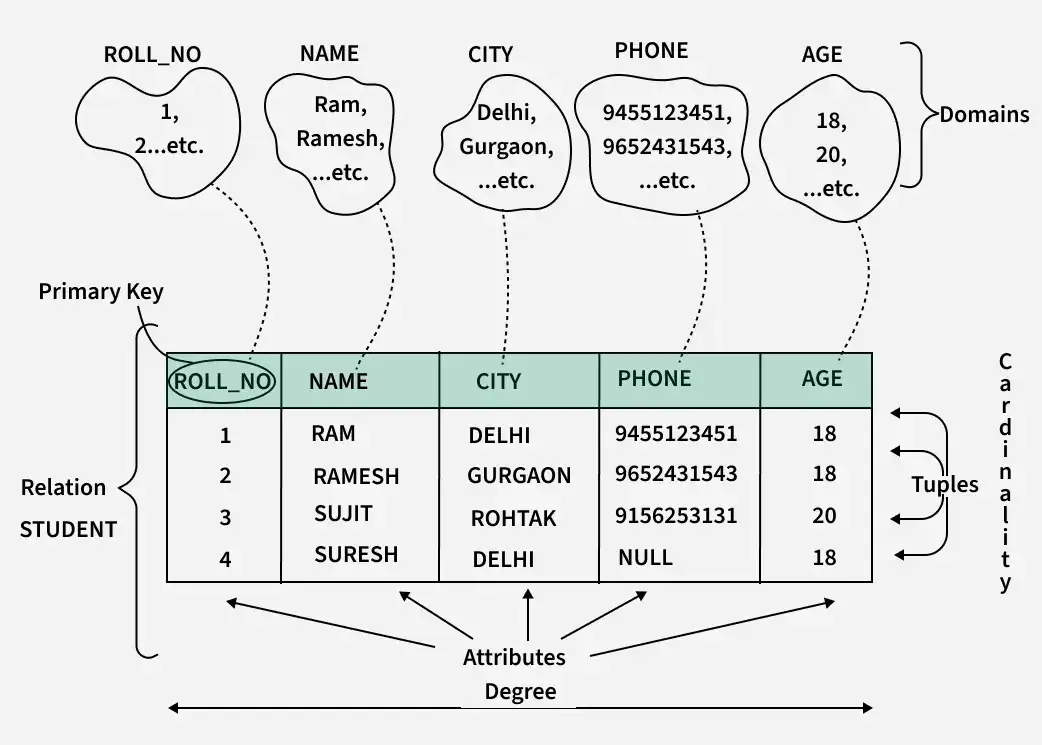
This diagram provides a great visual summary of how all these pieces fit together:
Properties of Attributes and Relations
The structure provided by the relational model allows us to define clear rules for our data.
Attribute Domain
A crucial concept for an attribute is its domain. A domain is the set of all possible, indivisible ("atomic") values an attribute can have. For example, the domain for an Age attribute might be integers from 0 to 120. The domain for a Gender attribute might be the set {'Male', 'Female', 'Other'}.
In practical terms, the domain is enforced through data types. When you create a table, you specify a data type for each column (e.g., INTEGER, TEXT, DATE). This prevents you from, for instance, storing a name in a date column, which is a major source of the data integrity that databases provide.
Let's watch a short clip that contrasts this with the more free-form nature of spreadsheets.
Database vs Spreadsheet - Advantages and Disadvantages
This clip from 365 Data Science highlights how databases enforce data types, a key feature that spreadsheets lack. This directly relates to the concept of an attribute's domain.
Please watch from 01:29 to 02:43. Pay attention to how pre-setting the data type in a database field prevents errors, unlike in a spreadsheet.
Degree and Cardinality
Two other properties describe the size and shape of a relation:
- Degree: The number of attributes (columns) in the relation.
- Cardinality: The number of tuples (rows) in the relation.
Let's watch one final clip to see these concepts, along with a review of the 'domain', defined in a practical context.
Introduction to Relational Data Model
This last segment from the Neso Academy video clearly defines 'domain', 'degree', and 'cardinality' using the student table example.
Watch from 03:00 to 04:55. This will solidify your understanding of these key properties.
Test your understanding!
Consider the following table named Products:
| ProductID | ProductName | Price | StockQuantity |
|---|---|---|---|
| 101 | Quantum Widget | 19.99 | 150 |
| 102 | Nano Spanner | 9.50 | 300 |
| 103 | Omega Gear | 35.00 | 75 |
Based on this table, answer the following:
- What is the degree of this relation?
- What is its cardinality?
- Identify one tuple from the table.
- What is the more common name for the
Priceattribute? - What might be the domain for the
StockQuantityattribute?
Show answer
- The degree is 4 (there are four columns: ProductID, ProductName, Price, StockQuantity).
- The cardinality is 3 (there are three rows of data).
- One tuple is the second row: (102, 'Nano Spanner', 9.50, 300).
- The common name for the
Priceattribute is column or field. - The domain for
StockQuantitywould be non-negative integers (e.g., integers from 0 upwards), as you cannot have negative stock.
Conclusion
In this lesson, we unpacked the foundational structure of relational databases. You now have the vocabulary and conceptual model needed to understand how data is organized before you start querying it.
Key Takeaways:
- The relational model, the most common logical data model, organizes data into relations (tables).
- This structure helps eliminate data redundancy and improve data integrity.
- The three core components have both formal and common names:
- Relation = Table
- Tuple = Row or Record
- Attribute = Column or Field
- Every attribute is defined by a domain of possible values, which is enforced using data types.
- A table's shape is described by its degree (number of columns) and cardinality (number of rows).
Preview of the Next Lesson:
Now that you understand the structure of a table, you're ready to interact with one. In our next lesson, we will finally write our first SQL query! You will learn how to use the SELECT statement to retrieve specific columns of data from a single table.