Hello! Welcome to your second lesson in the "Relational Model and SQL Fundamentals" module.
In the previous lesson, we established the theoretical foundation of the relational model. You learned that data is organized into relations (tables), which are composed of tuples (rows) and attributes (columns). This structure is the logical blueprint we interact with.
Today, we move from theory to practice. You're going to write your first SQL queries to retrieve data from these tables. The learning outcome for this lesson is to be able to write SELECT statements to retrieve specific columns from a single table. This is the most fundamental and common task in SQL.
This lesson will also touch upon a key concept you were interested in: the difference between declarative and procedural languages. SQL is a prime example of a declarative language. You state what you want, and the database figures out how to get it.

Projection: The Theory Behind Selecting Columns
Before we write any code, let's connect today's task to a formal concept. In relational algebra, the operation of selecting a subset of columns from a table is called projection. You are "projecting" the table onto a smaller set of attributes.
Understanding this theoretical underpinning can be very helpful. It clarifies that when you select specific columns, you are performing a well-defined mathematical operation on a set of data.
Relational Algebra and Intro to SQL
The following resource, 'Relational Algebra and Intro to SQL', introduces relational algebra and makes a direct connection between the projection operator and the SQL SELECT statement. This will bridge the gap between theory and practice.
Please read the short sections on 'Relational Algebra' and 'Basic Form' of a SQL query. Pay close attention to the paragraph that begins 'Note something confusing...'. It explicitly maps the projection operator (π) to the SELECT keyword.
As you just read, the SELECT statement in SQL is the practical implementation of the theoretical projection operator. Now let's see how it works.
The Anatomy of a Basic Query
The simplest possible query to retrieve data requires two keywords: SELECT and FROM.
SELECTspecifies the columns (attributes) you want to see.FROMspecifies the table (relation) you are querying.
Let's start with a video that walks through the basic query structure using a real-world dataset about earthquakes.
SQL SELECT Tutorial |¦| SQL Tutorial |¦| SQL for Beginners
This Socratica video provides a clear, step-by-step introduction to the SELECT statement. It starts by explaining the sample table and then demonstrates the most basic queries.
First, watch from 00:44 to 01:52 to familiarize yourself with the 'earthquake' table and its columns. Then, watch from 02:14 to 03:24 to see how to use SELECT * to retrieve all columns from the table.
As the video demonstrated, the syntax to retrieve every column from a table is:
SELECT * FROM table_name;
The asterisk (*) is a wildcard that means "all columns." While SELECT * is quick and useful for exploring a table for the first time, in a production environment (like in a software application or a support script), you should almost always specify the exact columns you need. This makes your query more readable, efficient, and less likely to break if the table structure changes later.
Selecting Specific Columns
Now for the main event: selecting only the columns you're interested in. To do this, you simply replace the asterisk with a comma-separated list of the column names you want.
The syntax is:SELECT column1, column2, ... FROM table_name;
This is a direct application of the projection concept we discussed earlier.
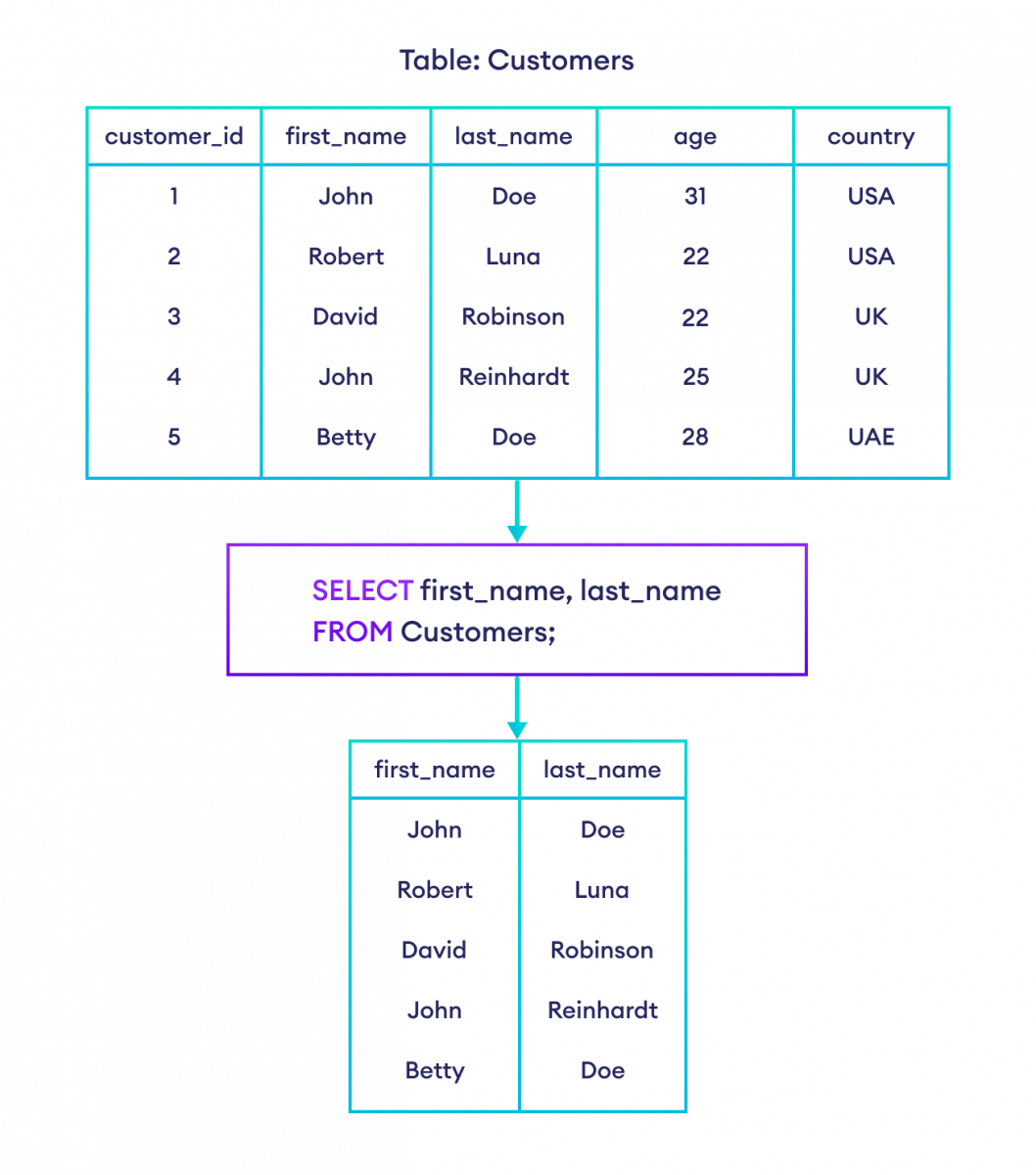
Let's see this in action with the same earthquake dataset.
SQL SELECT Tutorial |¦| SQL Tutorial |¦| SQL for Beginners
Continuing with the Socratica video, this next segment shows how to modify the query to select only specific columns.
Watch from 04:23 to 04:50. Notice how you can list the columns you want and even change their order in the result.
Test your understanding!
Imagine you are working with a products table that has the following columns: product_id, product_name, price, stock_quantity, and category.
Write a SQL query to retrieve only the name and price of all products.
Show answer
SELECT product_name, price FROM products;
Good Habits: Formatting and Aliases
Writing functional SQL is the first step. Writing clean, readable SQL is what makes you a professional. Let's cover two important conventions.
1. SQL Formatting
As a standard practice, SQL keywords (SELECT, FROM, etc.) are written in uppercase, while table and column names are in lowercase. SQL is technically case-insensitive about keywords, but this convention dramatically improves readability, especially in long queries.
SQL SELECT Statement | Basic SQL
This article from ThoughtSpot provides a concise guide to basic SQL syntax and best practices for formatting.
Please read the section titled 'Formatting convention'. It explains the standard practices for capitalization and whitespace.
2. Column Aliases with AS
Often, the column names in a database aren't very user-friendly (e.g., prod_nm, unit_cst). You can rename columns in your query's output using the AS keyword. This is called creating an alias. It doesn't change the name in the underlying table; it only affects how the column is labeled in your results.
Let's watch a quick demonstration of selecting specific columns and using aliases.
Learn Basic SQL in 15 Minutes | Business Intelligence For Beginners | SQL Tutorial For Beginners 1/3
This video from 'Learn BI Online' clearly demonstrates both selecting specific columns and renaming them with aliases.
Watch from 04:49 to 05:32. Pay attention to how the AS keyword is used to create simpler (name) or more descriptive ('full name') column titles in the results.
The syntax is:SELECT column_name AS new_name FROM table_name;
If your new name contains spaces, you must enclose it in double quotes (or square brackets in some SQL dialects like SQL Server).
For example:SELECT product_name AS "Product Name", price FROM products;
Test your understanding!
Using the same products table (product_id, product_name, price, stock_quantity, category), write a query that retrieves the product name and the quantity in stock. The product_name column should be displayed as Item, and the stock_quantity column should be displayed as Units on Hand.
Show answer
SELECT
  product_name AS "Item",
  stock_quantity AS "Units on Hand"
FROM products;
Note: Using line breaks for each column in the SELECT list is another common formatting convention that improves readability for queries with many columns.
Conclusion
Congratulations on writing your first SQL queries! You have learned the fundamental skill of retrieving and shaping data from a single table. By connecting the practical SELECT command to the theoretical concept of projection, you're building the deeper, logical understanding you're aiming for.
Key Takeaways:
- The core of a data retrieval query consists of
SELECT(for columns) andFROM(for tables). SELECT *is a shortcut to view all columns, but specifying columns explicitly is better practice.- Selecting specific columns is an implementation of the relational algebra concept of projection.
- You can control the order of columns in your result set by the order you list them in the
SELECTstatement. - Use the
ASkeyword to create aliases for columns to make your output more readable. - Formatting your code with uppercase keywords and logical line breaks is crucial for professional, maintainable SQL.
Preview of the Next Lesson:
So far, we've retrieved columns for all the rows in a table. But what if you only want to see earthquakes with a magnitude greater than 7.0, or products that are in the 'Electronics' category? In the next lesson, you will learn how to filter rows using the WHERE clause to make your queries much more powerful and specific.